사용자는 Form 입력을 지원하는 헬름차트를 작성할 수 있습니다.
Helm 3 이상의 버전에서만 사용 가능합니다.Form 입력을 지원하는 헬름차트
Form 입력을 지원하는 헬름차트를 사용해서 헬름인스톨을 하면 각 항목을 입력할 수 있는 사용자 UI가 제공됩니다.
헬름차트 파일 구성 및 values.schema.json 파일
헬름차트 파일 구성
Form 입력을 지원하기 위해서는 기본적인 헬름차트의 파일 구성에 values.schema.json 파일이 추가로 필요합니다.

values.schema.json 과 values.yaml 파일의 관계
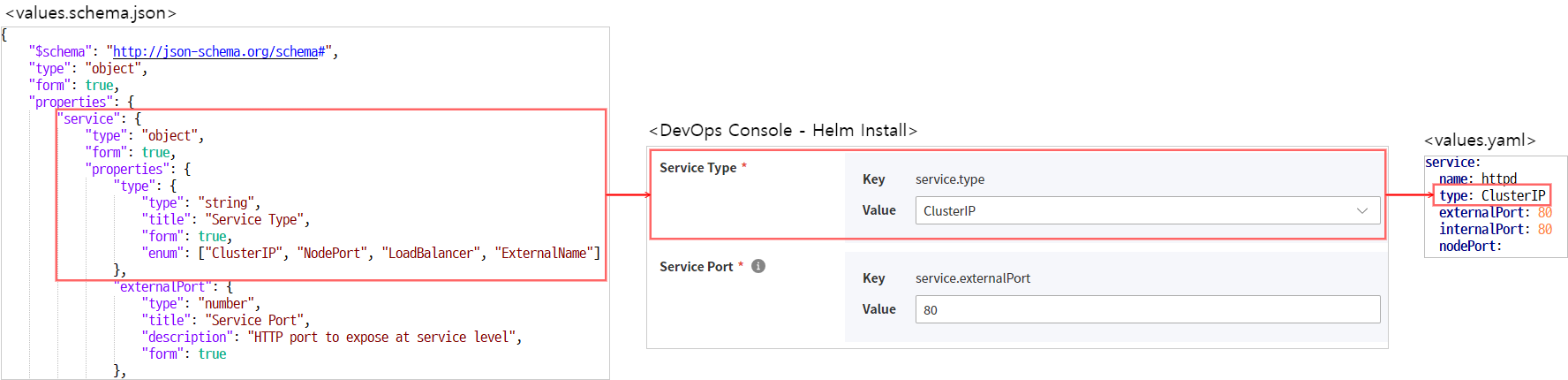
values.schema.json
values.yaml파일에 입력된 값을 validation 하기 위해 JSON Schema로 정의한 파일입니다.- DevOps Console에서는 JSON Schema의 기능에 더해 화면에 Form을 표시하고 사용자가 쉽게 입력할 수 있도록 기능을 추가 하였습니다.
JSON Schema 기본
DevOps Console에서 사용하는 values.schema.json 파일은 JSON Schema에서 정의한 표준 포맷을 지원하고 있습니다.
표준 포맷에 대한 자세한 가이드는 아래 사이트를 참고하세요.
기본적인 속성에 대한 설명은 다음과 같습니다.
| 속성 | Description | 데이터 타입 | 허용 값 |
|---|---|---|---|
| $schema |
| string | http://json-schema.org/schema# |
| type | 데이터 타입
| string |
|
| |||
| |||
| |||
| |||
| |||
| |||
| title | 라벨 | string | 항목의 라벨 정의 |
| description | description | string | tooltip으로 표시 됨 |
| readOnly | read only 여부 | boolean |
|
| required | 필수 입력 항목 목록 | array | e.g, "required": ["username", "password"] |
DevOps Console에서 정의한 항목
아래 항목은 DevOps Console에서 정의한 항목으로 DevOps Console에서만 유효하게 동작합니다.
| 속성 | Description | 데이터 타입 | 허용 값 |
|---|---|---|---|
| form | DevOps Console 화면 표시 여부
| boolean | default: false |
| render | 렌더러 변경 | string |
|
| format | string format reference 참고 | string |
|
| form_locale | 국제화 처리를 위해 정의
| object |
|
|
계층형 처리
계층형 구조를 처리하기 위해서 JSON Schema는 "type": "object" 속성 값과 properties 라는 속성을 정의할 수 있습니다.
하위 속성의 경우는 properties 항목 하위에 정의합니다.
아래는 service.internalPort 속성을 정의한 예시입니다.
"service": {
    "type": "object",
    "form": true,
    "properties": {
        "internalPort": {
            "type": "number",
            "title": "Container Port",
            "description": "HTTP port to expose at container level",
            "form": true
        }
<중략>
"service": {
"type": "object",
"form": true,
"properties": {
"internalPort": {
"type": "number",
"title": "Container Port",
"description": "HTTP port to expose at container level",
"form": true
}
<중략>국제화 처리
국제화 처리를 위해서는 form_locale 속성을 사용하고 아래와 같이 정의합니다.
국문/영문을 지원하고 있습니다.
"db": {
  "type": "string",
  "title": "DB",
  "description": "choose db type",
  "oneOf": [
    {
      "const": "in",
      "title": "internal"
    },
    {
      "const": "ex",
      "title": "external"
    }
  ],
  "form": true,
  "form_locale": {
    "ko": {
      "label": "데이터베이스",
      "description": "데이터베이스 타입을 선택하세요",
      "internal": "내부",
      "external": "외부"
    },
    "en": {
      "label": "Database"
    }
  }
}
"db": {
"type": "string",
"title": "DB",
"description": "choose db type",
"oneOf": [
{
"const": "in",
"title": "internal"
},
{
"const": "ex",
"title": "external"
}
],
"form": true,
"form_locale": {
"ko": {
"label": "데이터베이스",
"description": "데이터베이스 타입을 선택하세요",
"internal": "내부",
"external": "외부"
},
"en": {
"label": "Database"
}
}
}values.schema.json 작성 예제
Form 유형별 예제
Input
values.schema.json 파일에 정의된 필드를 화면에 form으로 보여주기 위해서는 form 필드의 값을 true로 설정해 주어야 합니다.
{
  "$schema": "http://json-schema.org/schema#",
  "type": "object",
  "properties": {
    "form_field": {
      "type": "string", <--- 문자열을 입력받는 input field 생성
      "form": true <----- true 시 화면에 표시
    },
    "hide_field": {  <-- 미표시
      "type": "string"
    }
  }
}
{
"$schema": "http://json-schema.org/schema#",
"type": "object",
"properties": {
"form_field": {
"type": "string", <--- 문자열을 입력받는 input field 생성
"form": true <----- true 시 화면에 표시
},
"hide_field": { <-- 미표시
"type": "string"
}
}
}Password
{
  "$schema": "http://json-schema.org/schema#",
  "type": "object",
  "properties": {
    "password_field": {
      "type": "string",
      "form": true,
      "render": "password", <---- password 로 표시
      "format": "password_confirm" <--- password 확인 입력창 추가 시
    }
  }
}
{
"$schema": "http://json-schema.org/schema#",
"type": "object",
"properties": {
"password_field": {
"type": "string",
"form": true,
"render": "password", <---- password 로 표시
"format": "password_confirm" <--- password 확인 입력창 추가 시
}
}
}Checkbox
"enabled": {
  "title": "enable persistence",
  "type": "boolean",
  "form": true
}
"enabled": {
"title": "enable persistence",
"type": "boolean",
"form": true
}Dropdown
Dropdown 필드를 화면에 표시하고 허용값을 지정하기 위해서, enum 과 oneOf 속성을 이용할 수 있습니다.
enum
화면에 표시되는 텍스트와 저장되는 값이 동일한 경우 사용합니다.
"postgres": {
  "type": "string",
  "title": "Postgres",
  "description": "choose PostgreSQL type.",
  "enum": [
    "internal",
    "external",
    "both"
  ],
  "form": true
}
"postgres": {
"type": "string",
"title": "Postgres",
"description": "choose PostgreSQL type.",
"enum": [
"internal",
"external",
"both"
],
"form": true
}oneOf
화면에 표시되는 텍스트와 저장되는 값을 각각 다르게 할 경우 사용합니다.
"Oneof": {
  "type": "string",
  "title": "DB",
  "description": "choose db type",
  "oneOf": [
    {
      "const": "in",  <-- 선택시 yaml 파일에 저장되는 값
      "title": "internal" <-- dropdown form에 표시되는 값
    },
    {
      "const": "ex",
      "title": "external"
    }
  ],
  "form": true
}
"Oneof": {
"type": "string",
"title": "DB",
"description": "choose db type",
"oneOf": [
{
"const": "in", <-- 선택시 yaml 파일에 저장되는 값
"title": "internal" <-- dropdown form에 표시되는 값
},
{
"const": "ex",
"title": "external"
}
],
"form": true
}Array
"Array": {
  "type": "array",
  "items": {
    "type": "string",
    "form": true
  },
  "form": true
}
"Array": {
"type": "array",
"items": {
"type": "string",
"form": true
},
"form": true
}Object Array
"objectArray": {
  "type": "array",
  "title": "Object Array",
  "form": true,
  "items": {
    "type": "object",
    "form": true,
    "properties": {
      "host": {
        "type": "string",
        "form": true
      },
      "path": {
        "type": "string",
        "form": true
      }
    }
  }
}
"objectArray": {
"type": "array",
"title": "Object Array",
"form": true,
"items": {
"type": "object",
"form": true,
"properties": {
"host": {
"type": "string",
"form": true
},
"path": {
"type": "string",
"form": true
}
}
}
}values.schema.json 전체 파일 작성 예제
system-nginx
{
    "$schema": "http://json-schema.org/schema#",
    "type": "object",
    "form": true,
    "properties": {
        "service": {
            "type": "object",
            "form": true,
            "properties": {
                "type": {
                    "type": "string",
                    "title": "Service Type",
                    "form": true,
                    "enum": ["ClusterIP", "NodePort", "LoadBalancer", "ExternalName"]
                },
                "externalPort": {
                    "type": "number",
                    "title": "Service Port",
                    "description": "HTTP port to expose at service level",
                    "form": true
                },
                "internalPort": {
                    "type": "number",
                    "title": "Container Port",
                    "description": "HTTP port to expose at container level",
                    "form": true
                }
            },
            "required": ["type", "externalPort", "internalPort"]
        },
        "ingress": {
            "type": "object",
            "form": true,
            "properties": {
                "enabled": {
                    "type": "boolean",
                    "title": "Use Ingress",
                    "form": true
                },
                "domain": {
                    "type": ["string", "null"],
                    "format": "hostname",
                    "title": "Ingress Domain",
                    "description": "Default host for the ingress resource (required when `ingress.enabled=true`)",
                    "form": true
                }
            }
        },
        "networkPolicy": {
            "type": "object",
            "form": true,
            "properties": {
                "enabled": {
                    "type": "boolean",
                    "title": "Use NetworkPolicy",
                    "form": true
                }
            }
        }
    }
}
{
"$schema": "http://json-schema.org/schema#",
"type": "object",
"form": true,
"properties": {
"service": {
"type": "object",
"form": true,
"properties": {
"type": {
"type": "string",
"title": "Service Type",
"form": true,
"enum": ["ClusterIP", "NodePort", "LoadBalancer", "ExternalName"]
},
"externalPort": {
"type": "number",
"title": "Service Port",
"description": "HTTP port to expose at service level",
"form": true
},
"internalPort": {
"type": "number",
"title": "Container Port",
"description": "HTTP port to expose at container level",
"form": true
}
},
"required": ["type", "externalPort", "internalPort"]
},
"ingress": {
"type": "object",
"form": true,
"properties": {
"enabled": {
"type": "boolean",
"title": "Use Ingress",
"form": true
},
"domain": {
"type": ["string", "null"],
"format": "hostname",
"title": "Ingress Domain",
"description": "Default host for the ingress resource (required when `ingress.enabled=true`)",
"form": true
}
}
},
"networkPolicy": {
"type": "object",
"form": true,
"properties": {
"enabled": {
"type": "boolean",
"title": "Use NetworkPolicy",
"form": true
}
}
}
}
}