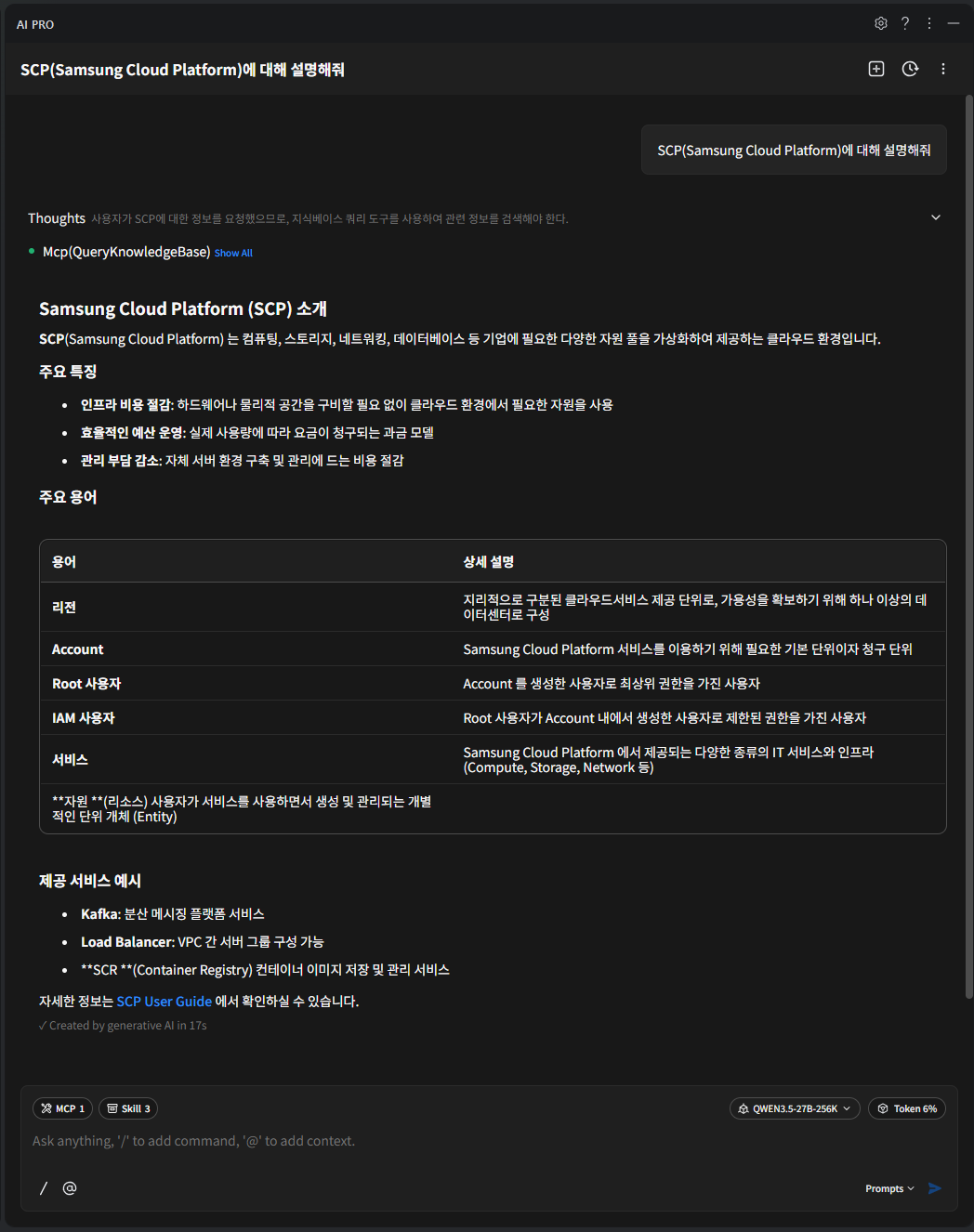
Docs mcp server
MCP Server 사용 가이드
MCP(Model Context Protocol) 기반의 도구로 SCP에서 관리하는 Documentation을 기반으로 MCP 서버의 도구를 검색/호출 합니다.
아래의 문서들로 부터 검색을 하여 데이터를 제공합니다.
User Guide : https://docs.e.samsungsdscloud.com/userguide/
Architecture Center : https://docs.e.samsungsdscloud.com/arch_cent/
Knowledge Center : https://docs.e.samsungsdscloud.com/knowledge_cent/
FAQ(서비스 포탈) : https://cloud.samsungsds.com/serviceportal/support/faq.html
Documentation MCP Server 연동 가이드
MCP Server 설정 : streamable http type
{
  "mcpServers": {
    "scp-knowledge-mcp-server": {
      "type": "http",
      "url": "https://scp-docs-mcp.kr-west1.e.samsungsdscloud.com/mcp"
    }
  }
}
Tools
Documentation MCP Server는 문서 검색 Tool과 OpenAPI/CLI Spec 조회 Tool을 제공합니다. 모든 Tool은 조회 전용(Read-only)으로 동작하며, SCP 자원을 직접 생성하거나 변경하지 않습니다.
문서 검색
| Tool | 상세 설명 |
|---|---|
| QueryKnowledgeBase | 사용자 질의에 따라 SCP의 문서(User Guide, Architecture Center, Knowledge Center, FAQ)내에서 적합한 문서를 응답합니다. |
- 주요 파라미터
| 파라미터 | 상세 설명 |
|---|---|
| query | (필수) Knowledge Base에서 검색할 자연어 질의 |
| language | 질의 언어
|
| top_k | 관련도가 높은 문서의 반환 개수
|
- 응답 예시
[{
	"content" : "Samsung Cloud Platform은 컴퓨팅, 스토리지, 네트워킹, 데이터베이스 등 기업에 필요한 다양한 자원 풀을 가상화하여 제공하는 클라우드 환경입니다.",
	"metadata" : {
      "source" : "https://docs.e.samsungsdscloud.com/userguide/scp_common/overview/#samsung-cloud-platfo",
      "label" : "Samsung Cloud Platform"
	}
}]
OpenAPI Spec 조회
SCP OpenAPI를 호출하기 전에 필요한 Endpoint 정보와 요청 규격을 조회합니다.
| Tool | 상세 설명 |
|---|---|
| list_available_regions | OpenAPI 요청 URL에 사용할 수 있는 Region과 기본 Region을 반환합니다. |
| list_available_services | OpenAPI Spec이 적재된 Service 목록과 Service별 Endpoint 수를 반환합니다. |
| search_by_api_path | 전체 Service를 대상으로 API Path, HTTP Method, 한국어/영어 키워드로 Endpoint를 검색합니다. |
| get_openapi_spec_endpoints | 특정 Service의 Endpoint 후보를 간결한 목록으로 반환합니다. |
| get_openapi_spec_details | 선택한 Endpoint의 실행용 상세 Spec(요청 파라미터, 필수 헤더, 응답 Schema 등)을 반환합니다. |
- search_by_api_path 응답 예시
{
  "result": {
    "total": 15,
    "returned": 1,
    "truncated": true,
    "guidance": "결과가 잘렸습니다. service_name/method 필터를 지정하거나 path_pattern·keyword를 더 구체화하세요.",
    "endpoints": [{
      "service_name": "virtualserver",
      "operationId": "listServerTypes",
      "method": "GET",
      "path": "/v1/server-types",
      "endpoint": "GET /v1/server-types",
      "summary": "List Server Types",
      "base_url": "https://virtualserver.kr-west1.e.samsungsdscloud.com"
    }]
  }
}
- get_openapi_spec_details 응답 예시(일부 생략)
{
  "requested": 1,
  "returned": 1,
  "max_batch_size": 5,
  "details": [{
    "found": true,
    "type": "openapi",
    "service_name": "virtualserver",
    "operationId": "listServerTypes",
    "method": "GET",
    "path": "/v1/server-types",
    "target_region": "kr-west1",
    "url_template": "https://virtualserver.kr-west1.e.samsungsdscloud.com/v1/server-types",
    "request": {
      "query_parameters": [
        { "Name": "limit", "Description": "Page size of items", "Schema": "integer", "Required": "false", "Example": "20" }
      ],
      "required_headers": [
        { "Name": "Scp-Accesskey", "Description": "SCP access key for authentication", "Required": "true" },
        { "Name": "Scp-Signature", "Description": "Request signature for authentication", "Required": "true" },
        { "Name": "Scp-Timestamp", "Description": "Request timestamp in UTC milliseconds", "Required": "true" },
        { "Name": "Scp-ClientType", "Description": "Client type for API calls", "Required": "true" }
      ]
    },
    "responses": [
      { "HTTP Code": "200", "Description": "OK", "Schema": "ServerTypeListResponseV1Dot4" }
    ],
    "executor_hints": {
      "side_effect_level": "read",
      "confirmation_required": false
    }
  }]
}
CLI Spec 조회
SCP CLI 명령을 실행하기 전에 필요한 명령 이름과 파라미터를 조회합니다.
| Tool | 상세 설명 |
|---|---|
| list_available_cli_services | CLI Spec이 적재된 Service 목록과 Service별 Command 수를 반환합니다. |
| search_cli_by_command | 전체 Service를 대상으로 CLI Command, HTTP Method, 한국어/영어 키워드로 명령을 검색합니다. |
| get_cli_spec_endpoints | 특정 Service의 CLI Command 후보를 간결한 목록으로 반환합니다. |
| get_cli_command_details | 선택한 CLI Command의 파라미터, 응답 필드, 실행 안전 힌트를 반환합니다. |
- get_cli_command_details 응답 예시(일부 생략)
{
  "requested": 1,
  "returned": 1,
  "max_batch_size": 5,
  "details": [{
    "found": true,
    "type": "cli",
    "service_name": "virtualserver",
    "cli_command": "listVirtualServers",
    "http_method": "GET",
    "description": "List Virtual Servers",
    "example": "scp-cli virtualserver server list --name servername --state ACTIVE --limit 20",
    "parameters": [
      { "Name": "name", "Required": false, "Type": "STRING", "Description": "Server name", "Example": "servername" },
      { "Name": "state", "Required": false, "Type": "STRING", "Description": "Server state", "Example": "ACTIVE" }
    ],
    "executor_hints": {
      "side_effect_level": "read",
      "confirmation_required": false
    }
  }]
}
Tool 사용 순서
Tool은 다음 순서로 사용하는 것을 권장합니다.
- SCP 기능, 과금, 운영 절차 등 문서 기반의 질문은 QueryKnowledgeBase를 사용합니다.
- API 또는 CLI 실행을 준비할 때는 목록 조회 → 검색 → 상세 조회 순서로 사용합니다.
- OpenAPI : list_available_services → search_by_api_path 또는 get_openapi_spec_endpoints → get_openapi_spec_details
- CLI : list_available_cli_services → search_cli_by_command 또는 get_cli_spec_endpoints → get_cli_command_details
- OpenAPI의 요청 URL Region이 필요한 경우 list_available_regions로 사용 가능한 Region을 확인한 뒤, get_openapi_spec_details의 target_region에 전달합니다.
상세 조회 응답의 executor_hints는 해당 API 또는 CLI 명령의 실행 영향도를 나타냅니다.
- side_effect_level : 실행 영향도(read, write, delete 등)
- confirmation_required : 실행 전 사용자 확인이 필요한지 여부
생성, 변경, 삭제 API는 confirmation_required 값을 확인한 뒤 실행 여부를 결정하시기 바랍니다.
활용 예시
Documentation Server 설정 예시
배경색 변경{ "mcpServers": { "scp-knowledge-mcp-server": { "type": "http", "url": "https://scp-docs-mcp.kr-west1.e.samsungsdscloud.com/mcp" } } }{ "mcpServers": { "scp-knowledge-mcp-server": { "type": "http", "url": "https://scp-docs-mcp.kr-west1.e.samsungsdscloud.com/mcp" } } }코드블록. 작업 수행 예시 Documentation Server 설정 예시 결과