이 섹션의 다중 페이지 출력 화면임. 여기를 클릭하여 프린트.
Simple AI Inference
- 1: Overview
- 1.1: ServiceWatch 지표
- 2: How-to Guides
- 3: References
- 3.1: API Reference
- 4: Data Privacy
- 5: Release Note
1 - Overview
서비스 개요
Simple AI Inference는 다양한 글로벌 파운데이션 모델을 API 형태로 제공하는 Serverless 서비스로써 LLM을 Samsung Cloud Platform 내부 자원이나 외부에서 사용할 수 있도록 Public 또는 Private 환경을 제공합니다.
Simple AI Inference를 이용하면 동일 API를 통해 여러 LLM 모델을 사용하고 AI 애플리케이션 서비스 개발 생산성을 향상시킬 수 있습니다. 또한 OpenAI 및 LangChain SDK와 호환성을 지원하여 기존 개발 환경 및 프레임워크에 손쉽게 연동할 수 있습니다.
특장점
- 편리한 LLM 모델 사용: Serverless 형태의 완전 관리형 서비스로써 동일 API를 통해 여러 LLM 모델을 사용할 수 있습니다.
- 효율적인 비용관리: 입력(Input) 및 출력(Output) 토큰의 실제 사용량을 기준으로 비용이 과금됩니다.
- 안정적인 서비스 제공: 트래픽 컨트롤(TPM/RTM)을 통하여 안정적인 서비스를 제공합니다.
- 기업용 보안 제공: 데이터는 철저한 보안 환경에서 안전하게 보호되며 외부 모델 학습에 사용되지 않습니다.
서비스 구성도
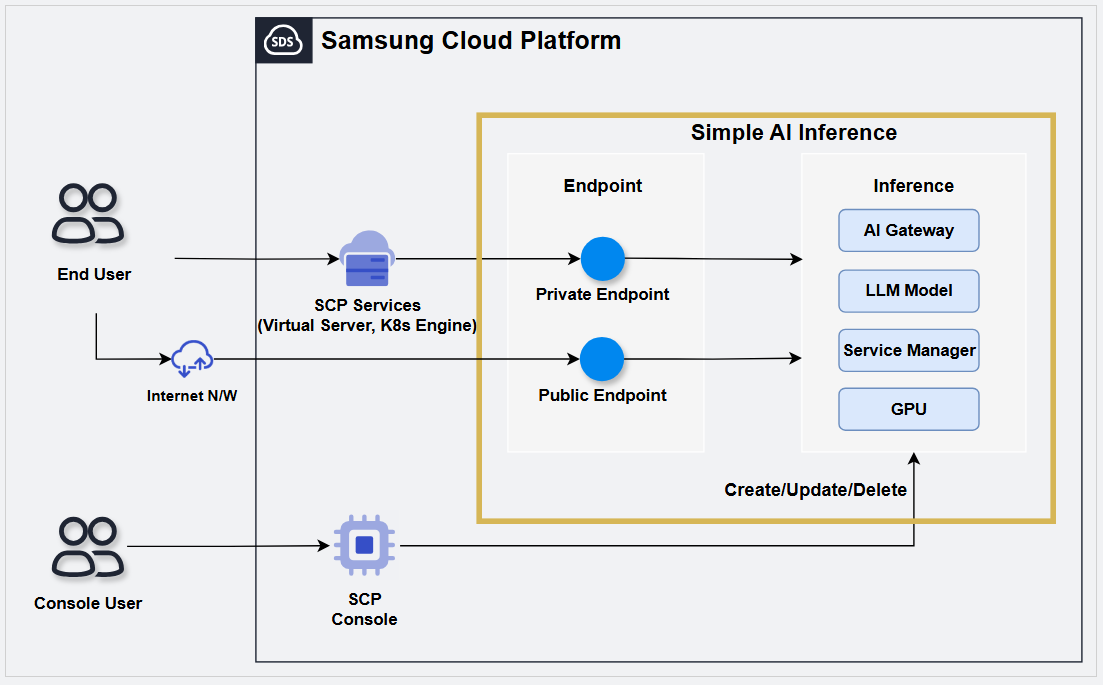
제공 기능
Simple AI Inference는 다음과 같은 기능을 제공하고 있습니다.
편리한 LLM 모델 확인
- LLM 모델 카탈로그를 통해 제공되는 LLM 모델의 특징 및 주요 활용처들을 쉽게 확인할 수 있습니다.
- PlayGround를 이용하여 제공되는 LLM 모델을 콘솔 화면에서 바로 확인하고 테스트할 수 있습니다.참고PlayGround는 2026년 9월 이후 제공될 예정입니다.
LLM 모델의 Account 공동 사용: Simple AI Inference에서 사용할 모델을 신청하면 동일 Account 내의 모든 사용자가 사용할 수 있습니다.
Serverless 서비스 제공 : 사용자는 자원의 관리 없이 API를 통해 원하는 모델을 요청하여 바로 사용할 수 있으며 사용한 만큼 비용을 지불하게 됩니다.
Public/Private 엔드 포인트 제공: 사용자의 추론 사용 형태에 따라 Public 또는 Private 엔드 포인트를 선택하여 사용할 수 있습니다.
안정적인 서비스 제공: 트래픽 컨트롤(TPM/RPM)을 통해 안정적인 서비스 환경을 제공합니다.
제공 모델
Simple AI Inference에서 제공하는 LLM 모델은 다음과 같습니다.
| 모델명 | 활용처 | 입력 타입 | TPM | RPM | Context Size | 이미지 입력 제한 수 |
|---|---|---|---|---|---|---|
| Qwen3.6-27B | Text, Agent | Text, Image | 1,000,000 | 100 | 262,144 | 8 |
| gemma-4-31B-it | Text, Agent | Text, Image | 1,000,000 | 100 | 262,144 | 8 |
| gpt-oss-120b | Text | Text | 1,000,000 | 100 | 131,072 | - |
| Llama-Guard-4-12B | Security | Text, Image | 1,000,000 | 250 | 307,200 | 8 |
| Qwen3-VL-Embedding-8B | embedding | Text, Image | 1,000,000 | 250 | 262,144 | 8 |
| Qwen3-VL-Reranker-8B | reranker | Text, Image | 1,000,000 | 250 | 262,144 | 8 |
리전별 제공 현황
Simple AI Inference 서비스를 제공하는 리전은 다음과 같습니다.
| 리전 | 제공 여부 |
|---|---|
| 한국 서부(kr-west1) | 제공 |
| 한국 동부(kr-east1) | 미제공 |
| 한국 남부1(kr-south1) | 미제공 |
| 한국 남부2(kr-south2) | 미제공 |
| 한국 남부3(kr-south3) | 미제공 |
선행 서비스
해당 서비스를 생성하기 전에 미리 구성되어 있어야 하는 서비스는 없습니다.
1.1 - ServiceWatch 지표
Simple AI Inference은 ServiceWatch로 지표를 전송합니다. 기본 모니터링으로 제공되는 지표는 5분 주기로 수집된 데이터입니다.
기본 지표
다음은 네임스페이스 Simple AI Inference에 대한 기본 지표입니다.
아래에서 지표명이 굵은 글씨로 표기된 지표는 Simple AI Inference에서 제공하는 기본 지표 중 주요 지표로 선정한 지표입니다.
주요 지표는 ServiceWatch에서 서비스별로 자동으로 구축되는 서비스 대시보드를 구성하는데 활용됩니다.
각 지표는 해당 지표를 조회할 때 어떤 통계값으로 조회하는 것이 의미있는지 의미 있는 통계값을 사용자 가이드를 통해 안내하고 있으며, 의미있는 통계 중에서 굵은 글씨로 표기된 통계값이 주요 통계값입니다.
서비스 대시보드 또는 모니터링 탭에서는 주요 지표를 주요 통계값을 통해 조회할수 있습니다. 또는 Simple AI Inference 상세 페이지의 모니터링 탭에서도 주요 지표에 대해 확인할 수 있습니다.
ServiceWatch의 지표 메뉴에서 GPU Device별 사용률도 확인할 수 있습니다.
| 성능 항목(지표명) | 상세 설명 | 단위 | 의미있는 통계 |
|---|---|---|---|
| Model Total Tokens | 모델 토큰 사용량(전체) | Count |
|
| Model Request Server Error | 모델 요청 실패 횟수(서버 오류) | Count |
|
| Model Input Tokens | 모델 토큰 사용량(입력, 캐시된 토큰 포함) | Count |
|
| Model Request Throttled | 모델 요청 제한 횟수(요청 한도 초과) | Count |
|
| Model Request Client Error | 모델 요청 실패 횟수(클라이언트 오류) | Count |
|
| Model Output Tokens | 모델 토큰 사용량(출력) | Count |
|
| Model Cached Tokens | 모델 토큰 사용량(캐시) | Count |
|
| Model Request Prompt Rejected | 모델 요청 거부 횟수(프롬프트 검수) | Count |
|
| Model Request Success | 모델 요청 성공 횟수 | Count |
|
2 - How-to Guides
Simple AI Inference 생성하기
Simple AI Inference를 이용하려면 먼저 Inference를 생성해야 합니다. Inference를 생성하려면 다음 절차를 따르세요.
모든 서비스 > AI-ML > Simple AI Inference 메뉴를 클릭하세요. Simple AI Inference의 Service Home 페이지로 이동합니다.
Service Home 페이지에서 Simple AI Inference 생성 버튼을 클릭하세요. Serverless Inference 생성 페이지로 이동합니다.
Serverless Inference 생성 페이지에서 서비스 생성에 필요한 정보들을 입력하고, 상세 옵션을 선택하세요.
- 서비스 정보 입력 영역에서 서비스 생성에 필요한 옵션을 선택하세요.
구분 필수 여부상세 설명 Inference 서비스명 필수 Serverless Inference 서비스명 입력 - 영문 소문자와 숫자를 사용해 3 ~ 25자로 입력
엔드포인트 필수 Simple AI Inference에 대한 외부 엑세스를 선택 - 프라이빗: 프라이빗 엔드포인트 접근 제어만 사용
- 프라이빗&퍼블릭: 프라이빗과 퍼블릭 엔드포인트 접근 제어 모두 사용
프라이빗 엔드 포인트 접근 제어 선택 Samsung Cloud Platform내 리소스를 추가하여 해당 리소스의 접근만 허용 - 프라이빗 접근 허용 리소스: 접근을 허용할 리소스를 선택
- 추가 버튼을 클릭하여 접근을 허용할 리소스 선택 가능
- 리소스 목록에서 삭제할 리소스를 선택한 후, 삭제 버튼을 클릭하여 삭제 가능
- 리소스를 추가하지 않을 경우, 동일 리전에 포함된 모든 서브넷 상의 리소스에 대한 접근을 허용
- Serverless 엔드 포인트 신청 후 수정 가능
퍼블릭 엔드 포인트 접근 제어 선택 퍼블릭 엔드 포인트 접근 제어의 사용 여부를 설정 - 사용으로 설정할 경우, 접근을 허용할 IP 또는 리소스 추가 가능
- 퍼블릭 접근 허용 IP: 접근을 허용할 IP 대역을 CIDR 형식 또는 IP 주소로 입력한 후, 추가 버튼을 클릭하여 추가 가능
- 최대 100개까지 추가 가능
- 사용하지 않을 경우, 모든 IP에 대한 접근을 허용
- Serverless 엔드 포인트 신청 후 수정 가능
표. Serverless Inference 서비스 정보 입력 항목주의퍼블릭 엔드 포인트 접근 제어를 사용하지 않거나 전체 IP 범위(Any, 0.0.0.0/0)로 설정할 경우, 레지스트리가 외부 스캔 및 해킹 등의 보안 공격에 노출될 수 있습니다. - 추가 정보 입력 영역에서 필요한 정보를 입력 또는 선택하세요.
구분 필수 여부상세 설명 태그 선택 태그 추가 - 자원 당 최대 50개까지 추가 가능
- 태그 추가 버튼을 클릭한 후 Key, Value 값을 입력 또는 선택
표. Serverless Inference 추가 정보 입력 항목
- 서비스 정보 입력 영역에서 서비스 생성에 필요한 옵션을 선택하세요.
요약 패널에서 생성한 상세 정보와 예상 청구 금액을 확인하고, 생성 버튼을 클릭하세요.
생성을 알리는 팝업창이 열리면 확인 버튼을 클릭하세요. 생성 신청이 완료됩니다.
- 생성이 완료되면, Serverless Inference 목록 페이지에서 생성한 내용을 확인하세요.
LLM 모델별 사용량 확인하기
Simple AI Inference의 Service Home 페이지에서 LLM 목록과 모델별 Token 사용량을 확인할 수 있습니다.
- 모든 서비스 > AI-ML > Simple AI Inference 메뉴를 클릭하세요. Simple AI Inference의 Service Home 페이지로 이동합니다.
- Service Home 페이지의 대시보드에서 LLM 모델별 사용량 목록에서 LLM의 모델별 사용량을 확인하세요.
구분 상세 설명 모델명 LLM 이름 - 이름을 클릭하면 해당 모델의 상세 페이지 내 Report 탭으로 이동
모델 타입 LLM 타입 - 모델별 정보는 제공 모델 참고
사용 토큰량(1 Week) 현재일 기준으로 1주일간 사용한 토큰량 표. Simple AI Inference LLM 모델별 사용량 항목
Serverless Inference 상세 정보 확인하기
Serverless Inference의 상세 정보를 확인하려면 다음 절차를 따르세요.
- 모든 서비스 > AI-ML > Simple AI Inference 메뉴를 클릭하세요. Simple AI Inference의 Service Home 페이지로 이동합니다.
- Service Home 페이지에서 Serverless Inference 메뉴를 클릭하세요. Serverless Inference 목록 페이지로 이동합니다.
항목 설명 서비스 생성 Serverless Inference 생성 가능 - 버튼 클릭 시 Serverless Inference 생성 페이지로 이동
- 생성 방법은 Simple AI Inference 생성하기 참고
Inference 서비스명 Serverless Inference 이름 모델 ID 모델 ID값 - 모델 ID 클릭 시 해당 모델의 상세 페이지로 이동
- 모델에 대한 상세 정보는 모델 상세 정보 확인하기 참고
모델명 모델 이름 - 모델 ID 클릭 시 해당 모델의 상세 페이지로 이동
- 모델에 대한 상세 정보는 모델 상세 정보 확인하기 참고
모델 종료 예정 일자 모델의 제공 종료 예정 일자 지연 시간 평균 응답 시간 처리량 모델이 1초당 평균적으로 생성하는 토큰 수 서비스 해지 Serverless Inference 해지 가능 - 버튼 클릭 시 Serverless Inference 해지 페이지로 이동
- 해지 방법은 Inference 해지하기 참고
표. Serverless Inference 목록 정보참고모델 ID 또는 모델명을 클릭하면 모델 카탈로그의 모델 상세 정보 페이지로 이동하여 모델의 상세정보를 확인할 수 있습니다.
- Serverless Inference 목록 페이지에서 상세정보를 확인할 Inference 서비스명을 클릭하세요. Serverless Inference 상세 페이지로 이동합니다.
- Serverless Inference 상세 페이지는 상세정보, Report, 태그, 작업 이력 탭으로 구성되어 있습니다.
상세 정보
Serverless Inference 목록 페이지에서 선택한 자원의 상세 정보를 확인하고, 필요한 경우 정보를 수정할 수 있습니다.
| 구분 | 상세 설명 |
|---|---|
| 서비스 | 서비스명 |
| 자원 유형 | 자원 유형 |
| SRN | Samsung Cloud Platform에서의 고유 자원 ID |
| 자원명 | 자원 이름 |
| 자원 ID | 서비스에서의 고유 자원 ID |
| 생성자 | 서비스를 생성한 사용자 |
| 생성 일시 | 서비스를 생성한 일시 |
| 수정자 | 서비스 정보를 수정한 사용자 |
| 수정 일시 | 서비스 정보를 수정한 일시 |
| 엔드포인트 | Simple AI Inference에 대한 외부 엑세스 방식
|
| 프라이빗 엔드포인트 | 프라이빗 엔드포인트값
|
| 퍼블릭 엔드포인트 | 퍼블릭 엔드포인트값
|
| 프라이빗 엔드포인트 접근 제어 | 프라이빗 접근이 허용된 리소스 정보
|
| 퍼블릭 엔드포인트 접근 제어 | 퍼블릭 접근이 허용된 IP 및 리소스 정보
|
Report
Serverless Inference 목록 페이지에서 선택한 자원의 일자별 LLM 호출 횟수와 토큰 사용량을 확인할 수 있습니다.
| 구분 | 상세 설명 |
|---|---|
| 검색 필터 | Report를 확인할 항목 선택
|
| 호출 횟수 | 조회 기간 동안 호출 횟수를 그래프로 표시 |
| 전체 호출 횟수 | 조회 기간 동안 호출 횟수를 모델별로 제공 |
| Token 사용량 | 조회 기간 동안 Input 및 Output Token 사용량을 그래프로 표시 |
| 전체 Token 수 | 조회 기간 동안 전체 Token 사용량을 Input 및 Output으로 구분하여 표시 |
| Request 당 평균 Token 수 | 조회 기간 동안 LLM 호출 시 사용한 평균 Token량을 Input 및 Output으로 구분하여 표시 |
태그
Serverless Inference 목록 페이지에서 선택한 자원의 태그 정보를 확인하고, 추가하거나 변경 또는 삭제할 수 있습니다.
| 구분 | 상세 설명 |
|---|---|
| 태그 목록 | 태그 목록
|
작업 이력
Serverless Inference 목록 페이지에서 선택한 자원의 작업 이력을 확인할 수 있습니다.
| 구분 | 상세 설명 |
|---|---|
| 작업 이력 목록 | 자원 변경 이력
|
모델 상세 정보 확인하기
Simple AI Inference에서 제공하는 모델과 모델의 상세 정보를 확인할 수 있습니다.
모델 상세 정보를 확인하려면 다음 절차를 따르세요.
- 모든 서비스 > AI-ML > Simple AI Inference 메뉴를 클릭하세요. Simple AI Inference의 Service Home 페이지로 이동합니다.
- Service Home 페이지에서 모델 카탈로그 메뉴를 클릭하세요. 모델 카탈로그 페이지로 이동합니다.
- 모델 카탈로그 페이지에서 상세 정보를 확인할 모델을 클릭하세요. 모델 카탈로그 상세 페이지로 이동합니다.
항목 설명 라이선스 버튼을 클릭하여 모델의 라이선스 내용 확인 가능 개요 모델에 대한 기본 설명 판매 기준 모델 개발사 범주 모델 활용 범위 마지막 버전 제공 버전 출시 날짜 모델 출시년도 및 일자 모델 ID 모델 ID 정보 최대 토큰 토큰 최대 크기 Output modelities 모델 출력 방식 Input modelities 모델 입력 방식 언어 모델 언어 종류 배포 유형 모델 배포 방식 Token Limits 토큰 제한값 Reqeust Limits 요청 제한값 표. Simple AI Inference 제공 모델 상세 정보
API 키 관리하기
Simple AI Inference를 Severless Inference에서 이용할 API Key를 생성하고 등록해야 합니다.
API 키 생성하기
API 키를 생성하려면 다음 절차를 따르세요.
모든 서비스 > AI-ML > Simple AI Inference 메뉴를 클릭하세요. Simple AI Inference의 Service Home 페이지로 이동합니다.
Service Home 페이지에서 API 키 메뉴를 클릭하세요. API 키 목록 페이지로 이동합니다.
API 키 목록 페이지에서 키 생성 버튼을 모델을 클릭하세요. API Key 생성 상세 페이지로 이동합니다.
API 키 생성 페이지에서 API 키를 생성하기 위한 정보를 입력한 후, 생성 버튼을 클릭하세요.
구분 필수 여부상세 설명 Inference 유형 필수 Inference 유형을 선택 만료 기간 필수 API 키의 만료 기간을 입력 - 영구 항목을 체크하면 기간 제한 없이 사용 가능
사용 용도 선택 API 키의 사용 용도를 128자 이내로 입력 표. Serverless Inference 서비스 정보 입력 항목주의퍼블릭 엔드 포인트 접근 제어를 사용하지 않거나 전체 IP 범위(Any, 0.0.0.0/0)로 설정할 경우, 레지스트리가 외부 스캔 및 해킹 등의 보안 공격에 노출될 수 있습니다.API 키 생성을 알리는 팝업창이 열리면 확인 버튼을 클릭하세요.
- API 키 생성 시 생성 시점에 최초 1회 다운로드됩니다.
API 키 확인하기
API 키를 확인하려면 다음 절차를 따르세요.
- 모든 서비스 > AI-ML > Simple AI Inference 메뉴를 클릭하세요. Simple AI Inference의 Service Home 페이지로 이동합니다.
- Service Home 페이지에서 API 키 메뉴를 클릭하세요. API 키 목록 페이지로 이동합니다.
항목 설명 인증키 인증키 정보 Inference 유형 인증키를 등록한 Inference 유형 생성 일시 인증키 생성 일시 만료 일시 인증키 만료 일시 삭제 선택한 API 키를 삭제 - API 키는 비활성화 상태에서만 삭제 가능
- 삭제된 API 키는 복구 불가
- API 키를 삭제하는 방법은 API 키 삭제하기 참고
더보기 선택한 API 키의 활성화/비활성화 상태 변경 - 사용: 비활성화된 인증키를 활성화
- 사용 중지: 활성화된 인증키를 비활성화
- API 키 상태를 변경하는 방법은 API 키 상태 변경하기 참고
키 생성 API 키를 생성 - 버튼 클릭 시 API 키 생성 페이지로 이동
- API 키를 생성하는 방법은 API 키 생성하기 참고
표. Simple AI Inference 제공 모델 상세 정보
- API 키는 생성 시 활성화 상태로 생성됩니다.
- API 키 노출이 의심되는 경우에는 사용 중지를 통해 API 키를 비활성화하여 API 호출을 즉시 차단하세요. 이후, API 키의 안정성이 확인되면 사용으로 키를 다시 활성화하여 사용할 수 있습니다.
API 키 상태 변경하기
API 키의 상태를 활성화 또는 비활성화할 수 있습니다.
API 키의 상태를 변경하려면 다음 절차를 따르세요.
- 모든 서비스 > AI-ML > Simple AI Inference 메뉴를 클릭하세요. Simple AI Inference의 Service Home 페이지로 이동합니다.
- Service Home 페이지에서 API 키 메뉴를 클릭하세요. API 키 목록 페이지로 이동합니다.
- API 키 목록 페이지에서 상태를 변경할 API 키를 모두 선택하세요.
- 목록 상단의 더보기 버튼을 클릭한 후, 사용 또는 사용 중지 버튼을 클릭하세요.
- API 키가 사용 상태인 경우: 사용 버튼을 클릭하여 활성화 가능
- API 키가 사용 중지 상태인 경우: 사용 중지 버튼을 클릭하여 비활성화 가능
- 상태 변경을 알리는 팝업창이 열리면 확인 버튼을 클릭하세요.
API 키 삭제하기
API 키를 삭제하려면 다음 절차를 따르세요.
- API 키는 비활성화 상태에서만 삭제할 수 있습니다.
- 삭제된 API 키는 복구할 수 없으며, 해당 키를 이용한 API 호출은 영구적으로 사용할 수 없습니다.
- API 키를 다시 사용하려면 새로운 API 키를 생성해야 합니다.
- 모든 서비스 > AI-ML > Simple AI Inference 메뉴를 클릭하세요. Simple AI Inference의 Service Home 페이지로 이동합니다.
- Service Home 페이지에서 API 키 메뉴를 클릭하세요. API 키 목록 페이지로 이동합니다.
- API 키 목록 페이지에서 삭제할 API 키가 비활성화 상태인지 확인하세요.
- API 키가 활성화 상태일 경우, API 키 상태 변경하기를 참고하여 비활성화 상태로 변경하세요.
- API 키 목록 페이지에서 삭제할 API 키를 모두 선택한 후, 삭제 버튼을 클릭하세요.
- 삭제를 알리는 팝업창이 열리면 확인 버튼을 클릭하세요.
Inference 해지하기
Serverless Inference 해지하기
Serverless Inference를 해지하려면 다음 절차를 따르세요.
- 모든 서비스 > AI-ML > Simple AI Inference 메뉴를 클릭하세요. Simple AI Inference의 Service Home 페이지로 이동합니다.
- Service Home 페이지에서 Serverless Inference 메뉴를 클릭하세요. Serverless Inference 목록 페이지로 이동합니다.
- Serverless Inference 목록 페이지에서 삭제할 Serverless Inference의서비스 해지 버튼을 클릭하세요.
- 서비스 해지를 알리는 팝업창이 열리면 서비스명을 입력한 후, 확인 버튼을 클릭하세요.
3 - References
References
Simple AI Inference에서 지원하는 API Reference를 확인할 수 있습니다.
| 구분 | 설명 |
|---|---|
| API Reference | Simple AI Inference에서 지원하는 API 목록
|
3.1 - API Reference
API Reference 개요
Simple AI Inference에서 지원하는 API Reference는 다음과 같습니다.
| API명 | API | 상세 설명 |
|---|---|---|
| Chat Completions API | POST /v1/chat/completions | OpenAI의 Completions API와 호환되며 OpenAI Python client에서 사용할 수 있습니다. |
| Completions API | POST /v1/completions | OpenAI의 Completions API와 호환되며 OpenAI Python client에서 사용할 수 있습니다. |
| Embedding API | POST /v1/embeddings | 텍스트를 고차원 벡터(임베딩)로 변환하여, 텍스트 간 유사도 계산, 클러스터링, 검색 등 다양한 자연어 처리(NLP) 작업에 활용할 수 있습니다. |
| Rerank API | POST /v2/rerank | 임베딩 모델이나 크로스 인코더 모델을 적용하여 단일 쿼리와 문서 목록의 각 항목 간 관련성을 예측합니다. |
| Responses API | POST /v1/responses | OpenAI의 Responses API와 호환되며 텍스트, 이미지, 파일 입력으로 텍스트 또는 JSON 출력을 생성할 수 있으며, 함수 호출 및 빌트인 도구를 지원합니다. |
| Tokenize API | POST /tokenize | 텍스트를 토큰 ID로 변환합니다. Completion 방식과 Chat 방식을 지원합니다. |
| Models API | GET /v1/models | 배포된 모델의 목록을 반환합니다. OpenAI의 Models API와 호환됩니다. |
Chat Completions API
POST /v1/chat/completions
개요
Chat Completions API는 OpenAI의 Completions API와 호환되며 OpenAI Python client에서 사용할 수 있습니다.
Request
Context
| Key | Type | Description | Example |
|---|---|---|---|
| Base URL | string | API 요청을 위한 Simple AI Inference URL | Simple AI Inference 엔드포인트 |
| Request Method | string | API 요청에 사용되는 HTTP 메서드 | POST |
| Headers | object | 요청 시 필요한 헤더 정보 | { “Content-Type”: “application/json”, “Authorization”: “bearer sai-xxxxxxx…” } |
| Body Parameters | object | 요청 본문에 포함되는 파라미터 | {“model”: “google/gemma-4-31B-it”, “messages”: [{“role”: “user”, “content”: “hello”}], “stream”: true } |
Path Parameters
| Name | type | Required | Description | Default value | Boundary value | Example |
|---|---|---|---|---|---|---|
| None |
Query Parameters
| Name | type | Required | Description | Default value | Boundary value | Example |
|---|---|---|---|---|---|---|
| None |
Body Parameters
| Name | Name Sub | type | Required | Description | Default value | Boundary value | Example |
|---|---|---|---|---|---|---|---|
| model | - | string | ✅ | 응답 생성에 사용할 모델을 지정 | “google/gemma-4-31B-it” | ||
| messages | role | string | ✅ | 대화 내역을 포함하는 메시지 리스트 | [ { “role” : “user” , “content” : “message” }] | ||
| frequency_penalty | - | number | ❌ | 반복되는 토큰에 대한 패널티를 조정 | 0 | -2.0 ~ 2.0 | 0.5 |
| logit_bias | - | object | ❌ | 특정 토큰의 확률을 조정(예시: { “100”: 2.0 }) | null | Key: 토큰 ID, Value: -100 ~ 100 | { “100”: 2.0 } |
| logprobs | - | boolean | ❌ | 상위 logprobs 개수의 토큰 확률을 반환 | false | true, false | true |
| max_completion_tokens | - | integer | ❌ | 최대 생성 토큰 수를 제한 | None | 0 ~ 모델 최대값 | 100 |
| max_tokens (Deprecated) | - | integer | ❌ | 최대 생성 토큰 수를 제한 | None | 0 ~ 모델 최대값 | 100 |
| n | - | integer | ❌ | 생성할 응답 개수를 지정 | 1 | 3 | |
| presence_penalty | - | number | ❌ | 기존 텍스트에 포함된 토큰에 대한 패널티를 조정 | 0 | -2.0 ~ 2.0 | 1.0 |
| seed | - | integer | ❌ | 랜덤성 제어를 위한 시드 값을 지정 | None | ||
| stop | - | string / array / null | ❌ | 특정 문자열이 나타나면 생성을 중단 | null | "\n" | |
| stream | - | boolean | ❌ | 스트리밍 방식으로 결과를 반환할지 여부 | false | true/false | true |
| stream_options | include_usage, continuous_usage_stats | object | ❌ | 스트리밍 옵션을 제어(예시: 사용량 통계 포함 여부) | null | { “include_usage”: true } | |
| temperature | - | number | ❌ | 생성 결과의 창의성을 조절(높을수록 무작위) | 1 | 0.0 ~ 1.0 | 0.7 |
| tool_choice | - | string | ❌ | 어떤 Tool이 모델에 의해 호출될지 조정
|
| ||
| tools | - | array | ❌ | 모델이 호출할 수 있는 Tool의 리스트
| None | ||
| top_logprobs | - | integer | ❌ | 0과 20사이의 정수 가장 확률이 높은 토큰의 수를 지정
| None | 0 ~ 20 | 3 |
| top_p | - | number | ❌ | 토큰의 샘플링 확률을 제한(높을수록 더 많은 토큰 고려) | 1 | 0.0 ~ 1.0 | 0.9 |
| prompt_safety_model | - | string | ❌ | Prompt 검사를 위한 guard 모델 지정. 설정 시 guard 모델로 prompt를 먼저 검사하며, unsafe로 판단되면 guard 결과를 반환하고 safe이면 model 파라미터에 지정된 모델로 요청을 처리 | “meta-llama/Llama-Guard-4-12B” | ||
| chat_template_kwargs | - | object | ❌ | 템플릿 렌더러에 전달할 추가 키워드 인자. 모델별 reasoning 설정을 위해 사용(자세한 내용은 Reasoning 설정 참고) | null | { “enable_thinking”: true } |
Example
curl -X 'POST' \
   {Simple AI Inference 엔드포인트}/v1/chat/completions \
  -H 'Authorization: bearer sai-xxxxxxx...' \
  -H 'Content-Type: application/json' \
  -d '{
    "model": "google/gemma-4-31B-it",
      "messages": [
      {
        "role": "assistant",
        "content": "You are a helpful assistant."
      },
      {
        "role": "user",
        "content": "한국의 수도는 어디입니까?"
      }
    ]
}'
curl -X 'POST' \
{Simple AI Inference 엔드포인트}/v1/chat/completions \
-H 'Authorization: bearer sai-xxxxxxx...' \
-H 'Content-Type: application/json' \
-d '{
"model": "google/gemma-4-31B-it",
"messages": [
{
"role": "assistant",
"content": "You are a helpful assistant."
},
{
"role": "user",
"content": "한국의 수도는 어디입니까?"
}
]
}'Response
200 OK
| Name | Type | Description |
|---|---|---|
| id | string | 응답의 고유 식별자 |
| object | string | 응답 객체의 타입(예시: “chat.completion”) |
| created | integer | 생성 시각(Unix timestamp, 초 단위) |
| model | string | 사용된 모델의 이름 |
| choices | array | 생성된 응답 선택지 목록 |
| choices[].index | integer | 해당 choice의 인덱스 |
| choices[].message | object | 생성된 메시지 객체 |
| choices[].message.role | string | 메시지 작성자의 역할(예시: “assistant”) |
| choices[].message.content | string | 생성된 메시지의 실제 내용 |
| choices[].message.reasoning | string | 생성된 추론 메시지의 실제 내용 |
| choices[].message.tool_calls | array (optional) | 도구 호출 정보(모델/설정에 따라 포함될 수 있음) |
| choices[].finish_reason | string or null | 응답이 종료된 이유(예시: “stop”, “length” 등) |
| choices[].stop_reason | object or null | 추가 중단 이유 세부 정보 |
| choices[].logprobs | object or null | 토큰 별 로그 확률 정보(설정에 따라 포함) |
| usage | object | 토큰 사용량 통계 |
| usage.prompt_tokens | integer | 입력 프롬프트에 사용된 토큰 수 |
| usage.completion_tokens | integer | 생성된 응답에 사용된 토큰 수 |
| usage.total_tokens | integer | 전체 토큰 수(입력 + 출력) |
Error Code
| HTTP status code | ErrorCode 설명 |
|---|---|
| 400 | Bad Request |
| 422 | Prompt Guard 등 정책에 의해 요청이 거절된 경우 |
| 500 | Internal Server Error |
Example
{
  "id": "chatcmpl-xxxxxxxx-xxxx-xxxx-xxxx-xxxxxxxxxxxx",
  "object": "chat.completion",
  "created": 1749702816,
  "model": "google/gemma-4-31B-it",
  "choices": [
    {
      "index": 0,
      "message": {
        "role": "assistant",
        "reasoning": null,
        "content": "한국의 수도는 서울입니다.",
        "tool_calls": []
      },
      "logprobs": null,
      "finish_reason": "stop",
      "stop_reason": null
    }
  ],
  "usage": {
    "prompt_tokens": 54,
    "total_tokens": 62,
    "completion_tokens": 8,
    "prompt_tokens_details": null
  },
  "prompt_logprobs": null
}
{
"id": "chatcmpl-xxxxxxxx-xxxx-xxxx-xxxx-xxxxxxxxxxxx",
"object": "chat.completion",
"created": 1749702816,
"model": "google/gemma-4-31B-it",
"choices": [
{
"index": 0,
"message": {
"role": "assistant",
"reasoning": null,
"content": "한국의 수도는 서울입니다.",
"tool_calls": []
},
"logprobs": null,
"finish_reason": "stop",
"stop_reason": null
}
],
"usage": {
"prompt_tokens": 54,
"total_tokens": 62,
"completion_tokens": 8,
"prompt_tokens_details": null
},
"prompt_logprobs": null
}Prompt Guard 응답
prompt_safety_model 파라미터를 설정한 경우, guard 모델이 prompt를 먼저 검사합니다.
- safe:
model파라미터에 지정된 모델로 요청이 그대로 처리됩니다. - unsafe: 아래와 같은 형태의 guard 결과를 반환하며 요청이 중단됩니다.
{
  "guard_result": "unsafe",
  "categories": ["S1", "S2"],
  "categories_description": ["Violent Crimes", "Non-Violent Crimes"],
  "messages": [
    "Cannot fulfill the request due to violent content.",
    "Cannot respond as it may promote illegal activities."
  ]
}
{
"guard_result": "unsafe",
"categories": ["S1", "S2"],
"categories_description": ["Violent Crimes", "Non-Violent Crimes"],
"messages": [
"Cannot fulfill the request due to violent content.",
"Cannot respond as it may promote illegal activities."
]
}Reasoning 설정
chat_template_kwargs 파라미터를 통해 모델별 reasoning(추론 모드) 설정을 제어할 수 있습니다. 모델마다 기본 동작과 지원하는 옵션이 다릅니다.
| 모델 | 기본 reasoning | chat_template_kwargs 설정 | 설명 |
|---|---|---|---|
| zai-org/GLM-5.2 | 켜짐 (Think Max) |
| reasoning_effort로 추론 깊이 조절, enable_thinking=false로 비활성화 |
| Qwen/Qwen3.6-27B | 켜짐 |
| 기본적으로 reasoning이 활성화되어 있으며, 필요시 비활성화 가능 |
| google/gemma-4-31B-it | 꺼짐 |
| 기본적으로 reasoning이 비활성화되어 있으며, 필요시 활성화 가능 |
| openai/gpt-oss-120b | medium |
| reasoning_effort로 추론 깊이 조절 (기본값: medium) |
curl -X 'POST' \
{Simple AI Inference 엔드포인트}/v1/chat/completions \
-H 'Authorization: bearer sai-xxxxxxx...' \
-H 'Content-Type: application/json' \
-d '{
"model": "zai-org/GLM-5.2",
"messages": [
{
"role": "user",
"content": "복잡한 수학 문제를 풀어주세요."
}
],
"chat_template_kwargs": {
"reasoning_effort": "high"
}
}'curl -X 'POST' \
{Simple AI Inference 엔드포인트}/v1/chat/completions \
-H 'Authorization: bearer sai-xxxxxxx...' \
-H 'Content-Type: application/json' \
-d '{
"model": "zai-org/GLM-5.2",
"messages": [
{
"role": "user",
"content": "복잡한 수학 문제를 풀어주세요."
}
],
"chat_template_kwargs": {
"reasoning_effort": "high"
}
}'참고
Completions API
POST /v1/completions
개요
Completions API는 OpenAI의 Completions API와 호환되며 OpenAI Python client에서 사용할 수 있습니다.
Request
Context
| Key | Type | Description | Example |
|---|---|---|---|
| Base URL | string | API 요청을 위한 Simple AI Inference URL | Simple AI Inference 엔드포인트 |
| Request Method | string | API 요청에 사용되는 HTTP 메서드 | POST |
| Headers | object | 요청 시 필요한 헤더 정보 | { “Content-Type”: “application/json”, “Authorization”: “bearer sai-xxxxxxx…” } |
| Body Parameters | object | 요청 본문에 포함되는 파라미터 | {“model”: “google/gemma-4-31B-it”, “prompt” : “hello”, “stream”: true } |
Path Parameters
| Name | type | Required | Description | Default value | Boundary value | Example |
|---|---|---|---|---|---|---|
| None |
Query Parameters
| Name | type | Required | Description | Default value | Boundary value | Example |
|---|---|---|---|---|---|---|
| None |
Body Parameters
| Name | Name Sub | type | Required | Description | Default value | Boundary value | Example |
|---|---|---|---|---|---|---|---|
| model | - | string | ✅ | 응답 생성에 사용할 모델을 지정 | “google/gemma-4-31B-it” | ||
| prompt | - | array | ✅ | 사용자 입력 텍스트 | "" | ||
| echo | - | boolean | ❌ | 입력 텍스트를 출력에 포함시킬지 여부 | false | true/false | true |
| frequency_penalty | - | number | ❌ | 반복되는 토큰에 대한 패널티를 조정 | 0 | -2.0 ~ 2.0 | 0.5 |
| logit_bias | - | object | ❌ | 특정 토큰의 확률을 조정 (예시: { “100”: 2.0 }) | null | Key: 토큰 ID, Value: -100~100 | { “100”: 2.0 } |
| logprobs | - | integer | ❌ | 상위 logprobs 개수의 토큰 확률을 반환 | null | 1 ~ 5 | 5 |
| max_completion_tokens | - | integer | ❌ | 최대 생성 토큰 수를 제한 | None | 0~모델 최대 값 | 100 |
| max_tokens (Deprecated) | - | integer | ❌ | 최대 생성 토큰 수를 제한 | None | 0~모델 최대 값 | 100 |
| n | - | integer | ❌ | 생성할 응답 개수를 지정 | 1 | 3 | |
| presence_penalty | - | number | ❌ | 기존 텍스트에 포함된 토큰에 대한 패널티를 조정 | 0 | -2.0 ~ 2.0 | 1.0 |
| seed | - | integer | ❌ | 랜덤성 제어를 위한 시드값을 지정 | None | ||
| stop | - | string / array / null | ❌ | 특정 문자열이 나타나면 생성을 중단 | null | "\n" | |
| stream | - | boolean | ❌ | 스트리밍 방식으로 결과를 반환할지 여부 | false | true/false | true |
| stream_options | include_usage, continuous_usage_stats | object | ❌ | 스트리밍 옵션을 제어 (예시: 사용량 통계 포함 여부) | null | { “include_usage”: true } | |
| temperature | - | number | ❌ | 생성 결과의 창의성을 조절 (높을수록 무작위) | 1 | 0.0 ~ 1.0 | 0.7 |
| top_p | - | number | ❌ | 토큰의 샘플링 확률을 제한 (높을수록 더 많은 토큰 고려) | 1 | 0.0 ~ 1.0 | 0.9 |
Example
curl -X 'POST' \
{Simple AI Inference 엔드포인트}/v1/completions \
-H 'Authorization: bearer sai-xxxxxxx...' \
-H 'Content-Type: application/json' \
-d '{
"model": "google/gemma-4-31B-it",
"prompt": "한국의 수도는 어디입니까?",
"temperature": 0.7
}'curl -X 'POST' \
{Simple AI Inference 엔드포인트}/v1/completions \
-H 'Authorization: bearer sai-xxxxxxx...' \
-H 'Content-Type: application/json' \
-d '{
"model": "google/gemma-4-31B-it",
"prompt": "한국의 수도는 어디입니까?",
"temperature": 0.7
}'Response
200 OK
| Name | Type | Description |
|---|---|---|
| id | string | 응답의 고유 식별자 |
| object | string | 응답 객체의 타입(예시: “text_completion”) |
| created | integer | 생성 시각(Unix timestamp, 초 단위) |
| model | string | 사용된 모델의 이름 |
| choices | array | 생성된 응답 선택지 목록 |
| choices[].index | number | 해당 choice의 인덱스 |
| choices[].text | string | 생성된 텍스트 객체 |
| choices[].logprobs | object | 토큰 별 로그 확률 정보(설정에 따라 포함) |
| choices[].finish_reason | string or null | 응답이 종료된 이유(예시: “stop”, “length” 등) |
| choices[].stop_reason | object or null | 추가 중단 이유 세부 정보 |
| choices[].prompt_logprobs | object or null | 입력 프롬프트 토큰별 로그 확률(널 가능) |
| usage | object | 토큰 사용량 통계 |
| usage.prompt_tokens | number | 입력 프롬프트에 사용된 토큰 수 |
| usage.total_tokens | number | 전체 토큰 수(입력 + 출력) |
| usage.completion_tokens | number | 생성된 응답에 사용된 토큰 수 |
| usage.prompt_tokens_details | object | 프롬프트 토큰 사용 세부 정보 |
Error Code
| HTTP status code | ErrorCode 설명 |
|---|---|
| 400 | Bad Request |
| 422 | Prompt Guard 등 정책에 의해 요청이 거절된 경우 |
| 500 | Internal Server Error |
Example
{
"id": "cmpl-xxxxxxxx-xxxx-xxxx-xxxx-xxxxxxxxxxxx",
"object": "text_completion",
"created": 1749702612,
"model": "google/gemma-4-31B-it",
"choices": [
{
"index": 0,
"text": " \nOur capital city is Seoul. \n\nA. 1\nB. ",
"logprobs": null,
"finish_reason": "length",
"stop_reason": null,
"prompt_logprobs": null
}
],
"usage": {
"prompt_tokens": 9,
"total_tokens": 25,
"completion_tokens": 16,
"prompt_tokens_details": null
}
}{
"id": "cmpl-xxxxxxxx-xxxx-xxxx-xxxx-xxxxxxxxxxxx",
"object": "text_completion",
"created": 1749702612,
"model": "google/gemma-4-31B-it",
"choices": [
{
"index": 0,
"text": " \nOur capital city is Seoul. \n\nA. 1\nB. ",
"logprobs": null,
"finish_reason": "length",
"stop_reason": null,
"prompt_logprobs": null
}
],
"usage": {
"prompt_tokens": 9,
"total_tokens": 25,
"completion_tokens": 16,
"prompt_tokens_details": null
}
}참고
Embedding API
POST /v1/embeddings
개요
Embedding API는 주어진 텍스트를 고차원 벡터(임베딩)로 변환하여, 텍스트 간 유사도 계산, 클러스터링, 검색 등 다양한 자연어 처리(NLP) 작업에 활용할 수 있도록 지원합니다.
Request
Context
| Key | Type | Description | Example |
|---|---|---|---|
| Base URL | string | API 요청을 위한 Simple AI Inference URL | Simple AI Inference 엔드포인트 |
| Request Method | string | API 요청에 사용되는 HTTP 메서드 | POST |
| Headers | object | 요청 시 필요한 헤더 정보 | { “Content-Type”: “application/json”, “Authorization”: “bearer sai-xxxxxxx…” } |
| Body Parameters | object | 요청 본문에 포함되는 파라미터 | { “model”: “Qwen/Qwen3-VL-Embedding-8B”, “input”: “What is the capital of France?”} |
Path Parameters
| Name | type | Required | Description | Default value | Boundary value | Example |
|---|---|---|---|---|---|---|
| None |
Query Parameters
| Name | type | Required | Description | Default value | Boundary value | Example |
|---|---|---|---|---|---|---|
| None |
Body Parameters
| Name | Name Sub | type | Required | Description | Default value | Boundary value | Example |
|---|---|---|---|---|---|---|---|
| model | - | string | ✅ | 응답 생성에 사용할 모델을 지정 | “Qwen/Qwen3-VL-Embedding-8B” | ||
| input | - | array | ✅ | 사용자의 검색 질의 또는 질문 | “What is the capital of France?" | ||
| encoding_format | - | string | ❌ | 임베딩을 반환할 형식을 지정 | “float” | “float”, “base64” | [0.01319122314453125,0.057220458984375, … (생략) |
| truncate_prompt_tokens | - | integer | ❌ | 입력 토큰 수를 제한 | > 0 | 100 |
Example
curl -X 'POST' \
{Simple AI Inference 엔드포인트}/v1/embeddings \
-H 'Authorization: bearer sai-xxxxxxx...' \
-H 'Content-Type: application/json' \
-d '{
"model": "Qwen/Qwen3-VL-Embedding-8B",
"input": "What is the capital of France?",
"encoding_format": "float"
}'curl -X 'POST' \
{Simple AI Inference 엔드포인트}/v1/embeddings \
-H 'Authorization: bearer sai-xxxxxxx...' \
-H 'Content-Type: application/json' \
-d '{
"model": "Qwen/Qwen3-VL-Embedding-8B",
"input": "What is the capital of France?",
"encoding_format": "float"
}'Response
200 OK
| Name | Type | Description |
|---|---|---|
| id | string | 응답의 고유 식별자 |
| object | string | 응답 객체의 타입(예시: “list” ) |
| created | number | 생성 시각(Unix timestamp, 초 단위) |
| model | string | 사용된 모델의 이름 |
| data | array | 임베딩 결과를 담은 객체 배열 |
| data.index | number | 입력 텍스트의 순서 인덱스 (예시: 입력 텍스트가 여러 개일 경우 순서를 나타냄) |
| data.object | string | 데이터 항목 타입 |
| data.embedding | array | 입력 텍스트의 임베딩 벡터 값 (모델의 임베딩 차원에 따른 float 배열로 구성) |
| usage | object | 토큰 사용량 통계 |
| usage.prompt_tokens | number | 입력 프롬프트에 사용된 토큰 수 |
| usage.total_tokens | number | 전체 토큰 수(입력 + 출력) |
| usage.completion_tokens | number | 생성된 응답에 사용된 토큰 수 |
| usage.prompt_tokens_details | object | 프롬프트 토큰의 세부 정보 |
Error Code
| HTTP status code | ErrorCode 설명 |
|---|---|
| 400 | Bad Request |
| 422 | Prompt Guard 등 정책에 의해 요청이 거절된 경우 |
| 500 | Internal Server Error |
Example
{
"id":"embd-xxxxxxxx-xxxx-xxxx-xxxx-xxxxxxxxxxxx",
"object":"list",
"created":1749035024,
"model":"Qwen/Qwen3-VL-Embedding-8B",
"data":[
{
"index":0,
"object":"embedding",
"embedding":
[0.01319122314453125,0.057220458984375,-0.028533935546875,-0.0008697509765625,-0.01422119140625,0.033416748046875,-0.0062408447265625,-0.04364013671875,-0.004497528076171875,0.0008072853088378906,-0.0193328857421875,0.041168212890625,-0.019317626953125,-0.0188751220703125,-0.047088623046875,
-0 ....(생략)
-0.05706787109375,-0.0147705078125]
}
],
"usage":
{
"prompt_tokens":9,
"total_tokens":9,
"completion_tokens":0,
"prompt_tokens_details":null
}
}{
"id":"embd-xxxxxxxx-xxxx-xxxx-xxxx-xxxxxxxxxxxx",
"object":"list",
"created":1749035024,
"model":"Qwen/Qwen3-VL-Embedding-8B",
"data":[
{
"index":0,
"object":"embedding",
"embedding":
[0.01319122314453125,0.057220458984375,-0.028533935546875,-0.0008697509765625,-0.01422119140625,0.033416748046875,-0.0062408447265625,-0.04364013671875,-0.004497528076171875,0.0008072853088378906,-0.0193328857421875,0.041168212890625,-0.019317626953125,-0.0188751220703125,-0.047088623046875,
-0 ....(생략)
-0.05706787109375,-0.0147705078125]
}
],
"usage":
{
"prompt_tokens":9,
"total_tokens":9,
"completion_tokens":0,
"prompt_tokens_details":null
}
}참고
Rerank API
POST /v2/rerank
개요
Rerank API는 임베딩 모델이나 크로스 인코더 모델을 적용하여 단일 쿼리와 문서 목록의 각 항목 간 관련성을 예측할 수 있습니다. 일반적으로 문장 쌍의 점수는 두 문장 간 유사도를 0에서 1 사이의 범위로 나타냅니다.
- Embedding 기반 모델: Query와 문서를 각각 벡터로 바꾼 뒤, 벡터간의 유사도(예시: 코사인 유사도)를 측정하여 점수를 계산합니다.
- Reranker(Cross-Encoder) 기반 모델: Query와 문서를 한쌍으로 모델에 넣어서 평가합니다.
Request
Context
| Key | Type | Description | Example |
|---|---|---|---|
| Base URL | string | API 요청을 위한 Simple AI Inference URL | Simple AI Inference 엔드포인트 |
| Request Method | string | API 요청에 사용되는 HTTP 메서드 | POST |
| Headers | object | 요청 시 필요한 헤더 정보 | { “Content-Type”: “application/json”, “Authorization”: “bearer sai-xxxxxxx…” } |
| Body Parameters | object | 요청 본문에 포함되는 파라미터 | { “model”: “Qwen/Qwen3-VL-Reranker-8B”, “query”: …, “documents”: […] } |
Path Parameters
| Name | type | Required | Description | Default value | Boundary value | Example |
|---|---|---|---|---|---|---|
| None |
Query Parameters
| Name | type | Required | Description | Default value | Boundary value | Example |
|---|---|---|---|---|---|---|
| None |
Body Parameters
| Name | Name Sub | type | Required | Description | Default value | Boundary value | Example |
|---|---|---|---|---|---|---|---|
| model | - | string | ✅ | 응답 생성에 사용할 모델을 지정 | “Qwen/Qwen3-VL-Reranker-8B” | ||
| query | - | string | ✅ | 사용자의 검색 질의 또는 질문 | “What is the capital of France?" | ||
| documents | - | array | ✅ | 재정렬 대상인 문서 목록 | 최대 모델 입력 길이 제한 | [“The capital of France is Paris.”] | |
| top_n | - | integer | ❌ | 반환할 상위 문서 개수를 지정(0이면 전체 반환) | 0 | > 0 | 5 |
| truncate_prompt_tokens | - | integer | ❌ | 입력 토큰 수를 제한 | > 0 | 100 |
Example
curl -X 'POST' \
{Simple AI Inference 엔드포인트}/v2/rerank \
-H 'Authorization: bearer sai-xxxxxxx...' \
-H 'Content-Type: application/json' \
-d '{
"model": "Qwen/Qwen3-VL-Reranker-8B",
"query": "What is the capital of France?",
"documents": [
"The capital of France is Paris.",
"France capital city is known for the Eiffel Tower.",
"Paris is located in the north-central part of France."
],
"top_n": 2,
"truncate_prompt_tokens": 512
}'curl -X 'POST' \
{Simple AI Inference 엔드포인트}/v2/rerank \
-H 'Authorization: bearer sai-xxxxxxx...' \
-H 'Content-Type: application/json' \
-d '{
"model": "Qwen/Qwen3-VL-Reranker-8B",
"query": "What is the capital of France?",
"documents": [
"The capital of France is Paris.",
"France capital city is known for the Eiffel Tower.",
"Paris is located in the north-central part of France."
],
"top_n": 2,
"truncate_prompt_tokens": 512
}'Response
200 OK
| Name | Type | Description |
|---|---|---|
| id | string | API 응답의 고유 식별자(UUID 형식) |
| model | string | 결과를 생성한 모델의 이름 |
| usage | object | 요청에 사용된 리소스 정보를 담은 객체 |
| usage.prompt_tokens | integer | 입력 프롬프트에 사용된 토큰 수 |
| usage.total_tokens | integer | 요청 처리에 사용된 총 토큰 수 |
| results | array | 쿼리와 관련된 문서들의 결과를 담은 배열 |
| results[].index | integer | 결과 배열 내의 순서 번호 |
| results[].document | object | 검색된 문서의 내용을 담은 객체 |
| results[].document.text | string | 검색된 문서의 실제 텍스트 내용 |
| results[].document.multi_modal | object or null | 멀티모달 문서 정보 |
| results[].relevance_score | float | 쿼리와 문서 간의 관련성을 나타내는 점수(0 ~ 1) |
Error Code
| HTTP status code | ErrorCode 설명 |
|---|---|
| 400 | Bad Request |
| 422 | Prompt Guard 등 정책에 의해 요청이 거절된 경우 |
| 500 | Internal Server Error |
Example
{
"id": "score-xxxxxxxx-xxxx-xxxx-xxxx-xxxxxxxxxxxx",
"model": "Qwen/Qwen3-VL-Reranker-8B",
"usage": {
"prompt_tokens": 54,
"total_tokens": 54
},
"results": [
{
"index": 0,
"document": {
"text": "The capital of France is Paris.",
"multi_modal": null
},
"relevance_score": 0.9237253665924072
},
{
"index": 2,
"document": {
"text": "Paris is located in the north-central part of France.",
"multi_modal": null
},
"relevance_score": 0.9181006550788879
}
]
}{
"id": "score-xxxxxxxx-xxxx-xxxx-xxxx-xxxxxxxxxxxx",
"model": "Qwen/Qwen3-VL-Reranker-8B",
"usage": {
"prompt_tokens": 54,
"total_tokens": 54
},
"results": [
{
"index": 0,
"document": {
"text": "The capital of France is Paris.",
"multi_modal": null
},
"relevance_score": 0.9237253665924072
},
{
"index": 2,
"document": {
"text": "Paris is located in the north-central part of France.",
"multi_modal": null
},
"relevance_score": 0.9181006550788879
}
]
}참고
Responses API
POST /v1/responses
개요
Responses API는 OpenAI의 Responses API와 호환되며 OpenAI Python client에서 사용할 수 있습니다. 텍스트, 이미지, 파일 입력으로 텍스트 또는 JSON 출력을 생성할 수 있으며, 함수 호출 및 빌트인 도구(web search, file search 등)를 지원합니다.
Request
Context
| Key | Type | Description | Example |
|---|---|---|---|
| Base URL | string | API 요청을 위한 Simple AI Inference URL | Simple AI Inference 엔드포인트 |
| Request Method | string | API 요청에 사용되는 HTTP 메서드 | POST |
| Headers | object | 요청 시 필요한 헤더 정보 | { “Content-Type”: “application/json”, “Authorization”: “bearer sai-xxxxxxx…” } |
| Body Parameters | object | 요청 본문에 포함되는 파라미터 | {“model”: “openai/gpt-oss-120b”, “input”: “한국의 수도는 어디입니까?” } |
Path Parameters
| Name | type | Required | Description | Default value | Boundary value | Example |
|---|---|---|---|---|---|---|
| None |
Query Parameters
| Name | type | Required | Description | Default value | Boundary value | Example |
|---|---|---|---|---|---|---|
| None |
Body Parameters
| Name | Name Sub | type | Required | Description | Default value | Boundary value | Example |
|---|---|---|---|---|---|---|---|
| model | - | string | ✅ | 응답 생성에 사용할 모델 ID | “openai/gpt-oss-120b” | ||
| input | - | string / array | ✅ | 모델에 대한 텍스트/이미지/파일 입력. 문자열 또는 InputItem 배열 | “Tell me a story” 또는 [{ “role” : “user”, “content” : “message” }] | ||
| instructions | - | string | ❌ | 모델 컨텍스트에 삽입되는 시스템(개발자) 메시지 | null | “You are a helpful assistant." | |
| temperature | - | number | ❌ | 샘플링 온도. 높을수록 무작위, 낮을수록 결정적 | 1 | 0 ~ 2 | 0.7 |
| top_p | - | number | ❌ | nucleus 샘플링 확률 제한. temperature와 함께 변경 권장하지 않음 | 1 | 0 ~ 1 | 0.9 |
| top_logprobs | - | integer | ❌ | 각 토큰 위치에서 반환할 최대 로그 확률 토큰 수 | null | 0 ~ 20 | 3 |
| stream | - | boolean | ❌ | 스트리밍 방식으로 결과를 반환할지 여부 | false | true/false | true |
| stream_options | include_usage | object | ❌ | 스트리밍 옵션을 제어(예시: 사용량 통계 포함 여부) | null | { “include_usage”: true } | |
| tools | - | array | ❌ | 모델이 호출할 수 있는 도구 목록(빌트인 도구 + function)
| [] | ||
| tool_choice | - | string / object | ❌ | 모델이 도구를 선택하는 방식
|
| ||
| prompt_safety_model | - | string | ❌ | Prompt 검사를 위한 guard 모델 지정. 설정 시 guard 모델로 prompt를 먼저 검사하며, unsafe로 판단되면 guard 결과를 반환하고 safe이면 model 파라미터에 지정된 모델로 요청을 처리 | “meta-llama/Llama-Guard-4-12B” | ||
| chat_template_kwargs | - | object | ❌ | 템플릿 렌더러에 전달할 추가 키워드 인자. 모델별 reasoning 설정을 위해 사용(gpt-oss-120b는 reasoning 파라미터 사용, 자세한 내용은 Reasoning 설정 참고) | null | { “enable_thinking”: true } | |
| reasoning | - | object | ❌ | gpt-oss-120b 모델의 reasoning 설정. effort 필드로 추론 깊이 지정(low/medium/high, 기본값 medium) | null | { “effort”: “high” } |
Example
curl -X 'POST' \
{Simple AI Inference 엔드포인트}/v1/responses \
-H 'Authorization: bearer sai-xxxxxxx...' \
-H 'Content-Type: application/json' \
-d '{
"model": "openai/gpt-oss-120b",
"input": "한국의 수도는 어디입니까?"
}'curl -X 'POST' \
{Simple AI Inference 엔드포인트}/v1/responses \
-H 'Authorization: bearer sai-xxxxxxx...' \
-H 'Content-Type: application/json' \
-d '{
"model": "openai/gpt-oss-120b",
"input": "한국의 수도는 어디입니까?"
}'Response
200 OK
| Name | Type | Description |
|---|---|---|
| id | string | 응답의 고유 식별자 |
| object | string | 응답 객체 타입(항상 “response”) |
| created_at | integer | 생성 시각(Unix timestamp, 초 단위) |
| completed_at | integer or null | 완료 시각(completed 상태일 때만 존재) |
| status | string | 응답 상태(completed/failed/in_progress/cancelled/queued/incomplete) |
| model | string | 사용된 모델 이름 |
| output | array | 모델이 생성한 출력 항목 배열 |
| output[].type | string | 출력 항목 타입(예시: “message”) |
| output[].id | string | 출력 항목 ID |
| output[].status | string | 항목 상태(예시: “completed”) |
| output[].role | string | 메시지 작성자 역할(예시: “assistant”) |
| output[].content | array | 콘텐츠 배열 |
| output[].content[].type | string | 콘텐츠 타입(예시: “output_text”) |
| output[].content[].text | string | 생성된 텍스트 |
| output[].content[].annotations | array | 어노테이션 배열 |
| error | object or null | 오류 정보 |
| incomplete_details | object or null | 미완료 사유(reason: max_output_tokens / content_filter) |
| instructions | string or null | 시스템/개발자 메시지 |
| max_output_tokens | integer or null | 최대 출력 토큰 수 |
| parallel_tool_calls | boolean | 병렬 도구 호출 허용 여부 |
| previous_response_id | string or null | 이전 응답 ID |
| reasoning | object or null | reasoning 구성(effort, summary) |
| store | boolean | 응답 저장 여부 |
| temperature | number | 샘플링 온도 |
| text | object | 텍스트 응답 구성(format 등) |
| tool_choice | string / object | 도구 선택 방식 |
| tools | array | 도구 목록 |
| top_p | number | Top P 값 |
| truncation | string | 잘라내기 전략 |
| usage | object | 토큰 사용량 통계 |
| usage.input_tokens | integer | 입력 토큰 수 |
| usage.input_tokens_details.cached_tokens | integer | 캐시된 토큰 수 |
| usage.output_tokens | integer | 출력 토큰 수 |
| usage.output_tokens_details.reasoning_tokens | integer | reasoning 토큰 수 |
| usage.total_tokens | integer | 전체 토큰 수 |
| metadata | object | 메타데이터 |
Error Code
| HTTP status code | ErrorCode 설명 |
|---|---|
| 400 | Bad Request |
| 422 | Prompt Guard 등 정책에 의해 요청이 거절된 경우 |
| 500 | Internal Server Error |
Example
{
"id": "resp_xxxxxxxxxxxxxxxxxxxxxxxxxxxxxxxxxxxxxxxxxxxxxxxx",
"object": "response",
"created_at": 1741476542,
"status": "completed",
"completed_at": 1741476543,
"error": null,
"incomplete_details": null,
"instructions": null,
"max_output_tokens": null,
"model": "openai/gpt-oss-120b",
"output": [
{
"type": "message",
"id": "msg_xxxxxxxxxxxxxxxxxxxxxxxxxxxxxxxxxxxxxxxxxxxxxxxx",
"status": "completed",
"role": "assistant",
"content": [
{
"type": "output_text",
"text": "한국의 수도는 서울입니다.",
"annotations": []
}
]
}
],
"parallel_tool_calls": true,
"previous_response_id": null,
"reasoning": {
"effort": null,
"summary": null
},
"store": true,
"temperature": 1.0,
"text": {
"format": {
"type": "text"
}
},
"tool_choice": "auto",
"tools": [],
"top_p": 1.0,
"truncation": "disabled",
"usage": {
"input_tokens": 54,
"input_tokens_details": {
"cached_tokens": 0
},
"output_tokens": 8,
"output_tokens_details": {
"reasoning_tokens": 0
},
"total_tokens": 62
},
"metadata": {}
}{
"id": "resp_xxxxxxxxxxxxxxxxxxxxxxxxxxxxxxxxxxxxxxxxxxxxxxxx",
"object": "response",
"created_at": 1741476542,
"status": "completed",
"completed_at": 1741476543,
"error": null,
"incomplete_details": null,
"instructions": null,
"max_output_tokens": null,
"model": "openai/gpt-oss-120b",
"output": [
{
"type": "message",
"id": "msg_xxxxxxxxxxxxxxxxxxxxxxxxxxxxxxxxxxxxxxxxxxxxxxxx",
"status": "completed",
"role": "assistant",
"content": [
{
"type": "output_text",
"text": "한국의 수도는 서울입니다.",
"annotations": []
}
]
}
],
"parallel_tool_calls": true,
"previous_response_id": null,
"reasoning": {
"effort": null,
"summary": null
},
"store": true,
"temperature": 1.0,
"text": {
"format": {
"type": "text"
}
},
"tool_choice": "auto",
"tools": [],
"top_p": 1.0,
"truncation": "disabled",
"usage": {
"input_tokens": 54,
"input_tokens_details": {
"cached_tokens": 0
},
"output_tokens": 8,
"output_tokens_details": {
"reasoning_tokens": 0
},
"total_tokens": 62
},
"metadata": {}
}Prompt Guard 응답
prompt_safety_model 파라미터를 설정한 경우, guard 모델이 prompt를 먼저 검사합니다.
- safe:
model파라미터에 지정된 모델로 요청이 그대로 처리됩니다. - unsafe: 아래와 같은 형태의 guard 결과를 반환하며 요청이 중단됩니다.
{
  "guard_result": "unsafe",
  "categories": ["S1", "S2"],
  "categories_description": ["Violent Crimes", "Non-Violent Crimes"],
  "messages": [
    "Cannot fulfill the request due to violent content.",
    "Cannot respond as it may promote illegal activities."
  ]
}{
"guard_result": "unsafe",
"categories": ["S1", "S2"],
"categories_description": ["Violent Crimes", "Non-Violent Crimes"],
"messages": [
"Cannot fulfill the request due to violent content.",
"Cannot respond as it may promote illegal activities."
]
}Reasoning 설정
chat_template_kwargs 또는 reasoning 파라미터를 통해 모델별 reasoning(추론 모드) 설정을 제어할 수 있습니다.
- gpt-oss-120b:
reasoning파라미터의effort필드로 추론 깊이를 지정합니다. (low/medium/high, 기본값 medium) - 기타 모델:
chat_template_kwargs파라미터를 사용하며, 설정 방법은 Chat Completions API - Reasoning 설정을 참고하세요.
| 모델 | 파라미터 | 기본 reasoning | 설정 방법 |
|---|---|---|---|
| openai/gpt-oss-120b | reasoning | medium | { “effort”: “low” } / { “effort”: “medium” } (기본) / { “effort”: “high” } |
| 기타 모델 | chat_template_kwargs | 모델마다 상이 | Chat Completions API - Reasoning 설정 참고 |
curl -X 'POST' \
   {Simple AI Inference 엔드포인트}/v1/responses \
  -H 'Authorization: bearer sai-xxxxxxx...' \
  -H 'Content-Type: application/json' \
  -d '{
    "model": "openai/gpt-oss-120b",
    "input": "복잡한 수학 문제를 풀어주세요.",
    "reasoning": {
      "effort": "high"
    }
  }'
curl -X 'POST' \
{Simple AI Inference 엔드포인트}/v1/responses \
-H 'Authorization: bearer sai-xxxxxxx...' \
-H 'Content-Type: application/json' \
-d '{
"model": "openai/gpt-oss-120b",
"input": "복잡한 수학 문제를 풀어주세요.",
"reasoning": {
"effort": "high"
}
}'참고
Tokenize API
POST /tokenize
개요
Tokenize API는 텍스트를 토큰 ID로 변환합니다. Completion 방식(prompt 기반)과 Chat 방식(messages 기반) 두 가지 요청 타입을 지원합니다. vLLM의 Tokenize API와 호환됩니다.
Request
Context
| Key | Type | Description | Example |
|---|---|---|---|
| Base URL | string | API 요청을 위한 Simple AI Inference URL | Simple AI Inference 엔드포인트 |
| Request Method | string | API 요청에 사용되는 HTTP 메서드 | POST |
| Headers | object | 요청 시 필요한 헤더 정보 | { “Content-Type”: “application/json”, “Authorization”: “bearer sai-xxxxxxx…” } |
| Body Parameters | object | 요청 본문에 포함되는 파라미터 | { “model”: “openai/gpt-oss-120b”, “prompt”: “Hello, world!” } |
Path Parameters
| Name | type | Required | Description | Default value | Boundary value | Example |
|---|---|---|---|---|---|---|
| None |
Query Parameters
| Name | type | Required | Description | Default value | Boundary value | Example |
|---|---|---|---|---|---|---|
| None |
Body Parameters - 공통
| Name | Name Sub | type | Required | Description | Default value | Boundary value | Example |
|---|---|---|---|---|---|---|---|
| model | - | string | ✅ | 토큰화에 사용할 모델을 지정 | “openai/gpt-oss-120b” |
Body Parameters - Completion 방식 (prompt 기반)
| Name | Name Sub | type | Required | Description | Default value | Boundary value | Example |
|---|---|---|---|---|---|---|---|
| prompt | - | string | ✅ | 토큰화할 텍스트 | “Hello, world!" | ||
| add_special_tokens | - | boolean | ❌ | true이면 특수 토큰(BOS 등)을 프롬프트에 추가 | true | true / false | true |
| return_token_strs | - | boolean | ❌ | true이면 토큰 ID에 해당하는 토큰 문자열도 함께 반환 | false | true / false | true |
Body Parameters - Chat 방식 (messages 기반)
| Name | Name Sub | type | Required | Description | Default value | Boundary value | Example |
|---|---|---|---|---|---|---|---|
| messages | role | string | ✅ | 대화 내역을 포함하는 메시지 리스트 | [{ “role”: “user”, “content”: “hi” }] | ||
| add_generation_prompt | - | boolean | ❌ | true이면 chat template에 생성 프롬프트를 추가. continue_final_message와 동시에 true로 설정 불가 | true | true / false | true |
| continue_final_message | - | boolean | ❌ | true이면 마지막 메시지가 EOS 없이 열린 형태로 포맷됨. 모델이 새 메시지를 시작하는 대신 해당 메시지를 이어감. add_generation_prompt와 동시에 true로 설정 불가 | false | true / false | false |
| add_special_tokens | - | boolean | ❌ | true이면 chat template가 추가하는 특수 토큰 외에 BOS 등의 특수 토큰을 추가로 삽입. 대부분의 모델은 chat template가 특수 토큰을 처리하므로 기본값 false 사용 권장 | false | true / false | false |
| return_token_strs | - | boolean | ❌ | true이면 토큰 ID에 해당하는 토큰 문자열도 함께 반환 | false | true / false | true |
| chat_template | - | string | ❌ | 변환에 사용할 Jinja 템플릿. 토크나이저에 정의되지 않은 경우 제공 필요 | null | ||
| chat_template_kwargs | - | object | ❌ | 템플릿 렌더러에 전달할 추가 키워드 인자 | null | { “add_generation_prompt”: true } | |
| tools | - | array | ❌ | 모델이 호출할 수 있는 Tool의 리스트 | null |
Example
curl -X 'POST' \
  {Simple AI Inference 엔드포인트}/tokenize \
  -H 'Authorization: bearer sai-xxxxxxx...' \
  -H 'Content-Type: application/json' \
  -d '{
    "model": "openai/gpt-oss-120b",
    "prompt": "Hello, world!"
  }'
curl -X 'POST' \
{Simple AI Inference 엔드포인트}/tokenize \
-H 'Authorization: bearer sai-xxxxxxx...' \
-H 'Content-Type: application/json' \
-d '{
"model": "openai/gpt-oss-120b",
"prompt": "Hello, world!"
}'curl -X 'POST' \
{Simple AI Inference 엔드포인트}/tokenize \
-H 'Authorization: bearer sai-xxxxxxx...' \
-H 'Content-Type: application/json' \
-d '{
"model": "openai/gpt-oss-120b",
"messages": [
{
"role": "user",
"content": "hi"
}
]
}'curl -X 'POST' \
{Simple AI Inference 엔드포인트}/tokenize \
-H 'Authorization: bearer sai-xxxxxxx...' \
-H 'Content-Type: application/json' \
-d '{
"model": "openai/gpt-oss-120b",
"messages": [
{
"role": "user",
"content": "hi"
}
]
}'Response
200 OK
| Name | Type | Description |
|---|---|---|
| count | integer | 토큰화된 토큰의 개수 |
| max_model_len | integer | 모델이 지원하는 최대 토큰 길이 |
| tokens | array | 토큰화된 토큰 ID 목록 |
| token_strs | array | 토큰 ID에 해당하는 토큰 문자열 목록(return_token_strs가 true인 경우에만 반환) |
Error Code
| HTTP status code | ErrorCode 설명 |
|---|---|
| 400 | Bad Request (model 필드 누락, request body 누락 등) |
| 404 | Model Not Found (지원하지 않는 모델) |
| 500 | Internal Server Error |
Example
{
  "max_model_len": 1024,
  "count": 6,
  "tokens": [638357778, 638357778, 399020470, 1618501362, 2382766391, 2765235376],
  "token_strs": null
}
{
"max_model_len": 1024,
"count": 6,
"tokens": [638357778, 638357778, 399020470, 1618501362, 2382766391, 2765235376],
"token_strs": null
}{
"max_model_len": 1024,
"count": 6,
"tokens": [638357778, 638357778, 399020470, 1618501362, 2382766391, 2765235376],
"token_strs": ["<|im_start|>", "user", "<|im_sep|>", "hi", "<|im_end|>", ""]
}{
"max_model_len": 1024,
"count": 6,
"tokens": [638357778, 638357778, 399020470, 1618501362, 2382766391, 2765235376],
"token_strs": ["<|im_start|>", "user", "<|im_sep|>", "hi", "<|im_end|>", ""]
}참고
Models API
GET /v1/models
개요
Models API는 Simple AI Inference 모델의 목록을 반환합니다. OpenAI의 Models API와 호환됩니다.
Request
Context
| Key | Type | Description | Example |
|---|---|---|---|
| Base URL | string | API 요청을 위한 Simple AI Inference URL | Simple AI Inference 엔드포인트 |
| Request Method | string | API 요청에 사용되는 HTTP 메서드 | GET |
| Headers | object | 요청 시 필요한 헤더 정보 | { “Authorization”: “bearer sai-xxxxxxx…” } |
| Body Parameters | - | - | GET 요청이므로 Body가 없습니다. |
Path Parameters
| Name | type | Required | Description | Default value | Boundary value | Example |
|---|---|---|---|---|---|---|
| None |
Query Parameters
| Name | type | Required | Description | Default value | Boundary value | Example |
|---|---|---|---|---|---|---|
| None |
Body Parameters
GET 요청이므로 Body가 없습니다.
Example
curl -X 'GET' \
  {Simple AI Inference 엔드포인트}/v1/models \
  -H 'Authorization: bearer sai-xxxxxxx...'
curl -X 'GET' \
{Simple AI Inference 엔드포인트}/v1/models \
-H 'Authorization: bearer sai-xxxxxxx...'Response
200 OK
| Name | Type | Description |
|---|---|---|
| object | string | 응답 객체의 타입(“list”) |
| data | array | 모델 객체 목록 |
| data[].id | string | 모델의 식별자 |
| data[].object | string | 객체의 타입(“model”) |
| data[].created | integer | 모델이 생성된 시각(Unix timestamp, 초 단위) |
| data[].owned_by | string | 모델의 소유자 |
Error Code
| HTTP status code | ErrorCode 설명 |
|---|---|
| 401 | Unauthorized (apikey 누락 또는 유효하지 않음) |
| 500 | Internal Server Error |
Example
{
  "data": [
    {
      "id": "openai/gpt-oss-120b",
      "created": 1780979126,
      "object": "model",
      "owned_by": "SCP Simple AI Inference"
    },
    {
      "id": "Qwen/Qwen3-VL-Embedding-8B",
      "created": 1781512915,
      "object": "model",
      "owned_by": "SCP Simple AI Inference"
    },
    {
      "id": "Qwen/Qwen3-VL-Reranker-8B",
      "created": 1781512915,
      "object": "model",
      "owned_by": "SCP Simple AI Inference"
    }
  ],
  "object": "list"
}
{
"data": [
{
"id": "openai/gpt-oss-120b",
"created": 1780979126,
"object": "model",
"owned_by": "SCP Simple AI Inference"
},
{
"id": "Qwen/Qwen3-VL-Embedding-8B",
"created": 1781512915,
"object": "model",
"owned_by": "SCP Simple AI Inference"
},
{
"id": "Qwen/Qwen3-VL-Reranker-8B",
"created": 1781512915,
"object": "model",
"owned_by": "SCP Simple AI Inference"
}
],
"object": "list"
}참고
4 - Data Privacy
데이터 개인정보 보호 및 보안
Simple AI Inference는 고객 데이터의 기밀성과 보안을 중요한 원칙으로 삼고 서비스를 운영합니다.
서비스를 통해 전달되는 추론 요청과 응답 데이터는 AI 추론 기능을 제공하고 서비스 운영에 필요한 범위 내에서만 처리됩니다. 해당 데이터는 서비스 제공 목적 외의 용도로 활용되지 않습니다.
Simple AI Inference는 다음 원칙을 준수합니다.
- 고객의 요청 및 응답 데이터는 서비스 제공을 위한 처리 목적에 한하여 사용됩니다.
- 고객의 요청 및 응답 내용을 고객의 동의 없이 제3자에게 제공하거나 공유하지 않습니다.
- 고객의 요청 및 응답 데이터는 AI 모델의 학습 또는 성능 개선을 위한 학습 데이터로 사용하지 않습니다.