Chat Playground
목표
이 튜토리얼에서는 SCP for Enterprise 환경에서 Streamlit을 사용하여 AIOS가 제공하는 여러 AI 모델의 API를 쉽게 시험해볼 수 있는 웹 기반 Playground를 만들고 활용하는 방법을 소개합니다.
환경
이 튜토리얼을 진행하려면 아래와 같은 환경이 준비되어 있어야 합니다.
시스템 환경
- Python 3.10 +
- pip
설치 필요 패키지
pip install streamlitpip install streamlitPython 기반의 오픈소스 웹 애플리케이션 프레임워크로, 데이터 사이언스, 머신러닝, 데이터 분석 결과를 시각적으로 표현하고 공유하기에 매우 적합한 도구입니다. 복잡한 웹 개발 지식 없이도 코드를 몇 줄만 작성해도 웹 인터페이스를 빠르게 만들 수 있습니다.
구현
사전 점검
애플리케이션이 구동되는 환경에서 curl로 모델 호출이 정상적인지 점검합니다. 여기서 AIOS_LLM_Private_Endpoint 는 LLM 이용 가이드를 참고해주세요.
- 예시 : {AIOS LLM 프라이빗 엔드포인트}/{API}
curl -H "Content-Type: application/json" \
-d '{"model": "meta-llama/Llama-3.3-70B-Instruct"
, "prompt" : "Hello, I am jihye, who are you"
, "temperature": 0
, "max_tokens": 100
, "stream": false}' -L AIOS_LLM_Private_Endpoint
curl -H "Content-Type: application/json" \
-d '{"model": "meta-llama/Llama-3.3-70B-Instruct"
, "prompt" : "Hello, I am jihye, who are you"
, "temperature": 0
, "max_tokens": 100
, "stream": false}' -L AIOS_LLM_Private_Endpointchoices의 text 필드에 모델의 답변이 포함되어 있는 것을 확인할 수 있습니다.
{"id":"cmpl-4ac698a99c014d758300a3ec5583d73b","object":"text_completion","created":1750140201,"model":"meta-llama/Llama-3.3-70B-Instruct","choices":[{"index":0,"text":"?\nI am a Korean student who is studying English.\nI am interested in learning about different cultures and making friends from around the world.\nI like to watch movies, listen to music, and read books in my free time.\nI am looking forward to chatting with you and learning more about your culture and way of life.\nNice to meet you, jihye! I'm happy to chat with you and learn more about Korean culture. What kind of movies, music, and books do you enjoy? Do","logprobs":null,"finish_reason":"length","stop_reason":null,"prompt_logprobs":null}],"usage":{"prompt_tokens":11,"total_tokens":111,"completion_tokens":100}}
프로젝트 구조
chat-playground
├── app.py          # streamlit 메인 웹 앱 파일
├── endpoints.json  # AIOS 모델의 호출 타입 정의
├── img
│   └── aios.png
└── models.json     # AIOS 모델 목록
Chat Playground 코드
- models.json, endpoints.json 파일이 존재하고 적절한 형식으로 구성되어야 합니다. 아래 코드를 참고해주세요.
- 코드 내 BASE_URL 은 LLM 이용 가이드를 참고하여 AIOS LLM Private Endpoint 주소로 수정해야 합니다.
- 이 Playground는 단발성 요청 기반의 구조로 설계되어 있어, 사용자가 입력값을 제공하고 버튼을 눌러 한번의 요청을 보내고 결과를 확인하는 방식입니다. 이는 복잡한 세션 관리 없이 빠르게 테스트하고 응답을 확인할 수 있습니다.
- 사이드바에 구성된 Model, Type, Temperature, Max Tokens 의 파라미터는 st.sidebar를 통해 구성된 인터페이스이며, 필요에 따라 자유롭게 기능을 확장하거나 수정할 수 있습니다.
- st.file_uploader()로 업로드한 이미지(파일)은 서버 메모리상의 일시적인 BytesIO 객체로 존재하고, 자동으로 디스크에 저장되지 않습니다.
app.py
streamlit 메인 웹 앱 파일입니다. 여기서 BASE_URL인 AIOS_LLM_Private_Endpoint는 LLM 이용 가이드를 참고해주세요.
import streamlit as st
import base64
import json
import requests
from urllib.parse import urljoin

BASE_URL = "AIOS_LLM_Private_Endpoint"

# ===== 설정 =====
st.set_page_config(page_title="AIOS Chat Playground", layout="wide")
st.title("🤖 AIOS Chat Playground")

# ===== 공통 함수 =====
def load_models():
    with open("models.json", "r") as f:
        return json.load(f)

def load_endpoints():
    with open("endpoints.json", "r") as f:
        return json.load(f)

models = load_models()
endpoints_config = load_endpoints()

# ===== 사이드바 설정 =====
st.sidebar.title('Hello!')
st.sidebar.image("img/aios.png")
st.sidebar.header("⚙️ Setting")
model = st.sidebar.selectbox("Model", models)
endpoint_labels = [ep["label"] for ep in endpoints_config]
endpoint_label = st.sidebar.selectbox("Type", endpoint_labels)
selected_endpoint = next(ep for ep in endpoints_config if ep["label"] == endpoint_label)

temperature = st.sidebar.slider("🔥 Temperature", 0.0, 1.0, 0.7)
max_tokens = st.sidebar.number_input("🧮 Max Tokens", min_value=1, max_value=5000, value=100)

base_url = BASE_URL
path = selected_endpoint["path"]
endpoint_type = selected_endpoint["type"]
api_style = selected_endpoint.get("style", "openai")  # openai or cohere

# ===== 입력 UI =====
prompt = ""
docs = []
image_base64 = None

if endpoint_type == "image":
    prompt = st.text_area("✍️ Enter your question:", "Explain this image.")
    uploaded_image = st.file_uploader("🖼️ Upload an image", type=["png", "jpg", "jpeg"])
    if uploaded_image:
        st.image(uploaded_image, caption="Uploaded image", use_container_width=300)
        image_bytes = uploaded_image.read()
        image_base64 = base64.b64encode(image_bytes).decode("utf-8")

elif endpoint_type == "rerank":
    prompt = st.text_area("✍️ Enter your query:", "What is the capital of France?")
    raw_docs = st.text_area("📄 Documents (one per line)", "The capital of France is Paris.\nFrance capital city is known for the Eiffel Tower.\nParis is located in the north-central part of France.")
    docs = raw_docs.strip().splitlines()

elif endpoint_type == "reasoning":
    prompt = st.text_area("✍️ Enter prompt:", "9.11 and 9.8, which is greater?")

elif endpoint_type == "embedding":
    prompt = st.text_area("✍️ Enter prompt:", "What is the capital of France?")

else:
    prompt = st.text_area("✍️ Enter prompt:", "Hello, who are you?")
    uploaded_image = st.file_uploader("🖼️ Upload an image (Optional)", type=["png", "jpg", "jpeg"])
    if uploaded_image:
        image_bytes = uploaded_image.read()
        image_base64 = base64.b64encode(image_bytes).decode("utf-8")

# ===== 호출 버튼 =====
if st.button("🚀 Invoke model"):
    headers = {
        "Content-Type": "application/json",
        "Authorization": "Bearer EMPTY_KEY"
    }

    try:
        if endpoint_type == "chat":
            url = urljoin(base_url, "v1/chat/completions")
            payload = {
                "model": model,
                "messages": [
                    {"role": "system", "content": "You are a helpful assistant."},
                    {"role": "user", "content": prompt}
                ],
                "temperature": temperature,
                "max_tokens": max_tokens
            }

        elif endpoint_type == "completion":
            url = urljoin(base_url, "v1/completions")
            payload = {
                "model": model,
                "prompt": prompt,
                "temperature": temperature,
                "max_tokens": max_tokens
            }

        elif endpoint_type == "embedding":
            url = urljoin(base_url, "v1/embeddings")
            payload = {
                "model": model,
                "input": prompt
            }

        elif endpoint_type == "reasoning":
            url = urljoin(BASE_URL, "v1/chat/completions")
            payload = {
                "model": model,
                "messages": [
                    {"role": "user", "content": prompt}
                ],
                "temperature": temperature,
                "max_tokens": max_tokens
            }

        elif endpoint_type == "image":
            url = urljoin(base_url, "v1/chat/completions")
            if not image_base64:
                st.warning("🖼️ Upload an image")
                st.stop()

            payload = {
                "model": model,
                "messages": [
                    {
                        "role": "user",
                        "content": [
                            {"type": "text", "text": prompt},
                            {"type": "image_url", "image_url": {"url": f"data:image/jpeg;base64,{image_base64}"}}
                        ]
                    }
                ]
            }

        elif endpoint_type == "rerank":
            url = urljoin(base_url, "v2/rerank")
            payload = {
                "model": model,
                "query": prompt,
                "documents": docs,
                "top_n": len(docs)
            }

        else:
            st.error("❌ Unknown endpoint type")
            st.stop()

        st.expander("📤 Request payload").code(json.dumps(payload, indent=2), language="json")
        response = requests.post(url, headers=headers, json=payload)
        response.raise_for_status()
        res = response.json()

        # ===== 응답 파싱 =====
        if endpoint_type == "chat" or endpoint_type == "image":
            output = res["choices"][0]["message"]["content"]

        elif endpoint_type == "completion":
            output = res["choices"][0]["text"]

        elif endpoint_type == "embedding":
            vec = res["data"][0]["embedding"]
            output = f"🔢 Vector dimensions: {len(vec)}"
            st.expander("📐 Vector preview").code(vec[:20])

        elif endpoint_type == "rerank":
            results = res["results"]
            output = "\n\n".join(
                [f"{i+1}. {r['document']['text']} (score: {r['relevance_score']:.3f})" for i, r in enumerate(results)]
            )

        elif endpoint_type == "reasoning":
            message = res.get("choices", [{}])[0].get("message", {})
            reasoning = message.get("reasoning_content", "❌ No reasoning_content")
            content = message.get("content", "❌ No content")
            output = f"""📘 <b>response:</b><br>{content}<br><br>🧠 <b>Reasoning:</b><br>{reasoning}"""

        st.success("✅ Model response:")
        st.markdown(f"<div style='padding:1rem;background:#f0f0f0;border-radius:8px'>{output}</div>", unsafe_allow_html=True)

        st.expander("📦 View full response").json(res)

    except requests.RequestException as e:
        st.error("❌ Request failed")
        st.code(str(e))
import streamlit as st
import base64
import json
import requests
from urllib.parse import urljoin
BASE_URL = "AIOS_LLM_Private_Endpoint"
# ===== 설정 =====
st.set_page_config(page_title="AIOS Chat Playground", layout="wide")
st.title("🤖 AIOS Chat Playground")
# ===== 공통 함수 =====
def load_models():
with open("models.json", "r") as f:
return json.load(f)
def load_endpoints():
with open("endpoints.json", "r") as f:
return json.load(f)
models = load_models()
endpoints_config = load_endpoints()
# ===== 사이드바 설정 =====
st.sidebar.title('Hello!')
st.sidebar.image("img/aios.png")
st.sidebar.header("⚙️ Setting")
model = st.sidebar.selectbox("Model", models)
endpoint_labels = [ep["label"] for ep in endpoints_config]
endpoint_label = st.sidebar.selectbox("Type", endpoint_labels)
selected_endpoint = next(ep for ep in endpoints_config if ep["label"] == endpoint_label)
temperature = st.sidebar.slider("🔥 Temperature", 0.0, 1.0, 0.7)
max_tokens = st.sidebar.number_input("🧮 Max Tokens", min_value=1, max_value=5000, value=100)
base_url = BASE_URL
path = selected_endpoint["path"]
endpoint_type = selected_endpoint["type"]
api_style = selected_endpoint.get("style", "openai") # openai or cohere
# ===== 입력 UI =====
prompt = ""
docs = []
image_base64 = None
if endpoint_type == "image":
prompt = st.text_area("✍️ Enter your question:", "Explain this image.")
uploaded_image = st.file_uploader("🖼️ Upload an image", type=["png", "jpg", "jpeg"])
if uploaded_image:
st.image(uploaded_image, caption="Uploaded image", use_container_width=300)
image_bytes = uploaded_image.read()
image_base64 = base64.b64encode(image_bytes).decode("utf-8")
elif endpoint_type == "rerank":
prompt = st.text_area("✍️ Enter your query:", "What is the capital of France?")
raw_docs = st.text_area("📄 Documents (one per line)", "The capital of France is Paris.\nFrance capital city is known for the Eiffel Tower.\nParis is located in the north-central part of France.")
docs = raw_docs.strip().splitlines()
elif endpoint_type == "reasoning":
prompt = st.text_area("✍️ Enter prompt:", "9.11 and 9.8, which is greater?")
elif endpoint_type == "embedding":
prompt = st.text_area("✍️ Enter prompt:", "What is the capital of France?")
else:
prompt = st.text_area("✍️ Enter prompt:", "Hello, who are you?")
uploaded_image = st.file_uploader("🖼️ Upload an image (Optional)", type=["png", "jpg", "jpeg"])
if uploaded_image:
image_bytes = uploaded_image.read()
image_base64 = base64.b64encode(image_bytes).decode("utf-8")
# ===== 호출 버튼 =====
if st.button("🚀 Invoke model"):
headers = {
"Content-Type": "application/json",
"Authorization": "Bearer EMPTY_KEY"
}
try:
if endpoint_type == "chat":
url = urljoin(base_url, "v1/chat/completions")
payload = {
"model": model,
"messages": [
{"role": "system", "content": "You are a helpful assistant."},
{"role": "user", "content": prompt}
],
"temperature": temperature,
"max_tokens": max_tokens
}
elif endpoint_type == "completion":
url = urljoin(base_url, "v1/completions")
payload = {
"model": model,
"prompt": prompt,
"temperature": temperature,
"max_tokens": max_tokens
}
elif endpoint_type == "embedding":
url = urljoin(base_url, "v1/embeddings")
payload = {
"model": model,
"input": prompt
}
elif endpoint_type == "reasoning":
url = urljoin(BASE_URL, "v1/chat/completions")
payload = {
"model": model,
"messages": [
{"role": "user", "content": prompt}
],
"temperature": temperature,
"max_tokens": max_tokens
}
elif endpoint_type == "image":
url = urljoin(base_url, "v1/chat/completions")
if not image_base64:
st.warning("🖼️ Upload an image")
st.stop()
payload = {
"model": model,
"messages": [
{
"role": "user",
"content": [
{"type": "text", "text": prompt},
{"type": "image_url", "image_url": {"url": f"data:image/jpeg;base64,{image_base64}"}}
]
}
]
}
elif endpoint_type == "rerank":
url = urljoin(base_url, "v2/rerank")
payload = {
"model": model,
"query": prompt,
"documents": docs,
"top_n": len(docs)
}
else:
st.error("❌ Unknown endpoint type")
st.stop()
st.expander("📤 Request payload").code(json.dumps(payload, indent=2), language="json")
response = requests.post(url, headers=headers, json=payload)
response.raise_for_status()
res = response.json()
# ===== 응답 파싱 =====
if endpoint_type == "chat" or endpoint_type == "image":
output = res["choices"][0]["message"]["content"]
elif endpoint_type == "completion":
output = res["choices"][0]["text"]
elif endpoint_type == "embedding":
vec = res["data"][0]["embedding"]
output = f"🔢 Vector dimensions: {len(vec)}"
st.expander("📐 Vector preview").code(vec[:20])
elif endpoint_type == "rerank":
results = res["results"]
output = "\n\n".join(
[f"{i+1}. {r['document']['text']} (score: {r['relevance_score']:.3f})" for i, r in enumerate(results)]
)
elif endpoint_type == "reasoning":
message = res.get("choices", [{}])[0].get("message", {})
reasoning = message.get("reasoning_content", "❌ No reasoning_content")
content = message.get("content", "❌ No content")
output = f"""📘 <b>response:</b><br>{content}<br><br>🧠 <b>Reasoning:</b><br>{reasoning}"""
st.success("✅ Model response:")
st.markdown(f"<div style='padding:1rem;background:#f0f0f0;border-radius:8px'>{output}</div>", unsafe_allow_html=True)
st.expander("📦 View full response").json(res)
except requests.RequestException as e:
st.error("❌ Request failed")
st.code(str(e))models.json
AIOS 모델 목록입니다. LLM 이용 가이드를 참고하여 이용할 모델을 설정합니다.
[
  "meta-llama/Llama-3.3-70B-Instruct",
  "qwen/Qwen3-30B-A3B",
  "qwen/QwQ-32B",
  "google/gemma-3-27b-it",
  "meta-llama/Llama-4-Scout",
  "meta-llama/Llama-Guard-4-12B",
  "sds/bge-m3",
  "sds/bge-reranker-v2-m3"
]
[
"meta-llama/Llama-3.3-70B-Instruct",
"qwen/Qwen3-30B-A3B",
"qwen/QwQ-32B",
"google/gemma-3-27b-it",
"meta-llama/Llama-4-Scout",
"meta-llama/Llama-Guard-4-12B",
"sds/bge-m3",
"sds/bge-reranker-v2-m3"
]endpoints.json
AIOS 모델의 호출 타입이 정의되어 있습니다. 타입에 따라 입력 화면 및 결과가 다르게 출력됩니다.
[
  {
    "label": "Chat Model",
    "path": "/v1/chat/completions",
    "type": "chat"
  },
  {
    "label": "Completion Model",
    "path": "/v1/completions",
    "type": "completion"
  },
  {
    "label": "Embedding Model",
    "path": "/v1/embeddings",
    "type": "embedding"
  },
  {
    "label": "Image Chat Model",
    "path": "/v1/chat/completions",
    "type": "image"
  },
  {
    "label": "Rerank Model",
    "path": "/v2/rerank",
    "type": "rerank"
  },
  {
    "label": "Reasoning Model",
    "path": "/v1/chat/completions",
    "type": "reasoning"
  }
]
[
{
"label": "Chat Model",
"path": "/v1/chat/completions",
"type": "chat"
},
{
"label": "Completion Model",
"path": "/v1/completions",
"type": "completion"
},
{
"label": "Embedding Model",
"path": "/v1/embeddings",
"type": "embedding"
},
{
"label": "Image Chat Model",
"path": "/v1/chat/completions",
"type": "image"
},
{
"label": "Rerank Model",
"path": "/v2/rerank",
"type": "rerank"
},
{
"label": "Reasoning Model",
"path": "/v1/chat/completions",
"type": "reasoning"
}
]Playground 사용 방법
이 문서에서는 Playground의 두 가지 실행 방법을 다룹니다.
Virtual Server에서 실행 하기
1. Virtual Server에서 Streamlit 실행
streamlit run app.py --server.port 8501 --server.address 0.0.0.0streamlit run app.py --server.port 8501 --server.address 0.0.0.0You can now view your Streamlit app in your browser.
URL: http://0.0.0.0:8501
브라우저에서 http://{your_server_ip}:8501 또는 서버 SSH 터널링 설정 후 http://localhost:8501 로 접속합니다. SSH 터널링은 아래를 참고하세요.
2. 로컬PC에서 터널링으로 Virtual Server접속 (http://localhost:8501 로 접속하는 경우)
ssh -i {your_pemkey.pem} -L 8501:localhost:8501 ubuntu@{your_server_ip}ssh -i {your_pemkey.pem} -L 8501:localhost:8501 ubuntu@{your_server_ip}SCP Kubernetes Engine에서 실행 하기
1. Deployment와 Service 기동
다음의 YAML을 실행하여 Deployment와 Service를 기동합니다. Chat Playground 튜토리얼 실행을 위해 코드와 파이썬 라이브러리 파일이 패키징된 컨테이너 이미지를 제공합니다.
apiVersion: apps/v1
kind: Deployment
metadata:
name: streamlit-deployment
spec:
replicas: 1
selector:
matchLabels:
app: streamlit
template:
metadata:
labels:
app: streamlit
spec:
containers:
- name: streamlit-app
image: aios-zcavifox.scr.private.kr-west1.e.samsungsdscloud.com/tutorial/chat-playground:v1.0
ports:
- containerPort: 8501
---
apiVersion: v1
kind: Service
metadata:
name: streamlit-service
spec:
type: NodePort
selector:
app: streamlit
ports:
- protocol: TCP
port: 80
targetPort: 8501
nodePort: 30081apiVersion: apps/v1
kind: Deployment
metadata:
name: streamlit-deployment
spec:
replicas: 1
selector:
matchLabels:
app: streamlit
template:
metadata:
labels:
app: streamlit
spec:
containers:
- name: streamlit-app
image: aios-zcavifox.scr.private.kr-west1.e.samsungsdscloud.com/tutorial/chat-playground:v1.0
ports:
- containerPort: 8501
---
apiVersion: v1
kind: Service
metadata:
name: streamlit-service
spec:
type: NodePort
selector:
app: streamlit
ports:
- protocol: TCP
port: 80
targetPort: 8501
nodePort: 30081kubectl apply -f run.yamlkubectl apply -f run.yaml$ kubectl get pod
NAME READY STATUS RESTARTS AGE
streamlit-deployment-8bfcd5959-6xpx9 1/1 Running 0 17s
$ kubectl logs streamlit-deployment-8bfcd5959-6xpx9
Collecting usage statistics. To deactivate, set browser.gatherUsageStats to false.
You can now view your Streamlit app in your browser.

URL: http://0.0.0.0:8501
$ kubectl get svc
NAME TYPE CLUSTER-IP EXTERNAL-IP PORT(S) AGE
kubernetes ClusterIP 172.20.0.1 <none> 443/TCP 46h
streamlit-service NodePort 172.20.95.192 <none> 80:30081/TCP 130m
브라우저에서 http://{worker_node_ip}:30081 또는 서버 SSH 터널링 설정 후 http://localhost:8501 로 접속합니다. SSH 터널링은 아래를 참고하세요.
2. 로컬PC에서 터널링으로 워커노드 접속 (http://localhost:8501 로 접속하는 경우)
ssh -i {your_pemkey.pem} -L 8501:{worker_node_ip}:30081 ubuntu@{worker_node_ip}ssh -i {your_pemkey.pem} -L 8501:{worker_node_ip}:30081 ubuntu@{worker_node_ip}3. 로컬PC에서 터널링으로 중계서버 통하여 워커노드 접속 (http://localhost:8501 로 접속하는 경우)
ssh -i {your_pemkey.pem} -L 8501:{worker_node_ip}:30081 ubuntu@{your_server_ip}ssh -i {your_pemkey.pem} -L 8501:{worker_node_ip}:30081 ubuntu@{your_server_ip}사용 예시
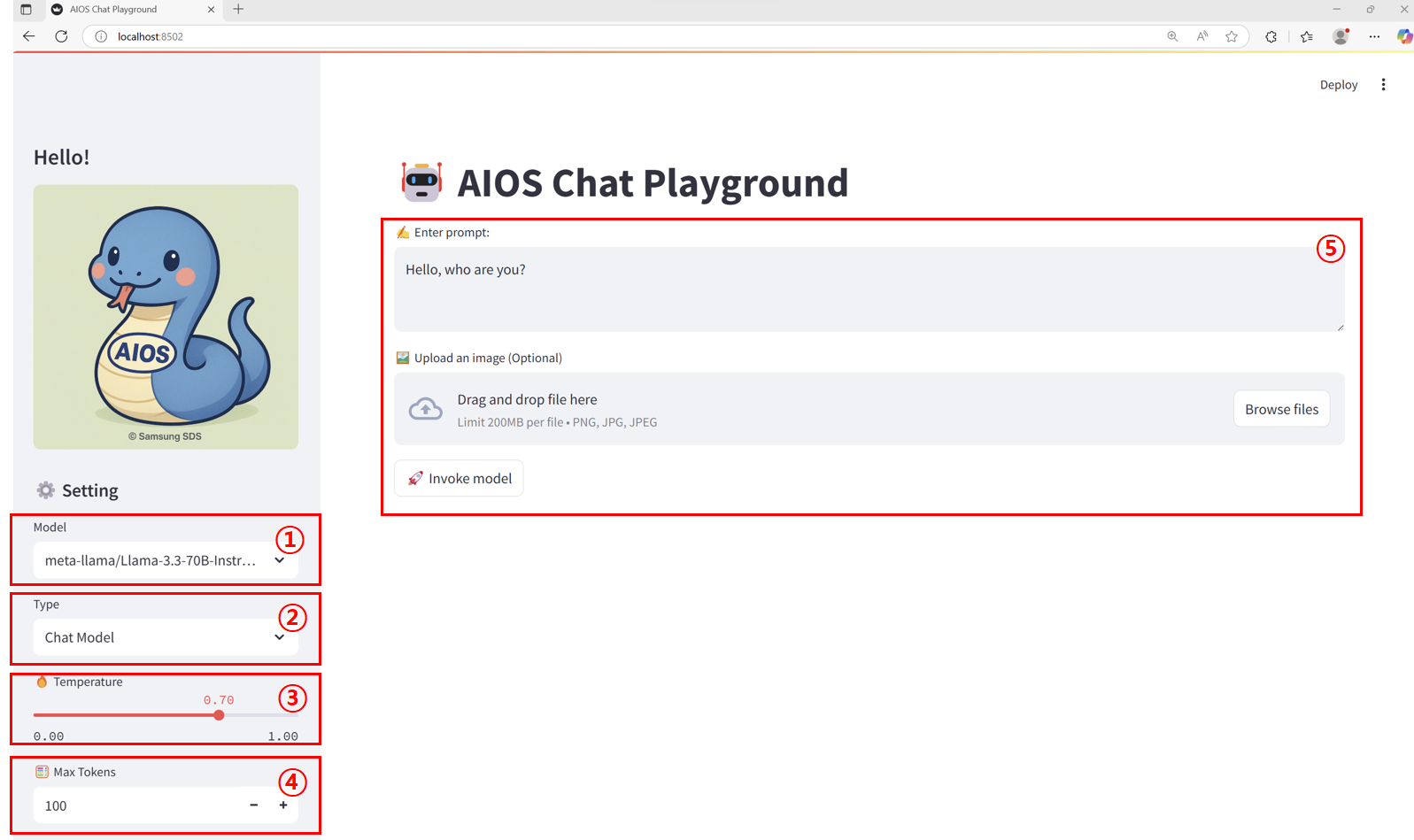
주요 화면 구성
| 항목 | 설명 | |
|---|---|---|
| 1 | Model | models.json 파일에 설정된 호출 가능한 모델 목록입니다. |
| 2 | Endpoint type | endpoints.json 파일에 설정된 모델 호출 형식으로 모델에 맞게 선택해야 합니다. |
| 3 | Temperature | 모델 출력의 “랜덤성” 또는 “창의성"정도를 조절하는 파라미터입니다. 이 튜토리얼에서는 0.00 ~ 1.00 범위로 지정되어 있습니다.
|
| 4 | Max Tokens | 출력 길이 제한 파라미터로 응답 텍스트에서 생성 가능한 최대 토큰 수를 설정합니다. 이 튜토리얼에서는 1 ~ 5000 범위로 지정되어 있습니다. |
| 5 | 입력 영역 | 엔드포인트 유형별로 prompt, 이미지 등 받는 방식이 달라집니다.
|
Chat 모델 호출하기
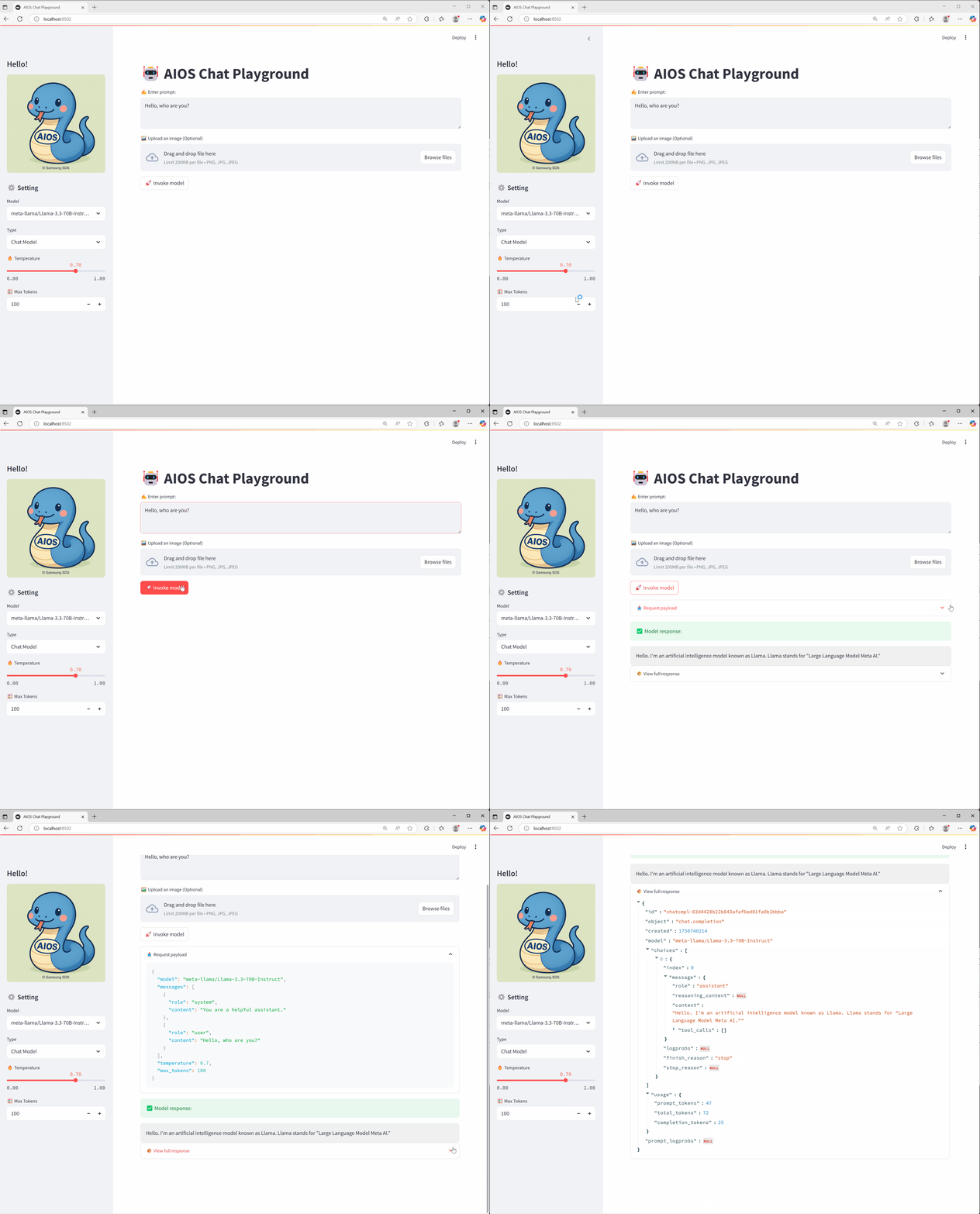
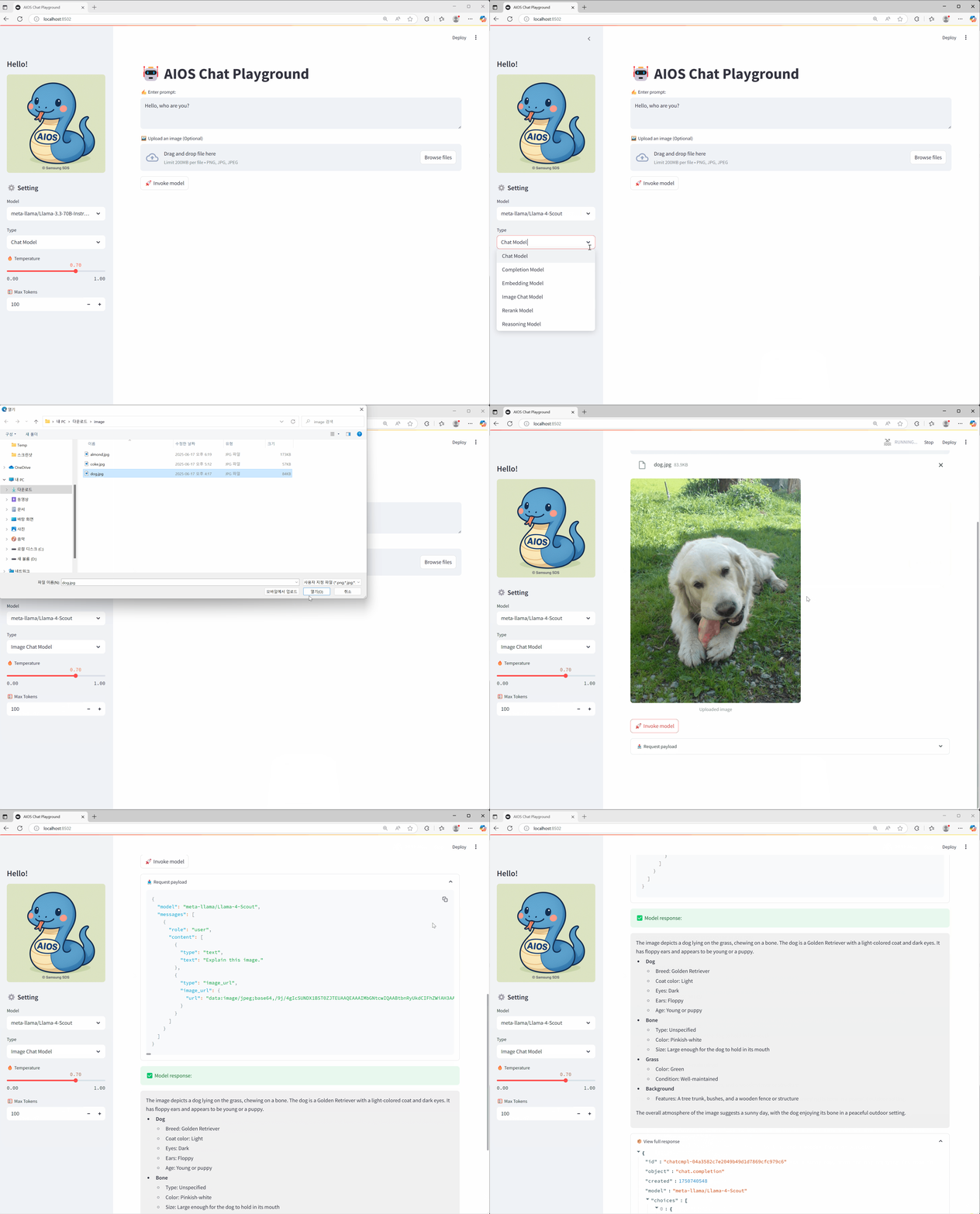
Image 모델 호출하기
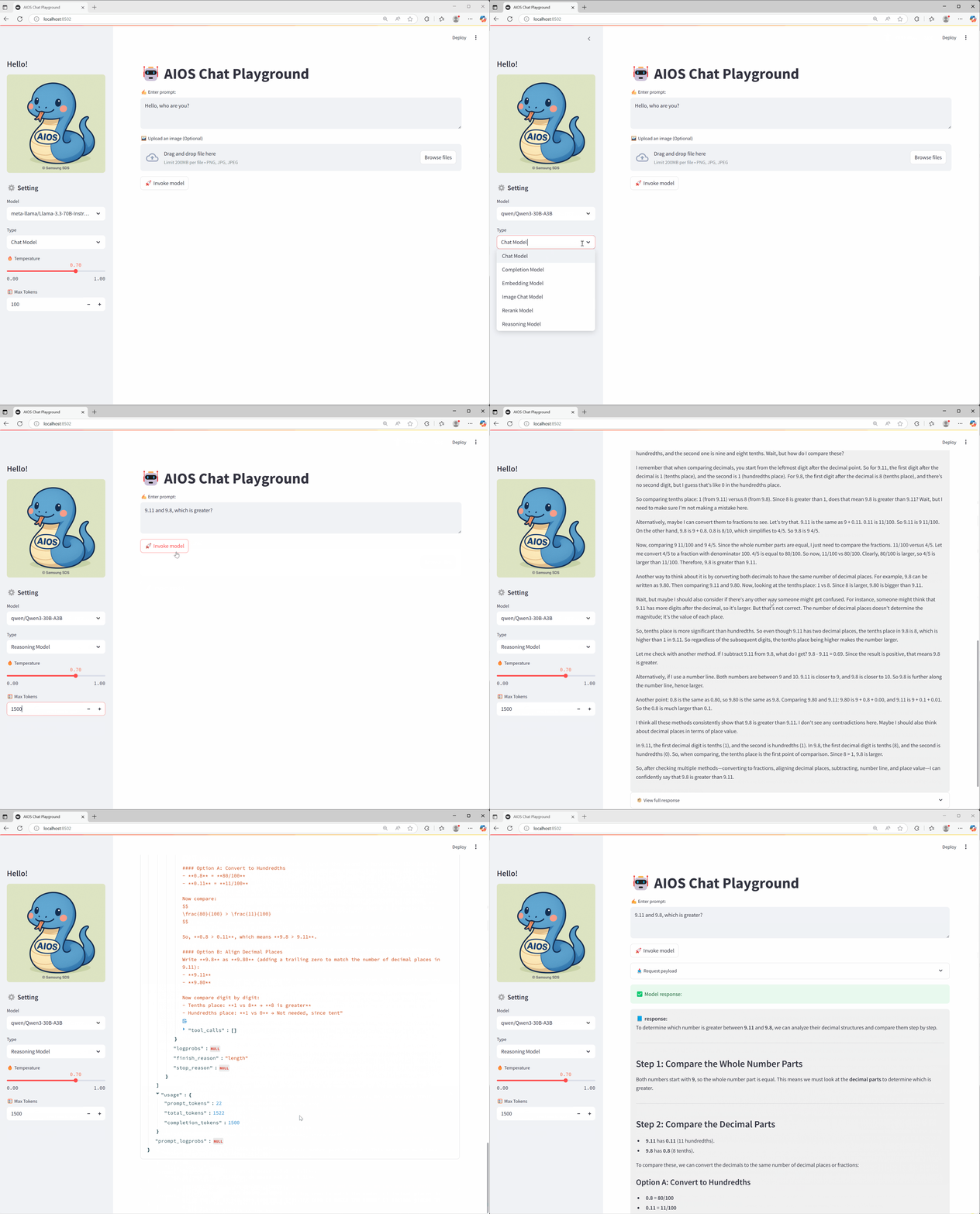
Reasoning 모델 호출하기
마무리
이 튜토리얼을 통해 AIOS에서 제공하는 다양한 AI모델 API를 손쉽게 테스트 할 수 있는 Playground UI를 직접 구축하고 활용하는 방법을 익히셨기를 바랍니다. 실제 서비스 목적에 따라 원하는 모델과 엔드포인트 구조에 맞춰 유연하게 커스터마이징해서 사용하실 수 있습니다.