Service Overview
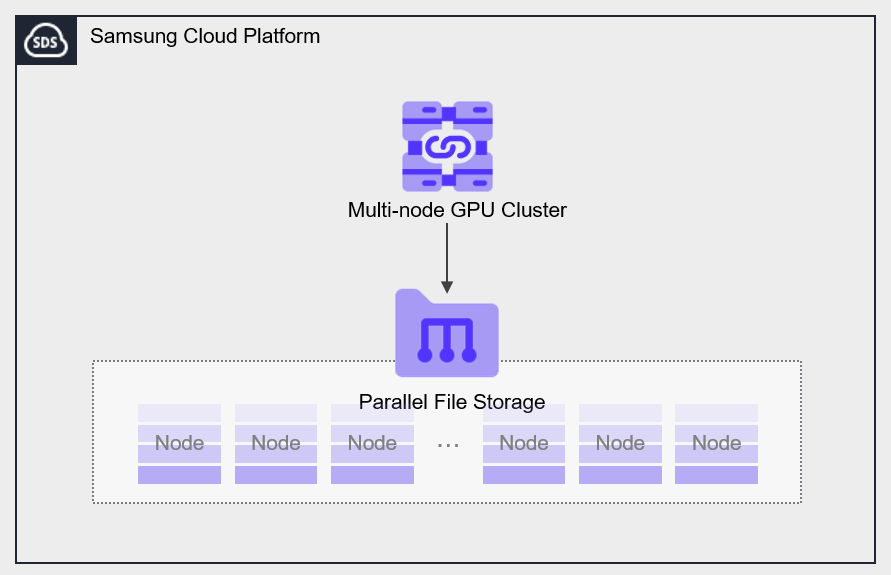
Parallel File Storage is a high‑performance parallel file storage based on All NVMe that can process large amounts of data quickly and efficiently.
Features
- Data processing speed improvement: Distribute file data across multiple storage nodes to improve data processing speed and reduce analysis time.
- Various Field Applications: Through fast data processing speed and analysis time, it can be utilized in various fields such as AI/ML analysis, big data analysis, etc.
Configuration diagram
Provided features
Parallel File Storage provides the following features.
- Volume Name: Users can set a name for each volume.
- Snapshot: Through the image snapshot feature, it is possible to recover data that has been modified or deleted.
- Connection Resources: Can be connected to and used in a Multi-node GPU Cluster.
- Terraform provision: Provides an IaC environment through Terraform.
Component
You can create a volume by selecting the disk type and protocol based on the user’s service environment and performance requirements. When using the snapshot feature, you can restore data to the desired point in time.
Volume
A volume (Volume) is the basic creation unit of the Parallel File Storage service and is used as data storage space. The user selects a name and size to create a volume, then connects to and uses it in a Multi-node GPU Cluster.
The volume name creation rules are as follows.
- It must start with a lowercase English letter and can be set to 3 to 21 characters using lowercase letters, numbers, and special characters (
_).
Snapshot
A snapshot (Snapshot) is an image backup taken at a specific point in time. You can recover changed and deleted data using the image snapshot feature. The user can restore to the most recent snapshot from the snapshot list.
Prerequisite Service
This is a list of services that must be pre-configured before creating the service. Please refer to the guide provided for each service and prepare in advance.
| Service Category | service | Detailed description |
|---|---|---|
| Compute | Multi-node GPU Cluster | Physical GPU server for large-scale high-performance AI computing |