Service Overview
Parallel File Storage is a high-performance parallel file storage based on All NVMe that can process large amounts of data quickly and efficiently.
Features
- Data Processing Speed Improvement: By distributing file data across multiple storage nodes, it improves data processing speed and reduces analysis time.
- Various Field Utilization: Through fast data processing speed and analysis time, it can be used in various fields such as AI/ML analysis, big data analysis, etc.
Diagram
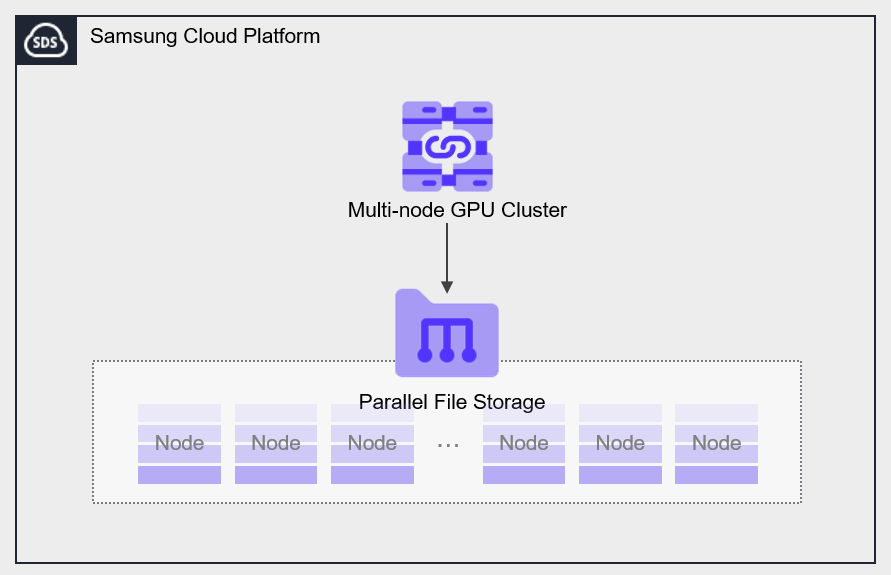
Provided Features
Parallel File Storage provides the following features.
- Volume Name: Users can set names for each volume.
- Snapshot: You can create a snapshot to restore to a specific point in time.
- Connection Resource: Can be connected and used in a Multi-node GPU Cluster.
Components
You can create a volume by selecting the disk type and protocol according to the user’s service environment and performance requirements. When using the snapshot feature, you can restore data to the point in time you want to recover.
Volume
Volume is the basic creation unit of the Parallel File Storage service and is used as data storage space. Users select a name and capacity to create a volume, then connect and use it in a Multi-node GPU Cluster.
The volume name creation rules are as follows.
- Starts with a lowercase English letter and can be set to 3 to 21 characters using lowercase letters, numbers, and special character (
_).
Snapshot
Snapshot (Snapshot) is an image backup at a specific point in time. Using the image snapshot function, you can recover changed or deleted data. The user selects the snapshot created at the point in time they want to recover from the snapshot list and performs the recovery.
- Snapshots can be created up to a maximum of 50.
- You can recover by selecting a specific snapshot from the snapshot list and creating a new volume based on the snapshot.
Pre-service
This is a list of services that must be pre-configured before creating the service. For details, refer to the guide provided for each service and prepare in advance.
| Service Category | Service | Detailed Description |
|---|---|---|
| Compute | Multi-node GPU Cluster | Physical GPU servers for large-scale high-performance AI computation |