Service Overview
Object Storage is an object storage that allows users to easily store and use the data they want and can be accessed via URL, making data management very convenient. It enables searching and retrieving large-scale data, and you can leverage features such as encryption and version control. Provides public and private URLs, and the public URL can be accessed over the internet.
Features
- Using S3 API: Through a Restful API, applications can access it easily and quickly, and because it is compatible with Amazon S3, it can be used effortlessly in applications integrated with Amazon S3.
- Secure Use: Encryption (SSE‑S3), access control, and Public/Private access features are provided, making it suitable for safely storing user data or backup data for service recovery.
- Cost Efficiency: Users do not predefine the bucket capacity and are provided storage space with an efficient pricing model that charges only for the amount used.
- Replication: You can perform replication on a bucket in a different location or the same location. * You can configure multiple replication policies, and if the source bucket becomes unavailable due to a failure or disaster, you can provide service through the replica bucket.
Configuration diagram
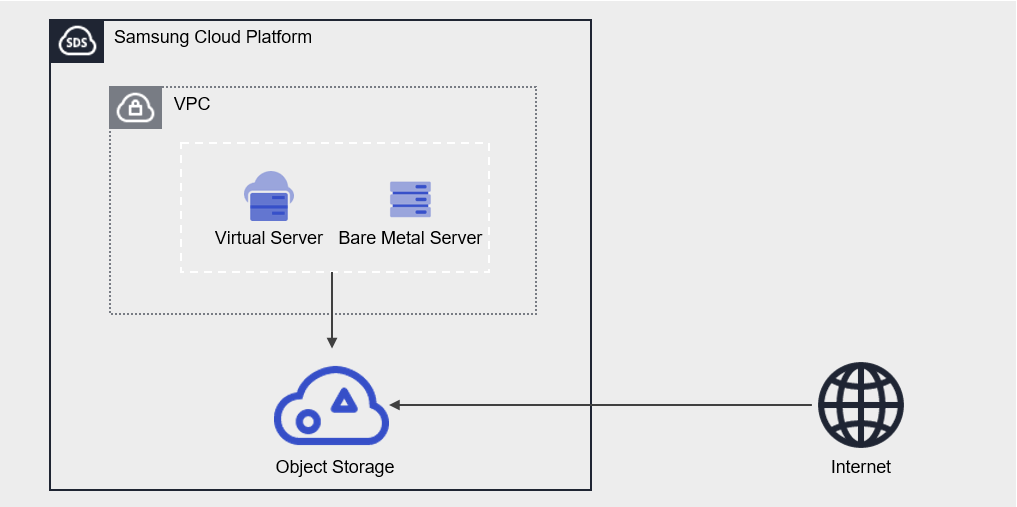
Provided Features
Object Storage provides the following features.
- Storage Management: Provides Object Storage creation, folder creation, folder deletion, file upload, file download, and file deletion functions.
- Version control: When you use version control, all versions of uploaded files are managed. * You can easily download previous files by viewing the version list.
- Encryption: If you enable encryption, encryption is provided using the SSE‑S3 method.
- Access Control: Using access control, you can directly enter the public IPs allowed to access Object Storage, or select resources within the same account (Virtual Server, Bare Metal Server, VPC Endpoint, etc.) that are permitted to access it.
- Replication: You can perform replication to a bucket in a different location or the same location.
- Multiple replication policies can be configured
- Permission Management: It is provided with Private permission by default, and offers Public permission and permission management features.
- Private permission: Allow file access and download only to users who know the authentication key.
- Public permission: If accessed via the file’s URL, the file is made public and downloadable to anyone worldwide.
- Monitoring: You can view monitoring information such as total file count, data size (Bytes), and HTTP method request counts through the Cloud Monitoring service.
- ServiceWatch Service Integration Provision: You can monitor data through the ServiceWatch service.
Component
authentication key
The authentication key is a required element that must be created in advance for using Object Storage.
The purpose of using the authentication key is as follows.
- In the Samsung Cloud Platform Console, you need an authentication key to create and access the Object Storage service.
- The API provided by Object Storage is compatible with Amazon S3, and you can use the same tools that leverage Amazon S3. * At this point, entering an authentication key is required, and it is used as a tool to identify whether the user has the appropriate permissions. For detailed instructions on creating and verifying authentication keys, see How-to guides > 인증키 생성하기.
Bucket
A bucket is the top-level folder, and all folders and files exist under the bucket. When you create an Object Storage service in the Samsung Cloud Platform Console, a bucket is created, and you can subsequently upload folders or files.
The bucket name creation rules are as follows.
- Bucket names must be at least 3 characters and no more than 63 characters.
- Bucket names can consist only of lowercase English letters, numbers, periods
.and hyphens-. - Bucket names must start with a lowercase letter or a digit.
- Bucket names must not contain two consecutive periods.
- Bucket names cannot end with a period or hyphen.
- Bucket names cannot have a period and hyphen adjacent to each other.
- Bucket names do not use the IP address format (e.g., 192.168.x.x).
- You cannot use admin as a bucket name.
- The bucket name must be unique within an Account/Region.
- The bucket name you previously used will be available in 1 hour.
| Example of a valid bucket name | Example of an invalid bucket name |
|---|---|
The following bucket names can be used
| The following bucket names cannot be used
|
Folder
Folder (Folder) is used to logically group files.
The folder name generation rules are as follows.
- Folder names can consist of Korean characters, English letters, numbers, and special characters.
- The special characters that cannot be entered are as follows.
| Special characters that cannot be used in folder names |
|---|
|
File
A file (File) refers to data stored in Object Storage and is the same as a regular file.
The filename generation rules are as follows.
- Filenames can consist of Korean characters, English letters, numbers, and special characters.
- The special characters that cannot be entered are listed below.
| Special characters that cannot be used in file names |
|---|
|
Folder names and file names are separated by a slash/. The following are examples of valid folder names and file names.
| Example of mixed use of folder and file names |
|---|
|
/), must be within 1,024 Bytes (UTF-8 encoding).URL
You can access the Object Storage bucket via URL. By providing both public and private URLs, access is possible not only within the same Samsung Cloud Platform environment but also from external internet environments.
The URL structure is organized as follows.
| URL without an Account ID | URL that uses the Account ID |
|---|---|
| https://[대표URL]/[bucket명]/[폴더명]/[파일명] | https://[대표URL]/[accountId]:[bucket명]/[폴더명]/[파일명] |
| Category | Explanation | Example |
|---|---|---|
| Main URL | Representative URL can be found at the Object Storage 상세 정보 확인하기 URL
| - |
| accountId | account ID
| c2ef8be0481d4094af3c6d046e536d25 |
| bucket name | User-created bucket name | bucketname |
| Folder name | Folder name where the file is located | folder/folder01/folder02/ |
| filename | File name | Filename02 |
The full URL information for the file can be found in 파일 정보 조회하기.
Constraints
The limitations of Object Storage are as follows.
| Category | Explanation |
|---|---|
| Number of creatable Object Storage services | Up to 1,000 per region |
| File name length (including path) | up to 1,024 Bytes |
| File upload size |
|
| Number of files in the bucket | 200 million or fewer |
- It is recommended to store up to 200 million files per bucket. * If the number exceeds 200 million, performance may degrade sharply, so manage the file count.
- S3 Backend Filesystem solution (ex. * When using s3fs, objectivefs, etc., we recommend not employing version control. * Performance degradation may occur when using version control.
- After changing IAM permissions, performing an Amazon S3 API call may take up to 30 seconds.
- Object Storage cannot be used for file upload and download when the IAM policy uses a temporary authentication type.
Please note that when IP access control is used in IAM policies, access between Object Storage and SCP resources is not possible.
To use the service, you must set the IAM policy to ‘Applied IP: All IPs, Excluded IP: Not used’.
- South Korea (kr-south3) region constraints
- File upload and download functions via the Samsung Cloud Platform Console are restricted.
- Use of the S3 API/CLI via a public URL is restricted.
- However, accessing a Private URL via resources (e.g., Virtual Server) created in the Samsung Cloud Platform Console is possible.
- Korea South 1 (kr-south1), Korea South 2 (kr-south2) region constraints
- A separate firewall rule must be allowed to enable access to the public URL.
- The public URL can be found on the Object Storage details page. * Please refer to Object Storage 상세 정보 확인하기.
Preliminary Service
Object Storage has no prerequisite services.