Service Overview
File Storage is a storage solution that allows servers connected via the network to easily store and share data, suitable for application environments that use multiple servers.
You can select the disk type based on performance requirements, and it will automatically scale up or down according to the user’s data volume without capacity limits.
Features
- Free volume usage: The volume size automatically expands or shrinks based on data creation and deletion without user configuration. * There is no cost for creating a volume; only usage fees for the stored data capacity are incurred.
- Various disk types provided: You can select a disk type based on the user’s intended use. * You can use HDDs that provide cost‑effective large‑capacity data storage, SSDs that offer reduced response times and high IOPS performance, and high‑performance SSDs.
- Snapshot Backup: Through the image snapshot feature, recovery of changed or deleted data is possible, and during disk backup, snapshots can be stored in a location different from the original. * The user selects the snapshot created at the desired recovery point from the list and performs the recovery.
- Replication: Creates an identical replica volume at another location, and the user can configure the data replication schedule. * If the original volume cannot be used due to failures or disasters, service can be provided through a replica volume.
- Multi-AZ: Create the same volume in a different location (AZ) within the region, so the service continues even in the event of a failure. * We need to verify availability by region.
Configuration
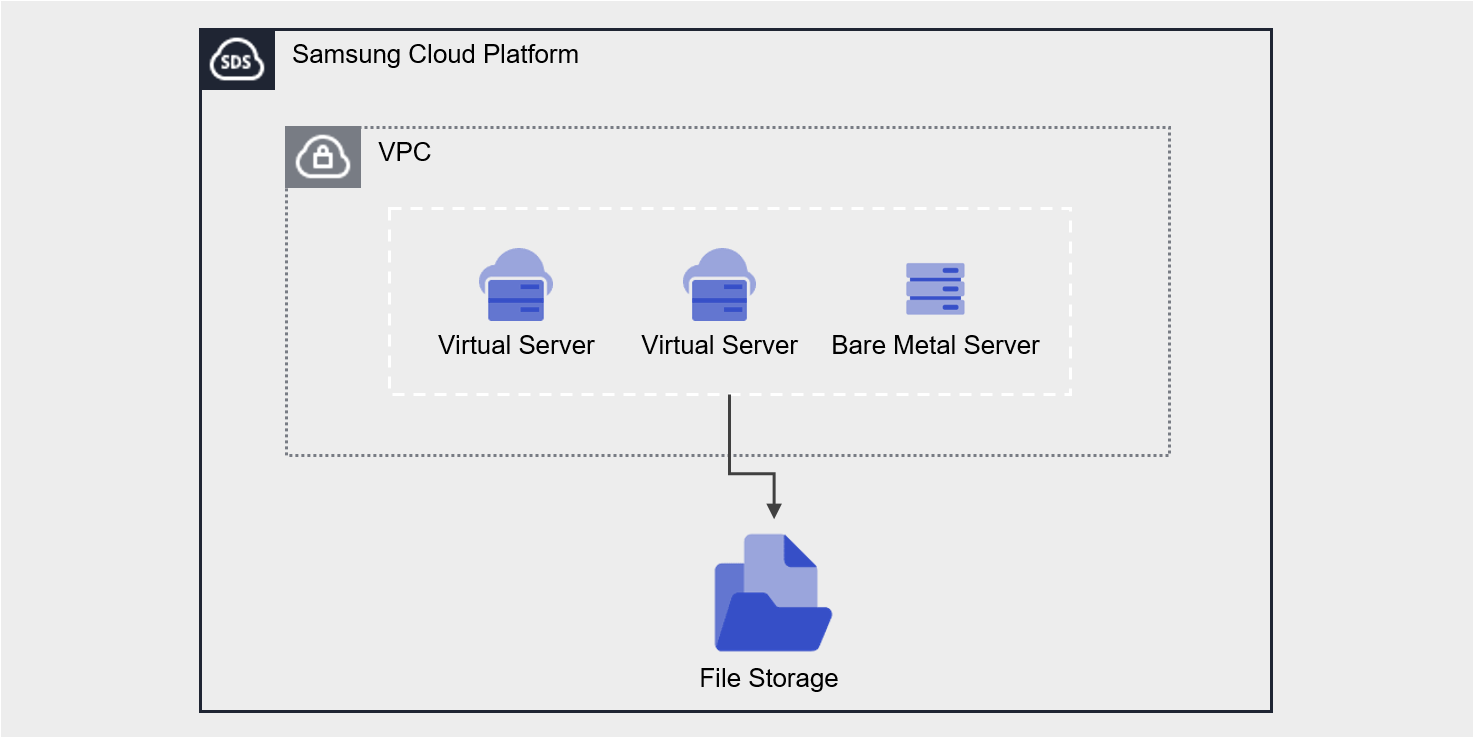
Provided features
File Storage provides the following features.
- Volume Name: You can set a name for each volume.
- Volume Type: You can select whether to enable Multi-AZ.
- Multi-AZ: Create the same volume in a different location (AZ) within the region
- Select the volume to connect to the server using Active Zone settings.
- When the Active Zone fails, it can be used with the volume replicated to the Standby Zone (with identical mount information).
- Single-AZ: Create a volume in a single location (AZ)
- Select an Availability Zone to specify the volume creation location.
- Multi-AZ: Create the same volume in a different location (AZ) within the region
- Disk Type: You can select the disk type based on performance requirements.
- HDD: General volume
- SSD: High‑performance General Volume
- High‑Performance SSD: Performance‑optimized volume that can be attached to a Multi-node GPU Cluster
- Protocol: You can select the protocol based on the user’s OS Image.
- NFS: primarily used on Linux operating systems
- CIFS: Primarily used in Windows operating systems
- Free Volume Usage: Provides flexible volume size based on stored data size without capacity settings.
- Connected Resources: Virtual Server, Bare Metal Server, GPU Server, Multi-node GPU Cluster can be connected to and used.
- Encryption: All volumes are encrypted with the XTS-AES-256 algorithm regardless of disk type.
- Snapshot: Through the image snapshot feature, you can create snapshots instantly or schedule snapshot creation.
- Retention Count: The number of snapshots retained that are automatically created by the schedule
- Schedule: Snapshot auto-creation interval
- Recovery: Recover the original volume to the latest snapshot, or select a snapshot at a specific point in time to create a recovery volume
- Replication: Replicates the volume to another location, and the user can set the replication schedule.
- Disk Backup: You can store snapshots on a backup-dedicated HDD storage and select the backup location.
- VPC Endpoint connection: File Storage can be used through a Private Network connection from an external network.
- ServiceWatch Service Integration: You can monitor data through the ServiceWatch service.
Component
You can create a volume by selecting the disk type and protocol according to the user’s service environment and performance requirements.
When using the snapshot feature, you can restore data to the desired point in time.
Volume
A volume (Volume) is the basic creation unit of the File Storage service and is used as data storage space. The user selects a name, disk type, and protocol (CIFS/NFS) to create a volume, then connects it to one or more servers for use.
The volume name creation rules are as follows.
- It must start with a lowercase English letter and can be set to 3-21 characters using lowercase letters, numbers, and special characters (
_).
Snapshot
A snapshot (Snapshot) is an image backup of a specific point in time. Using the image snapshot feature, you can recover changed or deleted data, or store snapshots in a different location from the original when performing disk backups. The user selects the snapshot created at the desired recovery point from the snapshot list and performs the recovery.
The following are considerations when using snapshots.
- The snapshot creation time is based on Asia/Seoul (GMT +09:00). Snapshots can be created up to a maximum of 800, and snapshots generated by schedule are not included. (Automatic creation via schedule is limited to a maximum of 128)
- Select the snapshot recovery button to restore the File Storage volume to the latest snapshot.
- If you select a specific snapshot from the snapshot list, you can recover by creating a new volume based on that snapshot.
- Automatic creation is possible through snapshot schedule settings.
- Since snapshot storage is included in File Storage usage and incurs charges, adjust the storage capacity by setting the snapshot retention period.
Preceding Service
This is a list of services that must be pre‑configured before creating the service. Refer to the guide provided for each service for detailed information and prepare in advance.
| Service Category | service | Detailed description |
|---|---|---|
| Compute | Virtual Server | Virtual server optimized for cloud computing |
| Compute | Bare Metal Server | High-performance physical server used without virtualization |