Overview
Service Overview
Backup is a service that backs up and restores the user’s data in a safe way.
The backup policy includes the backup target, cycle, and retention period, so the user sets the backup plan according to the business environment and requirements.
Features
- Backup scope: Provides optimal backup and recovery services suitable for various business purposes to safely preserve customers’ important data.
- Flexible Policy Setting: The backup policy can be set according to the usage environment and data importance. The user can select the backup target and type, and specify the retention period and schedule.
- Backup Network: The backup network connection has been designed to minimize the impact on services that may occur during backup. The backup system and network are restricted through access control to prevent unauthorized access.
- Remote Backup: You can store backup copies in a different location. In the event of a disaster or failure at the backup location, you can use the backup copy stored in a different location to recover.
Composition
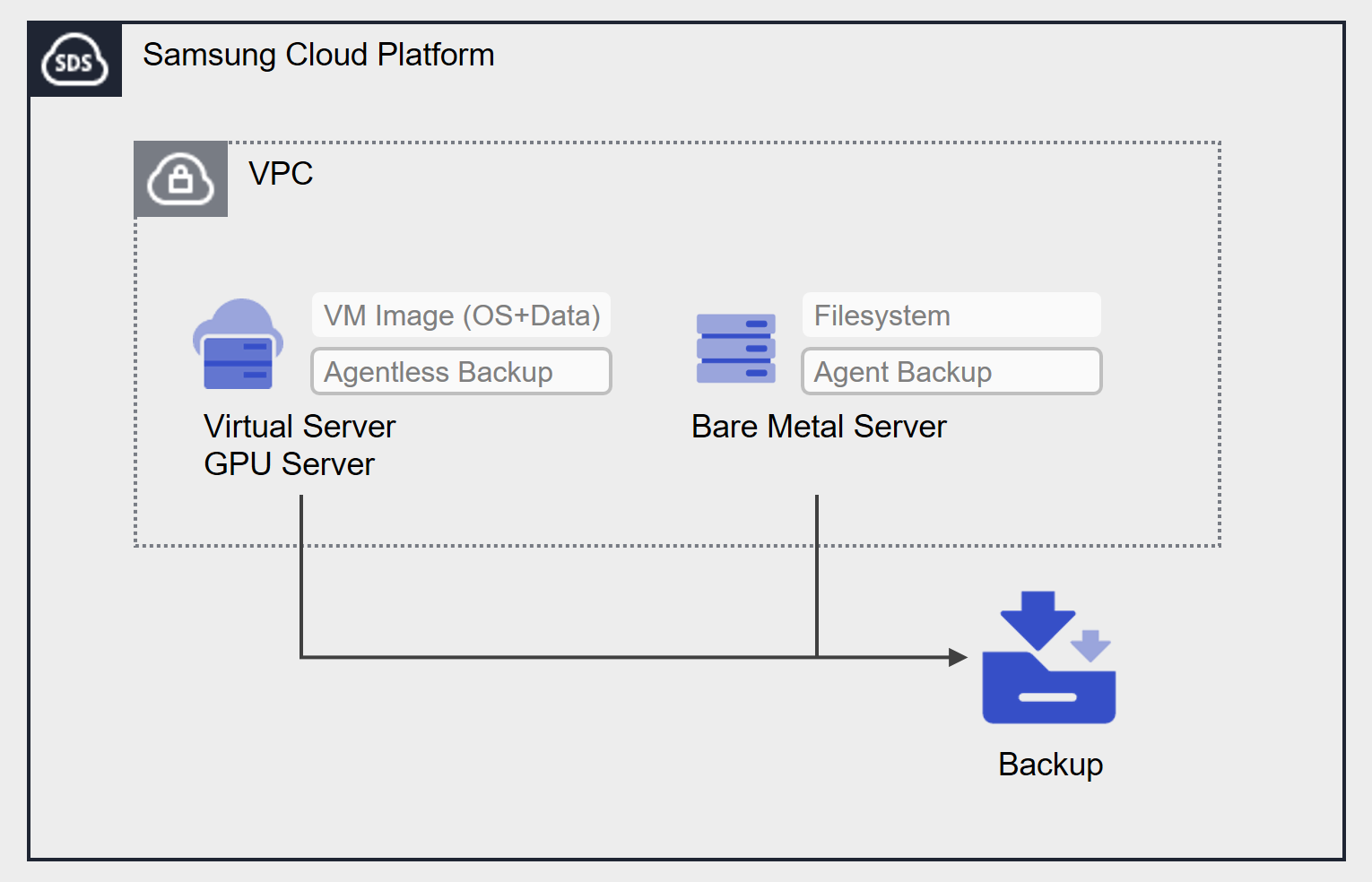
Provided Features
Backup provides the following functions.
- Backup target: The user can select the target server they want to secure the backup for.
- Backup Save: You can select the storage location of the backup.
- Encryption: You can choose whether to encrypt or not. If selected, AES-256 algorithm encryption will be applied.
- Retention period: You can set the retention period for the backup. Backups that have exceeded the retention period will be automatically deleted.
- Schedule: The cycle of automatic backup creation.
- Recovery: You can recover resources by selecting a backup created at the desired point in time.
Component
Backup provides scheduling functionality to automatically create backups at predefined cycles and times. The user can set the retention period, etc. to secure the backup at the desired point in time, and Agent configuration may be required depending on the Backup target and type.
Backup Type
Agentless Backup, Agent Backup are provided, and can be selected according to the Backup target.
- Agentless Backup: Without separate Agent configuration, backup can be performed through Backup service creation. Virtual Server, GPU Server’s VM Image backup corresponds to Agentless Backup.
- Agent Backup: Before creating a Backup service, it is necessary to create and configure a Backup Agent for the server to be backed up. This includes Filesystem backup for Bare Metal Servers.
Backup classification
- Full Backup: Performs a backup on the entire data.
- Incremental Backup: Backs up data changed based on the previous Full Backup.
Schedule
It automatically generates a backup according to the generation cycle set by the user. Schedule setting is possible up to 1 Full Backup and 6 Incremental Backups.
When using the immediate Backup feature, you can create a backup at a specific point in time outside of the schedule.
The backup cycle that can be set as a schedule is as follows.
Daily: Start Time selection
Every week: day of the week, start time selection
Every month: week, day of the week, start time selection
- Start Time: hour (1~23), minute (00, 30) selection
- Day of the week: Mon, Tue, Wed, Thu, Fri, Sat, Sun selection
- Parking: 1, 2, 3, 4, last parking selection
Storage Period
You can set the retention period of the backup created through the Backup service. The retention period that can be set is as follows.
- Agentless Backup: You can choose from 2 weeks (14 days), 1 month (31 days), 3 months (90 days), 6 months (180 days), or 1 year (365 days). It is applied based on the date, so if you set it to 1 month, it will be kept for 31 days.
- Agent Backup: You can choose from 2 weeks, 1 month, 3 months, 6 months, and 1 year. It is applied based on the unit interval, so if you set it to 1 month, the backup on January 1st will be kept until January 31st, the day before February 1st, and the backup on February 1st will be kept until the day before March 1st.
Preceding Service
This is a list of services that must be pre-configured before creating this service. Please refer to the guide provided for each service and prepare in advance for more details.
| Service Category | Service | Detailed Description |
|---|---|---|
| Compute | Virtual Server | Virtual server optimized for cloud computing |
| Compute | Bare Metal Server | High-performance physical server without virtualization |