Overview
Service Overview
Archive Storage is a storage service suitable for long-term retention of large amounts of data. The user can set a schedule to automatically move infrequently accessed data stored in Object Storage to Archive Storage, enabling efficient storage configuration and cost management. Additionally, upon user request, data stored in Archive Storage can be restored to Object Storage for use.
Features
Free Capacity Usage: When you create a bucket in Archive Storage, the bucket automatically expands or contracts based on the user’s data archiving and deletion. There is no cost for creating a storage bucket; you are only charged for storage usage.
Stable Data Recovery: Data that has been stored long-term can be searched and reliably recovered within three hours. During data recovery, select the target file and the Object Storage bucket where you want to store the data to recover it.
Cost Efficiency: By configuring Object Storage and Archive Storage efficiently according to the purpose and frequency of data usage, you can store and manage data at a reasonable cost.
Convenient Use: You can conveniently use features such as creating buckets, setting archiving schedules, and data recovery in the Samsung Cloud Platform Console. After migrating data for all files in Object Storage, you can apply a source deletion policy.
Configuration diagram
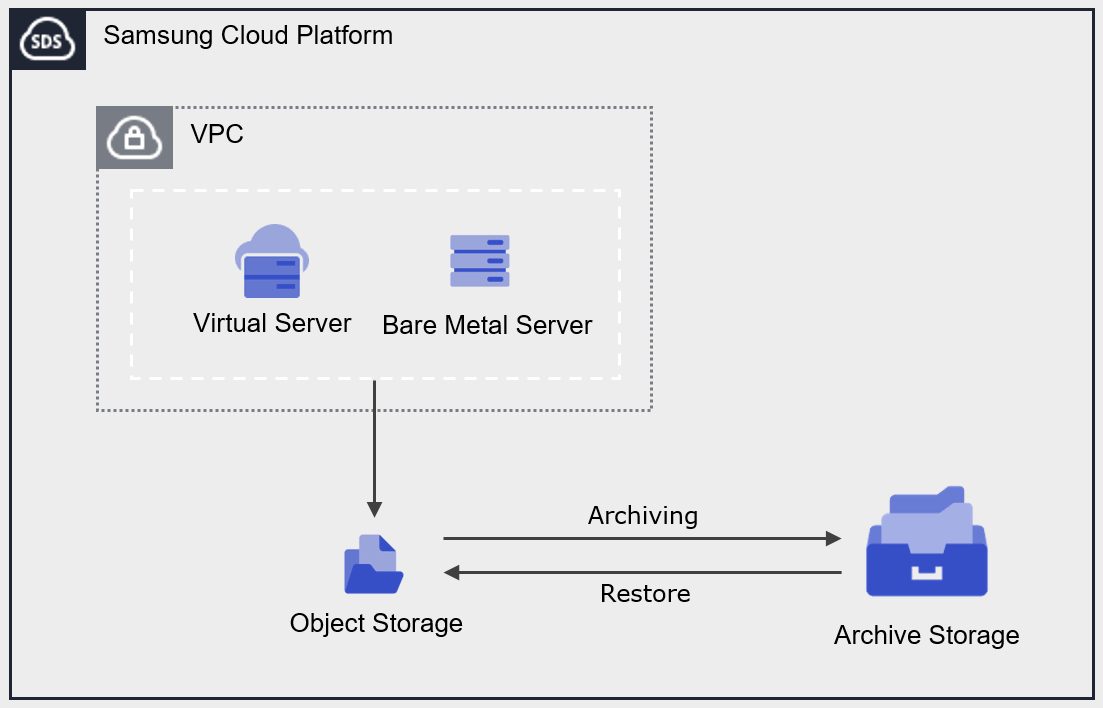
Provided features
Archive Storage provides the following features.
- Archiving Plan Configuration: Set a schedule to perform Archiving on all files in the Object Storage bucket.
- Data Recovery: You can recover to the target Object Storage bucket and folder using folders or files stored in Archive Storage.
- Archiving status monitoring: You can check the Archiving status (success, cancelled, failed, in progress, pending, skipped).
- Recovery status monitoring: You can view the recovery status (success, canceled, failed, in progress, pending).
- Encryption: When encryption is set to enabled, encryption is provided via the SSE‑S3 method.
- Version Management: You can manage archived files by version and restore a selected version.
- ServiceWatch Service Integration: You can monitor data using the ServiceWatch service.
Component
Authentication key
To create and access the Archive Storage service in the Samsung Cloud Platform Console, an authentication key is required. Therefore, to use Archive Storage, you must create an authentication key.
Bucket
A bucket is the top-level folder, and all folders and files reside under the bucket. When you create an Archive Storage service in the Samsung Cloud Platform Console, a bucket is created, and you can then upload folders or files.
The bucket name creation rules are as follows.
- Bucket names must be at least 3 characters and at most 63 characters.
- Bucket names can only be composed of lowercase English letters, numbers, periods
., and hyphens-. - Bucket names must start with a lowercase letter or a digit.
- Bucket names must not contain two consecutive periods.
- Bucket names cannot end with a period or hyphen.
- Bucket names cannot have a period and a hyphen adjacent to each other.
- Bucket names do not use the IP address format (e.g., 192.168.x.x).
- The bucket name cannot be admin.
- Bucket names must be unique within an Account/Region.
- The bucket name you previously used will be available after 1 hour.
| Example of a valid bucket name | Example of an invalid bucket name |
|---|---|
The following bucket names can be used
| The following bucket names cannot be used
|
folder
A folder (Folder) is used to logically group files.
The folder naming rules are as follows.
- Folder names can consist of Korean characters, English letters, numbers, and special characters.
- The special characters that cannot be entered are listed below.
| Special characters that cannot be used in folder names |
|---|
|
File
File (File) refers to data stored in Archive Storage and is the same as a regular file.
The filename generation rules are as follows.
- Filenames can consist of Korean characters, English letters, numbers, and special characters.
- The special characters that cannot be entered are listed below.
| Special characters that cannot be used in file names |
|---|
|
Folder names and file names are separated by slash /. The following are examples of valid folder and file names.
| Example of mixed use of folder names and file names |
|---|
|
/), must be within 1,024 bytes (based on UTF-8 encoding).Constraints
The limitations of Archive Storage are as follows.
| Category | description |
|---|---|
| Number of creatable Archive Storage services | 1000 or fewer |
| File name length (including path) | up to 1,024 Bytes |
Preceding Service
This is a list of services that must be pre‑configured before creating the service. Please refer to the guide provided for each service for details and prepare in advance.
| Service Category | Service | Detailed description |
|---|---|---|
| Storage | Object Storage | Object storage that simplifies data storage and retrieval |