Overview
Service Overview
Archive Storage is a storage service suitable for long-term storage of large amounts of data. Users can set a schedule to automatically transfer infrequently used data stored in Object Storage to Archive Storage, thereby efficiently configuring storage and managing costs. Additionally, if a user requests, data stored in Archive Storage can be restored to Object Storage for use.
Special Features
Free capacity usage: If you create a bucket in Archive Storage, the bucket automatically expands or shrinks according to the user’s data archiving and deletion. There is no cost for creating a storage bucket, and you are only charged for storage usage.
Stable Data Recovery: Data that has been stored long-term can be searched and reliably recovered within 3 hours. When recovering data, select the target file and the Object Storage bucket where you want to store it to recover the data.
Cost Efficiency: Depending on the purpose and frequency of data usage, you can efficiently configure Object Storage and Archive Storage to store and manage data at a reasonable cost.
Convenient Use: You can conveniently use functions such as bucket creation, Archiving schedule setting, and data recovery on the Samsung Cloud Platform Console. After migrating data for all files in Object Storage, you can apply a source deletion policy.
Diagram
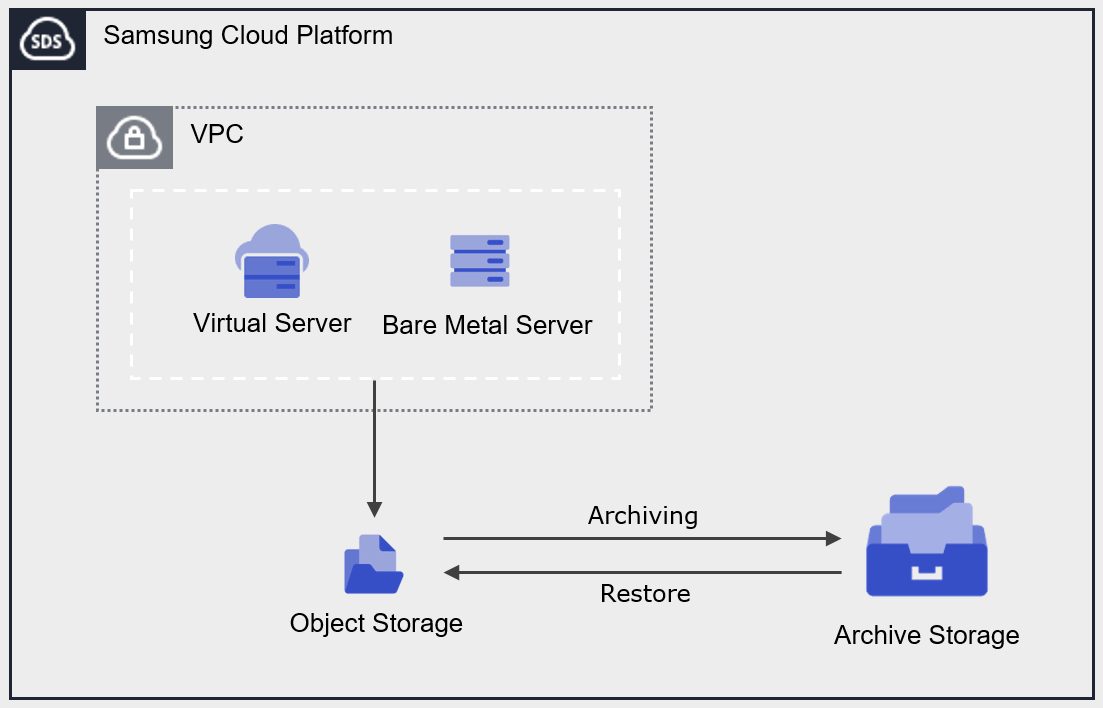
Provided Features
Archive Storage provides the following functions.
- Archiving Plan Setting: Set a schedule to perform archiving on all files in the Object Storage bucket.
- Data Recovery: You can recover to the Object Storage bucket and folder you want to store using folders or files stored in Archive Storage.
- Archiving status monitoring: Archiving status (success, cancelled, failed, in progress, pending, skipped) can be checked.
- Recovery status monitoring: You can check the recovery status (success, cancelled, failure, in progress, pending).
- Encryption: If encryption is set to use, encryption is provided via the SSE‑S3 method.
- Version Management: You can manage archived files by version and recover by selecting the desired version.
Components
Authentication Key
To create and access the Archive Storage service on the Samsung Cloud Platform Console, an authentication key is required. Therefore, to use Archive Storage, you must generate an authentication key.
bucket
Bucket (Bucket) is the top-level folder and all folders and files exist under the bucket. When you create an Archive Storage service in the Samsung Cloud Platform Console, a bucket is created, and thereafter you can upload folders or files.
The bucket name creation rules are as follows.
- Bucket name must be at least 3 characters and at most 63 characters.
- Bucket names can only consist of lowercase English letters, numbers, period
.and hyphen-. - Bucket name must start with a lowercase English letter or a number.
- Bucket names must not be used with two periods placed side by side.
- Bucket names cannot end with a period or hyphen.
- Bucket names cannot have periods and hyphens adjacent.
- Bucket names do not use IP address format (e.g., 192.168.x.x).
- You cannot use the name admin as a bucket name.
- Bucket name must be unique within the Account.
- The previously used bucket name can be used after up to 1 hour.
| Valid bucket name example | Invalid bucket name example |
|---|---|
Usable bucket names are as follows
| The following bucket names cannot be used
|
folder
Folder (Folder) is used to logically group files.
The folder name creation rules are as follows.
- Folder names can consist of Korean, English, numbers, and special characters.
- The special characters that cannot be entered are as follows.
| Special characters that cannot be used in folder names |
|---|
|
file
File (File) is the data stored in Archive Storage and is the same as a regular file.
The file name generation rules are as follows.
- File names can consist of Korean, English, numbers, and special characters.
- The special characters that cannot be entered are as follows.
| Special characters not allowed in file names |
|---|
|
Folder names and file names are separated by a slash/. The following are examples of valid folder names and file names.
| Example of mixed use of folder names and file names |
|---|
|
/), is limited to within 1,024 Bytes (based on UTF-8 encoding).Constraints
Archive Storage’s constraints are as follows.
| Category | Description |
|---|---|
| Number of creatable Archive Storage services | 1,000 or less |
| File name length (including path) | 1,024 Bytes or less |
- If using through IAM role, Archive Storage cannot be used via Samsung Cloud Platform Console, and only IAM users can use it.
Preliminary Service
This is a list of services that must be pre-configured before creating the service. For details, refer to the guide provided for each service and prepare in advance.
| Service Category | Service | Detailed Description |
|---|---|---|
| Storage | Object Storage | Object storage that facilitates data storage and retrieval |