The page has been translated by Gen AI.
Overview
Service Overview
WAF (Web Application Firewall) is a service that monitors website traffic to securely protect web applications. It quickly detects and analyzes HTTP and HTTPS–based security threats that target website vulnerabilities.
Features
- Powerful Detection/Blocking: We monitor the HTTP and HTTPS traffic of web pages registered by the customer to detect hacker attack attempts in real time. We classify attacks such as SQL Injection, Cross-Site Scripting (XSS), Web Scan, and provide various defense features needed for web security to respond immediately to new web attack types.
- Stable Web Service Operation Support: Respond to new security threats through web firewall signature patterns and firmware updates. Detect hacker attack attempts such as the top 10 OWASP (Open Web Application Security Project) attacks, the 8 major vulnerabilities identified by the National Intelligence Service, Zero-Day attacks, emerging web threats, and Bad Bots, to help operate efficient and stable web services.
- Convenient Security Management: Provides monthly reports, allowing you to conveniently review event details.
Service Architecture Diagram
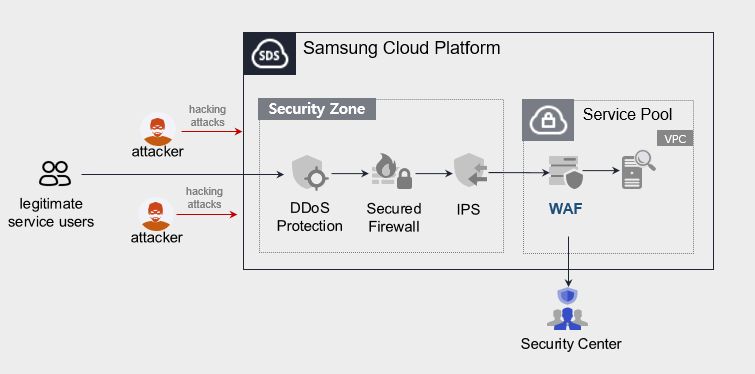
The public WAF service does not provide monitoring (Security Center).
Provided features
We provide the following features.
- Provides intrusion detection/analysis
- 24x365 event monitoring (alert issuance, monthly report provision), however, the public-facing WAF service does not provide this.
- Attack classification (Injection, XSS, File Include, File Up/Download, Web Scan, etc.) through web firewall event analysis
- Detection of latest attack patterns (e.g., Apache Struts vulnerabilities)
- Intrusion Response
- Provide IP information for attack attempts targeting registered URLs
Component
We install a WAF license on the Virtual Server within the VPC of Samsung Cloud Platform and provide the service.
Constraints
To use WAF, first verify the following items.
- If the WAF is configured as a single instance, service continuity cannot be guaranteed in the event of a failure of the WAF installation VM or the WAF application.
- The Load Balancer and WAF of Samsung Cloud Platform do not support bypass.
- The security monitoring service provided by Samsung Cloud Platform is offered only for Pentasecurity products. (operation + monitoring product)
- The public-facing WAF service does not provide security monitoring services.
- The WAF service is installed with direct support from an engineer, and it takes a certain amount of time from request to deployment.
Provision status by region
WAF is available in the environments below.
| Region | General (Enter) | Public |
|---|---|---|
| Korea West (kr-west1) | Provided | Not provided |
| Korea East (kr-east1) | Not provided | Not provided |
| South Korea South 1 (kr-south1) | Not provided | Provided |
| South Korea South 2 (kr-south2) | Not provided | Provided |
| South Korea South 3 (kr-south3) | Not provided | Provided |
Table. WAF regional availability status
Prior Service
This is a list of services that must be pre-configured before applying for the service. For details, refer to the guide provided for each service and prepare in advance.
- When using the WAF service, a WAF license is installed on the Virtual Server and provided. Install a Virtual Server that matches the service specifications you want first.
| Service Category | Service | Detailed description |
|---|---|---|
| Compute | Virtual Server | Virtual server optimized for cloud computing |
| Networking | Direct Connect | A service that securely and quickly connects the customer’s network to the Samsung Cloud Platform |
Table. WAF pre-service
Reference
Customers using Secured VPN do not need to apply for Direct Connect separately. (Direct Connect application is required when applying for Secured VPN)
However, regular (enterprise) customers who do not use Secured VPN must apply for Direct Connect separately.
* Application path : Console > Support Center > Service Request
* Service : Networking > Direct Connect
* Task Category : Uplink Line Request