The page has been translated by Gen AI.
Overview
Service Overview
WAF (Web Application Firewall) is a service that monitors website traffic to safely protect web applications. It quickly detects and analyzes HTTP, HTTPS-based security threats that target website vulnerabilities.
Features
- Powerful Detection/Blocking: Monitor the HTTP, HTTPS traffic of web pages registered by the customer, detecting hacker attack attempts in real time. Classify attacks such as SQL Injection, Cross-Site Scripting (XSS), Web Scan, and provide various defense functions needed for web security to immediately counter new web attack types.
- Stable Web Service Operation Support: We respond to new security threats through web firewall signature pattern and firmware updates. OWASP (Open Web Application Security Project) top 10 attacks, National Intelligence Service’s 8 major vulnerability attacks, Zero-Day attacks, and other new web threats as well as Bad Bot hacker attack attempts are detected to support the operation of efficient and stable web services..
- Convenient Security Management: Provides monthly reports so you can conveniently check event history.
Service Configuration Diagram
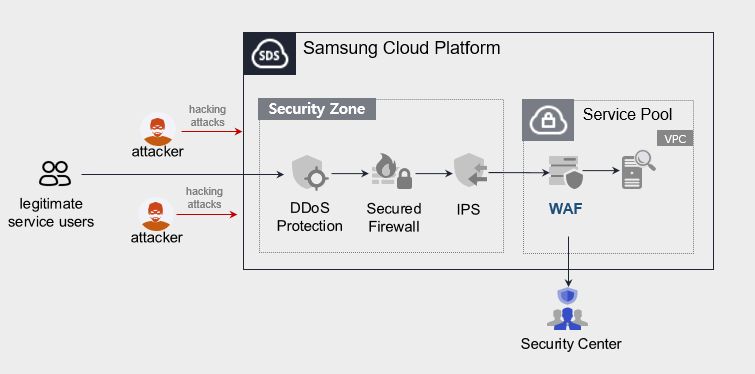
Public-facing WAF service does not provide monitoring (Security Center).
Provided Features
We provide the following features.
- Intrusion detection/analysis provided
- 24x365 event monitoring (alert issuance, monthly report provision), however, the public-facing WAF service does not provide this content.
- Attack classification through web firewall event analysis (Injection, XSS, File Include, File Up/Download, Web Scan, etc)
- Detection of latest attack patterns (including Apache Struts vulnerabilities)
- Intrusion Response
- Provide IP information of attack attempts on registered URL targets
Components
Samsung Cloud Platform’s VPC Virtual Server installs a WAF license and provides the service.
Constraints
To use WAF, please check the following items in advance.
- If WAF is configured as a single unit, service continuity cannot be guaranteed in case of a WAF installation VM or WAF application failure.
- Samsung Cloud Platform’s Load Balancer and WAF do not support bypass.
- Samsung Cloud Platform provided security monitoring service is offered only for Pentasecurity products. (operation + monitoring product)
- The public-oriented WAF service does not provide security monitoring services.
- The WAF service is directly installed with support from engineers, and it takes some time from application to deployment.
Provision status by region
WAF is available in the environment below.
| Region | General (Enter) | Public |
|---|---|---|
| Korea West (kr-west1) | Provided | Not provided |
| Korea East(kr-east1) | Not provided | Not provided |
| Korea South1(kr-south1) | Not provided | Provided |
| South Korea 2 (kr-south2) | Not provided | Provided |
| South Korea South3 (kr-south3) | Not provided | Provided |
Table. WAF regional availability status
Preceding Service
This is a list of services that must be pre-configured before applying for the service. For details, refer to the guide provided for each service and prepare in advance.
- When using the WAF service, a WAF license is installed on the Virtual Server and provided. First install a Virtual Server that matches the service specifications you want.
| Service Category | Service | Detailed Description |
|---|---|---|
| Compute | Virtual Server | Virtual server optimized for cloud computing |
| Networking | Direct Connect | A service that safely and quickly connects the customer’s network with Samsung Cloud Platform |
Table. WAF Pre-service
Reference
Customers using Secured VPN do not need a separate Direct Connect application. (Direct Connect application required when applying for Secured VPN)
However, regular (enterprise) customers who do not use Secured VPN must apply for Direct Connect separately.
* Application path : Console > Support Center > Service request
* Service : Networking > Direct Connect
* Work classification : Uplink line request