This is the multi-page printable view of this section. Click here to print.
WAF
1 - Overview
Service Overview
WAF (Web Application Firewall) is a service that monitors website traffic to safely protect web applications. It quickly detects and analyzes HTTP, HTTPS-based security threats that target website vulnerabilities.
Features
- Powerful Detection/Blocking: Monitor the HTTP, HTTPS traffic of web pages registered by the customer, detecting hacker attack attempts in real time. Classify attacks such as SQL Injection, Cross-Site Scripting (XSS), Web Scan, and provide various defense functions needed for web security to immediately counter new web attack types.
- Stable Web Service Operation Support: We respond to new security threats through web firewall signature pattern and firmware updates. OWASP (Open Web Application Security Project) top 10 attacks, National Intelligence Service’s 8 major vulnerability attacks, Zero-Day attacks, and other new web threats as well as Bad Bot hacker attack attempts are detected to support the operation of efficient and stable web services..
- Convenient Security Management: Provides monthly reports so you can conveniently check event history.
Service Configuration Diagram
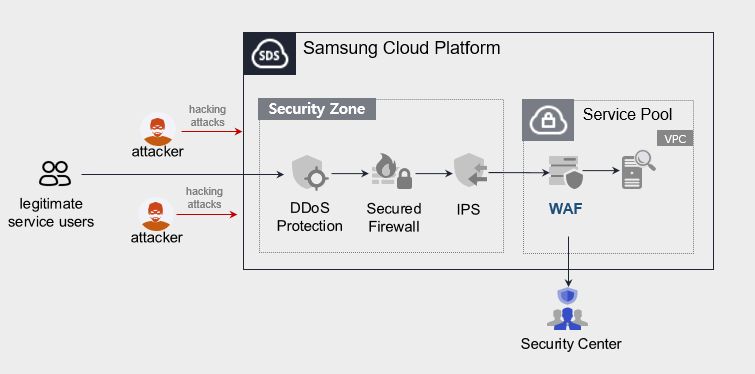
Provided Features
We provide the following features.
- Intrusion detection/analysis provided
- 24x365 event monitoring (alert issuance, monthly report provision), however, the public-facing WAF service does not provide this content.
- Attack classification through web firewall event analysis (Injection, XSS, File Include, File Up/Download, Web Scan, etc)
- Detection of latest attack patterns (including Apache Struts vulnerabilities)
- Intrusion Response
- Provide IP information of attack attempts on registered URL targets
Components
Samsung Cloud Platform’s VPC Virtual Server installs a WAF license and provides the service.
Constraints
To use WAF, please check the following items in advance.
- If WAF is configured as a single unit, service continuity cannot be guaranteed in case of a WAF installation VM or WAF application failure.
- Samsung Cloud Platform’s Load Balancer and WAF do not support bypass.
- Samsung Cloud Platform provided security monitoring service is offered only for Pentasecurity products. (operation + monitoring product)
- The public-oriented WAF service does not provide security monitoring services.
- The WAF service is directly installed with support from engineers, and it takes some time from application to deployment.
Provision status by region
WAF is available in the environment below.
| Region | General (Enter) | Public |
|---|---|---|
| Korea West (kr-west1) | Provided | Not provided |
| Korea East(kr-east1) | Not provided | Not provided |
| Korea South1(kr-south1) | Not provided | Provided |
| South Korea 2 (kr-south2) | Not provided | Provided |
| South Korea South3 (kr-south3) | Not provided | Provided |
Preceding Service
This is a list of services that must be pre-configured before applying for the service. For details, refer to the guide provided for each service and prepare in advance.
- When using the WAF service, a WAF license is installed on the Virtual Server and provided. First install a Virtual Server that matches the service specifications you want.
| Service Category | Service | Detailed Description |
|---|---|---|
| Compute | Virtual Server | Virtual server optimized for cloud computing |
| Networking | Direct Connect | A service that safely and quickly connects the customer’s network with Samsung Cloud Platform |
2 - How-to guides
Users can apply for the service by entering the required information for using the WAF service through the Samsung Cloud Platform Console.
WAF Apply
You can apply for and use the WAF service from the Samsung Cloud Platform Console.
To request WAF service creation, follow the steps below.
All Services > Security > WAF Click the menu. Navigate to the WAF’s Service Home page.
On the Service Home page, click the WAF Service Request button. Navigate to the Support Center > Service Request List > Service Request page.
Service Request page, please enter or select the relevant information in the required input fields.
- Select WAF creation in the task category.
Input Item Detailed Description Title Enter the title of the service request content - Example: WAF service creation request
Region Select the location of Samsung Cloud Platform - Automatically filled with the region corresponding to the Account
Service Select service category and service. If the WAF service request button is pressed, it is entered automatically - Service Category: Security
- Service: WAF
Task Category Select the type you want to request - WAF creation: select when requesting a new service
Content Guidance on creating and applying basic customer information - Content to be written: End customer/MSP information
Attachment Upload the completed WAF service application (required) and any additional files you wish to share - Each attached file must be within 5MB, up to a maximum of 5 files can be attached
- Only doc, docx, xls, xlsx, ppt, ppts, hwp, txt, pdf, jpg, jpeg, png, gif, tif files can be attached
Table. WAF Service Creation Request Items
- Select WAF creation in the task category.
After checking the application process and reference information, click the Form Download > Service Request Form Download button to download the WAF Service Application Form.
WAF Service Application Form please fill out.
- Refer to the item descriptions in the Application Information and Control Information tabs, and fill out the required fields.
Category Detailed Content Application Information Write required items such as application type, usage period, throughput information, basic information, etc. Monitoring Information Write required items such as WAF service application information, SSL certificate information, etc. - Public sector customers do not need to fill out
Table. Main contents of WAF service creation application form
- Refer to the item descriptions in the Application Information and Control Information tabs, and fill out the required fields.
Attach the completed application form in the attachment area.
On the service request page, click the Request button.
- When the application is completed, check the requested content on the Support Center > Service Request List page.
After the monitoring officer verifies the submitted service request, the process for using the service proceeds.
WAF service will be launched.
WAF Cancel
To request termination of the WAF service, follow the steps below.
- All Services > Management > Support Center Click the menu. Support Center > Service Home Go to the page.
- Click the Service Request button on the Support Center Service Home page. You will be taken to the Service Request List page.
- Service Request List page, click the Service Request button. It navigates to the Service Request page.
- Service Request page, please enter or select the relevant information in the required input fields.
- Select WAF termination in the work classification.
Input Item Detailed Description Title Enter the title of the service request content - Example: WAF service termination request
Region Select the location of Samsung Cloud Platform - Automatically filled with the region corresponding to the Account
Service Select service category and service - Service Category: Security
- Service: WAF
Task Category Select the type you want to request - WAF termination: select if you are terminating the service
Content Guidance on creating and applying basic customer information - Content to be written: End customer/MSP information
Attachment Upload the completed WAF service application (required) and any additional files you wish to share - Each attached file must be within 5 MB, up to a maximum of 5 files can be attached
- Only doc, docx, xls, xlsx, ppt, ppts, hwp, txt, pdf, jpg, jpeg, png, gif, tif files can be attached
Table. Table. WAF service termination request items
- Select WAF termination in the work classification.
- After checking the Application Process and Reference Information, click the Form Download > Service Request Form Download button to download the WAF Service Application Form.
- WAF Service Application Form please fill out.
- Refer to the item descriptions in the Application Information and Control Information tabs, and fill out the required items.
Category Detailed Content Application Information Application type, usage period, processing amount information, basic information, etc. Fill in required items Control Information When terminating the entire service, no input is required Table. Main contents of WAF service termination application form
- Refer to the item descriptions in the Application Information and Control Information tabs, and fill out the required items.
- Please attach the completed application form to the attachment area.
- On the service request page, click the Request button.
- When the application is completed, check the submitted details on the Support Center > Service Request list page.
- After the monitoring officer verifies the submitted service request, if the monitored URL, Port, and IP are deleted, the termination process is completed.
- Service termination takes 3 business days, counting from the cancellation request date.
2.1 - WAF Construction Process Guide
To initiate the WAF service, a license installation and control system connection check are required after applying for the service. If you apply for the WAF service, the person in charge will contact you after checking the service request details. Refer to the process below to apply for the WAF service.
WAF installation is directly supported by SDS engineers, and it proceeds after discussing the configuration/specifications with the customer company.
- Please apply for the service at least 1 month before the minimum service opening date (based on business days) considering the entire process schedule.

1. Preparatory Work
The preliminary preparation work for using the WAF service will proceed according to the following procedure.
- Apply for WAF installation as a service request.(MSP → SDS)
- Request WAF SW installation.(SDS → Engineer)
- Please provide engineer information for WAF installation work.(SDS → MSP)
2. Samsung Cloud Platform Console work (MSP performance)
To use the WAF service, the following work is done in the Samsung Cloud Platform Console.
- Register the SSL certificate in the Certificate Manager service.
- Application path: Samsung Cloud Platform Console > Security > Certificate Manager
- Purpose: Operation
- Create a Virtual Server service for WAF.
- Application path: Samsung Cloud Platform Console > Compute > Virtual Server
- WAF specifications determine the capacity of CPU/Memory/Block Storage
- WAF Virtual Server specification: Check the quotation
- Load Balancer service should be created.
- Application path: Samsung Cloud Platform Console > Networking > Load Balancer
- Create an L7 service for SSL Offloading.
- Create an L4 service when load balancing is needed for WAF redundancy.
- Create an L4 service when load balancing is needed for WEB server duplication.
- Set the necessary Load Balancer/Firewall/Security Group.
- Load Balancer’s communication path should have a corresponding Firewall and Security Group set as follows.
- The starting point is where you enter your network information.
Classification Common Security Zone FW Internet Gateway FW Load Balancer FW Virtual Server SG Inbound (Destination) LB 서비스 Public IP LB 서비스 Private IP LB 서비스 Private IP LB Link IP IP (example) 123.43.8.xxx 10.10.0.xxx 10.10.0.xxx 192.168.254.xxx Port LB Service Port LB Service Port LB Service Port Forward/Health Check Port Table. FW/SG setting items according to the communication path of Load Balancer
- Set the HTTP redirection of the LB service. (optional)
- Load Balancer’s HTTP redirection item should be set as follows.
Load Balancer Service L7 HTTP L7 HTTPS LB Profile > Profile Type Application Application LB Profile > Service Classification L7 HTTP L7 HTTP LB Profile > HTTP Redirection Settings Not Set IP/NAT IP set the same way set the same way Service Port 80 443 Transfer Port 80 80 Server Group > WAF in use Not set WAF Virtual Server Server Group > WAF not used not set WEB Virtual Server Certificate Registration Unregistered Registered Table. Load Balancer's HTTP redirection settings
- Grant WAF engineers access permission to the WAF Virtual Server.
3. WAF SW installation and testing (WAF engineer & MSP)
When the WAF specification is confirmed, the engineer installs the WAF software and proceeds with the test.
4. Policy request and reflection for WAF security monitoring
WAF security monitoring requires policies to be created and applied.
- Request the necessary policy from the Samsung Cloud Platform Console.(SDS → MSP)
- Deliver and apply the created policy.(SDS → MSP)
- Check the details that require policy registration.(Direct Connect Firewall/Security Group/Routing)
- SDS → Check if the WAF access path is secured for each customer company. If additional registration is required, please request by email.
- It checks if the log transmission path from WAF to SIEM is secured for each client company. If additional registration is required, please request by email.
Limitations
WAF installation, check the following restrictions first and proceed.
- When WAF is configured alone, service continuity cannot be guaranteed in case of WAF installation Virtual Server or WAF application failure (Samsung Cloud Platform LB and WAF do not support bypass)
- If the service availability of the WAF-applied target website is important, WAF duplication application is required. If WAF duplication application is required, it must be requested separately.
- Samsung Cloud Platform service provides security monitoring through Pentasecurity products only.
- Other vendor products are registered in the marketplace, but the SamsungSDS security management service is not provided.