Service Overview
WAF(Web Application Firewall) is a service that safely protects web applications by monitoring website traffic and blocking threat events. It quickly detects and blocks HTTP, HTTPS-based security threats that target website vulnerabilities.
Samsung Cloud Platform WAF is SECaaS‑based, and all user traffic passes through a SECaaS PoP before reaching the server. When attack traffic arrives, it is analyzed by SECaaS Rules, detected and blocked, and only clean traffic is forwarded to the server. Additionally, the service is provided from a nearby PoP based on the user’s connection country, and if a PoP fails, service is offered from another PoP within the same country or region.
Features
- Powerful detection/blocking: Monitor HTTP and HTTPS traffic of user‑registered domains to detect hacker attack attempts in real time. Analyze web firewall events to classify attacks such as Injection, XSS, Bot, Remote File Inclusion, and provide various defense capabilities needed for web security, including protection against bot attacks and various CVE vulnerabilities (Apache Struts, Log4j, etc.), enabling immediate response to emerging web attack types.
- Stable Web Service Operation: Perform web firewall signature pattern updates, and detect emerging web threats such as the top 10 OWASP (Open Web Application Security Project) attacks, Zero-Day attacks, and hacker attempts, to support efficient and reliable web service operation.
- Convenient Security Management: By monitoring various attack events in real time and notifying the customer’s representative, it enables proactive response to security threats. Additionally, detailed alert information about attacks (attack IP, target domain, detection time, etc.) can be conveniently viewed through the dashboard.
Service Architecture Diagram
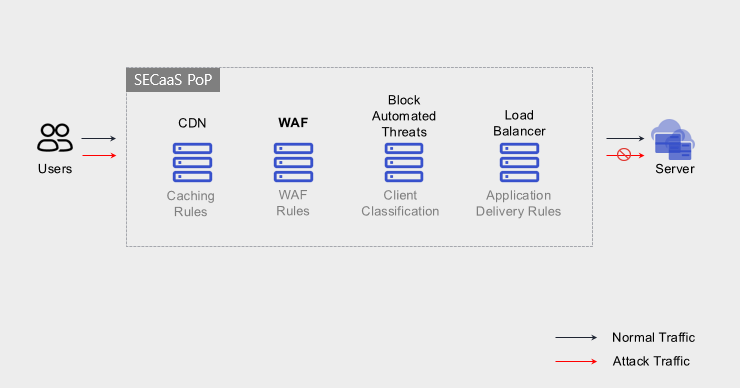
Provided features
We provide the following features.
- Intrusion detection and response via monitoring of registered URLs
- Attack classification through web firewall event analysis (Injection, XSS, Bot, Remote File Inclusion, etc.)
- Block attack traffic targeting registered URLs
- 24x365 event monitoring
- Precise security Rule creation and application through Customizing
- Supports various response settings (IP, request blocking, redirect, rewrite, rate limit, CAPTCHA, etc.)
- Web firewall operation
- Automatic updates of security threats (e.g., signature patterns) collected by TI and firmware updates
- Web firewall ACL management
- Flexible White List implementation (IP, Network, URL, country-based access control)
- Dashboard and Report screens (attack types, target IP, alarm list, etc.) provided
Component
domain
SECaaS WAF is registered on a per-domain basis.
- It can only be applied to domains served with an FQDN (Fully Qualified Domain Name); if the service is provided using an IP address instead of a domain, SECaaS WAF cannot be applied.
- Registration is allowed only for domains registered in the public DNS, and after verifying domain integrity via DNS lookup, it cannot be used when registering a private internal IP.
- It applies to traffic that uses HTTP/HTTPS protocols based on web applications, and other TCP traffic is dropped and cannot be used.
Traffic
Traffic is aggregated as the total Mbps of each registered domain between the SECaaS WAF and the Origin server.
Constraints
To use WAF, first verify the following items.
- Domain Use
- It can be applied only when the service uses an FQDN (Fully Qualified Domain Name). If the service is provided via an IP address instead of a website URL, WAF cannot be applied.
- Registration is possible only for domains registered in the public DNS. The WAF is located in the external Internet segment and verifies domain integrity via DNS lookup. (Registration with an internal private IP such as 10.10.10.10 makes WAF usage unavailable.)
- Use HTTP/HTTPS
- Only traffic using the HTTP/HTTPS protocol for web applications is accepted.
- TCP traffic that uses protocols other than http/https is dropped, so WAF cannot be used.
- XFF(X-Forwarded-For) header function Enable required
- SECaaS WAF has the XFF header feature enabled by default. If the XFF header feature is disabled, a session termination issue may occur.
- Client Source IP Change
- When forwarding a user request from the SECaaS WAF to the customer system, the Source IP is changed from the user’s original public IP to an IP range owned by the WAF. The original user public IP is delivered via the XFF header.
- Maximum Upload Size Limit
- The maximum uploadable file size is limited to 500 MB. (If the file exceeds 500 MB, separate agreement is required.)
Provision status by region
WAF is available in the environments below.
| Region | Provision status |
|---|---|
| Korea West (kr-west1) | Provided |
| Korea East (kr-east1) | Provided |
| South Korea South 1 (kr-south1) | Not provided |
| South Korea South 2 (kr-south2) | Not provided |
| South Korea South 3 (kr-south3) | Not provided |
Prior Service
This is a list of services that must be pre-configured before applying for the service. For details, refer to the guide provided for each service and prepare in advance.
| Service Category | Service | Detailed description |
|---|---|---|
| Compute | Virtual Server | Virtual server optimized for cloud computing |