The page has been translated by Gen AI.
User Portal
Overview
SingleID allows only authorized users to easily access information assets with a single authentication, and strengthens account security through policy-based permission management and real-time detection of authentication anomalies, and provides account management and access framework through various history management.
Provided Features
- Integrated authentication and account management
- Support various authentication integration protocols (SAML, OIDC, etc)
- Provision of self-service function for app usage request and approval
- Salesforce, Workday account synchronization and role (group) synchronization/management within the account
- Provide sign-up/withdrawal functionality that can issue accounts to partners, customers, etc., who are not employees.
- Passwordless and Multi-Factor Authentication
- PC/Mobile passwordless authentication and multi-factor authentication (MFA)
- Authentication method : SMS, email, SinlgeID Authenticator(mOTP, TOTP, PIN, biometric), Knox Messenger, Passkey, etc
- Provide composite authentication for secondary authentication through integration with existing primary authentication environment (MFA-only service use case)
- private certificate issuance/management function Private CA(Certificate Service Authority) through certificate-based authentication support(separate Use Case)
- PC/Mobile passwordless authentication and multi-factor authentication (MFA)
- Authentication and Account Information Integration
- Automation of app integration through Pre-Built Connector
- Simplified custom app integration through DIY integration templates
- Risk-based authentication anomaly detection
- Context-based access control based on the situation of attempting authentication
- Strengthening security through detailed login and authentication policy settings
- Public cloud access management for cloud operators/developers
- Console access control through role-based assigned accounts
- Resource access permission request/approval and resource access using OTP-based credential verification method
Notice
Depending on the company’s SingleID usage plan, the features provided to users may vary.
Service Configuration Diagram
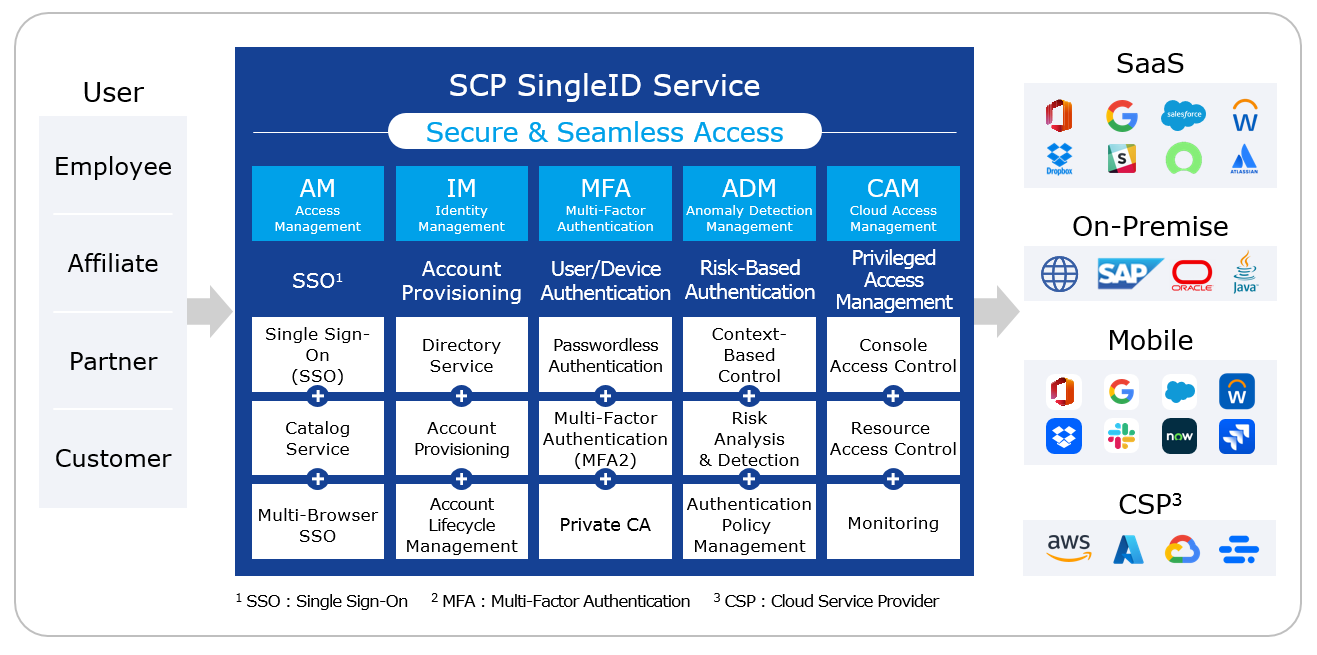
Reference
Depending on the SingleID product configuration, the features and configurations provided to the user may differ.
User Portal what is?
SingleID User Portal is the user interface of the SingleID service, providing various security features such as access to company applications, SSO, and access permission requests.
User Portal Screen Layout
User Portal is composed of the following menus.
- My App
- App Catalog
- Notification
- Approval Request
Manual composition
This manual is composed of the following contents.
- Overview: Explains the concept and manual screen composition with the SingleID overview.
- Announcements and Language Settings: Explains how to set the language in the SingleID solution and how to check urgent announcements that can be viewed before logging in.
- Login and Authentication: It explains how to register and use various authentication methods for login.
- Register authentication tool: Explains the enrollment process where the user registers an authentication tool.
- Sign Up: Explains the two methods of sign up.
- Find ID: Describes the procedure where the user finds their ID themselves through the Find ID function.
- Privacy Policy and Terms of Use: Explains the privacy policy and terms of use that can be found via the link at the bottom of the screen.
- PC SSO Agent: Describes the PC SSO Agent, which is a login/logout auxiliary function of SingleID.
- My App: Describes the My App menu that can be accessed via SSO.
- App Catalog: Describes the App Catalog menu that allows you to view the list of apps that can be requested.
- Notification: Describes the Notification menu that can check emergency notices and general notices. 12.Approval Request: Describes the Approval Request menu that can request or approve app usage.
- Personal Information Settings: You can set photos, preferred language, and system time zone Personal Information Settings, Authentication Settings, Login History/Environment, Logout etc., describing the personal settings menu.