To use the Samsung Cloud Platform SingleID Open API, the system must first be registered in Applications.
You must obtain a JWT token with the registered system information and include the JWT token in the HTTP header when calling the Samsung Cloud Platform SingleID Open API.
API Call Method
Call with the token (JWT Token) value included in the HTTP header
Set the access token header name to Authorization, and set the access token type value to Bearer - set the JWT Token value after the Bearer string.
Token original data sample { "sys":"test-system", "req":"761efd52-97d0-451f-9cf9-cf86740e7ca3", "uid":"gildong.hong", "rtn":"https://test.com/mfa/response","email":"gildong.hong@samsung.com","mobile":"+82-1012345678", "nbf": 1698232068, "exp": 1698239268, "iat": 1698232068, "displayUid": "gildong.hong@samsung.com" }
Table. Request Parameters
Response
Redirects to the MFA authentication page.
By default, the response token is transmitted using POST, but to transmit it using GET (query), add the following parameter to the request token.
returnMethod: get
Sample
Request
Response
curl -X GET "https://stg2-cloud.singleid.samsung.net/test-tenant/common-api/open/v1.1/mfa/request?jwtTokenRequest=eyJhbGciOiJIUzI1NiJ9.eyJzeXMiOiJ0ZXN0LXN5c3RlbSIsInJlcSI6Ijc2MWVmZDUyLTk3ZDAtNDUxZi05Y2Y5LWNmODY3NDBlN2NhMyIsInVpZCI6Imppbm9uZS5raW0iLCJydG4iOiJodHRwczovL3Rlc3QuY29tL21mYS9yZXNwb25zZSIsIm5iZiI6MTY5ODIzMjA2OCwiZXhwIjoxNjk4MjM5MjY4LCJpYXQiOjE2OTgyMzIwNjh9.cDgKMHIINaHhBiyAd_OIlVvQwmUs0QaXH_RfJ8B_KdY"
Page navigation
Table. Sample
Error Code
Http Response Code
Error Code
Error Message
Action Plan
400
N/A
N/A
Check token data.
Table. Error Code
API Specification - MFA Consumer Reques(Portal Common)
Token original data sample { "sys":"test-system", "req":"761efd52-97d0-451f-9cf9-cf86740e7ca3", "uid":"gildong.hong", "rtn":"https://test.com/mfa/response","email":"gildong.hong@samsung.com","mobile":"+82-1012345678", "nbf": 1698232068, "exp": 1698239268, "iat": 1698232068, "displayUid": "gildong.hong@samsung.com" }
MFA Consumer Home move status
registerFlag
Y
query
Boolean
true
Determines whether to navigate to the MFA Consumer Home. If true, it navigates to the MFA Consumer Home.
Table. Request Parameters
Response
When registerFlag = true: Redirect to MFA Consumer Home.
When registerFlag = false: Redirect to the MFA authentication page.
Sample
Request
Response
curl -X POST "https://stg2-cloud.singleid.samsung.net/test-tenant/common-api/open/v1.1/mfa/request?jwtTokenRequest=eyJhbGciOiJIUzI1NiJ9.eyJzeXMiOiJ0ZXN0LXN5c2t5bSIsInJlcSI6Ijc2MWVmZDUyLTk3ZDAtNDUxZi05Y2Y5LWNmODY3NDBlN2NhMyIsInVpZCI6Imppbm9uZS5raW0iLCJydG4iOiJodHRwczovL3Rlc3QuY29tL21mYS9yZXNwb25zZSIsIm5iZiI6MTY5ODIzMjA2OCwiZXhwIjoxNjk4MjM5MjY4LCJpYXQiOjE2OTgyMzIwNjh9.cDgKMHIINaHhBiyAd_OIlVvQwmUs0QaXH_RfJ8B_KdY®isterFlag=true"
Page navigation
Table. Sample
Error Code
Http Response Code
Error Code
Error Message
Action Plan
400
N/A
N/A
Checking token data.
Table. Error Code
API Specification - Send Email about Anomaly Detection(Tenant Admin Portal)
Table. Delete account assignment list (User Portal)
Request Parameter
Properties
Attribute
Mandatory
Parameter Type
Data Type
Sample Data
Note
instance id
instanceId
Y
JSON
String
SCP provision
permission set id
permissionSetId
Y
JSON
String
PERMISSION-SET-Ablxc5__qEaIYmWGyMeqlf
SCP provision
principal id
principalId
Y
JSON
String
gildong.hong
user’s username
principal type
principalType
Y
JSON
String
USER
Only the current USER is allowed.
target id
targetId
Y
JSON
String
“PROJECT-ka2tfhLHsweVwm4BrR1rae”
PROJECT ID, SCP provided
target type
targetType
Y
JSON
String
PROJECT
Only the current PROJECT functions
Table. Request Parameters
Response Parameter
Properties
Attribute
Data Type
Sample Data
Note
instance id
instanceId
JSON
Return deleted value
permission set id
permissionSetId
JSON
PERMISSION-SET-Ablxc5__qEaIYmWGyMeqlf
Return deleted value
principal id
principalId
JSON
gildong.hong
Return deleted value
principal type
principalType
JSON
USER
Return deleted value
target id
targetId
JSON
“PROJECT-ka2tfhLHsweVwm4BrR1rae”
Return deleted value
target type
targetType
JSON
PROJECT
Return deleted value
status
status
JSON
“SUCCESS”
Success or failure
failure reason
failureReason
JSON
Reason for failure
created date
createdDate
JSON
Deletion time
Table. Response Parameters
Sample
Request
Response
curl -X GET "https://stg1-cloud.singleid.samsung.net/test-tenant/common-api/open/v1.1/asis/test-tenant/user/mfa/token/authentication?userName=mkdir.kim&protocol=uma-uaf&sessionDataKey=sessionDataKey111&redirectUrl=redirectUrl1111&errorRedirectUrl=errorRedirectUrl1111¶ms=params111&language=ko"
The request could not be found. Please contact the administrator.
400
N/A
request.error.invalidStatus
The request status is incorrect. Please contact the administrator.
400
N/A
otp.error.notMatch
Invalid OTP. Please check the OTP.
400
N/A
otp.error.tooManyAttempts
Go to the security warning screen (your account has been locked due to multiple authentication failures)
Table. Error Code
1 - ADFS Adapter Guide
ADFS Adapter Guide
Microsoft ADFS (ActiveDirectory Federation Service) is a service that supports SAML/OAuth-based SSO (Single Sign-On) for web services based on AD accounts.
In MS, for web services linked with SSO, MFA (multi-factor authentication) using a 3rd Party solution is supported, and the component that must be developed/installed for this is the ADFS Adapter.
There are two primary methods for implementing an ADFS Adapter.
Server-to-Server Call method
WebClient method
Among them, the WebClient method minimizes firewall openings between the MFA server ↔ AD(FS) 間 and, by leveraging the CX offered by the MFA Provider, allows for a lightweight ADFS adaptor.
Reference
The SingleID ADFS Adapter was developed using the WebClient approach.
Caution
In the diagram of this document, it was written assuming a setting that stores the nonce value in LDAP.
The nonce value is used to verify MFA results, and it can be configured to be stored on the MFA server instead of LDAP.
For detailed information, please refer to the manual regarding ADFS Adaptor configuration.
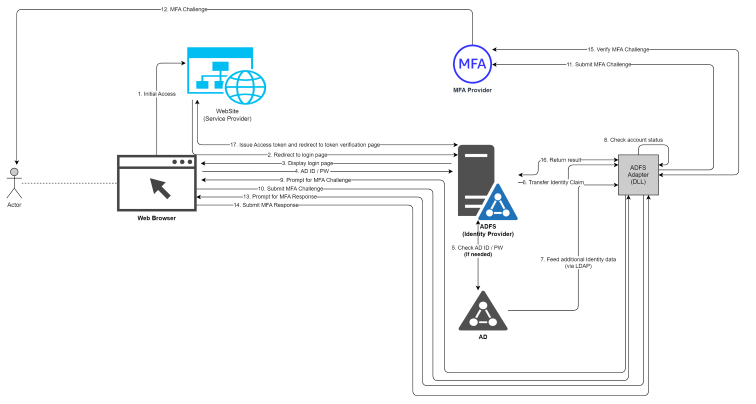
Server-to-Server Call method
Figure. Server-to-Server Call method
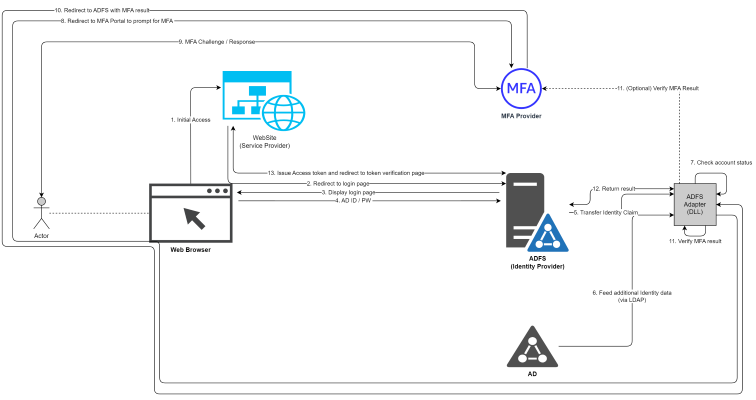
WebClient method
Figure. WebClient method
Internal operation
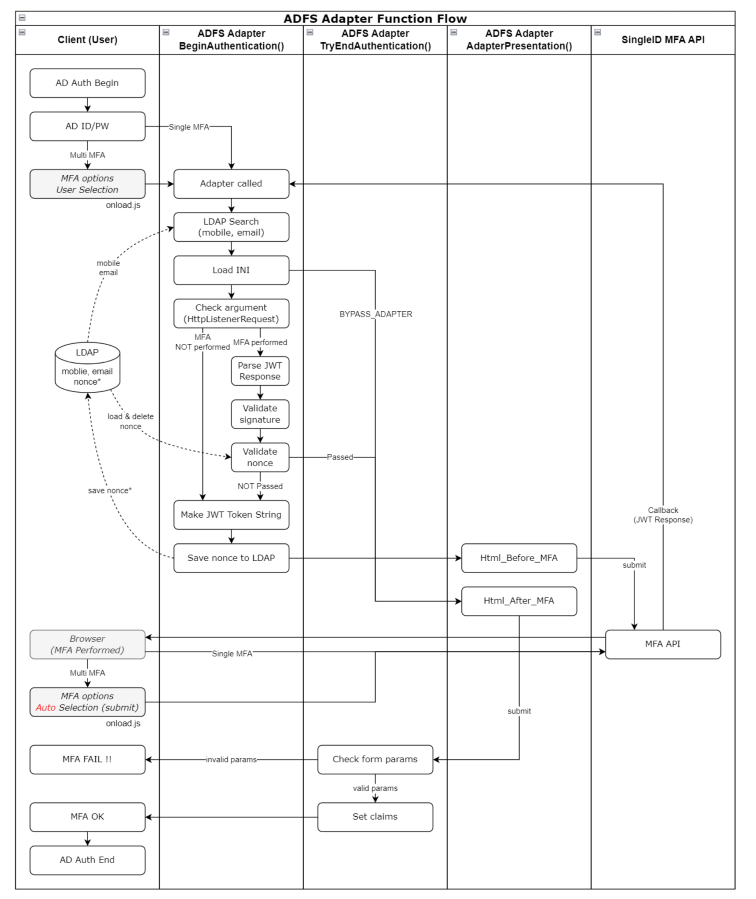
Overall flow diagram of the Adapter internals
Figure. Adapter overall internal flow diagram
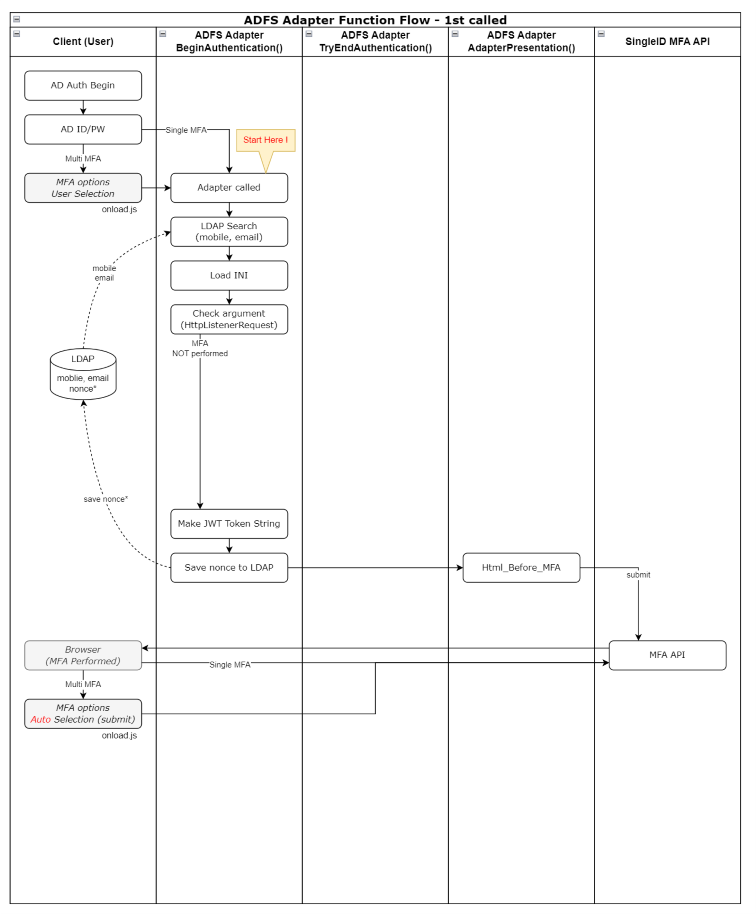
Adapter first execution flowchart
Figure. Adapter first execution flow diagram
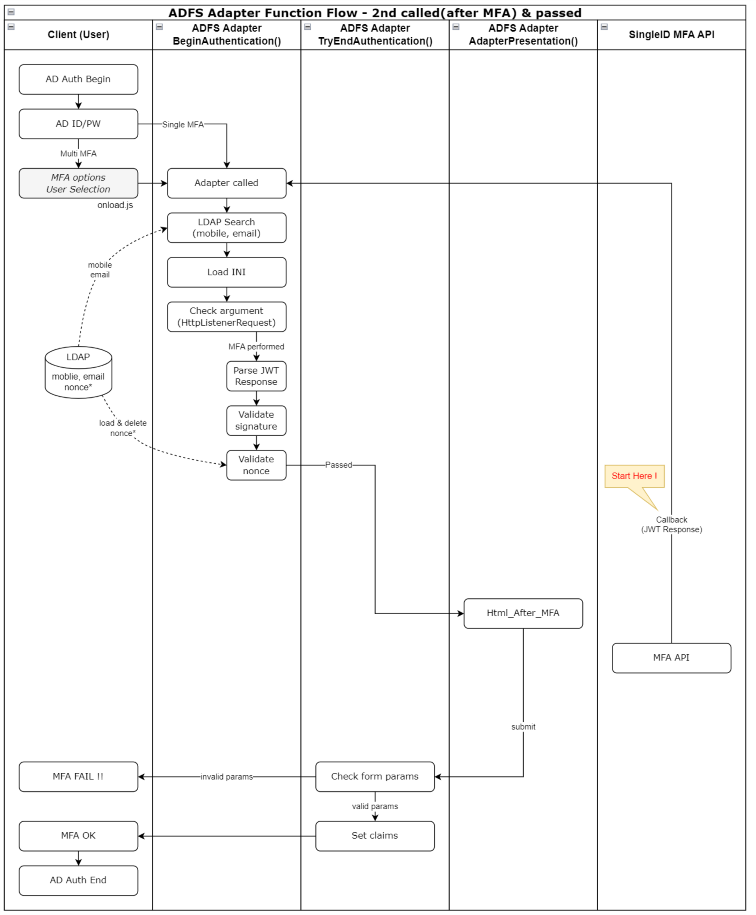
Flowchart after MFA execution (when MFA PASS)
Figure. Flowchart after MFA execution (MFA PASS case)
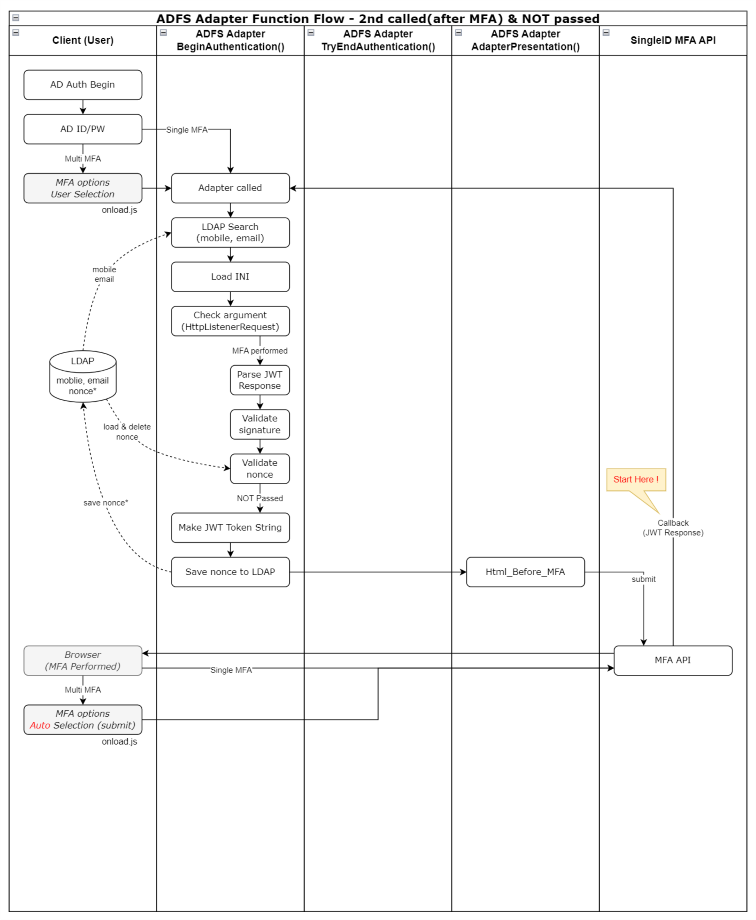
Flowchart after performing MFA (if MFA PASS not achieved)
Figure. Flowchart after performing MFA (when MFA PASS is not achieved)
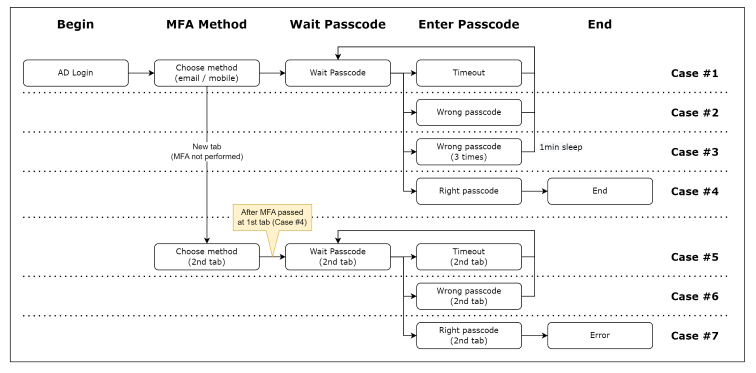
Scenario-specific behavior
Figure. Scenario-specific actions
Case #1
This occurs when the time limit is exceeded on the passcode entry screen, resulting in a timeout.
When a timeout occurs, the “Resend Code” button becomes active, and you can press this button to retry the Passcode.
Case #2
This is the case when an incorrect Passcode is entered.
You can attempt to enter the Passcode up to three times.
Case #3
This is the case where the passcode is entered incorrectly three times.
You cannot enter the Passcode for 1 minute.
Case #4
This is a normal MFA process.
Case #5
This occurs when a new browser tab is added on the MFA selection screen without entering the Passcode, and the MFA selection is completed.
After that, successfully complete MFA on the first tab.
This is the case where a timeout occurs in a new tab later.
Case #6
This occurs when a new browser tab is added on the MFA selection screen without entering the Passcode, and the MFA selection is completed.
After that, successfully complete MFA on the first tab.
This occurs when an incorrect Passcode is entered in a new tab later.
Case #7
This occurs when a new browser tab is added on the MFA selection screen without entering the Passcode, and the MFA selection is completed.
After that, MFA succeeds on the first tab.
This is the case when a valid Passcode is entered thereafter.
Both the 1st tab and 2nd tab are waiting for passcode input; after authenticating the 1st, attempting authentication on the 2nd yields no response on the 2nd (page freezes)
1st tab passcode waiting for input, 2nd tab MFA selection waiting state, after the 1st authentication, selecting the 2nd MFA type causes an error, AD displays an error message before the adapter operates
Scenario-specific behavior
Adapter installation
Application method
Pre-check
Pre‑inspection
Location
Inspection items
Remarks
ADFS server
MFA server accessibility (internal network, TCP 80/443)
Production environment: sopenapi.singleid.samsung.net
If connection fails, check the following three items ① Firewall check ② Proxy check ③ Website blocking check
Table. Personal Information Input Items
Adapter deployment
Caution
If the ADFS servers are configured as multiple instances, steps 1 through 4 of the seven steps below must be applied uniformly to all servers.
Upload the adapter-related files to the ADFS server
위치 : [drvie]:\ADFSadapter\

ADFSadapter.dll : Adapter 파일
ADFSadatper.ini : 환경 설정 파일
replace_dll.ps1 : 이미 설치된 Adapter를 개선 버전으로 교체 시 사용하는 스크립트 파일
restart_adfs.ps1 : AD FS 서비스 재시작 스크립트 파일
Assembly_netstandard2.0 폴더 : Adapter 적용 전 사전 설치 dll 파일들
Grant full permissions to the ADFS service account on the folder
C:\ADFSadapter 폴더 우클릭 > 속성 > 보안 > ADFS 서비스 계정 추가 후 모든 권한 허용 선택
※ ADFS 서비스 계정은 services.msc 실행 > ADFS 서비스 실행 계정 "다음 사용자로 로그온" 으로 확인
Add Registry
Adapter 관련 이벤트를 Windows 이벤트 로그에 찍기 위한 Registry 생성

HKEY_LOCAL_MACHINE\SYSTEM\CurrentControlSet\Services\EventLog 아래에 키 및 값(2개) 생성
- 생성 키 : MFA_Adapter
- MFA_Adapter에 값 2개 생성
   . 이름 : AutoBackupLogFiles
   . 종류 : DWORD(32비트) 값(REG_DWORD)
   . 데이터 : 0

   . 이름 : MaxSize
   . 종류 : DWORD(32비트) 값(REG_DWORD)
   . 데이터 : 16진수 80000

MFA_Adapter 키 아래에 키 및 값(1개) 생성
- 생성 키 : AdapterDLL
- AdapterDLL에 값 1개 생성
  . 이름 : EventMessageFile
  . 종류 : 확장 가능한 문자열 값(REG_EXPAND_SZ)
  . 데이터 : C:\Windows\Microsoft.NET\Framework64\v4.0.30319\EventLogMessages.dll
Pre-install the DLL required for the Adapter
The Assembly_netstandard2.0 folder in C:\ADFSadapter contains libraries that require pre‑installation; refer to the following for the installation process.
Install the DLL into the global assembly cache on the ADFS server so that the assembly required when the ADFS Adapter runs can be loaded.
**dll 설치**

#사전 작업
C:\ADFSadapter 폴더에 Assembly_netstandard2.0 폴더 압축을 풀어 복사해둔다.
#관리자 권한으로 Powershell 실행 후 수행 위치 이동
PS>cd C:\ADFSadapter

#dll 설치
PS>.\gacutil.exe /il .\Assembly_netstandard2.0\AssemblyList.txt
#dll 확인
PS>.\gacutil.exe /l
guide
Assembly_netstandard v2.0.zip file should be requested separately via email (singleid.scp@samsung.com).
The required assembly files for installation have been stored in the Assembly_netstandard2.0 folder, and after copying these files to the server, installation can be performed offline.
Assembly_netstandard2.0 folder: Microsoft.IdentityModel.Tokens v7.2, System.IdentityModel.Tokens.Jwt v7.2 DLL files for installing the assembly (including all dependency files)
Installation DLL list
Assembly name
Installed version
Package version
Microsoft.Bcl.AsyncInterfaces
1.0.0.0
1.0.0
Microsoft.IdentityModel.Abstractions
7.2.0.0
7.2.0
Microsoft.IdentityModel.JsonWebTokens
7.2.0.0
7.2.0
Microsoft.IdentityModel.Logging
7.2.0.0
7.2.0
Microsoft.IdentityModel.Tokens
7.2.0.0
7.2.0
System.Buffers
4.0.3.0
4.5.1
System.IdentityModel.Tokens.Jwt
7.2.0.0
7.2.0
System.Memory
4.0.1.1
4.5.3
System.Numerics.Vectors
4.1.4.0
4.5.0
Microsoft.CSharp
4.0.4.0
4.5.0
System.Runtime.CompilerServices.Unsafe
4.0.4.1
4.5.3
System.Security.Cryptography.Cng
4.3.0.0
5.0.0
System.Text.Encodings.Web
4.0.5.1
4.7.2
System.Text.Json
4.0.1.2
4.7.2
System.Threading.Tasks.Extensions
4.2.0.1
4.5.4
Table. Installation DLL list
Adapter Deployment
The NuGet file was downloaded and installed; note that the version displayed for the NuGet package may differ from the version installed on the server.
Based on .NET Framework 4.8, use the DLL with the .NET Standard 2.0 (supports .NET Framework 4.8) specification.
Apply Adapter
Run PowerShell in administrator mode and execute the following command
#수행 위치 이동
PS>cd C:\ADFSadapter

#dll 등록
PS>./gacutil.exe /if ADFSadapter.dll

#dll 확인
PS>./gacutil.exe /l ADFSadapter
 전역 어셈블리 캐시에 다음 어셈블리가 들어 있습니다.
  ADFSadapter, Version=1.2.1.0, Culture=neutral, PublicKeyToken=0e0fe476002e81b3, processorArchitecture=MSIL
#ADFS에 인증 공급자로 등록
PS>$typename="ADFSadapter.AuthenticationAdapter, ADFSadapter, Version=1.2.1.0, Culture=neutral, PublicKeyToken=0e0fe476002e81b3, processorArchitecture=MSIL"
PS>Register-AdfsAuthenticationProvider -TypeName $typename -Name "ADFSadapter"
#ADFS에 인증 공급자 확인
PS>Get-AdfsAuthenticationProvider
AdminName                          : ADFS MFA Adapter
AllowedForPrimaryExtranet          : False
AllowedForPrimaryIntranet          : False
AllowedForAdditionalAuthentication : True
AuthenticationMethods              : {http://schemas.microsoft.com/ws/2012/12/authmethod/otp}
Descriptions                       : {[1033, ADFS MFA Adapter], [1042, ADFS MFA Adapter]}
DisplayNames                       : {[1033, ADFS MFA Adapter], [1042, ADFS MFA Adapter]}
Name                               : ADFSadapter
IdentityClaims                     : {http://schemas.xmlsoap.org/ws/2005/05/identity/claims/upn}
IsCustom                           : True
RequiresIdentity                   : True
#ADFS 서비스 재시작
PS>net stop adfssrv
PS>net start adfssrv

#수행 위치 이동
PS>cd C:\ADFSadapter
#dll 등록
PS>./gacutil.exe /if ADFSadapter.dll
#dll 확인
PS>./gacutil.exe /l ADFSadapter
 전역 어셈블리 캐시에 다음 어셈블리가 들어 있습니다.
  ADFSadapter, Version=1.2.1.0, Culture=neutral, PublicKeyToken=0e0fe476002e81b3, processorArchitecture=MSIL
#ADFS 서비스 재시작
PS>net stop adfssrv
PS>net start adfssrv
Configure multi-factor authentication methods for ADFS
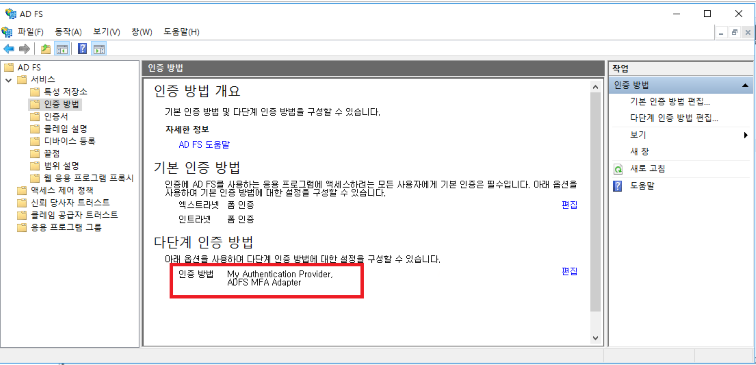
AD FS Management > Services > Authentication Methods > Multi-Factor Authentication Methods > Click Edit, then select the created mfa (ADFS MFA Adapter) and apply (multiple selection possible)
Apply MFA policy to the trusted party trust
AD FS Management > Relying Party Trust > Select the Relying Party Trust to apply > Edit Access Control Policy > ‘Allow all users and require MFA’ Select and apply
Adapter Upgrade and Change
This method is the adapter replacement procedure performed when upgrading or modifying an already registered ADFS MFA Adapter.
When performing the replacement, executing this script alone completes the Adapter change and its application.
#수행 위치 이동하여 변경된 Adapter.dll 파일 업로드
PS>cd C:\ADFSadapter

#Adapter 교체 수행

PS>./replace_dll.ps1

확인창 출력 시 예(Y) 혹은 모두 예(A) 클릭
 - 예(Y) 혹은 모두 예(A) 선택 : ADFS에서 기존 Adapter 제거 후 교체 작업 진행 (정상 절차)
 - 아니요(N) 혹은 모두 아니요(L) 선택 : Adapter 제거 안하고 다음 단계로 수행되어 오류 발생
 - 일시 중단(S) 선택: 해당 스크립트 중단
Reference
※ Execute on both the primary server and the secondary server.
Although an error occurs when registering with ADFS on the secondary server, the operation is required to install the DLL.
Adapter configuration
This is a description of the Adapter configuration file.
Before applying the ADFS Adapter, you must first configure the environment.
guide
Adapter installation location changes
Starting with adapter 1.2.0.6, you can install to drives other than the C drive.
Existing: installed only in C:/ADFSadapter
Change: Install at the root of the Z drive
Example: C:/ADFSadapter , D:/ADFSadapter , E:/ADFSadapter , …… , Z:/ADFSadapter
Caution: Install on only one drive; if installed on multiple drives, the system scans from C to Z and uses the first directory it finds.
The following example assumes the adapter is installed in the C:\ADFSadapter directory.
If you installed on a drive other than C, simply change the drive letter in the example below.
Example: If installed in D:\ADFSadapter, the ini path → D:\ADFSadapter\ADFSadapter.ini
File name and path
File name → ADFSadapter.ini
Full path → C:\ADFSadapter\ADFSadapter.ini
File encoding → be sure to save as UTF-8 (otherwise Korean characters will become garbled)
Things to note
When representing a value, you can use " and ‘, and you may include spaces on either side of =.
Whitespace before and after the Value is trimmed
The values below are all the same.
Example 1) MAIN_TITLE=DWP MFA Adapter
Example 2) MAIN_TITLE = DWP MFA Adapter
Example 3) MAIN_TITLE = “DWP MFA Adapter”
Example 4) MAIN_TITLE = " DWP MFA Adapter "
Sections whose names end with -1033 or -1042 indicate a locale.
At least 1033 must be present.
# ADFS MFA Adapter 환경 설정
# 설치위치 변경 사항
#   - v1.2.0.6 이전 : C:\ADFSadapter\ADFSadapter.ini
#   - v1.2.0.6 부터 : C 이외의 다른 드라이브에 설치할 수 있음 (adapter 리소스 설치한 위치와 동일)
#     예시: C:\ADFSadapter\ADFSadapter.ini , D:\ADFSadapter\ADFSadapter.ini , E:\ADFSadapter\ADFSadapter.ini
# 주의 : DLL 파일명은 ADFSadapter.dll 이며, 기존의 Nexsign 연계한 MFAadapter.dll과는 다름


# 값을 표현할때 " 와 ' 를 사용할 수 있으며 = 좌우에 빈칸을 입력해도 됩니다
# Value 의 앞뒤에 있는 공백은 Trim 처리 됩니다.
# 아래의 Value는 모두 동일합니다.
# 예1) MAIN_TITLE=ADFS MFA Adapter
# 예2) MAIN_TITLE = ADFS MFA Adapter
# 예3) MAIN_TITLE = "ADFS MFA Adapter"
# 예4) MAIN_TITLE = "   ADFS MFA Adapter   "


# 섹션 이름들 중에 뒷부분에 -1033, -1042 가 붙는 것들은 locale 을 의미합니다
# 최소한 1033 은 반드시 있어야 합니다
# locale number : 1033 (en-us), 1042 (ko)
# locale section : MFA-1033, MFA-1042, TXT-1033, TXT-1042, MSG-1033, MSG-1042


# LOG_LEVEL (Windows 이벤트 로그에 기록하는 기준)
# 0 : Error
# 1 : Error + Warning
# 2 : Error + Warning + Information + Debug


[MAIN]
MAIN_MFA_TITLE="ADFS MFA Adapter"
MAIN_CLAIM1=http://schemas.microsoft.com/ws/2008/06/identity/claims/authenticationmethod
MAIN_CLAIM2=http://schemas.microsoft.com/ws/2012/12/authmethod/otp


# MFA API 정보
# URL 끝부분에 "/" 붙이지 말 것
#MFA_API_URL="https://stg2-cloud.singleid.samsung.net/test/common-api/open/v1.1/mfa/request"
MFA_API_URL="https://stg1-cloud.singleid.samsung.net/test/common-api/open/v1.1/mfa/request"
CONSUMER_KEY="**************************************"
SECRET_KEY="**************************************"


# Donmain vs Consumer Key 리스트
# 도메인별로 Consumer Key가 다른 경우에는 리스트로 나열 (이런 경우, 위의 CONSUMER_KEY 값을 비울 것)
# Reqeust Token의 sys 값에 대입
# 형태 : DOMAIN_CONSUMER_KEY_##=domain;consumerKey
# 예시: DOMAIN_CONSUMER_KEY_01=aaa.com;**************************************
#     DOMAIN_CONSUMER_KEY_02=bbb.com;**************************************
# (주의) CONSUMER_KEY 값과 리스트 값이 모두 있다면, CONSUMER_KEY 값만 사용함
DOMAIN_CONSUMER_KEY_01=aaa.com;**************************************
DOMAIN_CONSUMER_KEY_02=bbb.com;**************************************

# Donmain vs Secret Key 리스트
# 도메인별로 Secret Key가 다른 경우에는 리스트로 나열 (이런 경우, 위의 SECRET_KEY 값을 비울 것)
# 형태 : DOMAIN_SECRET_KEY_##=domain;secretKey
# 예시: DOMAIN_SECRET_KEY_01=aaa.com;**************************************
#     DOMAIN_SECRET_KEY_02=bbb.com;**************************************
# (주의) SECRET_KEY 값과 리스트 값이 모두 있다면, SECRET_KEY 값만 사용함
DOMAIN_SECRET_KEY_01=aaa.com;**************************************
DOMAIN_SECRET_KEY_02=bbb.com;**************************************

# LDAP Search 결과에 따른, MFA 진행 여부
# 0 : LDAP Search를 하지 않음 (아래의 LDAP_SERVER, LDAP_USE_IDPW, ... 등의 정보 사용하지 않음. token에는 빈 값 대입)
# 1 : LDAP Search를 시도하지만 실패해도 관계없음 (서버 실패, 정보 없음 등이 발생하여도 MFA 진행함. token에는 빈 값 대입)
# 2 : LDAP Search가 성공 & 사용자 정보가 존재해야 함 (사용자 정보가 존재할 경우에만 진행함. 단, 결과 값이 빈 값이어도 진행함)
USE_LDAP_SEARCH=1


# LDAP 주소와 ID/PW
# LDAP_SERVER는 domain, ipv4, ipv6 등의 3가지 모두 가능하며, 앞부분에 대문자 "LDAP://" 을 붙여야 함 (반드시 대문자)
# 예시: LDAP://adpw5004.hw.dev , LDAP://70.2.180.218 , LDAP://fe80::644b:3c9f:c5ac:ce1c%10
# ID/PW를 사용하려면 LDAP_USE_IDPW 값을 1, 사용하지 않으려면 LDAP_USE_IDPW 값을 0 으로 설정
# SSL/TLS 사용하려면 LDAP_SSLTLS 값을 1, 사용하지 않으려면 LDAP_SSLTLS 값을 0 으로 설정 (단, LDAP_USE_IDPW=1 인 경우에만 해당)
LDAP_SERVER="LDAP://adpw5004.hw.dev"
LDAP_USE_IDPW=1
LDAP_SSLTLS=1
LDAP_ID="isadmin"
LDAP_PW="sds*****"


# DNS Lookup을 하여 LDAP 서버(LDAP_SERVER)의 IP 주소를 확인하고, IP 주소 기반으로 접속 여부
# LDAP_SERVER 값이 IP(ipv4, ipv6)로 설정되어 있어도 DNS Lookup을 수행하며, IP 그대로 리턴됨
# 만약, DNS Lookup을 실패하면, LDAP_SERVER 값 그대로 접속
# 0 : LDAP_SERVER 값 그대로 서버에 접속 (DNS lookup 하지 않음)
# 1 : DNS lookup으로 IP 주소를 확인하여 LDAP 서버에 접속 (DNS lookup 결과 리스트에서 첫번째 IP 사용)
# 2 : DNS lookup으로 IP 주소를 확인하고, LDAP_WHITE_IP_## 리스트에서 가장 먼저 해당되는 IP를 사용 (리스트에 없으면, LDAP_SERVER 사용)
# 3 : DNS lookup으로 IP 주소를 확인하고, LDAP_WHITE_IP_## 리스트에서 가장 먼저 해당되는 IP를 사용 (리스트에 없으면, LDAP 접속 안함)
LDAP_DNS_LOOKUP=1


# DNS Lookup 결과가 여러 개일때, 첫번째 IP 주소로 연결이 안되면 그 다음 IP 주소로 시도할지 여부
# 예시: lookup 결과가 4개 : 1차 IP 연결 실패 -> 2차 IP 연결 시도 & 싪패 -> 3차 IP 연결 시도 & 싪패 -> 4차 IP 연결 시도
LDAP_DNS_IF_FAIL_USE_NEXT=1


# DNS Lookup 결과와 비교하는 접속 허용된 LDAP 서버 IP 리스트 (LDAP_DNS_LOOKUP = 2 or 3 인 경우에만 해당)
# LDAP_WHITE_IP_## 형태이며, 01부터 99까지 순차적으로 기록
# DNS Lookup 결과와 리스트를 순차적으로 비교
# IPv4, IPv6 형태로 기록 (동일한 서버의 IPv4, IPv6가 있다면 리스트의 앞순위에 있는 IP가 적용됨)
# DNS Lookup 결과 순서와 White IP 리스트 순서가 다르다면 -> White IP 리스트 순서를 따름
LDAP_WHITE_IP_01="70.2.180.218"
LDAP_WHITE_IP_02="fe80::644b:3c9f:c5ac:ce1c%10"


# 사용자 정보를 암호화할지 여부 (예: mobile, email 등)
# 대상 : USERINFO_## 리스트
# 암호화 여부에 따라 API 서버에 전송하는 token의 claim 이름이 다름
# 0 : 암호화 하지 않음 -> token의 claim 이름이 plainMobile, plainEmail
# 1 : 암호화 -> token의 claim 이름이 mobile, email
USERINFO_ENCRYPT=0


# LDAP Search할 사용자 정보 attribute name과 JWT token에 사용할 claim name (2개 값을 구분하는 delimeter = ";")
# 형태: USERINFO_## = attribute;encryptedClaim;plainClaim
#   예시: LDAP에서 "mail" 속성을 읽어서, JWT에 "email" claim으로 사용된다면 -> "mail;email;plainEmail"
# key 명칭은 "USERINFO_##" 형태로 하고, 시작은 USERINFO_01
# key 갯수 : 0개 ~ 최대 99개 (0개인 경우, ini에 아무것도 적지 않으면 되며, USERINFO_00 이라고 적지 말 것)
# 주의사항) USERINFO_##에서 ## 에 해당되는 숫자는 반드시 01부터 시작하며, 여러 개인 경우 번호가 끊어지지 않아야 함
#           USERINFO_01, USERINFO_02, USERINFO_03 : OK (01, 02, 03 정보가 사용됨)
#           USERINFO_01, USERINFO_02, USERINFO_05 : 02까지 읽고, 끊어진 번호 이후는 사용하지 않음 (01, 02 정보가 사용됨)
USERINFO_01=mobile;mobile;plainMobile
USERINFO_02=mail;email;plainEmail


# MFA API 서버가 Callback 해줄때, 결과 Parameter에 사용되는 Key 이름
# 예시: https://adpw5004.hw.dev/adfs/ls?client-request-id=xxxxxx&pullStatus=0&jwtTokenResponse=yyyyyy
KEY_NAME_IN_RESPONSE="jwtTokenResponse"


# JWT Token의 exp에 적용될 더하기 값
# 형테 : 일시분초(dhms) 형태의 문자열 -> 1d=86400, 1h=3600, 1m=60 (dhms 가 전혀 없는 단순 숫자는 초로 판단함)
# 예시1 : 1d02h38m27s -> 95907 초
# 예시2 : 12345 -> 12345 초
TOKEN_EXP_TIME=1d


# API 호출할때 구성하는 token에 client claim을 추가할지 여부
# client : SAML인 경우 issuer, OIDC인 경우 client-id
# 0 : token에 client 포함시키지 않음
# 1 : token에 client 포함
TOKEN_CLAIM_CLIENT=0


# MFA nonce(guid, requset-id) 검증 방법
# 0 : 검증 안함
# 1 : adapter가 생성한 guid를 LDAP에 저장/비교하는 방식 (adapter가 검증)
#     -> 관련 설정 값 : CACHE_ATTRIBUTE, CACHE_DELIMETER, SKEW_SECONDS, CACHE_LIFE_TIME
# 2 : API 서버가 생성한 requeset-id를 adapter가 받아서 호출 URL에 사용하는 방식 (API 서버가 검증)
#     -> 관련 설정 값 : MFA_VERIFY_URL
MFA_VERIFY_TYPE=2


# MFA 결과검증 URL (서버 to 서버 통신) : URL 뒷부분에 API 서버로부터 받은 {request-id}를 덧붙여서 호출함
# adapter는 리턴 200 (OK) 인지 확인하여 MFA 결과 처리
# URL 끝부분에 "/" 붙이지 말 것
MFA_VERIFY_URL="https://stg1-cloud.iam.samsung.net/test/common-api/open/v1.1/mfa/request/status"


# MFA 결과검증할때 사용할 보안 프로토콜
# 선택 가능한 프로토콜 (대소문자 구분 없음) : TLS12, TLS13
# (주의) SSL3, TLS, TLS11 은 사용하지 않음
MFA_VERIFY_SECURE_PROTOCOL="TLS12"


# 사용자의 req guid 값을 저장할 LDAP attribute의 이름
# (주의) LDAP에 write 권한이 있어야 함
CACHE_ATTRIBUTE="otherPager"


# LDAP에 저장하는 req + 시간 정보를 조합할때 사용하는 delimeter -> "req;시간"
CACHE_DELIMETER=";"


# LDAP에 저장된 req의 시간과 JWT 수신시 시간의 차이 허용치 (초단위)
# MFA 선택화면 누를 때가 아니라, AD 로그인 직후의 시간이므로 (MFA 선택화면 보일때 이미 시간이 저장되었음)
# 사용자가 MFA 선택화면 누르고 Passcode 입력할 때까지의 시간이 아님
# 따라서, tight 하게 시간을 설정하면 안되며, 1시간 정도가 적당?? (MFA 선택을 1시간 고민하는 사람이 있나?)
SKEW_SECONDS=3600


# LDAP에 저장된 req의 수명 -> 다음 access시 시간 확인해서 이전의 오래된 것들 삭제
# 형태 : 일시분초(dhms) 형태의 문자열 -> 1d=86400, 1h=3600, 1m=60 (dhms 가 전혀 없는 단순 숫자는 초로 판단함)
# 예시1 : 1d02h38m27s -> 95907 초
# 예시2 : 12345 -> 12345 초
CACHE_LIFE_TIME=1d


# Adapter 기능을 ByPass 할 것인지 여부 (0=정상 사용, 283901=무력화, 그 외 값들=정상 사용)
# MFA 기능 문제로 급하게 adapter 기능의 무력화가 필요한 비상 상황에서 사용
# 평상시에는 절대로 수정하지 말 것 -> 평상시 값은 0
# 주의 : 무력화하려면 반드시 정확한 값을 설정해야 함 (0 이외의 숫자가 해당되는 것이 아니며 정확한 숫자 필요함. noise 우려)
BYPASS_ADAPTER=0


[API]
API_SYSTEMNAME=SingleID


[MSG-1033]
MSG_INTERNAL_ERROR="Internal error occurred. Contact administrator."


[MSG-1042]
MSG_INTERNAL_ERROR="Internal error occurred. Contact administrator."


[MANAGE]
LOG_LEVEL=2
Configuration value description
Fixed value: means that the value displayed in the “Configured Value” column of the table below is used unchanged when installing on the ADFS server.
If you want to add languages other than English and Korean, you can add them for two sections.
→ MSG-1033, MSG-1042
Since the SingleID MFA API URL can vary depending on the tenant, you need to verify the exact URL.
CONSUMER_KEY
4312a8b9-75c4-7897-89a7-89347f18943e
Consumer Key issued by SingleID
SECRET_KEY
gQgkyLVO6FR8vJkLtlgBiupsRM/ilgrbEfoKWRnhALd=
Secret Key issued by SingleID used for JWT Signautre verification External disclosure prohibited
DOMAIN_CONSUMER_KEY_01
4312a8b9-75c4-7897-89a7-89347f18943e
Domain vs Consumer Key list If the Consumer Key differs per domain, list them (in this case, clear the CONSUMER_KEY value above) Format: DOMAIN_CONSUMER_KEY_##=domain;consumerKey Example: DOMAIN_CONSUMER_KEY_01=aaa.com;4312a8b9-75c4-7897-89a7-89347f18943e DOMAIN_CONSUMER_KEY_02=bbb.com;96567780-2b12-23da-637c-9375a6502d5a (Note) If both CONSUMER_KEY and list values are present, use only the CONSUMER_KEY value.
DOMAIN_CONSUMER_KEY_02
96567780-2b12-23da-637c-9375a6502d5a
DOMAIN_CONSUMER_KEY_##
367c89d5-88f7-978a-9739-8ed21748f36b
DOMAIN_SECRET_KEY_01
gQgkyLVO6FR8vJkLtlgBiupsRM/ilgrbEfoKWRnhALd=
Domain vs Secret Key list If the Secret Key differs per domain, list them (in this case, clear the above SECRET_KEY value) Format: DOMAIN_SECRET_KEY_##=domain;secretKey Example: DOMAIN_SECRET_KEY_01=aaa.com;gQgkyLVO6FR8vJkLtlgBiupsRM/ilgrbEfoKWRnhALd= DOMAIN_SECRET_KEY_02=bbb.com;kgkWRnLygQhsRgrLVbtKlO6FiLdABupEgoMR8v/ilfJ= (Note) If both SECRET_KEY value and list values are present, use only the SECRET_KEY value.
DOMAIN_SECRET_KEY_02
kgkWRnLygQhsRgrLVbtKlO6FiLdABupEgoMR8v/ilfJ=
DOMAIN_SECRET_KEY_##
dABupkRnLygQhsrLgWVRbt8vRgkLilLKlO1FioMgfJE=
USE_LDAP_SEARCH
0 or 1 or 2
LDAP Search based MFA decision 0 : Do not perform LDAP Search (do not use information such as LDAP_SERVER, LDAP_USE_IDPW, etc. Assign an empty value to the token) 1 : Attempt LDAP Search but failure is acceptable (proceed with MFA even if server failure, missing information, etc. Assign an empty value to the token) 2 : LDAP Search succeeds & user information must exist (proceed only if user information exists. However, proceed even if the result value is empty)
LDAP_SERVER
LDAP://adpw5004.hw.dev
LDAP address that can query AD user information All three types such as domain, ipv4, and ipv6 are supported, and you must prepend “LDAP://” to the beginning.
LDAP_USE_IDPW
0 or 1
Whether to use id/pw when connecting to LDAP Since the adapter operates with system privileges, it is typical for LDAP connections to work without id/pw, though there are cases where this is not true If the system is configured to connect without id/pw and an AD connection error appears in the event log, it is necessary to configure it to connect using id/pw. Setting this value to 1 requires that LDAP_ID and LDAP_PW be set.
LDAP_SSLTLS
0 or 1
Whether to use SSL/TLS when connecting to LDAP Set to use by default
LDAP_ID
LDAP connection ID
LDAP connection ID (when LDAP_USE_IDPW=1)
LDAP_PW
LDAP connection pw
LDAP connection password (when LDAP_USE_IDPW=1)
LDAP_DNS_LOOKUP
0 or 1 or 2 or 3
Perform a DNS lookup to obtain the IP address of the LDAP server (LDAP_SERVER) and determine connection status based on the IP address
0 : Connect to the server using the LDAP_SERVER value directly (no DNS lookup)
1 : Perform a DNS lookup to obtain the IP address and connect to the LDAP server (use the first IP from the DNS lookup result list)
2 : Perform a DNS lookup to obtain the IP address and use the first matching IP from the LDAP_WHITE_IP_## list (if not found, use LDAP_SERVER)
3 : Perform a DNS lookup to obtain the IP address and use the first matching IP from the LDAP_WHITE_IP_## list (if not found, do not connect to LDAP) |
| | LDAP_DNS_IF_FAIL_USE_NEXT | 0 or 1 | | When there are multiple DNS lookup results, whether to try the next IP address if the first IP address fails to connect Example: lookup results are 4: 1st IP connection failure -> attempt 2nd IP & failure -> attempt 3rd IP & failure -> attempt 4th IP |
| | LDAP_WHITE_IP_01 | 70.2.180.218 | | List of allowed LDAP server IPs compared with DNS Lookup results (applicable only when LDAP_DNS_LOOKUP = 2 or 3) LDAP_WHITE_IP_## format, recorded sequentially from 01 to 99 Compare the DNS Lookup results with the list sequentially Recorded in IPv4 or IPv6 format (if the same server has both IPv4 and IPv6, the IP appearing earlier in the list is used) If the order of DNS Lookup results differs from the White IP list order → follow the White IP list order |
| | LDAP_WHITE_IP_02 | | | fe80::644b:3c9f:c5ac:ce1c%10 |
| | LDAP_WHITE_IP_## | | | A. : 01 ~ 99 White IP address (IPv4 or IPv6) |
| | USERINFO_ENCRYPT | 0 or 1 | | Whether to encrypt user information (e.g., mobile, email, etc.) Target : USERINFO_## list The claim name of the token sent to the API server varies depending on encryption status 0 : No encryption -> token claim names are plainMobile, plainEmail 1 : Encryption -> token claim names are mobile, email |
| | USERINFO_01 | mobile;mobile;plainMobile | O | The attribute name of user information to search in LDAP and the claim name to use in the JWT token (the delimiter separating the three values is “;”) Format: USERINFO_## = attribute;encryptedClaim;plainClaim Example: If you read the “mail” attribute from LDAP and use the encrypted value as the “email” claim and the plain value as the “plainEmail” claim in the JWT → “mail;email;plainEmail” |
| | USERINFO_02 | mail;email;plainEmail | O | |
| | USERINFO_## | | | A. : 01 ~ 99 [LDAP attribute name];[encrypted token claim name];[plain token claim name] |
| | KEY_NAME_IN_RESPONSE | jwtTokenResponse | O | Key name used in the result parameter when the MFA API server performs a callback Example: https://adpw5004.hw.dev/adfs/ls?client-request-id=xxxxxx&pullStatus=0&jwtTokenResponse=yyyyyy |
| | TOKEN_EXP_TIME | 1d | | The additive value applied to the JWT token’s exp a string in day-hour-minute-second (dhms) format 1d=86400, 1h=3600, 1m=60 A plain number without any dhms is interpreted as seconds Example 1: 1d02h38m27s → 95907 seconds Example 2: 12345 → 12345 seconds |
| | TOKEN_CLAIM_CLIENT | 0 or 1 | | Whether to add a client claim to the token configured when making an API call client: issuer for SAML, client-id for OIDC 0: do not include client in the token 1: include client in the token |
| | MFA_VERIFY_TYPE | 0 or 1 or 2 | | MFA nonce(guid, requset-id) verification method 0 : No verification 1 : Method where the guid generated by the adapter is stored/compared in LDAP (adapter verifies) → related configuration values: CACHE_ATTRIBUTE, CACHE_DELIMETER, SKEW_SECONDS, CACHE_LIFE_TIME 2 : Method where the requeset-id generated by the API server is received by the adapter and used in the call URL (API server verifies) → related configuration value: MFA_VERIFY_URL |
| | MFA_VERIFY_URL | https://stg1-cloud.iam.samsung.net/test/common-api/open/v1.1/mfa/request/status | | MFA result verification URL (server-to-server communication): Append the {request-id} received from the API server to the end of the URL and call it → the adapter checks that the return is 200 (OK) to process the MFA result Do not append a “/” at the end of the URL |
| | MFA_VERIFY_SECURE_PROTOCOL | TLS12 or TLS13 | | Security protocol to use when verifying MFA results Available protocols (case-insensitive): TLS12, TLS13 (Note) Do not use SSL3, TLS, TLS11 |
| | CACHE_ATTRIBUTE | otherPager | O | Name of the LDAP attribute that stores the user’s req guid value |
| | CACHE_DELIMETER | ; | | Delimiter used when combining the req and time information stored in LDAP -> “req;time” |
| | SKEW_SECONDS | 3600 | | Allowed time difference (in seconds) between the request time stored in LDAP and the time when the JWT is received It is the time immediately after AD login, not when the MFA selection screen is clicked (the time is already recorded when the MFA selection screen appears) It is not the time until the user clicks the MFA selection screen and enters the passcode Therefore, the time should not be set too tightly; about one hour is appropriate?? (Is there anyone who would consider MFA selection for an hour?) |
| | CACHE_LIFE_TIME | 1d | | Lifetime of req stored in LDAP -> On the next access, check the time and delete the older ones String in dhms (days, hours, minutes, seconds) format 1d=86400, 1h=3600, 1m=60 (A plain number without dhms is interpreted as seconds) |
| | BYPASS_ADAPTER | 0 or 283901 | | Whether to bypass the Adapter function (0 = normal operation, 283901 = disable, other values = normal operation) Used in emergency situations where the adapter function must be quickly disabled due to MFA issues Never modify under normal circumstances -> the normal value is 0 Caution: To disable, you must set the exact value (numbers other than 0 are not applicable; a precise number is required. Concern about noise) |
| API | API_SYSTEMNAME | SingleID | O | (No impact on MFA functionality) |
| MSG-1033 | MSG_INTERNAL_ERROR | Internal error occurred. Contact administrator. | | Message displayed to the user when the process stops due to authentication interruption, error occurrence, etc. (English) |
| MSG-1042 | MSG_INTERNAL_ERROR | Internal error occurred. Contact administrator. | | Message displayed to the user when the process stops due to authentication interruption, error occurrence, etc. (Korean) Since entering Korean causes an error, please input in English. |
| MANAGE | LOG_LEVEL | 0 or 1 or 2 | | Criteria for recording in the Windows event log 0 = Record only errors 1 = Record errors + warnings only 2 = Record errors + warnings + informational messages, etc. |
Table. Description of configuration values
INI configuration method
LDAP Search related
When you want to use DNS lookup for the LDAP server’s hostName.
When you want to use only the first address among multiple DNS lookup results
When you want to attempt connections sequentially to all DNS lookup results.
When you want to use an ID/password to connect to an LDAP server.
When you want to connect only to allowed LDAP addresses (White IP list)
Configure the user attributes to retrieve from LDAP
Regarding API connection
Whether user information included in the token sent to the API server is encrypted
The leading part of the LDAP server address must be uppercase “LDAP://”.
It was found that connections fail when using lowercase on the development server during testing.
If the DNS lookup fails, the LDAP_SERVER value is used directly as the LDAP connection address.
When you want to use only the first address among multiple DNS lookup results
LDAP_DNS_LOOKUP=1
LDAP_DNS_IF_FAIL_USE_NEXT=0
DNS Lookup 결과가 다음과 같다고 하면,
IP1 = 10.10.10.10
IP2 = 10.10.10.20
IP3 = 10.10.10.30
LDAP_DNS_IF_FAIL_USE_NEXT=0, because it is set to
Only IP1 attempts to connect to the server and then stops, regardless of success or failure.
Therefore, setting LDAP_DNS_IF_FAIL_USE_NEXT=0 requires caution.
When you want to attempt connections sequentially to all DNS lookup results
LDAP_DNS_LOOKUP=1
LDAP_DNS_IF_FAIL_USE_NEXT=1
If the DNS Lookup result is as follows,
IP1 = 10.10.10.10
P2 = 10.10.10.20
IP3 = 10.10.10.30
LDAP_DNS_IF_FAIL_USE_NEXT=1 is set, so
Attempt to connect to IP1, IP2, and IP3 sequentially until successful.
For example, if the connection to IP2 succeeds, IP3 will not attempt to connect.
When you want to use an ID/password when connecting to an LDAP server
LDAP_ID="******"
LDAP_PW="******"
Since MFA operates with system privileges, it may not require an id/pw.
If the LDAP connection fails without an ID/password (you can determine the connection status from the server logs)
Please try a configuration that uses an ID/password.
When you want to connect only to allowed LDAP addresses (White IP list)
LDAP_DNS_LOOKUP=2
또는
LDAP_DNS_LOOKUP=3

LDAP_WHITE_IP_01="70.2.180.218"
LDAP_WHITE_IP_02="fe80::644b:3c9f:c5ac:ce1c%10"
Without using the DNS lookup result as is,
It compares against the White IP list and uses only the addresses that are included in the White IP list.
For example, the DNS Lookup result is as follows,
IP1 = 10.10.10.10
IP2 = 10.10.10.20
IP3 = 10.10.10.30
If the white IP list is as follows,
WIP1 = 10.10.10.20
WIP2 = 10.10.10.40
The actual address used is IP2 = WIP1 = 10.10.10.20.
The order follows the White IP list order.
In the following case, attempts to connect to the server are made in the order 10.10.10.30, 10.10.10.20.
IP1 = 10.10.10.10
IP2 = 10.10.10.20
IP3 = 10.10.10.30
WIP1 = 10.10.10.30
WIP2 = 10.10.10.20
If there is nothing that belongs to the White IP list,
LDAP_DNS_LOOKUP=2 → Use the LDAP_SERVER value directly as the LDAP connection address.
LDAP_DNS_LOOKUP=3 → Does not connect to the LDAP server. (Option that requires careful use)
User information claim to be included in the Request Token sent to the MFA API server.
It queries LDAP for the number of items specified in the ini list, includes the results in the token, and sends them to the MFA API server.
Please refer to the description of “USERINFO_##” in the table on the page below for the configuration rules.
If you configure as in the above sample and the LDAP query result is as follows,
The Request Token is composed as follows.
If the query result is empty, include the empty value in the token as is (as with plainCompany and plainDepartment below).
To prevent querying LDAP, clear the setting value or mark it as a remark.
In this case, the token does not contain user information.
USERINFO_01=
또는
#USERINFO_01=mobile;mobile;plainMobile
API connection related
Whether user information included in the token sent to the API server is encrypted
USERINFO_ENCRYPT=0
As of adapter version 1.2.0.8, it is not implemented the same as the API server’s encryption logic, making encrypted transmission impossible.
The server uses AES GCM encryption, but the adapter cannot use AES GCM due to the characteristics of the development environment.
Target information: mobile, email
Therefore, use USERINFO_ENCRYPT=0.
The adapter and the API server are connected via HTTPS, so there should be no man‑in‑the‑middle hijacking issue.
Must have write (write) permission on LDAP → important weekly!
It uses the otherPager attribute in LDAP user information as a temporary storage area.
Adapters lack a session concept, so they cannot store or remember information themselves.
The LDAP server has the same address as the LDAP Search.
In other words, it means that options such as LDAP SERVER and LDAP_DNS_LOOKUP are also applied.
The above configuration is interpreted as follows.
MFA_VERIFY_TYPE=1 : The method of storing/comparing the guid generated by the adapter in LDAP (adapter verification)
Use the attribute called “otherPager” in LDAP user information
Multiple pieces of information to be stored are separated by ‘;’ and concatenated as a string → example: “aaa;bbb;ccc”
The allowed time difference between the time stored in LDAP for the request and the time when the JWT is received is 3600 seconds.
The lifetime of req stored in LDAP is 1d (one day) → On the next access, check the time and delete the older entries.
MFA integrity verification method: API server verification
When the adapter receives the MFA result JWT token returned by the API server, it uses the req value from the token’s information to
It queries the API server again and verifies that the result is 200.
The above configuration is interpreted as follows.
MFA_VERIFY_TYPE=2 : The method where the adapter receives the request-id generated by the API server and uses it in the call URL (validated by the API server)
You must keep the contents of the INI file provided during the initial installation unchanged.
If changed arbitrarily, the adapter may not work at all.
Some values may need to be changed depending on the system context, but gathering input from the relevant parties or responsible personnel must precede any changes.
Options that need to be obtained from the SingleID operations department and configured
API-related URLs, keys, and bearer values, which are provided by the SingleID operations department.
The typical setting for the security protocol (MFA_VERIFY_SECURE_PROTOCOL) is TLS 1.2.
Options that must be set according to the installation environment
These are the options determined after the installation environment assessment is completed.
INI configuration and results
USERINFO_ENCRYPT
USE_LDAP_SEARCH
LDAP_DNS_LOOKUP
LDAP_DNS_IF_FAIL_USE_NEXT
LDAP_USE_IDPW
MFA_VERIFY_TYPE
Caution
The consumer key and secret key used on this page are sample data. (fake value)
USERINFO_ENCRYPT
USERINFO_ENCRYPT=0
Set whether the user information included in the token sent by the adapter to the MFA API server is encrypted or plain text. (For example, mobile, email)
Adapter version v1.2.0.8 (April 2024) currently cannot use AES/GCM/NoPadding, so it is set to plaintext.
In other words, it is fixed at USERINFO_ENCRYPT=0.
In the future, if the adapter can support AES/GCM/NoPadding, the configuration can be changed.
USE_LDAP_SEARCH
USE_LDAP_SEARCH=0
LDAP_SERVER=“LDAP://adpw5004.hw.dev”
Since USE_LDAP_SEARCH is 0, the LDAP_SERVER value is not used.
In other words, if USE_LDAP_SEARCH is 0, you can set LDAP_SERVER to an empty value or remove it.
USE_LDAP_SEARCH=1
What if the LDAP search fails?
Treat the user information as empty and proceed to the next step.
It doesn’t matter whether the cause of the failure is a server connection failure or missing information.
USE_LDAP_SEARCH=2
What if the LDAP search fails?
Displays an error to the user and halts execution.
The server log records as follows. (Or similar content)
Unable to retrieve user information from LDAP.
This option should be used very carefully, and it is recommended to set it to USE_LDAP_SEARCH=1 whenever possible.
It would be advisable to delegate handling of missing user information to the MFA API side.
Because adapters inevitably provide insufficient user guidance and functionality in such situations.
The adapter stores DNS lookup results in memory as a list (an ordered list) → LDAP address list
Assume LDAP server redundancy and that each IP is as follows. (The IP that is looked up in DNS)
IP#1 : 10.10.10.10
IP#2 : 10.10.10.20
Since the DNS lookup result applies to both IPv4 and IPv6, the result appears as follows. (The below is a sample and may differ from the actual.)
IP#1 = fe80::644b:3c9f:c5ac:ce1c%10
IP#2 = fe80::f03d:b045:8dc3:f5ed%3
IP#3 = 10.10.10.10
IP#4 = 10.10.10.20
In this state, we can consider the following cases.
Case 1) If DNS Lookup failed
The LDAP address list contains one entry, and the LDAP_SERVER value is assigned directly.
In other words, the first value of the LDAP address list = “LDAP://adpw5004.hw.dev”
Case 2) If DNS Lookup succeeds and there is a White IP list setting (LDAP_WHITE_IP_##=“x.x.x.x”)
The LDAP address list is created in the order of the White IP list.
In the above sample, the values of the LDAP address list are as follows.
first value = 10.10.10.10
The second White IP 10.10.10.30 is not included in the LDAP address list because it does not appear in the DNS lookup results.
Case 3) If DNS Lookup succeeds and there is no White IP list configuration value (LDAP_WHITE_IP_##="" or LDAP_WHITE_IP_## not set)
Incorporate the DNS lookup results into the LDAP address list.
In the above sample, the values of the LDAP address list are as follows.
first value = fe80::644b:3c9f:c5ac:ce1c%10
Second value = fe80::f03d:b045:8dc3:f5ed%3
third value = 10.10.10.10
4th value = 10.10.10.20
LDAP_DNS_IF_FAIL_USE_NEXT
LDAP_DNS_IF_FAIL_USE_NEXT=0
Assume that the LDAP address list is as follows.
First value = 10.10.10.10
Second value = 10.10.10.20
If the connection attempt to the first address 10.10.10.10 fails, do not proceed further.
Set the LDAP search result (user information) to an empty value.
LDAP_DNS_IF_FAIL_USE_NEXT=1
Assume that the LDAP address list is as follows.
First value = 10.10.10.10
Second value = 10.10.10.20
If the connection attempt to the first address 10.10.10.10 fails, it attempts to connect to the second address.
If it fails up to the second connection attempt, set the LDAP search result (user information) to an empty value.
LDAP_USE_IDPW
LDAP_USE_IDPW=0
LDAP_ID="******"
LDAP_PW="******"
If LDAP_USE_IDPW is 0, the LDAP_ID and LDAP_PW values are not used.
In other words, if LDAP_USE_IDPW is 0, you can set LDAP_ID and LDAP_PW to empty values or delete them.
LDAP_USE_IDPW=1
LDAP_ID=""
LDAP_PW=""
If LDAP_USE_IDPW is 1, LDAP_ID and LDAP_PW values are required.
Therefore, if you leave the LDAP_ID and LDAP_PW values empty or delete them as shown in the sample above, you will not be able to connect to the LDAP server.
LDAP_USE_IDPW=1
LDAP_ID="******"
LDAP_PW="******"
It means that the LDAP connection uses an ID/password; if the connection fails, verify that the ID/password are correct.
Since INI files are plain text, there is a risk that the ID/password could be exposed.
Therefore, it is necessary to configure the server environment so that LDAP access works without using an ID/password whenever possible.
MFA_VERIFY_TYPE
MFA_VERIFY_TYPE=0
Verification of MFA results from the adapter’s perspective,
The user’s MFA execution is performed via the MFA API, and the adapter revalidates the result.
If the MFA_VERIFY_TYPE value is 0, it means that the MFA result is not verified.
In normal operation, it is not set to 0.
The adapter directly performs MFA result verification.
To do this, you need to use an LDAP server, and LDAP write permission is required.
The CACHE_ATTRIBUTE value must not be changed.
The user information included in the token sent to the API server is set to an empty string value. (e.g., mobile, email, etc.)
Even though LDAP search is not used, the LDAP_SERVER information is present because MFA_VERIFY_TYPE=1.
DNS lookup for the LDAP server is not performed.
In other words, use the LDAP_SERVER value directly as the LDAP address.
The adapter directly validates the MFA result, using the LDAP server at this point. Therefore, an LDAP server address value must be provided.
The above configuration means that the adapter stores the generated nonce in the “otherPager” attribute of the user information in the LDAP server, and retrieves it for comparison when MFA is completed.
Retrieve user information from LDAP (e.g., mobile, email, etc.).
If the LDAP connection fails or there are no query results, the user information is set to an empty string.
Do not use an ID/password when connecting to LDAP.
This applies to cases where you can connect to LDAP without entering an ID/password.
Use SSL/TLS when connecting to LDAP to enhance security.
DNS lookup for the LDAP server is not performed.
In other words, use the LDAP_SERVER value directly as the LDAP address.
The adapter directly validates the MFA result, using the LDAP server. Therefore, an LDAP server address must be provided.
The above configuration means that the adapter stores the generated nonce in the “otherPager” attribute of the user information in the LDAP server, and retrieves it for comparison when MFA is completed.
Retrieve user information from LDAP. (e.g., mobile, email, etc.)
If the LDAP connection fails or there are no query results, the user information is set to an empty string.
Do not use an ID/password when connecting to LDAP.
This applies to situations where LDAP can be accessed without entering an ID/password.
DNS lookup is not performed for the LDAP server.
In other words, use the LDAP_SERVER value directly as the LDAP address.
The API server validates the MFA result, and the security protocol uses TLS 1.2.
Extract the “req” value included in the MFA result response token received from the API server, and append it to the end of the result verification URL.
Retrieve user information from LDAP. (e.g., mobile, email, etc.)
If the LDAP connection fails or there are no query results, the user information is set to an empty string.
Use id/pw when connecting to LDAP.
This account must have write permission.
Use SSL/TLS when connecting to LDAP to enhance security.
Use DNS lookup for the LDAP server.
Assign the DNS lookup results directly to the LDAP address table.
If DNS lookup fails, only one LDAP_SERVER value is recorded in the LDAP address table.
Attempt to connect only to the first entry in the LDAP address table.
Even if it fails, it does not attempt to connect to the next server in the sequence.
The adapter directly validates the MFA result, using the LDAP server at this stage. Therefore, an LDAP server address value must be provided.
The above configuration means that the adapter stores the generated nonce in the “otherPager” attribute of the user information in the LDAP server, and retrieves it for comparison when MFA is completed.
Retrieve user information from LDAP (e.g., mobile, email, etc.).
If the LDAP connection fails or there are no query results, the user information is set to an empty string.
Use id/pw when connecting to LDAP.
This account must have write permission.
Use SSL/TLS when connecting to LDAP to enhance security.
Use DNS lookup for the LDAP server.
Create an LDAP address table in the order of the White IP list by comparing the DNS lookup results with the White IP list.
Even if the DNS lookup succeeds, if it is not in the White IP list, only one LDAP_SERVER value is recorded in the LDAP address table.
If DNS lookup fails, only one LDAP_SERVER value is recorded in the LDAP address table.
Attempt to connect to the LDAP address table sequentially from the beginning,
If it fails, it attempts to connect to the next server in order.
The API server validates the MFA result, and the security protocol uses TLS 1.2.
Extract the “req” value included in the MFA result response token received from the API server, and append it to the end of the result verification URL.
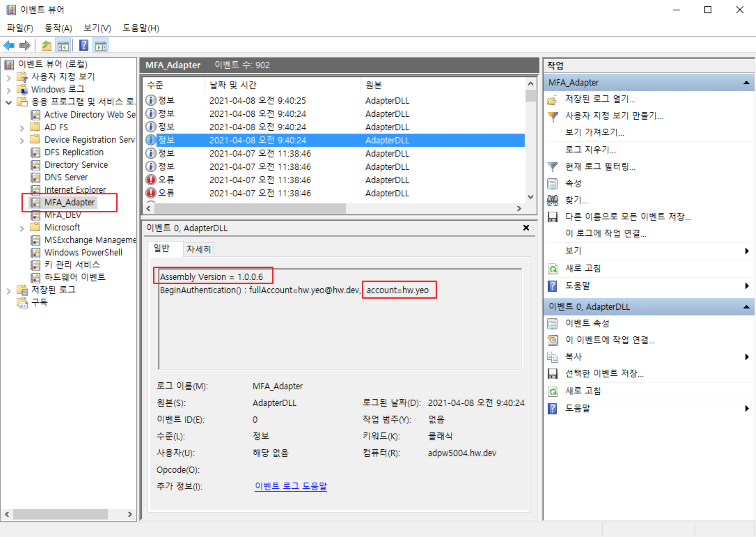
The logs of the Adapter execution process are recorded in the Windows Event Log area.
By adjusting the LOG_LEVEL value in the ADFSadapter.ini configuration, you can selectively record errors, warnings, and general logs.
Setting LOG_LEVEL in ADFSadapter.ini
Set value
recording log
LOG_LEVEL=0
Error log
LOG_LEVEL=1
Error and warning logs
LOG_LEVEL=2
Log errors, warnings, and general messages
Windows event log location
Computer Management (Local) > System Tools > Event Viewer > Application and Services Logs > MFA_Adapter
At the beginning of each account’s log, the MFA version and account name are displayed → reference for log analysis/tracing
During operation, focus on monitoring parts marked as “error” or “warning”.
Windows Event Log Description and Mitigation Steps
[#0000] Success
Err.Success
에러가 아니고, 단순한 로그입니다.
불필요한 로그이며, 이 로그가 보인다면 개발자에게 해당 로그 삭제하라고 하시면 됩니다.

[#0001] Invalid Arguments
Err.InvalidArguments
에러 : adapter 프로그램 내부의 함수 호출할 때, 함수 인자(argument) 누락이 있다는 뜻입니다.
조치 : 심각한 에러이며, 개발자에게 즉시 전달하여 신속히 조치되도록 합니다.
참고
별다른 증상없이 adapter가 동작할 수도 있으나, 심각한 에러 잠재성이 있으므로 방치하면 안됩니다.

[#1000] identityClaim 에서 계정정보(account)를 추출할 수 없습니다.
Err.IdentityClaimHasNoAccount
에러 : adapter 실행 초기에 AD 서버로부터 현재 사용자의 정보를 받는데, account 정보를 찾을 수 없습니다.
조치 : AD 서버 상태를 확인해봅니다.
참고
LDAP에서 Query 하는 것이 아니라, ADFS 내부적으로 처리되는 정보 흐름으로서, 이 상황이 발생하면 adapter가 정상 동작할 수 없는 환경이라고 보면 됩니다.

[#1001] INI 파일을 load 할 수 없습니다.
Err.FailToLoadIni
에러 : 서버에서 MFA 환경설정 INI 파일을 읽을 수 없습니다.
조치 : 서버에 다음의 경로에 파일이 있는지 확인
C:\ ADFSadapter \ ADFSadapter.ini
참고
만일, 파일이 있다면, 파일 속성 또는 권한 확인합니다.

[#1002] HTML 파일들을 load 할 수 없습니다.
Err.FailToLoadHtml
에러 : 서버에서 HTML 파일을 읽을 수 없습니다.
조치 : 서버에 다음의 경로에 파일이 있는지 확인합니다.
C:\ ADFSadapter \ Html_*.txt
참고
만일, 파일이 있다면, 파일 속성 또는 권한 확인합니다. 1개라도 없으면 에러 발생힙니다. 어떤 것이 누락되었는지는 서버 이벤트 로그에서 알 수 있습니다.

[#1003] LDAP에서 사용자 정보를 가져올 수 없습니다.
Err.FailToLdapSearch
에러 : LDAP 서버에 Query를 헀으나, AD 사용자 정보를 가져오지 못했습니다.
조치 : AD 서버 상태를 확인해봅니다.
참고
Token 구성에 mobile, email 정보가 필요한데, 이 정보들을 가져올때 실패한 것입니다. 사용자 정보가 존재한다면, mobile, email이 빈 값이어도 에러로 처리하지 않습니다. 그래서, 본 에러가 발생한 것은 LDAP Query 자체가 안된다고 보면 됩니다.

[#1004] BeginAuthentication 함수의 request에 URL 정보가 없습니다.
Err.NoURLInRequest
에러 : Adapter 실행 초기에 실행되는 BeginAuthentication 함수의 인자 request에 URL 정보가 없습니다.
조치 : SingleID MFA API 서버가 정상적으로 response를 보내는지 확인합니다.
참고
URL 정보가 없으면, SingleID MFA API 서버가 GET 방식으로 전송한 response를 사용할 수 없습니다.

[#1005] JWT token 생성을 할 수 없습니다.
Err.FailToMakeJwtToken
에러 : GenerateRequestToken 함수가 token 생성에 실패했습니다.
조치 : 정확한 원인은 서버 이벤트 로그에서 확인 가능하며, 개발자에게 원인 분석을 요청합니다.

[#1006] ADFSadapter 디렉토리 또는 INI 파일을 찾을 수 없습니다. C to Z 드라이브 중의 한 곳에 [drive]:/ADFSadapter/ADFSadapter.ini 파일이 존재해야 합니다.
Err.CannotFindDirOrIni
에러 : adapter 버전 1.2.0.6 부터 adapter 설치 위치가 C 드라이브 고정이 아닌 C to Z 드라이브 중의 한 곳에 설치할 수 있으며, adapter는 C to Z 드라이브 스캔을 통해서 설치된 위치를 알아냅니다. [drive]:/ADFSadapter/ADFSadapter.ini 파일이 존재해야 합니다.
조치 : 서버에 adapter 설치가 제대로 되었는지, 디렉토리명과 파일명이 정확한지 확인합니다. 드라이브 억세스가 막혀있는지 확인합니다.

[#2000] TryEndAuthentication()에 계정정보(account)가 없습니다.
Err.TryEndHasNoAccount
에러 : TryEndAuthentication 단계로 넘어왔으나, 계정 정보를 알 수 없습니다. (adpater 자체 에러)
조치 : 개발자에게 신속히 상황 전달 및 원인 분석을 요청합니다.
참고
이러한 경우는 절대 발생할 수 없으며, 발생해서도 안됩니다.

[#2001] Step 정보가 없습니다.
Err.NoStepInfo
에러 : MFA 진행 단계(step) 정보가 없습니다. (adpater 자체 에러)
조치 : 개발자에게 신속히 상황 전달 및 원인 분석을 요청합니다.
참고
이러한 경우는 절대 발생할 수 없으며, 발생해서도 안됩니다.

[#2002] 잘못된 Step 정보입니다.
Err.InvalidStepInfo
에러 : MFA 진행 단계(step) 정보가 잘 못 되었습니다. (adpater 자체 에러)
조치 : 개발자에게 신속히 상황 전달 및 원인 분석을 요청합니다.
참고
이러한 경우는 절대 발생할 수 없으며, 발생해서도 안됩니다.

[#3000] HTML 문자열을 가져옵니다.
Err.SucceedInGetHtml
에러가 아니고, 단순한 로그입니다. 서버의 Html_.txt 파일을 읽은 내용을 보여줍니다. Html_.txt 파일 내용 수정 후에 adpater가 파일 내용을 제대로 읽었는지 확인할 때 도움이 됩니다.

[#3001] HTML을 가져올 수 없습니다.
Err.FailToGetHtml
에러 : 서버의 Html_*.txt 파일을 읽지 못한 것입니다.
조치 : 파일이 존재하는지, Read 권한이 있는지, Lock 걸려있는지 등을 확인해봅니다.

[#4000] Html 파일이 존재하지 않습니다.
Err.HtmlFileNotFound
에러 : 서버의 Html_*.txt 파일을 읽지 못한 것입니다.
조치 : 파일이 존재하는지, 확인해봅니다.

[#4001] Html 파일이 존재하나, 파일 내용이 없습니다.
Err.HtmlFileIsEmpty
에러 : 서버의 Html_*.txt 파일을 읽지 못한 것입니다.
조치 : 파일 Read 권한이 있는지, Lock 걸려있는지 등을 확인해봅니다.

[#4002] HtmlPrefix 리스트에 없는 step 입니다.
Err.StepNotInHtmlPrefixList
에러 : adapter 내부에는 처리 step 별로 정의해 둔 keyword 리스트가 있는데, 그 리스트에 없는 keyword가 발견되었다는 뜻입니다.
조치 : 개발자에게 신속히 상황 전달 및 원인 분석을 요청합니다.
참고
이러한 경우는 절대 발생할 수 없으며, 발생해서도 안됩니다.

[#4003] HtmlPrefix 리스트에서 prefix 값이 비어 있습니다.
Err.EmptyPrefixInHtmlPrefixList
에러 : adapter 내부에는 처리 step 별로 정의해 둔 keyword 리스트가 있는데, 그 리스트에 아무런 내용이 없다는 뜻입니다.
조치 : 개발자에게 신속히 상황 전달 및 원인 분석을 요청합니다.
참고
이러한 경우는 절대 발생할 수 없으며, 발생해서도 안됩니다.

[#5000] ini 파일을 읽을 수 없습니다.
Err.FailToReadIniFile
에러 : INI 파일을 읽을 수 없습니다.
조치 : 서버에 다음의 경로에 파일이 있는지 확인
C:\ ADFSadapter \ ADFSadapter.ini
참고
만일, 파일이 있다면, 파일 속성 또는 권한 확인합니다.

[#5001] 시스템명칭(API_SYSTEMNAME)이 ini 에 없습니다.
Err.NoSystemNameInIni
에러 : INI 파일에 "API_SYSTEMNAME" 설정 값이 없습니다.
조치 : INI 전체적으로 누락된 것이 없는지, INI 가 구버전의 것인지 등을 확인힙니다.

[#5002] claim1(MAIN_CLAIM1)이 ini 에 없습니다.
Err.NoClaim1InIni
에러 : INI 파일에 "MAIN_CLAIM1" 설정 값이 없습니다.
조치 : INI 전체적으로 누락된 것이 없는지, INI 가 구버전의 것인지 등을 확인힙니다.

[#5003] claim2(MAIN_CLAIM2)가 ini 에 없습니다.
Err.NoClaim2InIni
에러 : INI 파일에 "MAIN_CLAIM2" 설정 값이 없습니다.
조치 : INI 전체적으로 누락된 것이 없는지, INI 가 구버전의 것인지 등을 확인힙니다.

[#5004] ini 파일이 존재하지 않습니다.
Err.IniFileNotFound
에러 : 서버에서 MFA 환경설정 INI 파일을 찾을 수 없습니다.
조치 : 서버에 다음의 경로에 파일이 있는지 확인
C:\ ADFSadapter \ ADFSadapter.ini

[#5005] ini 리스트에 AddToList() 실패했습니다.
Err.FailToAddIniList
에러 : adapter 내부 에러입니다.
조치 : 개발자에게 신속히 상황 전달 및 원인 분석을 요청합니다.
참고
이러한 경우는 절대 발생할 수 없으며, 발생해서도 안됩니다.

[#5006] ini 파일에서 읽어온 key, value가 아무것도 없습니다.
Err.NoKeyValueInIni
에러 : INI 파일을 읽었으나, key, value 조합으로 설정된 것이 전혀 없습니다.
조치 : INI 파일 내용을 확인힙니다.

[#5007] LDAP 서버 정보가 ini 에 없습니다. (LDAP_SERVER)
Err.NoLdapServerValueInIni
에러 : INI 파일에 "LDAP_SERVER" 설정 값이 없습니다.
조치 : INI 전체적으로 누락된 것이 없는지, INI 가 구버전의 것인지 등을 확인힙니다.

[#5008] MFA API URL이 ini 에 없습니다. (MFA_API_URL)
Err.NoMfaApiUrlValueInIni
에러 : INI 파일에 "MFA_API_URL" 설정 값이 없습니다.
조치 : INI 전체적으로 누락된 것이 없는지, INI 가 구버전의 것인지 등을 확인힙니다.

[#5009] Consumer Key 값이 ini 에 없습니다. (CONSUMER_KEY)
Err.NoConsumerKeyValueInIni
에러 : INI 파일에 "CONSUMER_KEY" 설정 값이 없습니다.
조치 : INI 전체적으로 누락된 것이 없는지, INI 가 구버전의 것인지 등을 확인힙니다.

[#5010] Secret Key 값이 ini 에 없습니다. (SECRET_KEY)
Err.NoSecretKeyValueInIni
에러 : INI 파일에 "SECRET_KEY" 설정 값이 없습니다.
조치 : INI 전체적으로 누락된 것이 없는지, INI 가 구버전의 것인지 등을 확인힙니다.

[#5011] Cache Attribute 값이 ini 에 없습니다. (CACHE_ATTRIBUTE)
Err.NoCacheAttributeValueInIni
에러 : INI 파일에 "CACHE_ATTRIBUTE" 설정 값이 없습니다.
조치 : INI 전체적으로 누락된 것이 없는지, INI 가 구버전의 것인지 등을 확인힙니다.

[#5012] Cache Delimeter 값이 ini 에 없습니다. (CACHE_DELIMETER)
Err.NoCacheDelimeterValueInIni
에러 : INI 파일에 "CACHE_DELIMETER" 설정 값이 없습니다.
조치 : INI 전체적으로 누락된 것이 없는지, INI 가 구버전의 것인지 등을 확인힙니다.

[#5013] Skew Seconds 값이 ini 에 없습니다. (SKEW_SECONDS)
Err.NoSkewSecondsValueInIni
에러 : INI 파일에 "SKEW_SECONDS" 설정 값이 없습니다.
조치 : INI 전체적으로 누락된 것이 없는지, INI 가 구버전의 것인지 등을 확인힙니다.

[#5014] Token expiration time 값이 ini 에 없습니다. (TOKEN_EXP_TIME)
Err.NoTokenExpTimeInIni
에러 : INI 파일에 "TOKEN_EXP_TIME" 설정 값이 없습니다.
조치 : INI 전체적으로 누락된 것이 없는지, INI 가 구버전의 것인지 등을 확인힙니다.

[#5015] Cache life time 값이 ini 에 없습니다. (CACHE_LIFE_TIME)
Err.NoCacheLifeTimeInIni
에러 : INI 파일에 "CACHE_LIFE_TIME" 설정 값이 없습니다.
조치 : INI 전체적으로 누락된 것이 없는지, INI 가 구버전의 것인지 등을 확인힙니다.

[#5016] 사용자 정보 claim 리스트가 ini 에 없습니다. (USERINFO_##)
Err.NoUserinfoListInIni
reserved (예약된 에러 코드이며, 향후 사용 예정)

[#5017] LDAP 연결시 id/pw 사용하도록 설정되어 있으나(LDAP_USE_IDPW=1), LDAP id 또는 pw가 ini 에 없습니다. (LDAP_ID, LDAP_PW)
Err.NoLdapIdPwInIni
에러 : LDAP 접속시 id/pw 사용하도록 설정되어 있으나, INI 파일에 LDAP_ID, LDAP_PW 설정 값이 없습니다.
조치 : INI 전체적으로 누락된 것이 없는지, INI 가 구버전의 것인지 등을 확인힙니다.

[#6000] AD(LDAP)에서 사용자 정보를 검색하는 과정에 Exception이 발생했습니다.
Err.ExceptionInAD
에러 : LDAP 서버에 Query를 헀으나, 그 과정 중에 Exception이 발생했습니다.
조치 : INI에 설정한 AD 서버 주소가 정확한지 확인해봅니다. 그리고, AD 서버 상태를 확인해봅니다.
참고
이벤트 로그에 있는 자세한 Exception 내용을 개발자에게 전달합니다.

[#6001] AD(LDAP)에서 사용자 정보를 찾을 수 없습니다.
Err.CannotFindUserInAD
에러 : LDAP 서버에 Query를 헀으나, AD 사용자 정보를 가져오지 못했습니다.
조치 : AD 서버 상태를 확인해봅니다.
참고
Token 구성에 mobile, email 정보가 필요한데, 이 정보들을 가져올때 실패한 것입니다. 사용자 정보가 존재한다면, mobile, email이 빈 값이어도 에러로 처리하지 않습니다. 그래서, 본 에러가 발생한 것은 LDAP Query 자체가 안된다고 보면 됩니다
User error message
If an error occurs during the MFA process, an error message is displayed on the user’s PC screen.
The error message is fixed as “Internal error occurred. Contact administrator.”, and the error code is displayed on the next line.
The following provides an explanation of the causes and remedies for error codes. ※ Refer to event logs of server internal processing steps other than user error messages.
ErrorCode : 0001
* Err.IdentityClaimHasNoAccount
* 함수 호출시 인자(arguments)가 잘 못 되었음
* 사용자에게 보여주는 에러는 아님
+ → 혹시 보인다면, 개발자에게 문의
+ → 이 시점의 서버 이벤트 로그를 봐야 함

ErrorCode : 1000
* Err.IdentityClaimHasNoAccount
* "identityClaim 에서 계정정보(account)를 추출할 수 없습니다."
* adapter 실행 초기에 AD 서버로부터 현재 사용자의 정보를 받는데, account 정보를 찾을 수 없음
* LDAP에서 Query 하는 것이 아니라, ADFS 내부적으로 처리되는 정보 흐름으로서,
+ 이 상황이 발생하면 adapter가 정상 동작할 수 없는 환경이라고 보면 됨
* AD 서버 상태를 먼저 확인해 볼 것

ErrorCode : 1001
* Err.FailToLoadIni
* 서버에서 MFA 환경설정 INI 파일을 읽을 수 없음
* 서버에 다음의 경로에 파일이 있는지 확인
+ C:\ ADFSadapter \ ADFSadapter.ini
* 만일, 파일이 있다면, 파일 속성 또는 권한 확인

ErrorCode : 1002
* Err.FailToLoadHtml
* 서버에서 HTML 파일을 읽을 수 없음
* 서버에 다음의 경로에 파일이 있는지 확인
+ C:\ ADFSadapter \ Html_*.txt
* 만일, 파일이 있다면, 파일 속성 또는 권한 확인
* 1개라도 없으면 에러 발생함 → 어떤 것이 누락되었는지는 서버 이벤트 로그에서 알 수 있음

ErrorCode : 1003
* Err.FailToLdapSearch
* "LDAP에서 사용자 정보를 가져올 수 없습니다."
* LDAP 서버에 Query를 헀으나, AD 사용자 정보를 가져오지 못함
* Token 구성에 mobile, email 정보가 필요한데, 이 정보들을 가져올때 실패하였음
* mobile, email이 빈 값이어도 에러로 처리하지 않음
* 그래서, 본 에러가 발생한 것은 LDAP Query 자체가 안된다고 보면 됨

ErrorCode : 1004
* Err.NoURLInRequest
* "BeginAuthentication 함수의 request에 URL 정보가 없습니다."
* Adapter 실행 초기에 실행되는 BeginAuthentication 함수의 인자 request에 URL 정보가 없음
* URL 정보가 없으면, SingleID MFA API 서버가 GET 방식으로 전송한 response를 사용할 수 없음
* SingleID MFA API 서버가 정상적으로 response를 보내는지 확인 필요

ErrorCode : 1005
* Err.FailToMakeJwtToken
* "JWT token 생성을 할 수 없습니다."
* GenerateRequestToken 함수가 token 생성에 실패하였음
* 정확한 원인은 서버 이벤트 로그에서 확인

ErrorCode : 1006
* Err.CannotFindDirOrIni
* "JWT token 생성을 할 수 없습니다."
* ADFSadapter 디렉토리 또는 INI 파일을 찾을 수 없음
* adapter 버전 1.2.0.6 부터 adapter 설치 위치가 C 드라이브 고정이 아닌 C to Z 드라이브 중의 한 곳에 설치할 수 있으며,
+ adapter는 C to Z 드라이브 스캔을 통해서 설치된 위치를 알아냄
* [drive]:/ADFSadapter/ADFSadapter.ini 파일이 존재해야 함
* 서버에 adapter 설치가 제대로 되었는지, 디렉토리명과 파일명이 정확한지 확인
* 드라이브 억세스가 막혀있는지 확인

ErrorCode : 2000
* Err.TryEndHasNoAccount
* "TryEndAuthentication()에 계정정보(account)가 없습니다."
* TryEndAuthentication 단계로 넘어왔으나, 계정 정보를 알 수 없음
* 이러한 경우는 절대 발생할 수 없음 (발생하였다면, 개발자에게 문의)

ErrorCode : 2001
* Err.NoStepInfo
* MFA 진행 단계(step) 정보가 없음
* 상세 정보와 원인은 서버의 이벤트 로그를 확인할 것

ErrorCode : 2002
* Err.InvalidStepInfo
* MFA 진행 단계(step) 정보가 잘 못 되었음
* 상세 정보와 원인은 서버의 이벤트 로그를 확인할 것
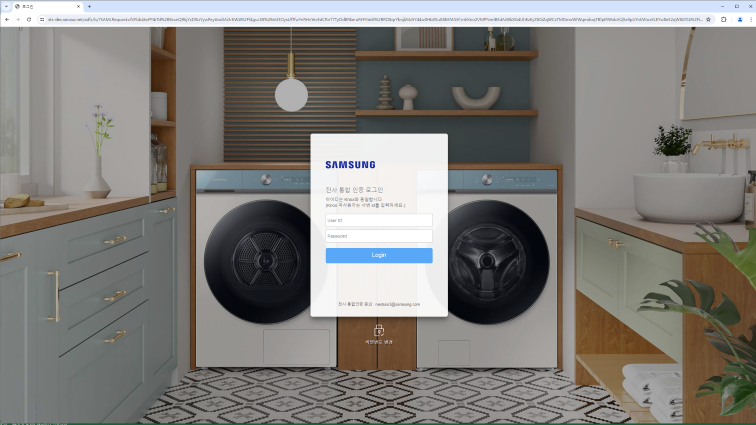
Modify ADFS login page
onload.js edit
Background
If multiple MFA methods are configured, the user will see a selection screen as shown below.
If you are viewing the screen for the first time (MFA not yet completed), you need to make a selection on this screen.
ADFS login page modification
The issue is that after completing MFA, the selection screen is displayed again, and the user has to make the selection again.
This creates a user inconvenience, and selecting a different MFA for the second option will lead to unintended results.
After MFA is completed and the above selection screen appears, an automatic transition feature is needed. (auto submit)
To achieve this, edit the contents of the onload.js file that already exists in ADFS.
If it is not Multi MFA, editing the onload.js file is not required.
File path
It is located at the following path on the AD server.
Directory = C:/default_WebTheme/script
Filename = onload.js
File Edit
Add the script below at the end of the file content.
Caution
Do not copy and paste the Script Text from the example below.
The multilingual message is not being entered properly in the Text below.
You need to prepare a separate file that contains valid script text.
onload.js must be saved as UTF-8.
// ------------------------------------------ SingleID MFA : begin
function singleidMfa() {
var authOptions = document.getElementById('authOptions')
if (authOptions) {
var noticeflag = document.getElementById('mfaGreeting');
var url = document.location.href;
var isToken = url.indexOf('jwtTokenResponse');
if (noticeflag && isToken < 1) {
var browserLang = navigator.language || navigator.userLanguage;
// 다국어 처리
// 한국어
if (lang == 'ko-KR' || lang == 'ko') {
document.getElementById('footerPlaceholder').innerHTML="<h3 style='font-weight: bold;'><br/> <br/> ※ 신규 복합인증솔루션 테스트 중 (13:00~15:00) <br/> 'My Authentication Provider' 메뉴를 이용해주세요. </h3>";
}
// 중국어
else if (lang == "zh" || lang.indexOf("zh-") > -1) {
document.getElementById('footerPlaceholder').innerHTML="<h3 style='font-weight: bold;'><br/> <br/> ※ 正在??新的?合??解?方案 (13:00~15:00) <br/> ?登? 'My Authentication Provider' 菜?。 </h3>";
}
// 베트남어
else if (lang == "vi") {
document.getElementById('footerPlaceholder').innerHTML="<h3 style='font-weight: bold;'><br/> <br/> ※ đang ki?m tra gi?i phap xac th?c k?t h?p m?i (13:00~15:00) <br/> Xin vui long đ?ng nh?p vao trinh đ?n 'My Authentication Provider'. </h3>";
}
// 스페인어
else if (lang == "es" || lang.indexOf("es-") > -1) {
document.getElementById('footerPlaceholder').innerHTML="<h3 style='font-weight: bold;'><br/> <br/> ※ Prueba de una nueva solucion de autenticacion compleja (13:00~15:00) <br/> Inicie sesion en el menu 'My Authentication Provider'. </h3>";
}
// 영어
else {
document.getElementById('footerPlaceholder').innerHTML="<h3 style='font-weight: bold;'><br/> <br/> ※ Testing a new MFA solution (13:00~15:00) <br/> Please use 'My Authentication Provider' menu. </h3>";
}
}
var opt = document.getElementById('optionSelection');
if (opt && isToken > 0) {
opt.value = 'ADFSadapter';
document.forms['options'].submit();
}
}
}
window.addEventListener('load', function () {
singleidMfa();
});
// ------------------------------------------ SingleID MFA : end
Script functionality
This applies when the page’s controls include authOptions.
This operates after the page load has fully completed. (Because executing before that causes an error)
Add to the load event using window.addEventListener (same as the window.onload event)
Case 1 : When mfaGreeting is present in the control and jwtTokenResponse is not in the URL, display a user guidance message according to the browser’s language settings (multilingual)
Case 2: If there is an optionSelection among the controls and the URL contains jwtTokenResponse, assign ADFSadapter to optionSelection and force the options form to submit.
Cautions when adding scripts
To avoid affecting the existing script and to make management easier, placing it at the end of the script is safest.
Apply onload.js
Modify the onload.js file and apply the changes to enable ADFS Sign-in Page customization.
Caution
The malicious script includes commands that could trigger false positives, and some commands are shown differently from the ones you actually need to input.
-ON-LOADScriptPath is actually the following command, so please avoid any confusion.
Application Method
Check Status
PS> Get-AdfsWebConfig ## Check the applied (active) WebTheme
PS> Get-AdfsWebTheme ## Check the list of generated WebThemes
Apply theme
Theme application method 1) Create a new one from the default theme
PS> New-AdfsWebTheme -Name "custom_stg" -SourceName default  ## 새로운 WebTheme 생성
PS> Set-AdfsWebTheme -TargetName "custom_stg" -Illustration @{Path="C:\adfs_Login_dev\illustration\image_0624\8.jpg"} -Logo @{Path="C:\adfs_Login_dev\images\logo.png"} -StyleSheet @{Path="C:\adfs_Login_dev\css\style.css"} -ON-LOADScriptPath "C:\adfs_Login_dev\script\ON-LOAD_new.js"  ## custom 한 js 파일 적용
How to Apply Theme 2) Update from the Existing Theme
PS> New-AdfsWebTheme -Name "custom_stg" -SourceName [전자테마]  ## 새로운 WebTheme 생성
PS > Set-AdfsWebTheme -TargetName "custom_stg" -OnLoadScriptPath "C:\adfs_Login_dev\script\onload_stg.js"  ## custom 한 js 파일 적용
Figure. Theme applied
※ Theme application methods 1) and 2): server command screenshot. When organizing Confluence, the OnLoad command is automatically altered, so a screenshot is attached.
PS> Set-AdfsWebConfig -ActiveThemeName "custom_stg" ## 생성된 WebTheme 활성화
Restore existing theme
PS> Set-AdfsWebConfig -ActiveThemeName "default" ## 기존 WebTheme 활성화
Reference
A WebTheme can only apply one custom js file
We also contacted Microsoft, but officially only one onload.js file can be applied, and the additional method we suggested does not work**
“the ON-LOAD.js is an integrated part of the HTML (the last script in the body) which always executes when the ADFS Page is loaded
There can be only one named ON-LOAD.JS per Web theme.

What is possible though is that additional ('external') scripts can be loaded as part of the actual ON-LOAD.js execution

let’s say in a specific part of your ON-LOAD.JS you want to load a bootstap.js which implements additional functionality
you would firstly import that additional JS to the webpage as AdditionalFileResource //it should not be named ON-LOAD.js

eg
Set-AdfsWebTheme -TargetName custom -AdditionalFileResource @{Uri='/adfs/portal/script/bootstrap.js';path="c:\theme\script\bootstrap.js"}

then you implement a loading functionality in the ON-LOAD.js which dynamically loads your additional script as needed”
In other words, as stated in the official documentation, only one ON-LOAD.JS file can be applied to a single ADFS theme page.
However, we presented that an additional file named bootstap.js can be applied on the same page using AdditionalFileResource.
Reference
Additional options can be applied when setting WebTheme
You can apply illustration, logo, stylesheet, and other items through options.
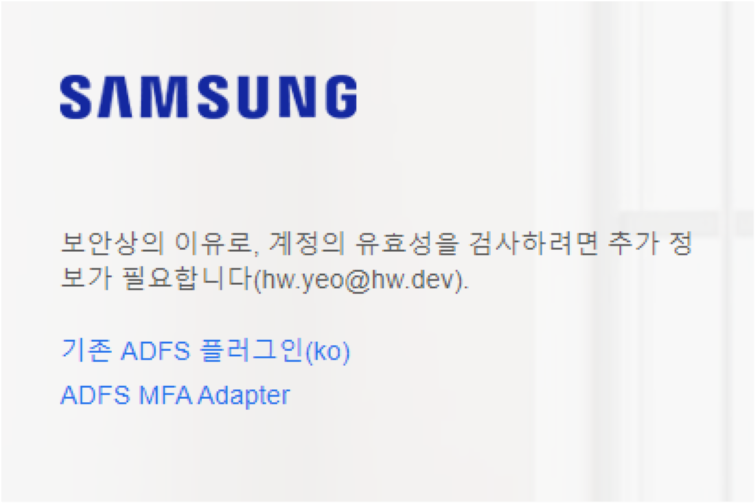
When applying multiple adapters and the user selects one, you can set the adapter’s display name to show it to the user (browser).
By default, the name (Name) used when registering the Adapter is displayed.
Before applying
Displayed to the user (browser) using the name used when registering the adapter.
After applying
Displayed to the user (browser) as the Adapter’s display name
You can set different display names for each language.
guide
During testing, the language setting is applied in three options: Korean, English, and Global
The display name of the Adapter changes according to the browser’s language (chrome://settings/languages, edge://settings/languages).
For browser languages that start with en- such as English (United States) and English (United Kingdom), the English setting is applied. If Korean or a non‑English language is selected, the global setting is applied.
Configuration method
Set the display name of ADFSadapter (new adapter name)
ko(Korean), en(English), unset(global) set to three locales
Set-AdfsAuthenticationProviderWebContent -Name "ADFSadapter" -Locale ko -DisplayName "신규 ADFS 플러그인(ko)" -Description "신규 ADFS 플러그인 설명(ko)"
Set-AdfsAuthenticationProviderWebContent -Name "ADFSadapter" -locale en -DisplayName "New ADFS Plugin (en)" -Description "New ADFS Plugin Description (en)"
Set-AdfsAuthenticationProviderWebContent -Name "ADFSadapter" -DisplayName "New ADFS Plugin(global)" -Description "New ADFS Plugin Description(global)"
Set display name of MyAuthenticationProvider (existing Adapter name)
ko(Korean), en(English), unset(global) set to three locales
Locale ID: see the following reference [MS-OE376]; separate inquiry
Tips related to ADFS Adapter
Adapter registration and operation sequence summary
Adapter DLL → Register in the GAC area → Register in ADFS → Check the multi‑factor authentication method in ADFS management → Adapter operates when AD authentication requires MFA
Tools required for managing adapters (gacutil.exe)
Tool for registering or unregistering the Adapter DLL in the AD FS server’s GAC.
Reference
What is GAC?
It is an abbreviation for Global Assembly Cache, and the special cache GAC for sharing .NET assemblies across the entire machine is located in a directory named assembly under the Windows directory.
Assemblies installed in the GAC must be strongly-named assemblies.
A DLL must include the Version, Culture, and public key along with its name.
When a DLL is installed in the GAC, it takes priority at runtime.
Even when using the same DLL name, multiple versions can coexist.
Register/Delete Adapter in GAC (using gacutil.exe)
Usually used in cmd, but for convenience we use it in PowerShell (however, it must be used in the form .\gacutil.exe).
Disable multi-factor authentication method in ADFS management
Unregister-AdfsAuthenticationProvider
Restart ADFS service
Replace the DLL in the GAC
Register-AdfsAuthenticationProvider
Restart ADFS service
Set multi-factor authentication method in ADFS management
The above step1) ~ step7) process can be automated with the replace_dll.ps1 script file.
If the MFA feature does not work properly
AD account/password authentication unavailable → Since it is before the MFA stage, it is not related to the Adapter
Check adapter registration status → Verify that ADFS MFA Adapter is displayed when executing the Get-AdfsAuthenticationProvider command
Check AD FS configuration → Check that ADFS MFA Adapter is specified in Service > Authentication Methods > Multi-Factor Authentication Methods → Service > Device Registration Check that it is configured → Access Control Policy is configured to require MFA, verify this.
Check Adapter execution logs → Log location: Computer Management > System Tools > Event Viewer > Application and Services Logs > MFA_Adapter → Check if there are logs displayed as error → If an error occurs, forward the log details to the developer for analysis.
2 - Adapter Configuration Guide
Adapter Configuration Guide
This is a description of the Adapter configuration file.
Before applying the ADFS Adapter, you must first configure the environment.
Caution
adapter installation location changes
Starting with adapter 1.2.0.6, installation is possible on drives other than the C drive.
Caution : It must be installed on only a single drive; if installed on multiple drives, the system scans from C to Z and uses the first directory found.
The following example assumes the adapter is installed in the C:\ADFSadapter directory. If installed on a drive other than C, simply change the drive letter in the example below.
Example: If installed in D:\ADFSadapter, the ini path → D:\ADFSadapter\ADFSadapter.ini
File name and path
File name: ADFSadapter.ini
Full path: C:\ADFSadapter\ADFSadapter.ini
File encoding: must be saved as UTF-8 (Korean characters may become garbled)
Points to note
* 값을 표현할때 "와" 를 사용할 수 있으며 = 좌우에 빈칸을 입력해도 됩니다.
+ Value 의 앞뒤에 있는 공백은 Trim 처리 됩니다.
+ 아래의 Value는 모두 동일함
+ 예1) MAIN_TITLE = DWP MFA Adapter
+ 예2) MAIN_TITLE = DWP MFA Adapter
+ 예3) MAIN_TITLE = "DWP MFA Adapter"
+ 예4) MAIN_TITLE = " DWP MFA Adapter "

* 섹션 이름들 중에 뒷부분에 -1033, -1042 가 붙는 것들은 locale 을 의미합니다.
+ 최소한 1033 은 반드시 있어야 합니다.
+ locale number : 1033 (en-us), 1042 (ko)
+ locale section : MFA-1033, MFA-1042, TXT-1033, TXT-1042, MSG-1033, MSG-1042
Example of ini file structure
Among the example configuration values below, some values are masked for security purposes, and the actual values are not asterisks.
# ADFS MFA Adapter 환경 설정
# 설치위치 변경 사항
#   - v1.2.0.6 이전 : C:\ADFSadapter\ADFSadapter.ini
#   - v1.2.0.6 부터 : C 이외의 다른 드라이브에 설치할 수 있음 (adapter 리소스 설치한 위치와 동일)
#     예시: C:\ADFSadapter\ADFSadapter.ini , D:\ADFSadapter\ADFSadapter.ini , E:\ADFSadapter\ADFSadapter.ini
# 주의 : DLL 파일명은 ADFSadapter.dll 이며, 기존의 Nexsign 연계한 MFAadapter.dll과는 다름


# 값을 표현할때 " 와 ' 를 사용할 수 있으며 = 좌우에 빈칸을 입력해도 됩니다
# Value 의 앞뒤에 있는 공백은 Trim 처리 됩니다.
# 아래의 Value는 모두 동일합니다.
# 예1) MAIN_TITLE=ADFS MFA Adapter
# 예2) MAIN_TITLE = ADFS MFA Adapter
# 예3) MAIN_TITLE = "ADFS MFA Adapter"
# 예4) MAIN_TITLE = "   ADFS MFA Adapter   "


# 섹션 이름들 중에 뒷부분에 -1033, -1042 가 붙는 것들은 locale 을 의미합니다
# 최소한 1033 은 반드시 있어야 합니다
# locale number : 1033 (en-us), 1042 (ko)
# locale section : MFA-1033, MFA-1042, TXT-1033, TXT-1042, MSG-1033, MSG-1042


# LOG_LEVEL (Windows 이벤트 로그에 기록하는 기준)
# 0 : Error
# 1 : Error + Warning
# 2 : Error + Warning + Information + Debug


[MAIN]
MAIN_MFA_TITLE="ADFS MFA Adapter"
MAIN_CLAIM1=http://schemas.microsoft.com/ws/2008/06/identity/claims/authenticationmethod
MAIN_CLAIM2=http://schemas.microsoft.com/ws/2012/12/authmethod/otp


# MFA API 정보
# URL 끝부분에 "/" 붙이지 말 것
#MFA_API_URL="https://stg2-cloud.singleid.samsung.net/test/common-api/open/v1.1/mfa/request"
MFA_API_URL="https://stg1-cloud.singleid.samsung.net/test/common-api/open/v1.1/mfa/request"
CONSUMER_KEY="**************************************"
SECRET_KEY="**************************************"


# Donmain vs Consumer Key 리스트
# 도메인별로 Consumer Key가 다른 경우에는 리스트로 나열 (이런 경우, 위의 CONSUMER_KEY 값을 비울 것)
# Reqeust Token의 sys 값에 대입
# 형태 : DOMAIN_CONSUMER_KEY_##=domain;consumerKey
# 예시: DOMAIN_CONSUMER_KEY_01=aaa.com;**************************************
#     DOMAIN_CONSUMER_KEY_02=bbb.com;**************************************
# (주의) CONSUMER_KEY 값과 리스트 값이 모두 있다면, CONSUMER_KEY 값만 사용함
DOMAIN_CONSUMER_KEY_01=aaa.com;**************************************
DOMAIN_CONSUMER_KEY_02=bbb.com;**************************************

# Donmain vs Secret Key 리스트
# 도메인별로 Secret Key가 다른 경우에는 리스트로 나열 (이런 경우, 위의 SECRET_KEY 값을 비울 것)
# 형태 : DOMAIN_SECRET_KEY_##=domain;secretKey
# 예시: DOMAIN_SECRET_KEY_01=aaa.com;**************************************
#     DOMAIN_SECRET_KEY_02=bbb.com;**************************************
# (주의) SECRET_KEY 값과 리스트 값이 모두 있다면, SECRET_KEY 값만 사용함
DOMAIN_SECRET_KEY_01=aaa.com;**************************************
DOMAIN_SECRET_KEY_02=bbb.com;**************************************

# LDAP Search 결과에 따른, MFA 진행 여부
# 0 : LDAP Search를 하지 않음 (아래의 LDAP_SERVER, LDAP_USE_IDPW, ... 등의 정보 사용하지 않음. token에는 빈 값 대입)
# 1 : LDAP Search를 시도하지만 실패해도 관계없음 (서버 실패, 정보 없음 등이 발생하여도 MFA 진행함. token에는 빈 값 대입)
# 2 : LDAP Search가 성공 & 사용자 정보가 존재해야 함 (사용자 정보가 존재할 경우에만 진행함. 단, 결과 값이 빈 값이어도 진행함)
USE_LDAP_SEARCH=1


# LDAP 주소와 ID/PW
# LDAP_SERVER는 domain, ipv4, ipv6 등의 3가지 모두 가능하며, 앞부분에 대문자 "LDAP://" 을 붙여야 함 (반드시 대문자)
# 예시: LDAP://adpw5004.hw.dev , LDAP://70.2.180.218 , LDAP://fe80::644b:3c9f:c5ac:ce1c%10
# ID/PW를 사용하려면 LDAP_USE_IDPW 값을 1, 사용하지 않으려면 LDAP_USE_IDPW 값을 0 으로 설정
# SSL/TLS 사용하려면 LDAP_SSLTLS 값을 1, 사용하지 않으려면 LDAP_SSLTLS 값을 0 으로 설정 (단, LDAP_USE_IDPW=1 인 경우에만 해당)
LDAP_SERVER="LDAP://adpw5004.hw.dev"
LDAP_USE_IDPW=1
LDAP_SSLTLS=1
LDAP_ID="isadmin"
LDAP_PW="sds*****"


# DNS Lookup을 하여 LDAP 서버(LDAP_SERVER)의 IP 주소를 확인하고, IP 주소 기반으로 접속 여부
# LDAP_SERVER 값이 IP(ipv4, ipv6)로 설정되어 있어도 DNS Lookup을 수행하며, IP 그대로 리턴됨
# 만약, DNS Lookup을 실패하면, LDAP_SERVER 값 그대로 접속
# 0 : LDAP_SERVER 값 그대로 서버에 접속 (DNS lookup 하지 않음)
# 1 : DNS lookup으로 IP 주소를 확인하여 LDAP 서버에 접속 (DNS lookup 결과 리스트에서 첫번째 IP 사용)
# 2 : DNS lookup으로 IP 주소를 확인하고, LDAP_WHITE_IP_## 리스트에서 가장 먼저 해당되는 IP를 사용 (리스트에 없으면, LDAP_SERVER 사용)
# 3 : DNS lookup으로 IP 주소를 확인하고, LDAP_WHITE_IP_## 리스트에서 가장 먼저 해당되는 IP를 사용 (리스트에 없으면, LDAP 접속 안함)
LDAP_DNS_LOOKUP=1


# DNS Lookup 결과가 여러 개일때, 첫번째 IP 주소로 연결이 안되면 그 다음 IP 주소로 시도할지 여부
# 예시: lookup 결과가 4개 : 1차 IP 연결 실패 -> 2차 IP 연결 시도 & 싪패 -> 3차 IP 연결 시도 & 싪패 -> 4차 IP 연결 시도
LDAP_DNS_IF_FAIL_USE_NEXT=1


# DNS Lookup 결과와 비교하는 접속 허용된 LDAP 서버 IP 리스트 (LDAP_DNS_LOOKUP = 2 or 3 인 경우에만 해당)
# LDAP_WHITE_IP_## 형태이며, 01부터 99까지 순차적으로 기록
# DNS Lookup 결과와 리스트를 순차적으로 비교
# IPv4, IPv6 형태로 기록 (동일한 서버의 IPv4, IPv6가 있다면 리스트의 앞순위에 있는 IP가 적용됨)
# DNS Lookup 결과 순서와 White IP 리스트 순서가 다르다면 -> White IP 리스트 순서를 따름
LDAP_WHITE_IP_01="70.2.180.218"
LDAP_WHITE_IP_02="fe80::644b:3c9f:c5ac:ce1c%10"


# 사용자 정보를 암호화할지 여부 (예: mobile, email 등)
# 대상 : USERINFO_## 리스트
# 암호화 여부에 따라 API 서버에 전송하는 token의 claim 이름이 다름
# 0 : 암호화 하지 않음 -> token의 claim 이름이 plainMobile, plainEmail
# 1 : 암호화 -> token의 claim 이름이 mobile, email
USERINFO_ENCRYPT=0


# LDAP Search할 사용자 정보 attribute name과 JWT token에 사용할 claim name (2개 값을 구분하는 delimeter = ";")
# 형태: USERINFO_## = attribute;encryptedClaim;plainClaim
#   예시: LDAP에서 "mail" 속성을 읽어서, JWT에 "email" claim으로 사용된다면 -> "mail;email;plainEmail"
# key 명칭은 "USERINFO_##" 형태로 하고, 시작은 USERINFO_01
# key 갯수 : 0개 ~ 최대 99개 (0개인 경우, ini에 아무것도 적지 않으면 되며, USERINFO_00 이라고 적지 말 것)
# 주의사항) USERINFO_##에서 ## 에 해당되는 숫자는 반드시 01부터 시작하며, 여러 개인 경우 번호가 끊어지지 않아야 함
#           USERINFO_01, USERINFO_02, USERINFO_03 : OK (01, 02, 03 정보가 사용됨)
#           USERINFO_01, USERINFO_02, USERINFO_05 : 02까지 읽고, 끊어진 번호 이후는 사용하지 않음 (01, 02 정보가 사용됨)
USERINFO_01=mobile;mobile;plainMobile
USERINFO_02=mail;email;plainEmail


# MFA API 서버가 Callback 해줄때, 결과 Parameter에 사용되는 Key 이름
# 예시: https://adpw5004.hw.dev/adfs/ls?client-request-id=xxxxxx&pullStatus=0&jwtTokenResponse=yyyyyy
KEY_NAME_IN_RESPONSE="jwtTokenResponse"


# JWT Token의 exp에 적용될 더하기 값
# 형테 : 일시분초(dhms) 형태의 문자열 -> 1d=86400, 1h=3600, 1m=60 (dhms 가 전혀 없는 단순 숫자는 초로 판단함)
# 예시1 : 1d02h38m27s -> 95907 초
# 예시2 : 12345 -> 12345 초
TOKEN_EXP_TIME=1d


# API 호출할때 구성하는 token에 client claim을 추가할지 여부
# client : SAML인 경우 issuer, OIDC인 경우 client-id
# 0 : token에 client 포함시키지 않음
# 1 : token에 client 포함
TOKEN_CLAIM_CLIENT=0


# MFA nonce(guid, requset-id) 검증 방법
# 0 : 검증 안함
# 1 : adapter가 생성한 guid를 LDAP에 저장/비교하는 방식 (adapter가 검증)
#     -> 관련 설정 값 : CACHE_ATTRIBUTE, CACHE_DELIMETER, SKEW_SECONDS, CACHE_LIFE_TIME
# 2 : API 서버가 생성한 requeset-id를 adapter가 받아서 호출 URL에 사용하는 방식 (API 서버가 검증)
#     -> 관련 설정 값 : MFA_VERIFY_URL
MFA_VERIFY_TYPE=2


# MFA 결과검증 URL (서버 to 서버 통신) : URL 뒷부분에 API 서버로부터 받은 {request-id}를 덧붙여서 호출함
# adapter는 리턴 200 (OK) 인지 확인하여 MFA 결과 처리
# URL 끝부분에 "/" 붙이지 말 것
MFA_VERIFY_URL="https://stg1-cloud.iam.samsung.net/test/common-api/open/v1.1/mfa/request/status"


# MFA 결과검증할때 사용할 보안 프로토콜
# 선택 가능한 프로토콜 (대소문자 구분 없음) : TLS12, TLS13
# (주의) SSL3, TLS, TLS11 은 사용하지 않음
MFA_VERIFY_SECURE_PROTOCOL="TLS12"


# 사용자의 req guid 값을 저장할 LDAP attribute의 이름
# (주의) LDAP에 write 권한이 있어야 함
CACHE_ATTRIBUTE="otherPager"


# LDAP에 저장하는 req + 시간 정보를 조합할때 사용하는 delimeter -> "req;시간"
CACHE_DELIMETER=";"


# LDAP에 저장된 req의 시간과 JWT 수신시 시간의 차이 허용치 (초단위)
# MFA 선택화면 누를 때가 아니라, AD 로그인 직후의 시간이므로 (MFA 선택화면 보일때 이미 시간이 저장되었음)
# 사용자가 MFA 선택화면 누르고 Passcode 입력할 때까지의 시간이 아님
# 따라서, tight 하게 시간을 설정하면 안되며, 1시간 정도가 적당?? (MFA 선택을 1시간 고민하는 사람이 있나?)
SKEW_SECONDS=3600


# LDAP에 저장된 req의 수명 -> 다음 access시 시간 확인해서 이전의 오래된 것들 삭제
# 형태 : 일시분초(dhms) 형태의 문자열 -> 1d=86400, 1h=3600, 1m=60 (dhms 가 전혀 없는 단순 숫자는 초로 판단함)
# 예시1 : 1d02h38m27s -> 95907 초
# 예시2 : 12345 -> 12345 초
CACHE_LIFE_TIME=1d


# Adapter 기능을 ByPass 할 것인지 여부 (0=정상 사용, 283901=무력화, 그 외 값들=정상 사용)
# MFA 기능 문제로 급하게 adapter 기능의 무력화가 필요한 비상 상황에서 사용
# 평상시에는 절대로 수정하지 말 것 -> 평상시 값은 0
# 주의 : 무력화하려면 반드시 정확한 값을 설정해야 함 (0 이외의 숫자가 해당되는 것이 아니며 정확한 숫자 필요함. noise 우려)
BYPASS_ADAPTER=0


[API]
API_SYSTEMNAME=SingleID


[MSG-1033]
MSG_INTERNAL_ERROR="Internal error occurred. Contact administrator."


[MSG-1042]
MSG_INTERNAL_ERROR="Internal error occurred. Contact administrator."


[MANAGE]
LOG_LEVEL=2
Configuration value description
Fixed value : It means that the value displayed in the Setting Value column of the table below is used as-is when installing on the ADFS server.
If you want to add languages other than English and Korean, you can add them for two sections.
(Note) If both the SECRET_KEY value and the list value exist, use only the SECRET_KEY value
DOMAIN_SECRET_KEY_02
kgkWRnLygQhsRgrLVbtKlO6FiLdABupEgoMR8v/ilfJ=
DOMAIN_SECRET_KEY_##
dABupkRnLygQhsrLgWVRbt8vRgkLilLKlO1FioMgfJE=
USE_LDAP_SEARCH
0 or 1 or 2
Whether to proceed with MFA based on LDAP Search results
0 : Do not perform LDAP Search (do not use information such as LDAP_SERVER, LDAP_USE_IDPW, etc. Assign an empty value to the token)
1 : Attempt LDAP Search but failure does not matter (proceed with MFA even if server failure, missing information, etc. Assign an empty value to the token)
2 : LDAP Search succeeds & user information must exist (proceed only if user information exists. However, proceed even if the result value is empty)
LDAP_SERVER
LDAP://adpw5004.hw.dev
LDAP address that can query AD user information
All three of domain, ipv4, ipv6 are supported, and you must prepend “LDAP://” at the beginning.
LDAP_USE_IDPW
0 or 1
Whether to use id/pw when connecting to LDAP
Since the adapter operates with system privileges, it is typical for LDAP connections to work without id/pw, but there are cases where this is not true.
If the system is configured to connect without id/pw and an AD connection error appears in the event log, you need to configure it to connect using id/pw.
If this value is set to 1, you must set LDAP_ID and LDAP_PW.
LDAP_SSLTLS
0 or 1
Whether to use SSL/TLS when connecting to LDAP
Set to use by default
LDAP_ID
LDAP connection ID
LDAP connection ID (when LDAP_USE_IDPW=1)
LDAP_PW
LDAP connection pw
LDAP connection password (when LDAP_USE_IDPW=1)
LDAP_DNS_LOOKUP
0 or 1 or 2 or 3
Perform a DNS lookup to obtain the IP address of the LDAP server (LDAP_SERVER) and determine connection based on the IP address
0: Connect to the server using the LDAP_SERVER value as is (no DNS lookup)
1: Perform a DNS lookup to obtain the IP address and connect to the LDAP server (use the first IP from the DNS lookup result list)
2: Perform a DNS lookup to obtain the IP address and use the first matching IP from the LDAP_WHITE_IP_## list (if not found, use LDAP_SERVER)
3: Perform a DNS lookup to obtain the IP address and use the first matching IP from the LDAP_WHITE_IP_## list (if not found, do not connect to LDAP)
LDAP_DNS_IF_FAIL_USE_NEXT
0 or 1
When there are multiple DNS lookup results, whether to try the next IP address if the first IP address fails to connect
Example: lookup results are 4: 1st IP connection failure -> 2nd IP attempt & failure -> 3rd IP attempt & failure -> 4th IP attempt
LDAP_WHITE_IP_01
70.2.180.218
LDAP server IP list allowed for connection compared with DNS Lookup results (applicable only when LDAP_DNS_LOOKUP = 2 or 3)
In the form LDAP_WHITE_IP_##, recorded sequentially from 01 to 99
Compare DNS Lookup results with the list sequentially
Recorded in IPv4 or IPv6 format (if the same server has both IPv4 and IPv6, the IP appearing earlier in the list is applied)
If the order of DNS Lookup results differs from the White IP list order → follow the White IP list order
LDAP_WHITE_IP_02
fe80::644b:3c9f:c5ac:ce1c%10
LDAP_WHITE_IP_##
A. : 01 ~ 99 White IP address (IPv4 or IPv6)
USERINFO_ENCRYPT
0 or 1
Whether to encrypt user information (e.g., mobile, email, etc.)
Target: USERINFO_## list
The claim name in the token sent to the API server varies depending on encryption status
0: No encryption -> token claim names are plainMobile, plainEmail
1: Encryption -> token claim names are mobile, email
USERINFO_01
mobile;mobile;plainMobile
O
The attribute name of user information to search in LDAP and the claim name to use in the JWT token (delimiter separating the three values = “;”)
Example: If you read the “mail” attribute from LDAP and use the encrypted value as the “email” claim and the plain value as the “plainEmail” claim in the JWT, then → “mail;email;plainEmail”
A string in day-hour-minute-second (dhms) format 1d=86400, 1h=3600, 1m=60
A plain number without any dhms is interpreted as seconds
Example 1: 1d02h38m27s → 95907 seconds Example 2: 12345 → 12345 seconds
TOKEN_CLAIM_CLIENT
0 or 1
Whether to add a client claim to the token configured when calling the API
client: issuer for SAML, client-id for OIDC
0: Do not include client in the token
1: Include client in the token
MFA_VERIFY_TYPE
0 or 1 or 2
MFA nonce (guid, request-id) verification methods
0: No verification
1: Store and compare the guid generated by the adapter in LDAP (adapter performs verification) → related configuration values: CACHE_ATTRIBUTE, CACHE_DELIMETER, SKEW_SECONDS, CACHE_LIFE_TIME
2: The adapter receives the request-id generated by the API server and uses it in the call URL (API server performs verification) → related configuration value: MFA_VERIFY_URL
MFA verification URL (server-to-server communication): Append the {request-id} received from the API server to the end of the URL and call it → the adapter checks that the return is 200 (OK) to process the MFA result
Do not append a ‘/’ at the end of the URL
MFA_VERIFY_SECURE_PROTOCOL
TLS12 or TLS13
Security protocol to use when verifying MFA results