To use the SCP SingleID Open API, the system must be registered as an Application first.
The registered system information is used to issue a JWT Token, which must be included in the HTTP header when calling the SCP SingleID Open API.
API Calling Method
Call with the token (JWT Token) value included in the HTTP header
Set the access token header name to Authorization and the access token type value to Bearer - set the JWT Token value after the Bearer string.
Original token sample data { "sys":"test-system", "req":"761efd52-97d0-451f-9cf9-cf86740e7ca3", "uid":"gildong.hong", "rtn":"https://test.com/mfa/response","email":"gildong.hong@samsung.com","mobile":"+82-1012345678", "nbf": 1698232068, "exp": 1698239268, "iat": 1698232068, "displayUid": "gildong.hong@samsung.com" }
Table. Request Parameters
Response
MFA authentication page is redirected.
By default, the response token is delivered in the post method, but if you want to deliver it in the get method (query), add the following parameters to the request token:
returnMethod: get
Sample
Request
Response
curl -X GET "https://stg2-cloud.singleid.samsung.net/test-tenant/common-api/open/v1.1/mfa/request?jwtTokenRequest=eyJhbGciOiJIUzI1NiJ9.eyJzeXMiOiJ0ZXN0LXN5c3RlbSIsInJlcSI6Ijc2MWVmZDUyLTk3ZDAtNDUxZi05Y2Y5LWNmODY3NDBlN2NhMyIsInVpZCI6Imppbm9uZS5raW0iLCJydG4iOiJodHRwczovL3Rlc3QuY29tL21mYS9yZXNwb25zZSIsIm5iZiI6MTY5ODIzMjA2OCwiZXhwIjoxNjk4MjM5MjY4LCJpYXQiOjE2OTgyMzIwNjh9.cDgKMHIINaHhBiyAd_OIlVvQwmUs0QaXH_RfJ8B_KdY"
Page moved
Table. Sample
Error Code
Http Response Code
Error Code
Error Message
Measures
400
N/A
N/A
Check the token data.
Table. Error Code
API Specification - MFA Consumer Request(Portal Common)
Token original data sample { "sys":"test-system", "req":"761efd52-97d0-451f-9cf9-cf86740e7ca3", "uid":"gildong.hong", "rtn":"https://test.com/mfa/response","email":"gildong.hong@samsung.com","mobile":"+82-1012345678", "nbf": 1698232068, "exp": 1698239268, "iat": 1698232068, "displayUid": "gildong.hong@samsung.com" }
MFA Consumer Home Redirect
registerFlag
Y
query
Boolean
true
Determines whether to move to MFA Consumer Home. If true, it moves to MFA Consumer Home.
Table. Request Parameters
Response
registerFlag = true: Redirects to MFA Consumer Home.
registerFlag = false: Redirects to MFA authentication page.
Sample
Request
Response
curl -X POST "https://stg2-cloud.singleid.samsung.net/test-tenant/common-api/open/v1.1/mfa/request?jwtTokenRequest=eyJhbGciOiJIUzI1NiJ9.eyJzeXMiOiJ0ZXN0LXN5c3RlbSIsInJlcSI6Ijc2MWVmZDUyLTk3ZDAtNDUxZi05Y2Y5LWNmODY3NDBlN2NhMyIsInVpZCI6Imppbm9uZS5raW0iLCJydG4iOiJodHRwczovL3Rlc3QuY29tL21mYS9yZXNwb25zZSIsIm5iZiI6MTY5ODIzMjA2OCwiZXhwIjoxNjk4MjM5MjY4LCJpYXQiOjE2OTgyMzIwNjh9.cDgKMHIINaHhBiyAd_OIlVvQwmUs0QaXH_RfJ8B_KdY®isterFlag=true"
Page move
Table. Sample
Error Code
Http Response Code
Error Code
Error Message
Action Plan
400
N/A
N/A
Check token data.
Table. Error Code
API Specification - Send Email about Anomaly Detection(Tenant Admin Portal)
curl -X GET "https://stg1-cloud.singleid.samsung.net/test-tenant/common-api/open/v1.1/asis/test-tenant/user/mfa/token/authentication?userName=mkdir.kim&protocol=uma-uaf&sessionDataKey=sessionDataKey111&redirectUrl=redirectUrl1111&errorRedirectUrl=errorRedirectUrl1111¶ms=params111&language=en"
The request is not found. Please contact the administrator.
400
N/A
request.error.invalidStatus
The request status is incorrect. Please contact the administrator.
400
N/A
otp.error.notMatch
The OTP is incorrect. Please check the OTP.
400
N/A
otp.error.tooManyAttempts
Move to the security warning screen (the account is locked due to multiple authentication failures)
Table. Error Code
1 - ADFS Adapter Guide
ADFS Adapter Guide
Microsoft ADFS (Active Directory Federation Service) is a service that supports SAML/Oauth-based SSO (Single-Sign-On) for web services based on AD accounts.
MS supports MFA (multi-factor authentication) using 3rd party solutions for SSO-linked web services. To do this, an ADFS Adapter must be developed and installed.
There are two main ways to implement an ADFS Adapter:
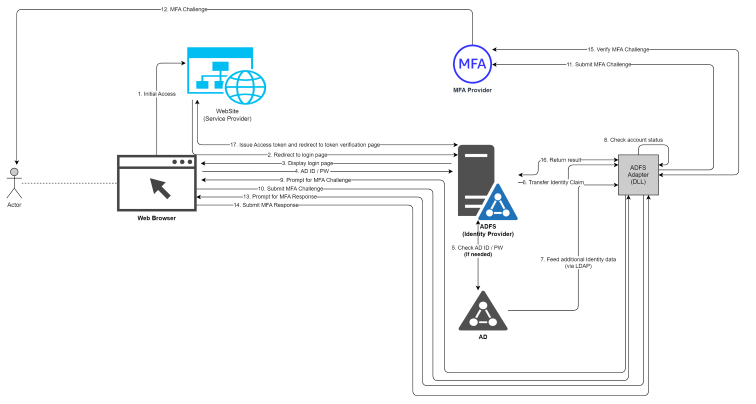
Server-to-Server Call method
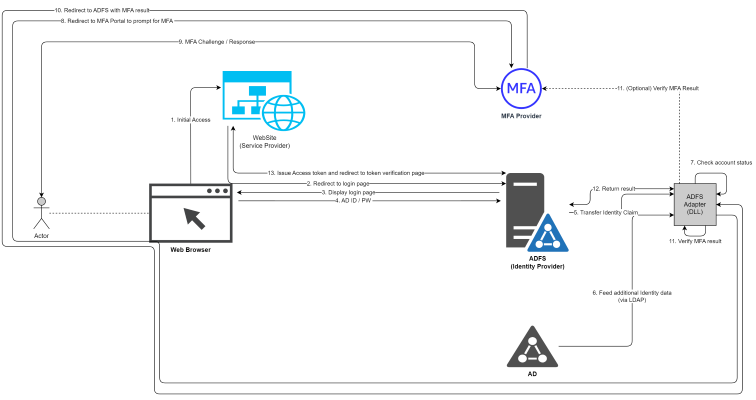
WebClient method
Among them, the WebClient method has the advantage of minimizing firewall opening between MFA servers and AD (FS) and utilizing CX provided by MFA providers, making it possible to lightweight ADFS Adaptor.
Note
SingleID ADFS Adapter was developed using the WebClient method.
Caution
The diagram in this document assumes a setting that stores the nonce value in LDAP. The nonce value is used to verify the MFA result, and the setting can be changed to store it in the MFA server instead of LDAP.
Please refer to the ADFS Adaptor settings manual for more detailed information.
Server-to-Server Call Method
Figure. Server-to-Server Call Method
WebClient Method
Figure. WebClient Method
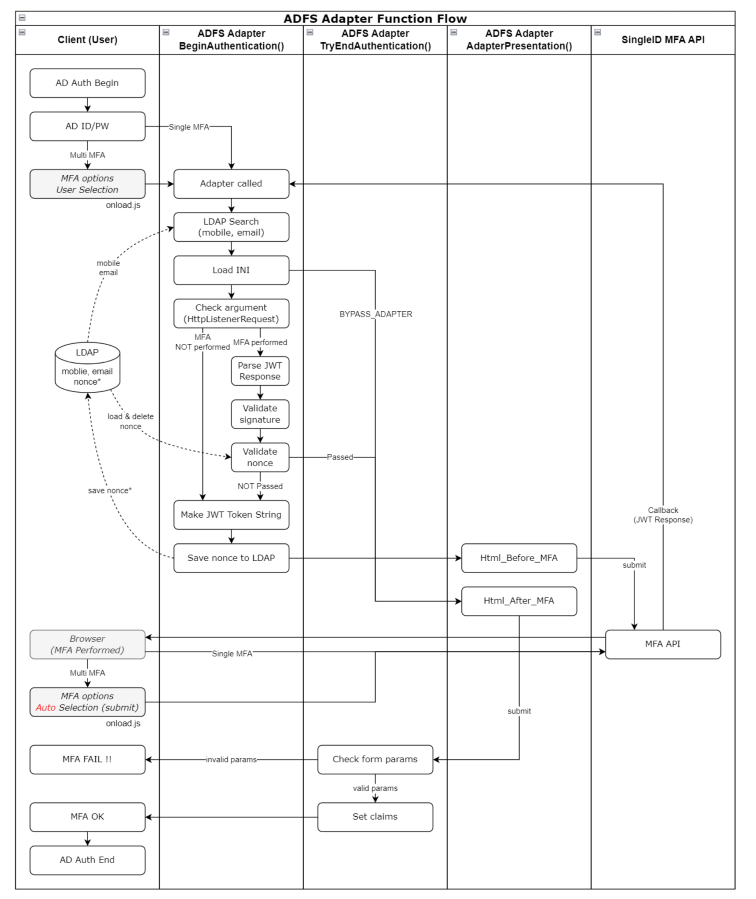
Internal Operation
Overall Flowchart of Adapter
Figure. Overall Flowchart of Adapter
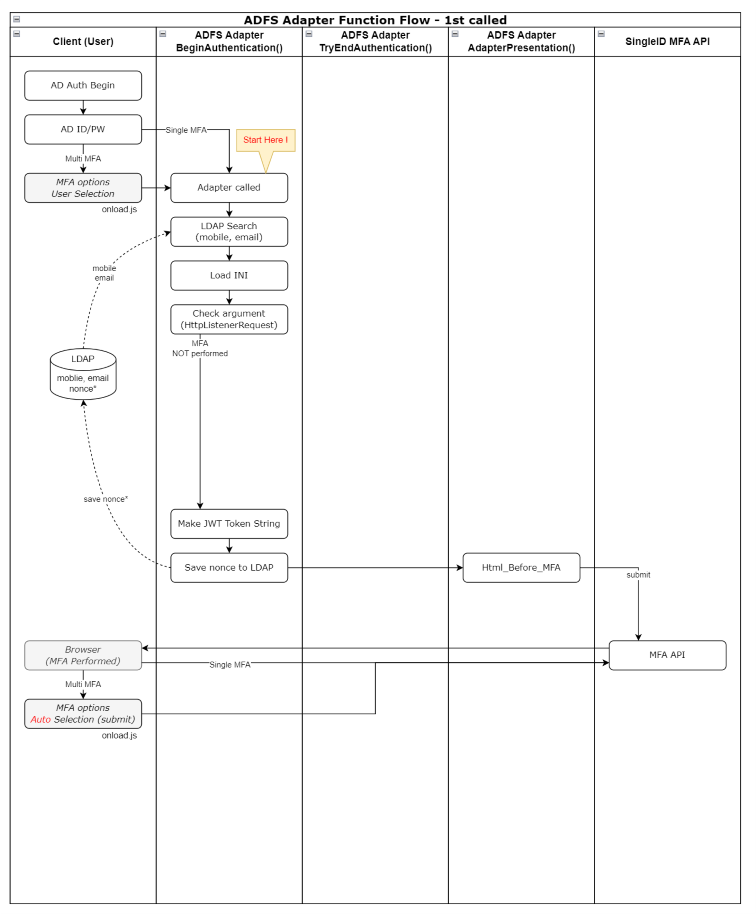
Flowchart at First Run of Adapter
Figure. Flowchart at First Run of Adapter
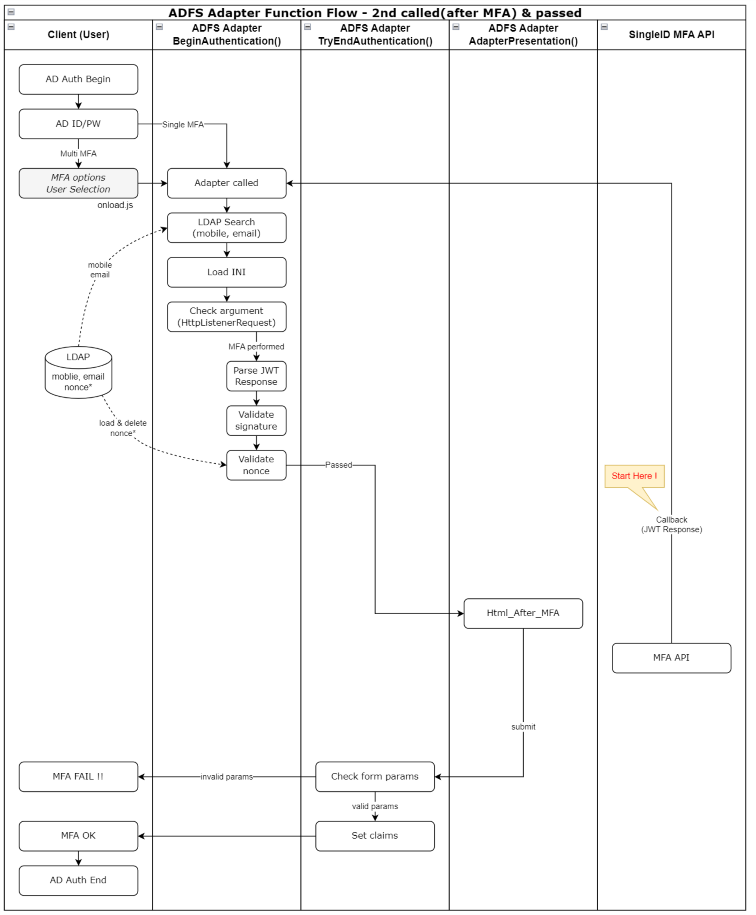
Flowchart after MFA (MFA PASS Case)
Figure. Flowchart after MFA (MFA PASS Case)
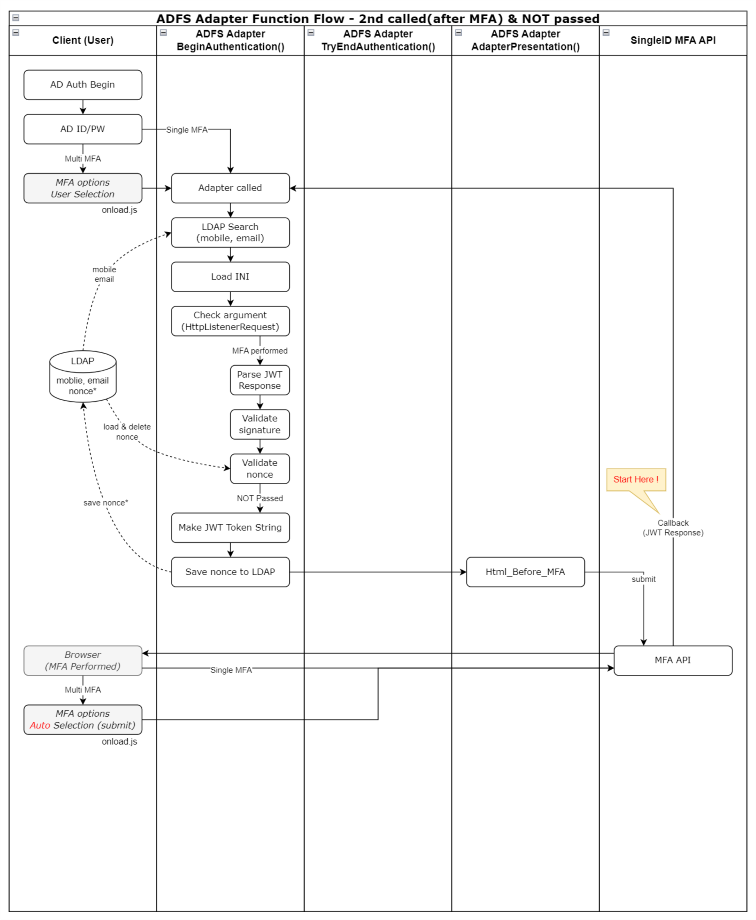
Flowchart after MFA (MFA FAIL Case)
Figure. Flowchart after MFA (MFA FAIL Case)
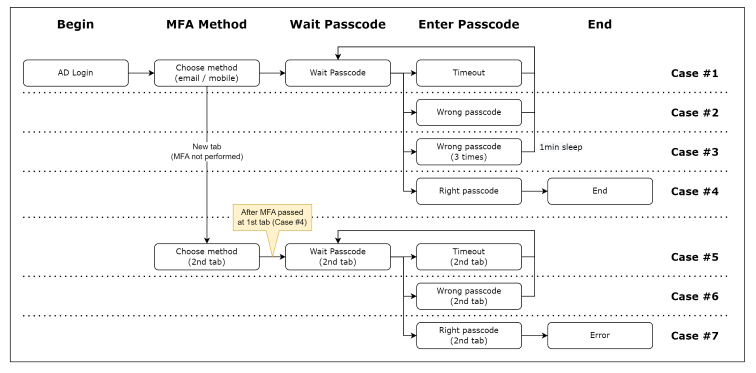
Operation by Scenario
Figure. Scenario-based actions
Case #1
Passcode input screen has timed out due to exceeding the time limit.
When timed out, the “Resend Code” button is activated, and you can retry the Passcode by clicking this button.
Case #2
Incorrect Passcode has been entered.
You can attempt to enter the Passcode up to 3 times.
Case #3
Passcode input has failed 3 times.
You cannot enter the Passcode for 1 minute.
Case #4
Normal MFA process.
Case #5
On the MFA selection screen, the Passcode was not entered, and a new browser tab was added, proceeding to MFA selection.
After that, MFA is successful on the initial tab.
After that, the new tab times out.
Case #6
On the MFA selection screen, the Passcode was not entered, and a new browser tab was added, proceeding to MFA selection.
After that, MFA is successful on the initial tab.
After that, an incorrect Passcode is entered on the new tab.
Case #7
On the MFA selection screen, the Passcode was not entered, and a new browser tab was added, proceeding to MFA selection.
After that, MFA is successful on the initial tab.
After entering the normal Passcode:
1st tab, 2nd tab are both in passcode input waiting state, after 1st authentication, 2nd authentication attempt results in no response from 2nd tab (page freeze)
1st tab is in passcode input waiting state, 2nd tab is in MFA selection waiting state, after 1st authentication, selecting 2nd MFA type results in error, error message is displayed from AD before adapter operation
Scenario-based actions
Adapter installation
Application method
Pre-check
Pre-check
Location
Check item
Note
ADFS server
MFA server connection availability (group network, TCP 80/443)
If nonce is stored in LDAP, MFA server communication is not required
.NET Framework 4.8 installation availability
User PC
MFA server connection availability (internet network, TCP 80/443)
Quality: ops-sopenapi.singleid.samsung.net
Operation: sopenapi.singleid.samsung.net
If connection is not available, check the following three items ① Firewall check ② Proxy check ③ Website block check
Table. Personal information input items
Adapter deployment
Caution
If multiple ADFS servers are configured, steps 1-4 of the following 7 steps must be applied to all servers.
Upload adapter-related files to the ADFS server
Location: [drvie]:\ADFSadapter\

ADFSadapter.dll: Adapter file
ADFS Adapter Configuration File : configuration file
replace_dll.ps1 : script file used to replace the installed Adapter with an improved version
restart_adfs.ps1 : AD FS service restart script file
Assembly_netstandard2.0 folder : pre-installation dll files for Adapter application
Grant full permissions to the ADFS service account for the corresponding folder
Right-click on the C:\ADFSadapter folder > Properties > Security > Add the ADFS service account and select all permissions
※ The ADFS service account can be checked by running services.msc > AD FS service execution account "Log on as"
Registry addition
Create a registry to record Adapter-related events in the Windows event log

Create a key and two values under HKEY_LOCAL_MACHINE\SYSTEM\CurrentControlSet\Services\EventLog
- Created key: MFA_Adapter
- Create two values in MFA_Adapter
   . Name: AutoBackupLogFiles
   . Type: DWORD (32-bit) value (REG_DWORD)
   . Data: 0

   . Name: MaxSize
   . Type: DWORD (32-bit) value (REG_DWORD)
   . Data: hexadecimal 80000

Create a key and one value under MFA_Adapter
- Created key: AdapterDLL
- Create one value in AdapterDLL
  . Name: EventMessageFile
  . Type: expandable string value (REG_EXPAND_SZ)
Here is the translation:

  . Data: C:\Windows\Microsoft.NET\Framework64\v4.0.30319\EventLogMessages.dll
Adapter required dll pre-installation
The Assembly_netstandard2.0 folder in C:\ADFSadapter contains a collection of libraries that need to be pre-installed. Refer to the following for the installation work.
When the ADFS Adapter runs, the necessary assemblies are loaded, and the dll is installed in the Global Assembly Cache of the ADFS server.
**dll installation**

#Pre-work
Unzip and copy the Assembly_netstandard2.0 folder to the C:\ADFSadapter folder.
#Run Powershell with administrator privileges and move to the execution location
PS>cd C:\ADFSadapter

#dll installation
PS>.\gacutil.exe /il .\Assembly_netstandard2.0\AssemblyList.txt
#dll verification
PS>.\gacutil.exe /l
Notice
Assembly_netstandard v2.0.zip file can be requested separately via email (singleid.scp@samsung.com).
The necessary assembly files are stored in the Assembly_netstandard2.0 folder, and the files can be copied to the server and installed offline.
Assembly_netstandard2.0 folder: dll files for installing Microsoft.IdentityModel.Tokens v7.2, System.IdentityModel.Tokens.Jwt v7.2 assemblies (including all dependency files)
Installed dll list
Assembly Name
Installation Version
Package Version
Microsoft.Bcl.AsyncInterfaces
1.0.0.0
1.0.0
Microsoft.IdentityModel.Abstractions
7.2.0.0
7.2.0
Microsoft.IdentityModel.JsonWebTokens
7.2.0.0
7.2.0
Microsoft.IdentityModel.Logging
7.2.0.0
7.2.0
Microsoft.IdentityModel.Tokens
7.2.0.0
7.2.0
System.Buffers
4.0.3.0
4.5.1
System.IdentityModel.Tokens.Jwt
7.2.0.0
7.2.0
System.Memory
4.0.1.1
4.5.3
System.Numerics.Vectors
4.1.4.0
4.5.0
Microsoft.CSharp
4.0.4.0
4.5.0
System.Runtime.CompilerServices.Unsafe
4.0.4.1
4.5.3
System.Security.Cryptography.Cng
4.3.0.0
5.0.0
System.Text.Encodings.Web
4.0.5.1
4.7.2
System.Text.Json
4.0.1.2
4.7.2
System.Threading.Tasks.Extensions
4.2.0.1
4.5.4
Table. Installed DLL List
Adapter Deployment
The nuget file was downloaded and installed, and note that the nuget package version and the version installed on the server may differ.
Use the dll as .net standard 2.0 (.net framework 4.8 supported) based on .net framework 4.8.
Adapter Application
Run in administrator mode using powershell and execute the following command
# Move to execution location
PS>cd C:\ADFSadapter

# Register dll
PS>./gacutil.exe /if ADFSadapter.dll

# Check dll
PS>./gacutil.exe /l ADFSadapter
 The following assembly is in the global assembly cache.
  ADFSadapter, Version=1.2.1.0, Culture=neutral, PublicKeyToken=0e0fe476002e81b3, processorArchitecture=MSIL
# Register as authentication provider in ADFS
PS>$typename="ADFSadapter.AuthenticationAdapter, ADFSadapter, Version=1.2.1.0, Culture=neutral, PublicKeyToken=0e0fe476002e81b3, processorArchitecture=MSIL"
PS>Register-AdfsAuthenticationProvider -TypeName $typename -Name "ADFSadapter"
# Check authentication provider in ADFS
PS>Get-AdfsAuthenticationProvider
AdminName                          : ADFS MFA Adapter
AllowedForPrimaryExtranet          : False
AllowedForPrimaryIntranet          : False
AllowedForAdditionalAuthentication : True
AuthenticationMethods              : {http://schemas.microsoft.com/ws/2012/12/authmethod/otp}
Descriptions                       : {[1033, ADFS MFA Adapter], [1042, ADFS MFA Adapter]}
DisplayNames                       : {[1033, ADFS MFA Adapter], [1042, ADFS MFA Adapter]}
Name                               : ADFSadapter
IdentityClaims                     : {http://schemas.xmlsoap.org/ws/2005/05/identity/claims/upn}
IsCustom                           : True
RequiresIdentity                   : True
# Restart ADFS service
PS>net stop adfssrv
PS>net start adfssrv
#Move to the execution location
PS>cd C:\ADFSadapter
#Register dll
PS>./gacutil.exe /if ADFSadapter.dll
#Check dll
PS>./gacutil.exe /l ADFSadapter
 The following assembly is in the global assembly cache.
  ADFSadapter, Version=1.2.1.0, Culture=neutral, PublicKeyToken=0e0fe476002e81b3, processorArchitecture=MSIL
#Restart ADFS service
PS>net stop adfssrv
PS>net start adfssrv
Set up ADFS multi-factor authentication method
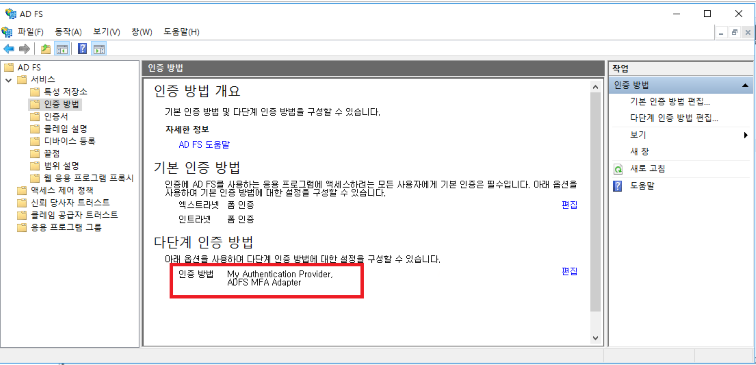
AD FS Management > Services > Authentication Methods > Multi-factor Authentication Methods > Click Edit and select the created mfa (ADFS MFA Adapter) and apply (multiple selections are possible)
Apply MFA policy to relying party trust
AD FS Management > Relying Party Trusts > Select the relying party trust to apply > Edit Access Control Policy > Select ‘Allow all users and require MFA’ and apply
Adapter Upgrade and Change
This method is performed when the ADFS MFA Adapter is already registered and the Adapter needs to be upgraded or changed. The adapter replacement work can be completed by running this script only.
#Move to the execution location and upload the changed Adapter.dll file
PS>cd C:\ADFSadapter

#Perform adapter replacement


PS>./replace_dll.ps1

Confirmation window output: Click Yes (Y) or All Yes (A)
 - Selecting Yes (Y) or All Yes (A): Remove existing Adapter from ADFS and proceed with replacement work (normal procedure)
 - Selecting No (N) or All No (L): Do not remove Adapter and proceed to the next step, resulting in an error
 - Selecting Suspend (S): Suspend the script
Note
※ Perform on both primary and secondary servers.
On secondary servers, an error occurs when registering with ADFS, but it is necessary to perform for dll installation
Adapter Settings
Description of the Adapter environment setting file.
You must configure the environment before applying the ADFS Adapter.
Guide
Adapter installation location change
From adapter 1.2.0.6, installation is possible on drives other than C.
Existing: Only installed on C:/ADFSadapter
Changed: Installed on the root of drives from C to Z
Example: C:/ADFSadapter, D:/ADFSadapter, E:/ADFSadapter, ……, Z:/ADFSadapter
Precautions: It can only be installed on one drive, and if it is installed on multiple drives, the first discovered directory is used while scanning from C to Z
The following example is the case where the adapter is installed in the C:\ADFSadapter directory.
If installed on a drive other than C, only the drive name (drive letter) in the example below needs to be changed.
Example: If installed in D:\ADFSadapter, the ini path is → D:\ADFSadapter\ADFSadapter.ini
File Name and Path
File Name → ADFSadapter.ini
Full Path → C:\ADFSadapter\ADFSadapter.ini
File Encoding → Must be saved in UTF-8 (otherwise, Korean characters will be broken)
Things to Keep in Mind
When expressing values, " and ’ can be used, and spaces can be entered on either side of =
Spaces before and after the Value are trimmed
The following Values are all the same
Example 1) MAIN_TITLE=DWP MFA Adapter
Example 2) MAIN_TITLE = DWP MFA Adapter
Example 3) MAIN_TITLE = “DWP MFA Adapter”
Example 4) MAIN_TITLE = " DWP MFA Adapter "
Section names with -1033, -1042 at the end represent locale
At least 1033 must exist.
# ADFS MFA Adapter Environment Settings
# Installation location changes
#   - Before v1.2.0.6: C:\ADFSadapter\ADFSadapter.ini
#   - From v1.2.0.6: Can be installed on a drive other than C (same location as adapter resource installation)
#     Example: C:\ADFSadapter\ADFSadapter.ini, D:\ADFSadapter\ADFSadapter.ini, E:\ADFSadapter\ADFSadapter.ini
# Note: The DLL file name is ADFSadapter.dll, which is different from the existing MFAadapter.dll linked to Nexsign


# When expressing values, " and ' can be used, and spaces can be entered on both sides of =
# Spaces before and after the value are trimmed.
# The following values are all the same.
# Example 1) MAIN_TITLE=ADFS MFA Adapter
# Example 2) MAIN_TITLE = ADFS MFA Adapter
# Example 3) MAIN_TITLE = "ADFS MFA Adapter"
# Example 4) MAIN_TITLE = "   ADFS MFA Adapter   "


# Among the section names, those with -1033, -1042 at the end mean locale
# At least 1033 must exist
# Locale number: 1033 (en-us), 1042 (ko)
# Locale section: MFA-1033, MFA-1042, TXT-1033, TXT-1042, MSG-1033, MSG-1042


# LOG_LEVEL (criteria for recording in Windows event log)
# 0: Error
# 1: Error + Warning
# 2: Error + Warning + Information + Debug


[MAIN]
MAIN_MFA_TITLE="ADFS MFA Adapter"
MAIN_CLAIM1=http://schemas.microsoft.com/ws/2008/06/identity/claims/authenticationmethod
MAIN_CLAIM2=http://schemas.microsoft.com/ws/2012/12/authmethod/otp


# MFA API Information
# Do not add "/" at the end of the URL
#MFA_API_URL="https://stg2-cloud.singleid.samsung.net/test/common-api/open/v1.1/mfa/request"
MFA_API_URL="https://stg1-cloud.singleid.samsung.net/test/common-api/open/v1.1/mfa/request"
CONSUMER_KEY="**************************************"
SECRET_KEY="**************************************"


# Domain vs Consumer Key List
# If the Consumer Key is different for each domain, list it (in this case, leave the CONSUMER_KEY value above blank)
# Insert the sys value of the Request Token
# Format: DOMAIN_CONSUMER_KEY_##=domain;consumerKey
# Example: DOMAIN_CONSUMER_KEY_01=aaa.com;**************************************
#     DOMAIN_CONSUMER_KEY_02=bbb.com;**************************************
# (Note) If both CONSUMER_KEY value and list value exist, only the CONSUMER_KEY value is used
DOMAIN_CONSUMER_KEY_01=aaa.com;**************************************
DOMAIN_CONSUMER_KEY_02=bbb.com;**************************************

# Domain vs Secret Key List
# If the Secret Key is different for each domain, list it (in this case, leave the SECRET_KEY value above blank)
# Format: DOMAIN_SECRET_KEY_##=domain;secretKey
# Example: DOMAIN_SECRET_KEY_01=aaa.com;**************************************
#     DOMAIN_SECRET_KEY_02=bbb.com;**************************************
# (Note) If both SECRET_KEY value and list value exist, only the SECRET_KEY value is used
DOMAIN_SECRET_KEY_01=aaa.com;**************************************
DOMAIN_SECRET_KEY_02=bbb.com;**************************************
# LDAP Search result-based MFA progress
# 0 : Do not perform LDAP Search (do not use the information below, such as LDAP_SERVER, LDAP_USE_IDPW, etc. Insert an empty value into the token)
# 1 : Attempt LDAP Search, but failure is irrelevant (proceed with MFA even if server failure or no information occurs. Insert an empty value into the token)
# 2 : LDAP Search must be successful and user information must exist (proceed only if user information exists. However, proceed even if the result value is empty)
USE_LDAP_SEARCH=1


# LDAP address and ID/PW
# LDAP_SERVER can be domain, ipv4, ipv6, and must be prefixed with "LDAP://" in uppercase (must be uppercase)
# Example: LDAP://adpw5004.hw.dev , LDAP://70.2.180.218 , LDAP://fe80::644b:3c9f:c5ac:ce1c%10
# Set LDAP_USE_IDPW to 1 to use ID/PW, and set to 0 not to use
# Set LDAP_SSLTLS to 1 to use SSL/TLS, and set to 0 not to use (only applicable when LDAP_USE_IDPW=1)
LDAP_SERVER="LDAP://adpw5004.hw.dev"
LDAP_USE_IDPW=1
LDAP_SSLTLS=1
LDAP_ID="isadmin"
LDAP_PW="sds*****"


# Perform DNS Lookup to verify the IP address of the LDAP server (LDAP_SERVER) and connect based on the IP address
# Even if the LDAP_SERVER value is set to IP (ipv4, ipv6), DNS Lookup is performed and the IP is returned as is
# If DNS Lookup fails, connect using the LDAP_SERVER value as is
# 0 : Connect to the server using the LDAP_SERVER value as is (do not perform DNS lookup)
# 1 : Connect to the LDAP server using the IP address verified through DNS lookup (use the first IP in the DNS lookup result list)
# 2 : Verify the IP address through DNS lookup and use the first matching IP in the LDAP_WHITE_IP_## list (use the LDAP_SERVER if not found in the list)
# 3 : Verify the IP address through DNS lookup and use the first matching IP in the LDAP_WHITE_IP_## list (do not connect to the LDAP server if not found in the list)
LDAP_DNS_LOOKUP=1
# DNS Lookup result has multiple entries, try to connect to the next IP address if the first one fails
# Example: 4 lookup results: 1st IP connection fails -> try 2nd IP & fail -> try 3rd IP & fail -> try 4th IP
LDAP_DNS_IF_FAIL_USE_NEXT=1


# List of allowed LDAP server IP addresses to compare with DNS Lookup results (only applicable when LDAP_DNS_LOOKUP = 2 or 3)
# In the format of LDAP_WHITE_IP_##, recorded sequentially from 01 to 99
# Compare DNS Lookup results with the list sequentially
# Record in IPv4 or IPv6 format (if the same server has both IPv4 and IPv6, the one with higher priority in the list is applied)
# If the order of DNS Lookup results and White IP list is different, follow the order of White IP list
LDAP_WHITE_IP_01="70.2.180.218"
LDAP_WHITE_IP_02="fe80::644b:3c9f:c5ac:ce1c%10"


# Whether to encrypt user information (e.g., mobile, email, etc.)
# Target: USERINFO_## list
# Depending on the encryption, the claim name of the token sent to the API server is different
# 0: Do not encrypt -> token claim name is plainMobile, plainEmail
# 1: Encrypt -> token claim name is mobile, email
USERINFO_ENCRYPT=0


# LDAP Search user information attribute name and JWT token claim name (delimiter between two values = ";")
# Format: USERINFO_## = attribute;encryptedClaim;plainClaim
#   Example: If "mail" attribute is read from LDAP and used as "email" claim in JWT, then "mail;email;plainEmail"
# Key name is in the format "USERINFO_##", starting with USERINFO_01
# Number of keys: 0 to a maximum of 99 (if 0, do not write anything in the ini file, and do not write USERINFO_00)
# Note) In USERINFO_##, the number corresponding to ## must start from 01 and not be interrupted if there are multiple
#           USERINFO_01, USERINFO_02, USERINFO_03: OK (01, 02, 03 information is used)
#           USERINFO_01, USERINFO_02, USERINFO_05: only read up to 02, and do not use the numbers after the interruption (01, 02 information is used)
USERINFO_01=mobile;mobile;plainMobile
USERINFO_02=mail;email;plainEmail


# MFA API server's callback result parameter key name
# Example: https://adpw5004.hw.dev/adfs/ls?client-request-id=xxxxxx&pullStatus=0&jwtTokenResponse=yyyyyy
KEY_NAME_IN_RESPONSE="jwtTokenResponse"


# JWT Token's exp additional value
# Format: dhms (day, hour, minute, second) string -> 1d=86400, 1h=3600, 1m=60 (simple number without dhms is considered as seconds)
# Example 1: 1d02h38m27s -> 95907 seconds
# Example 2: 12345 -> 12345 seconds
TOKEN_EXP_TIME=1d


# Whether to add client claim to the token when calling the API
# Client: issuer for SAML, client-id for OIDC
# 0: Do not include client in the token
# 1: Include client in the token
TOKEN_CLAIM_CLIENT=0


# MFA nonce (guid, request-id) verification method
# 0: Do not verify
# 1: Adapter generates guid and stores/compares it in LDAP (adapter verifies)
#     -> Related settings: CACHE_ATTRIBUTE, CACHE_DELIMETER, SKEW_SECONDS, CACHE_LIFE_TIME
# 2: API server generates request-id and adapter uses it in the call URL (API server verifies)
#     -> Related settings: MFA_VERIFY_URL
MFA_VERIFY_TYPE=2
# MFA result verification URL (server to server communication) : Appends the {request-id} received from the API server to the end of the URL
# The adapter checks if the return is 200 (OK) to process the MFA result
# Do not add a "/" at the end of the URL
MFA_VERIFY_URL="https://stg1-cloud.iam.samsung.net/test/common-api/open/v1.1/mfa/request/status"


# Security protocol used for MFA result verification
# Available protocols (case-insensitive) : TLS12, TLS13
# (Note) Do not use SSL3, TLS, TLS11
MFA_VERIFY_SECURE_PROTOCOL="TLS12"


# Name of the LDAP attribute to store the user's req guid value
# (Note) Write permission to LDAP is required
CACHE_ATTRIBUTE="otherPager"


# Delimiter used to combine req and time information stored in LDAP -> "req;time"
CACHE_DELIMETER=";"


# Allowed time difference (in seconds) between the time stored in LDAP and the time the JWT is received
# This is the time after AD login, not when the MFA selection screen is displayed (the time is already stored when the MFA selection screen is displayed)
# Therefore, the time should not be set too tightly, and around 1 hour is suitable?? (Is there anyone who takes 1 hour to select MFA?)
SKEW_SECONDS=3600
# Time to live for req stored in LDAP -> Check time on next access and delete old ones
# Format: String in dhms (day, hour, minute, second) format -> 1d=86400, 1h=3600, 1m=60 (numbers without dhms are considered seconds)
# Example 1: 1d02h38m27s -> 95907 seconds
# Example 2: 12345 -> 12345 seconds
CACHE_LIFE_TIME=1d


# Whether to bypass adapter functionality (0=normal use, 283901=disable, other values=normal use)
# For emergency situations where adapter functionality needs to be disabled due to MFA issues
# Do not modify this value under normal circumstances -> Normal value is 0
# Note: To disable, the exact value must be set (not just any non-zero number, exact number required to avoid noise)
BYPASS_ADAPTER=0


[API]
API_SYSTEMNAME=SingleID


[MSG-1033]
MSG_INTERNAL_ERROR="Internal error occurred. Contact administrator."


[MSG-1042]
MSG_INTERNAL_ERROR="Internal error occurred. Contact administrator."


[MANAGE]
LOG_LEVEL=2
Setting Value Description
Fixed Value: This means that the value displayed in the “Setting Value” column in the table below is used as is when installing the ADFS server.
If you want to add languages other than English and Korean, you can add them for two sections: MSG-1033, MSG-1042
dss
Key
Setting Value (Example)
Fixed
Description
MAIN
MAIN_MFA_TITLE
ADFS MFA Adapter
O
HTML page title (does not affect MFA functionality)
SingleID MFA API address The address may vary depending on the tenant, so you need to check the exact address value
CONSUMER_KEY
4312a8b9-75c4-7897-89a7-89347f18943e
Consumer Key issued by SingleID
SECRET_KEY
gQgkyLVO6FR8vJkLtlgBiupsRM/ilgrbEfoKWRnhALd=
Secret Key issued by SingleID Used for JWT Signature verification Absolute prohibition on external disclosure
DOMAIN_CONSUMER_KEY_01
4312a8b9-75c4-7897-89a7-89347f18943e
Domain vs Consumer Key list If the Consumer Key is different for each domain, list it (in this case, leave the CONSUMER_KEY value blank) Format: DOMAIN_CONSUMER_KEY_##=domain;consumerKey Example: DOMAIN_CONSUMER_KEY_01=aaa.com;4312a8b9-75c4-7897-89a7-89347f18943e DOMAIN_CONSUMER_KEY_02=bbb.com;96567780-2b12-23da-637c-9375a6502d5a (Note) If both CONSUMER_KEY value and list value exist, only CONSUMER_KEY value is used
DOMAIN_CONSUMER_KEY_02
96567780-2b12-23da-637c-9375a6502d5a
DOMAIN_CONSUMER_KEY_##
367c89d5-88f7-978a-9739-8ed21748f36b
DOMAIN_SECRET_KEY_01
gQgkyLVO6FR8vJkLtlgBiupsRM/ilgrbEfoKWRnhALd=
Domain vs Secret Key list If the Secret Key is different for each domain, list it (in this case, leave the SECRET_KEY value blank) Format: DOMAIN_SECRET_KEY_##=domain;secretKey Example: DOMAIN_SECRET_KEY_01=aaa.com;gQgkyLVO6FR8vJkLtlgBiupsRM/ilgrbEfoKWRnhALd= DOMAIN_SECRET_KEY_02=bbb.com;kgkWRnLygQhsRgrLVbtKlO6FiLdABupEgoMR8v/ilfJ= (Note) If both SECRET_KEY value and list value exist, only SECRET_KEY value is used
DOMAIN_SECRET_KEY_02
kgkWRnLygQhsRgrLVbtKlO6FiLdABupEgoMR8v/ilfJ=
DOMAIN_SECRET_KEY_##
dABupkRnLygQhsrLgWVRbt8vRgkLilLKlO1FioMgfJE=
USE_LDAP_SEARCH
0 or 1 or 2
MFA progress based on LDAP Search result 0 : Do not perform LDAP Search (do not use the information below, such as LDAP_SERVER, LDAP_USE_IDPW, etc. and insert an empty value into the token) 1 : Try LDAP Search, but proceed with MFA even if it fails (proceed with MFA even if server failure or no information occurs, and insert an empty value into the token) 2 : Proceed with MFA only if LDAP Search is successful and user information exists (proceed only when user information exists, but proceed even if the result value is empty)
LDAP_SERVER
LDAP://adpw5004.hw.dev
LDAP address that can query AD user information Domain, IPv4, and IPv6 are all possible, and “LDAP://” must be attached to the beginning
LDAP_USE_IDPW
0 or 1
Whether to use id/pw when accessing LDAP The adapter operates with system privileges, so it is common to access LDAP without id/pw, but there are cases where it is not If there is an AD connection error in the event log while the id/pw is not used for connection, it is necessary to set it to use id/pw If this value is set to 1, LDAP_ID and LDAP_PW values must be set
LDAP_SSLTLS
0 or 1
Whether to use SSL/TLS when connecting to LDAP Generally, it is set to use
LDAP_ID
LDAP connection id
LDAP connection id (when LDAP_USE_IDPW=1)
LDAP_PW
LDAP connection pw
LDAP connection pw (when LDAP_USE_IDPW=1)
LDAP_DNS_LOOKUP
0 or 1 or 2 or 3
Whether to perform DNS Lookup to check the IP address of the LDAP server (LDAP_SERVER) and connect based on the IP address 0 : Connect to the server with the LDAP_SERVER value as is (do not perform DNS lookup) 1 : Perform DNS lookup to check the IP address and connect to the LDAP server (use the first IP in the DNS lookup result list) 2 : Perform DNS lookup to check the IP address and use the first IP that matches the LDAP_WHITE_IP_## list (if not in the list, use the LDAP_SERVER value) 3 : Perform DNS lookup to check the IP address and use the first IP that matches the LDAP_WHITE_IP_## list (if not in the list, do not connect to LDAP)
LDAP_DNS_IF_FAIL_USE_NEXT
0 or 1
Whether to try the next IP address when the first IP address fails to connect after performing DNS lookup Example: If there are 4 lookup results, try to connect to the first IP, and if it fails, try to connect to the second IP, and if it fails, try to connect to the third IP, and if it fails, try to connect to the fourth IP
LDAP_WHITE_IP_01
70.2.180.218
List of allowed LDAP server IP addresses for comparison with DNS lookup results (only applicable when LDAP_DNS_LOOKUP = 2 or 3) Format: LDAP_WHITE_IP_##, recorded sequentially from 01 to 99 Compare DNS lookup results with the list in sequence Recorded in IPv4 or IPv6 format (if the same server has both IPv4 and IPv6, the IP in the higher order of the list is applied) If the DNS lookup result order and the White IP list order are different, follow the White IP list order
LDAP_WHITE_IP_02
fe80::644b:3c9f:c5ac:ce1c%10
LDAP_WHITE_IP_##
A. : 01 ~ 99 White IP address (IPv4 or IPv6)
USERINFO_ENCRYPT
0 or 1
Whether to encrypt user information (e.g., mobile, email, etc.) Target: USERINFO_## list The claim name of the token sent to the API server differs depending on the encryption 0: Not encrypted -> token claim name is plainMobile, plainEmail 1: Encrypted -> token claim name is mobile, email
USERINFO_01
mobile;mobile;plainMobile
O
LDAP Search user information attribute name and JWT token claim name (delimiter to separate three values = “;”) Format: USERINFO_## = attribute; encryptedClaim; plainClaim Example: If you read the “mail” attribute from LDAP and use the encrypted value as the “email” claim and the plain text value as the “plainEmail” claim in the JWT → “mail;email;plainEmail”
Value added to the exp of the JWT token String in the format of day, hour, minute, and second (dhms) 1d = 86400, 1h = 3600, 1m = 60 If there is no dhms, it is considered as seconds Example 1: 1d02h38m27s → 95907 seconds Example 2: 12345 → 12345 seconds
TOKEN_CLAIM_CLIENT
0 or 1
Whether to add the client claim to the token when calling the API Client: issuer in the case of SAML, client-id in the case of OIDC 0: Do not include the client in the token 1: Include the client in the token
MFA_VERIFY_TYPE
0 or 1 or 2
MFA nonce (guid, request-id) verification method 0: Do not verify 1: Method of storing and comparing the guid created by the adapter in LDAP (verified by the adapter) → related setting values: CACHE_ATTRIBUTE, CACHE_DELIMETER, SKEW_SECONDS, CACHE_LIFE_TIME 2: Method of using the request-id created by the API server and used in the call URL (verified by the API server) → related setting value: MFA_VERIFY_URL
MFA result verification URL (server-to-server communication): The {request-id} received from the API server is appended to the end of the URL and called → The adapter checks if the return is 200 (OK) to process the MFA result Do not add a “/” at the end of the URL
MFA_VERIFY_SECURE_PROTOCOL
TLS12 or TLS13
Secure protocol used for MFA result verification Selectable protocols (case-insensitive): TLS12, TLS13 (Note) Do not use SSL3, TLS, or TLS11
CACHE_ATTRIBUTE
otherPager
O
Name of the LDAP attribute to store the user’s req guid value
CACHE_DELIMETER
“;”
Delimiter used to combine the req and time information when storing in LDAP -> “req;time”
SKEW_SECONDS
3600
Time difference allowance (in seconds) between the time stored in LDAP and the time received in the JWT This is the time right after AD login, not the time when the MFA selection screen is displayed (the time has already been stored when the MFA selection screen is displayed) Therefore, do not set the time too tightly, and about 1 hour is suitable?? (Is there anyone who takes 1 hour to select MFA?)
CACHE_LIFE_TIME
1d
Lifetime of the req stored in LDAP -> delete old ones when checking the time at the next access String in the format of day, hour, minute, and second (dhms) 1d = 86400, 1h = 3600, 1m = 60 If there is no dhms, it is considered as seconds
BYPASS_ADAPTER
0 or 283901
Whether to bypass the adapter function (0 = normal use, 283901 = disable, other values = normal use) Used in emergency situations where the adapter function needs to be disabled due to MFA function issues Do not modify this value in normal situations -> the normal value is 0 Note: To disable, you must set the exact value (not just any number other than 0, but the exact number is required. Be careful of noise)
API
API_SYSTEMNAME
SingleID
O
(No effect on MFA function)
MSG-1033
MSG_INTERNAL_ERROR
“Internal error occurred. Contact administrator.”
Message to display to the user when stopping due to authentication interruption, error occurrence, etc. (English)
MSG-1042
MSG_INTERNAL_ERROR
“Internal error occurred. Contact administrator.”
Message to display to the user when stopping due to authentication interruption, error occurrence, etc. (English) Enter in English, as entering in Korean will cause an error
MANAGE
LOG_LEVEL
0 또는 1 또는 2
Standard for recording in the Windows event log 0 = record only errors 1 = record errors and warnings 2 = record all including errors, warnings, and information
Table. Setting value description
INI Setting Method
LDAP Search related
Using DNS Lookup with the hostName of the LDAP server
Using only the first address among multiple DNS Lookup results
Attempting to connect to multiple DNS Lookup results in sequence
Using id/pw when connecting to the LDAP server
Using a specific LDAP attribute name and JWT token claim name (USERINFO_##)
Only allowed LDAP addresses can be accessed (White IP list)
Set user attributes to be retrieved from LDAP
API connection related
Whether to encrypt user information included in the token sent to the API server
MFA integrity verification method: Verified by the adapter
MFA integrity verification method: Verified by the API server
Others
Options that should never be changed
Options that must be issued and set by the SingleID operations department
Options that need to be set according to the installation environment
Caution
The consumer key and secret key used on this page are sample data. (fake value)
LDAP Search related
When using DNS Lookup with the hostName of the LDAP server
The beginning of the LDAP server address must be “LDAP://” in uppercase.
It has been confirmed that if it is in lowercase during testing on the development server, the connection will not be made.
If DNS Lookup fails, the LDAP_SERVER value is used as the LDAP connection address.
When you want to use only the first address among multiple DNS Lookup results
LDAP_DNS_LOOKUP=1
LDAP_DNS_IF_FAIL_USE_NEXT=0
DNS lookup result is as follows,
IP1 = 10.10.10.10
IP2 = 10.10.10.20
IP3 = 10.10.10.30
Since LDAP_DNS_IF_FAIL_USE_NEXT=0,
it attempts to connect to IP1 only and stops regardless of success or failure.
Therefore, setting LDAP_DNS_IF_FAIL_USE_NEXT=0 requires caution.
When you want to attempt to connect to all DNS lookup results sequentially
LDAP_DNS_LOOKUP=1
LDAP_DNS_IF_FAIL_USE_NEXT=1
DNS lookup result is as follows,
IP1 = 10.10.10.10
IP2 = 10.10.10.20
IP3 = 10.10.10.30
Since LDAP_DNS_IF_FAIL_USE_NEXT=1,
it attempts to connect to IP1, IP2, and IP3 sequentially until it succeeds.
For example, if it succeeds in connecting to IP2, it will not attempt to connect to IP3.
LDAP Server Connection using ID/PW
LDAP_ID="******"
LDAP_PW="******"
MFA operates with system privileges, so ID/PW may not be necessary.
If LDAP connection is not possible without ID/PW (can be checked in server logs),
please try setting it to use ID/PW.
Allowing only permitted LDAP addresses (White IP list)
LDAP_DNS_LOOKUP=2
or
LDAP_DNS_LOOKUP=3

LDAP_WHITE_IP_01="70.2.180.218"
LDAP_WHITE_IP_02="fe80::644b:3c9f:c5ac:ce1c%10"
This method does not use the DNS Lookup result directly,
but compares it with the White IP list and only uses addresses that belong to the list.
For example, if the DNS Lookup result is as follows,
IP1 = 10.10.10.10
IP2 = 10.10.10.20
IP3 = 10.10.10.30
And the White IP list is as follows,
WIP1 = 10.10.10.20
WIP2 = 10.10.10.40
The actual address used is IP2 = WIP1 = 10.10.10.20.
The order follows the White IP list order.
In the following case, the server attempts to connect in the order of 10.10.10.30, 10.10.10.20.
IP1 = 10.10.10.10
IP2 = 10.10.10.20
IP3 = 10.10.10.30
WIP1 = 10.10.10.30
WIP2 = 10.10.10.20
If there is no White IP list,
LDAP_DNS_LOOKUP=2 → The LDAP_SERVER value is used directly as the LDAP connection address.
LDAP_DNS_LOOKUP=3 → No connection to the LDAP server is made. (An option that requires caution when using)
User information claim to be included in the Request Token to be sent to the MFA API server.
It retrieves a list of items from LDAP based on the number set in the ini file and includes the results in the token to be sent to the MFA API server.
The configuration rules can be found in the table on the page below, under the “USERINFO_##” description.
If the LDAP query results are as follows, like the sample above,
The Request Token will be composed as follows.
If the query results are empty, they will be included in the token as is (like plainCompany and plainDepartment below).
To avoid querying from LDAP, you can empty or remark the setting value.
In this case, the token will not contain user information.
USERINFO_01=
or
#USERINFO_01=mobile;mobile;plainMobile
API Connection Related
Whether to encrypt user information included in the token to be sent to the API server
USERINFO_ENCRYPT=0
As of adapter version 1.2.0.8, it is not possible to transmit encrypted data because the encryption logic of the API server is not implemented in the same way.
The server uses AES GCM encryption, but the adapter cannot use AES GCM due to its development environment characteristics.
Target information: mobile, email
Therefore, we use USERINFO_ENCRYPT=0.
Since the adapter and API server are connected via https, it is unlikely that there will be a man-in-the-middle interception issue.
MFA Integrity Verification Method: Verified by Adapter
You must have write permission to LDAP → Very important every week!
This method uses the “otherPager” attribute in LDAP user information as a temporary storage space.
The adapter has no session concept, so it cannot store or remember information on its own.
The LDAP server is the same as the LDAP Search address.
In other words, options such as LDAP SERVER and LDAP_DNS_LOOKUP are also applied.
The above settings are interpreted as follows:
MFA_VERIFY_TYPE=1 : A method of storing/comparing the guid created by the adapter in LDAP (verified by the adapter)
Use the “otherPager” attribute of LDAP user information
Multiple stored information is concatenated with “;” and stored as a string → Example: “aaa;bbb;ccc”
The allowed difference between the time of the request stored in LDAP and the time of receiving JWT is 3600 seconds
The lifespan of the request stored in LDAP is 1d (one day) → When accessing again, check the time and delete old ones
MFA integrity verification method: Verified by API server
When the adapter receives the MFA result jwt token responded by the API server, it uses the req value in the token’s information to ask the API server again, and checks if the result is 200.
The above settings are interpreted as follows:
MFA_VERIFY_TYPE=2 : The method of using the request-id created by the API server and received by the adapter to call the URL (verified by the API server)
The contents of the INI file provided at the initial installation must be maintained as is.
If changed arbitrarily, the adapter may not work at all.
Some values may need to be changed depending on the system situation, but the opinion of the administrator/responsible person must be gathered in advance.
Options that must be issued and set by the SingleID Operations Department
API-related addresses, keys, and bearer values are provided by the SingleID operations department.
The general setting for the security protocol (MFA_VERIFY_SECURE_PROTOCOL) is TLS 1.2.
Options that need to be set according to the installation environment
These options are determined after investigating the installation environment.
INI Settings and Results
USERINFO_ENCRYPT
USE_LDAP_SEARCH
LDAP_DNS_LOOKUP
LDAP_DNS_IF_FAIL_USE_NEXT
LDAP_USE_IDPW
MFA_VERIFY_TYPE
Note
The consumer key and secret key used on this page are sample data. (fake value)
USERINFO_ENCRYPT
USERINFO_ENCRYPT=0
Sets whether the user information included in the token sent by the adapter to the MFA API server is encrypted or in plain text. (For example, mobile, email)
As of adapter version v1.2.0.8 (April ‘24), since AES/GCM/NoPadding cannot be used, it is set to plain text.
In other words, USERINFO_ENCRYPT=0 is fixed.
Later, if the adapter supports AES/GCM/NoPadding, the setting can be changed.
USE_LDAP_SEARCH
USE_LDAP_SEARCH=0
LDAP_SERVER=“LDAP://adpw5004.hw.dev”
Since USE_LDAP_SEARCH is 0, the LDAP_SERVER value is not used.
In other words, if USE_LDAP_SEARCH is 0, LDAP_SERVER can be set to an empty value or deleted.
USE_LDAP_SEARCH=1
What if the LDAP search fails?
The user information is treated as an empty value and proceeds to the next step.
The cause of the failure, whether it’s a server connection failure or no information, is irrelevant.
USE_LDAP_SEARCH=2
What if the LDAP search fails?
An error is displayed to the user and the process is stopped.
The server log will record the following (or similar content): → “Failed to retrieve user information from LDAP.”
This option should be used with caution and, if possible, set to USE_LDAP_SEARCH=1.
It is desirable to leave the handling of user information that is not available to the MFA API side.
Adapters may not be able to handle user guidance and functions for these situations.
The adapter remembers the DNS lookup result in memory as a list (an ordered list) → LDAP address list
Assuming the LDAP server is duplicated and each IP is as follows. (IP that can be looked up from DNS)
IP#1 : 10.10.10.10
IP#2 : 10.10.10.20
Since the DNS lookup result applies to both IPv4 and IPv6, the result comes out as follows. (The following is a sample and is different from the actual result)
IP#1 = fe80::644b:3c9f:c5ac:ce1c%10
IP#2 = fe80::f03d:b045:8dc3:f5ed%3
IP#3 = 10.10.10.10
IP#4 = 10.10.10.20
In this state, the following cases can be considered.
Case 1) If DNS lookup fails
The number of LDAP address lists is 1, and the LDAP_SERVER value is directly assigned.
Note: I’ve translated only the Korean text into English, leaving the code, HTML, and other non-Korean elements unchanged.
That is, the 1st value of the LDAP address list = “LDAP://adpw5004.hw.dev”
Case 2) If DNS Lookup is successful and there is a White IP list setting value (LDAP_WHITE_IP_##=“x.x.x.x”)
The LDAP address list is created in the order of the White IP list.
In the case of the above sample, the value of the LDAP address list is as follows.
→ 1st value = 10.10.10.10
The 2nd White IP 10.10.10.30 is not reflected in the LDAP address list because it does not exist in the DNS Lookup result.
Case 3) If DNS Lookup is successful and there is no White IP list setting value (LDAP_WHITE_IP_##="" or no LDAP_WHITE_IP_##)
The DNS Lookup result is reflected in the LDAP address list.
In the case of the above sample, the value of the LDAP address list is as follows. → 1st value = fe80::644b:3c9f:c5ac:ce1c%10 → 2nd value = fe80::f03d:b045:8dc3:f5ed%3 → 3rd value = 10.10.10.10 → 4th value = 10.10.10.20
LDAP_DNS_IF_FAIL_USE_NEXT
LDAP_DNS_IF_FAIL_USE_NEXT=0
Assuming the LDAP address list is as follows.
1st value = 10.10.10.10
2nd value = 10.10.10.20
If the connection attempt to the 1st address 10.10.10.10 fails, it will not proceed further.
The LDAP search result (user information) is set to an empty value.
LDAP_DNS_IF_FAIL_USE_NEXT=1
Assuming the LDAP address list is as follows.
1st value = 10.10.10.10
2nd value = 10.10.10.20
If the connection attempt to the 1st address 10.10.10.10 fails, it will attempt to connect to the 2nd address.
If the connection to the 2nd address also fails, the LDAP search result (user information) is set to an empty value.
LDAP_USE_IDPW
LDAP_USE_IDPW=0
LDAP_ID="******"
LDAP_PW="******"
If LDAP_USE_IDPW is 0, the LDAP_ID and LDAP_PW values are not used.
In other words, if LDAP_USE_IDPW is 0, LDAP_ID and LDAP_PW can be set to empty values or deleted.
LDAP_USE_IDPW=1
LDAP_ID=""
LDAP_PW=""
If LDAP_USE_IDPW is 1, LDAP_ID and LDAP_PW values are absolutely necessary.
Therefore, if you leave LDAP_ID and LDAP_PW values empty or delete them, as shown in the sample above, you will not be able to connect to the LDAP server.
LDAP_USE_IDPW=1
LDAP_ID="******"
LDAP_PW="******"
This means that id/pw is used for LDAP connection, and if the connection fails, check if the id/pw is correct.
Since the INI file is in plain text, there is a risk that the id/pw will be exposed.
Therefore, it is necessary to configure the server environment so that LDAP connection is possible without using id/pw as much as possible.
MFA_VERIFY_TYPE
MFA_VERIFY_TYPE=0
From the adapter’s perspective, MFA result verification means that the adapter re-confirms the result of the user’s MFA performance, which is done through the MFA API.
If the MFA_VERIFY_TYPE value is 0, it means that MFA result verification is not performed.
In normal operating conditions, it is not set to 0.
The adapter directly performs MFA result verification.
To do this, the LDAP server is utilized, and LDAP write permission is required.
The CACHE_ATTRIBUTE value is not allowed to be changed.
The user information included in the token sent to the API server is set to an empty string value. (e.g., mobile, email, etc.)
The reason LDAP_SERVER information exists even though LDAP search is not used is because MFA_VERIFY_TYPE=1.
DNS lookup for the LDAP server is not performed.
In other words, the LDAP_SERVER value is used directly as the LDAP address.
The adapter directly verifies the MFA result, using the LDAP server. Therefore, the LDAP server address value must exist.
The above setting means that the adapter stores the nonce it created in the “otherPager” attribute of the user information in the LDAP server and retrieves it for comparison when MFA is completed.
Retrieve user information from LDAP (e.g., mobile, email, etc.).
If the LDAP connection fails or there is no search result, the user information will be set to an empty string value.
Do not use id/pw for LDAP connection.
This applies to cases where the LDAP connection is possible without entering id/pw.
Use SSL/TLS to enhance security when connecting to LDAP.
Do not perform DNS lookup for the LDAP server.
In other words, use the LDAP_SERVER value directly as the LDAP address.
The adapter directly verifies the MFA result, using the LDAP server. Therefore, the LDAP server address value is required.
The above settings mean that the adapter stores the created nonce in the “otherPager” attribute of the user information in the LDAP server and retrieves it for comparison when MFA is completed.
Retrieve user information from LDAP (e.g., mobile, email, etc.).
If the LDAP connection fails or there is no search result, the user information will be set to an empty string value.
Do not use id/pw for LDAP connection.
This applies to cases where you can connect to LDAP without entering id/pw.
DNS lookup for the LDAP server is not performed.
In other words, the LDAP_SERVER value is used directly as the LDAP address.
The API server verifies the MFA result, and the security protocol uses TLS 1.2.
Extract the “req” value included in the MFA result response token received from the API server, and append it to the end of the result verification URL.
Retrieve user information from LDAP (e.g., mobile, email, etc.).
If the LDAP connection fails or there is no search result, the user information is set to an empty string value.
Use id/pw for LDAP connection.
This account must have write permission.
Use SSL/TLS for LDAP connection to enhance security.
Use DNS lookup for the LDAP server.
DNS Lookup results are directly inserted into the LDAP address table.
If DNS Lookup fails, only one LDAP_SERVER value is recorded in the LDAP address table.
Only the first one in the LDAP address table is attempted to connect.
Even if it fails, it does not attempt to connect to the next server in sequence.
The adapter directly performs MFA result verification, using the LDAP server. Therefore, the LDAP server address value must exist.
The above settings mean that the adapter stores the created nonce in the “otherPager” attribute of the user information in the LDAP server and compares it when MFA is completed.
User information is retrieved from LDAP (e.g., mobile, email, etc.).
If the LDAP connection fails or there are no search results, the user information is set to an empty string value.
ID/PW is used for LDAP connection.
This account must have write permissions.
SSL/TLS is used to enhance security when connecting to the LDAP server.
DNS Lookup is used for the LDAP server.
The DNS Lookup result is compared to the White IP list, and the LDAP address table is created in the order of the White IP list.
If the DNS Lookup is successful but the IP is not in the White IP list, only one LDAP_SERVER value is recorded in the LDAP address table.
If the DNS Lookup fails, only one LDAP_SERVER value is recorded in the LDAP address table.
The LDAP address table is attempted to connect in order from the beginning, and if it fails, it attempts to connect to the next server in sequence.
The API server verifies the MFA result, and the security protocol uses TLS 1.2.
The “req” value included in the MFA result response token received from the API server is extracted and appended to the end of the result verification URL.
The log of the adapter execution process is recorded in the Windows event log area.
By adjusting the LOG_LEVEL value in the ADFSadapter.ini setting, you can selectively record error, warning, and general logs.
LOG_LEVEL Setting in ADFSadapter.ini
Value Setting
Recorded Log
LOG_LEVEL=0
Error recording
LOG_LEVEL=1
Error, warning recording
LOG_LEVEL=2
Error, warning, general message all recording
Windows Event Log Location
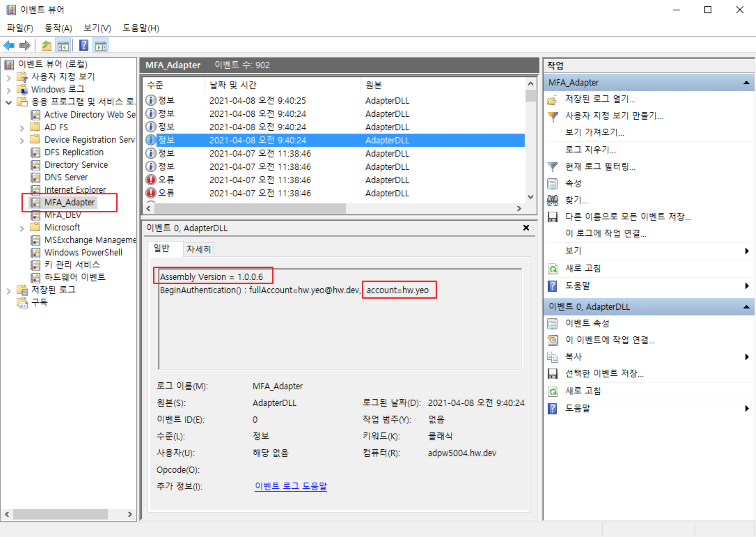
Computer Management (Local) > System Tools > Event Viewer > Application and Service Logs > MFA_Adapter
At the beginning of each account log, the MFA version and account name are displayed → Refer to log analysis/tracing
During operation, focus on monitoring the parts displayed as “Error” or “Warning”
Windows Event Log Description and Handling Method
[#0000] Success
Err.Success
This is not an error, but a simple log.
It's an unnecessary log, and if you see this log, you can ask the developer to delete it.

[#0001] Invalid Arguments
Err.InvalidArguments
Error: This means that an argument is missing when calling a function within the adapter program.
Action: This is a serious error, and it should be immediately reported to the developer for prompt action.
Note
Although the adapter may work without any symptoms, it has the potential for serious errors, so it should not be neglected.

[#1000] Cannot extract account information from identityClaim
Err.IdentityClaimHasNoAccount
Error: When the adapter is executed initially, it receives the current user's information from the AD server, but cannot find the account information.
Action: Check the status of the AD server.
Note
This is not an LDAP query, but an internally processed information flow within ADFS. If this situation occurs, it means that the adapter is in an environment where it cannot function normally.

[#1001] Cannot load INI file
Err.FailToLoadIni
Error: The server cannot read the MFA environment configuration INI file.
Action: Check if the file exists in the following path on the server
C:\ ADFSadapter \ ADFSadapter.ini
Note
If the file exists, check the file properties or permissions.

[#1002] HTML files cannot be loaded.
Err.FailToLoadHtml
Error: The server cannot read the HTML file.
Action: Check if the file exists in the following path on the server.
C:\ ADFSadapter \ Html_*.txt
Note
If the file exists, check the file properties or permissions. If any of them are missing, an error will occur. You can find out what is missing in the server event log.

[#1003] Cannot retrieve user information from LDAP.
Err.FailToLdapSearch
Error: The LDAP server was queried, but the AD user information could not be retrieved.
Action: Check the status of the AD server.
Note
The token configuration requires mobile and email information, but this information failed to be retrieved. If user information exists, even if mobile and email are empty, it will not be treated as an error. Therefore, this error means that the LDAP query itself failed.

[#1004] The BeginAuthentication function's request does not contain URL information.
Err.NoURLInRequest
Error: The BeginAuthentication function's argument request does not contain URL information when the adapter is first executed.
Action: Check if the SingleID MFA API server is sending a normal response.
Note
If there is no URL information, the response sent by the SingleID MFA API server in GET mode cannot be used.

[#1005] Cannot create a JWT token.
Err.FailToMakeJwtToken
Error: The GenerateRequestToken function failed to create a token.
Action: The exact cause can be found in the server event log, and the developer should be asked to analyze the cause.
[#1006] ADFS adapter directory or INI file not found. The [drive]:/ADFSadapter/ADFSadapter.ini file must exist on one of the drives from C to Z.
Err.CannotFindDirOrIni
Error: From adapter version 1.2.0.6, the adapter installation location is not fixed to the C drive, but can be installed on any drive from C to Z, and the adapter scans the drives to determine the installation location. The [drive]:/ADFSadapter/ADFSadapter.ini file must exist.
Action: Check if the adapter is installed correctly on the server, if the directory name and file name are correct, and if drive access is blocked.

[#2000] No account information in TryEndAuthentication().
Err.TryEndHasNoAccount
Error: The authentication process has moved to the TryEndAuthentication stage, but account information is unknown. (Adapter internal error)
Action: Immediately report the situation to the developer and request cause analysis.
Note: This case should never occur and should not occur.

[#2001] No step information.
Err.NoStepInfo
Error: There is no information about the MFA progress stage (step). (Adapter internal error)
Action: Immediately report the situation to the developer and request cause analysis.
Note: This case should never occur and should not occur.

[#2002] Invalid step information.
Err.InvalidStepInfo
Error: The MFA progress stage (step) information is incorrect. (Adapter internal error)
Action: Immediately report the situation to the developer and request cause analysis.
Note: This case should never occur and should not occur.

[#3000] Retrieves the HTML string.
Err.SucceedInGetHtml
This is not an error, but a simple log. It displays the contents of the Html_.txt file read from the server. It helps to check if the adapter reads the file contents correctly after modifying the Html_.txt file contents.
[#3001] Unable to retrieve HTML.
Err.FailToGetHtml
Error: The server is unable to read the Html_*.txt file.
Action: Check if the file exists, has read permission, or is locked.

[#4000] HTML file not found.
Err.HtmlFileNotFound
Error: The server is unable to read the Html_*.txt file.
Action: Check if the file exists.

[#4001] HTML file exists but is empty.
Err.HtmlFileIsEmpty
Error: The server is unable to read the Html_*.txt file.
Action: Check if the file has read permission or is locked.

[#4002] Step not found in HtmlPrefix list.
Err.StepNotInHtmlPrefixList
Error: The adapter has a predefined keyword list for each processing step, and a keyword not in the list was found.
Action: Immediately report the situation to the developer and request cause analysis.
Note: This case should never occur and should not occur.

[#4003] Empty prefix value in HtmlPrefix list.
Err.EmptyPrefixInHtmlPrefixList
Error: The adapter has a predefined keyword list for each processing step, and the list is empty.
Action: Immediately report the situation to the developer and request cause analysis.
Note: This case should never occur and should not occur.
[#5000] Unable to read the ini file.
Err.FailToReadIniFile
Error: Unable to read the INI file.
Action: Check if the file exists at the following path on the server:
C:\ ADFSadapter \ ADFSadapter.ini
Note:
If the file exists, check the file properties or permissions.

[#5001] System name (API_SYSTEMNAME) is not in the ini file.
Err.NoSystemNameInIni
Error: The "API_SYSTEMNAME" setting value is not in the INI file.
Action: Check if anything is missing in the INI file, or if the INI file is an old version.

[#5002] Claim1 (MAIN_CLAIM1) is not in the ini file.
Err.NoClaim1InIni
Error: The "MAIN_CLAIM1" setting value is not in the INI file.
Action: Check if anything is missing in the INI file, or if the INI file is an old version.

[#5003] Claim2 (MAIN_CLAIM2) is not in the ini file.
Err.NoClaim2InIni
Error: The "MAIN_CLAIM2" setting value is not in the INI file.
Action: Check if anything is missing in the INI file, or if the INI file is an old version.

[#5004] The ini file does not exist.
Err.IniFileNotFound
Error: Unable to find the MFA environment configuration INI file on the server.
Action: Check if the file exists at the following path on the server:
C:\ ADFSadapter \ ADFSadapter.ini

[#5005] Failed to add to the ini list using AddToList().
Err.FailToAddIniList
Error: This is an internal adapter error.
Action: Immediately report the situation to the developer and request cause analysis.
Note
This case should never occur and should not occur.

[#5006] No key or value was read from the ini file.
Err.NoKeyValueInIni
Error: The INI file was read, but no key-value combination was set.
Action: Check the contents of the INI file.

[#5007] LDAP server information is not in the ini file. (LDAP_SERVER)
Err.NoLdapServerValueInIni
Error: There is no "LDAP_SERVER" setting value in the INI file.
Action: Check if anything is missing in the INI file, or if the INI file is an old version.

[#5008] MFA API URL is not in the ini file. (MFA_API_URL)
Err.NoMfaApiUrlValueInIni
Error: There is no "MFA_API_URL" setting value in the INI file.
Action: Check if anything is missing in the INI file, or if the INI file is an old version.

[#5009] Consumer Key value is not in the ini file. (CONSUMER_KEY)
Err.NoConsumerKeyValueInIni
Error: There is no "CONSUMER_KEY" setting value in the INI file.
Action: Check if anything is missing in the INI file, or if the INI file is an old version.

[#5010] Secret Key value is not in the ini file. (SECRET_KEY)
Err.NoSecretKeyValueInIni
Error: There is no "SECRET_KEY" setting value in the INI file.
Action: Check if anything is missing in the INI file, or if the INI file is an old version.
[#5011] Cache Attribute value is not in the ini file. (CACHE_ATTRIBUTE)
Err.NoCacheAttributeValueInIni
Error: There is no "CACHE_ATTRIBUTE" setting value in the INI file.
Action: Check if there are any missing values in the INI file, or if the INI file is an old version.

[#5012] Cache Delimeter value is not in the ini file. (CACHE_DELIMETER)
Err.NoCacheDelimeterValueInIni
Error: There is no "CACHE_DELIMETER" setting value in the INI file.
Action: Check if there are any missing values in the INI file, or if the INI file is an old version.

[#5013] Skew Seconds value is not in the ini file. (SKEW_SECONDS)
Err.NoSkewSecondsValueInIni
Error: There is no "SKEW_SECONDS" setting value in the INI file.
Action: Check if there are any missing values in the INI file, or if the INI file is an old version.

[#5014] Token expiration time value is not in the ini file. (TOKEN_EXP_TIME)
Err.NoTokenExpTimeInIni
Error: There is no "TOKEN_EXP_TIME" setting value in the INI file.
Action: Check if there are any missing values in the INI file, or if the INI file is an old version.

[#5015] Cache life time value is not in the ini file. (CACHE_LIFE_TIME)
Err.NoCacheLifeTimeInIni
Error: There is no "CACHE_LIFE_TIME" setting value in the INI file.
Action: Check if there are any missing values in the INI file, or if the INI file is an old version.

[#5016] User information claim list is not in the ini file. (USERINFO_##)
Err.NoUserinfoListInIni
Reserved (This error code is reserved and will be used in the future.)
[#5017] LDAP connection is set to use id/pw (LDAP_USE_IDPW=1), but LDAP id or pw is not in the ini file (LDAP_ID, LDAP_PW)
Err.NoLdapIdPwInIni
Error: LDAP connection is set to use id/pw, but LDAP_ID and LDAP_PW settings are not found in the INI file.
Action: Check if there are any missing settings in the INI file and if the INI file is an old version.

[#6000] An exception occurred while searching for user information in AD (LDAP).
Err.ExceptionInAD
Error: An exception occurred while querying the LDAP server.
Action: Check if the AD server address set in the INI file is correct and check the status of the AD server.
Reference: Provide the detailed exception content in the event log to the developer.

[#6001] Unable to find user information in AD (LDAP).
Err.CannotFindUserInAD
Error: Unable to retrieve AD user information from the LDAP server.
Action: Check the status of the AD server.
Reference: The token configuration requires mobile and email information, but failed to retrieve this information. If user information exists, empty mobile and email values are not treated as errors. Therefore, this error occurs when the LDAP query itself fails.
User Error Message
If an error occurs during the MFA process, an error message is displayed on the user’s PC screen.
The error message is fixed as “Internal error occurred. Contact administrator.” and the error code is displayed on the next line.
Below is an explanation of the error code, its cause, and the measures to take.
※ Refer to the event log of the server’s internal processing procedure, excluding user error messages
ErrorCode : 0001
* Err.IdentityClaimHasNoAccount
* The function call arguments were incorrect
* This error is not shown to the user
+ → If it appears, contact the developer
+ → Check the server event log at this point

ErrorCode : 1000
* Err.IdentityClaimHasNoAccount
* "Cannot extract account information from identityClaim."
* At the initial execution of the adapter, it receives the current user's information from the AD server, but cannot find account information
* Since it's an internally processed information flow within ADFS, rather than querying LDAP,
+ If this situation occurs, consider the adapter unable to function normally
* Check the AD server status first

ErrorCode : 1001
* Err.FailToLoadIni
* The server cannot read the MFA environment configuration INI file
* Check if the file exists at the following path on the server
+ C:\ ADFSadapter \ ADFSadapter.ini
* If the file exists, check its properties or permissions

ErrorCode : 1002
* Err.FailToLoadHtml
* The server cannot read the HTML file
* Check if the file exists at the following path on the server
+ C:\ ADFSadapter \ Html_*.txt
* If the file exists, check the file properties or permissions
* If one or more are missing, an error occurs → You can find out what is missing in the server event log

ErrorCode : 1003
* Err.FailToLdapSearch
* "Failed to retrieve user information from LDAP."
* The LDAP server was queried, but failed to retrieve AD user information
* The token configuration requires mobile and email information, but failed to retrieve this information
* Even if mobile and email are empty values, they are not processed as errors
* So, this error occurred because the LDAP query itself failed

ErrorCode : 1004
* Err.NoURLInRequest
* "There is no URL information in the request of the BeginAuthentication function."
* The request argument of the BeginAuthentication function, which runs at the initial execution of the adapter, has no URL information
* Without URL information, the response sent by the SingleID MFA API server in GET method cannot be used
* You need to check if the SingleID MFA API server is sending the response normally

ErrorCode : 1005
* Err.FailToMakeJwtToken
* "Failed to create a JWT token."
* The GenerateRequestToken function failed to create a token
* The exact cause can be found in the server event log

ErrorCode : 1006
* Err.CannotFindDirOrIni
* "Failed to create a JWT token."
* The ADFSadapter directory or INI file cannot be found
* From adapter version 1.2.0.6, the adapter installation location can be installed in any drive from C to Z, not just the C drive, and
+ Adapter scans C to Z drives to find the installed location
* [drive]:/ADFSadapter/ADFSadapter.ini file must exist
* Check if the adapter is installed correctly on the server and if the directory name and file name are correct
* Check if drive access is blocked

ErrorCode : 2000
* Err.TryEndHasNoAccount
* "No account information in TryEndAuthentication()"
* Moved to the TryEndAuthentication step, but account information is unknown
* This case should never occur (if it occurs, contact the developer)

ErrorCode : 2001
* Err.NoStepInfo
* No MFA step information
* Check the server's event log for detailed information and cause

ErrorCode : 2002
* Err.InvalidStepInfo
* MFA step information is incorrect
* Check the server's event log for detailed information and cause
ADFS Login Page Modification
Editing onload.js
Background
If multiple MFAs are set, the user will see a selection screen like the one below.
In the initial screen display (MFA not yet completed), a selection is required on this screen.
The problem is that after completing the MFA, the selection screen is displayed again, and the user has to perform the selection action again. This can cause user inconvenience, and if a different MFA is selected the second time, it may lead to unintended results.
After completing the MFA, the above selection screen should be automatically submitted when it appears. To achieve this, the existing onload.js file in ADFS needs to be edited. If it’s not a multi-MFA case, editing the onload.js file is not necessary.
File Path
The file exists in the following directory on the AD server:
Directory = C:/default_WebTheme/script
File name = onload.js
File Editing
Add the following script to the end of the file contents:
Note
Do not use copy and paste with the example Script Text below, as multilingual messages may not be input correctly.
Prepare a separate file with the correct Script Text.
The onload.js file must be saved in UTF-8 format.
// ------------------------------------------ SingleID MFA : begin
function singleidMfa() {
var authOptions = document.getElementById('authOptions')
if (authOptions) {
var noticeflag = document.getElementById('mfaGreeting');
var url = document.location.href;
var isToken = url.indexOf('jwtTokenResponse');
if (noticeflag && isToken < 1) {
var browserLang = navigator.language || navigator.userLanguage;
// 다국어 처리
// 한국어
if (lang == 'ko-KR' || lang == 'ko') {
document.getElementById('footerPlaceholder').innerHTML="<h3 style='font-weight: bold;'><br/> <br/> ※ 신규 복합인증솔루션 테스트 중 (13:00~15:00) <br/> 'My Authentication Provider' 메뉴를 이용해주세요. </h3>";
}
// 중국어
else if (lang == "zh" || lang.indexOf("zh-") > -1) {
document.getElementById('footerPlaceholder').innerHTML="<h3 style='font-weight: bold;'><br/> <br/> ※ 正在??新的?合??解?方案 (13:00~15:00) <br/> ?登? 'My Authentication Provider' 菜?。 </h3>";
}
// 베트남어
else if (lang == "vi") {
document.getElementById('footerPlaceholder').innerHTML="<h3 style='font-weight: bold;'><br/> <br/> ※ đang ki?m tra gi?i phap xac th?c k?t h?p m?i (13:00~15:00) <br/> Xin vui long đ?ng nh?p vao trinh đ?n 'My Authentication Provider'. </h3>";
}
// 스페인어
else if (lang == "es" || lang.indexOf("es-") > -1) {
document.getElementById('footerPlaceholder').innerHTML="<h3 style='font-weight: bold;'><br/> <br/> ※ Prueba de una nueva solucion de autenticacion compleja (13:00~15:00) <br/> Inicie sesion en el menu 'My Authentication Provider'. </h3>";
}
// 영어
else {
document.getElementById('footerPlaceholder').innerHTML="<h3 style='font-weight: bold;'><br/> <br/> ※ Testing a new MFA solution (13:00~15:00) <br/> Please use 'My Authentication Provider' menu. </h3>";
}
}
var opt = document.getElementById('optionSelection');
if (opt && isToken > 0) {
opt.value = 'ADFSadapter';
document.forms['options'].submit();
}
}
}
window.addEventListener('load', function () {
singleidMfa();
});
// ------------------------------------------ SingleID MFA : end
Script Function
This applies to the case where authOptions exist among the page controls.
It operates after the page load is completely finished (because an error occurs if it runs before that).
It uses window.addEventListener to add to the load event (same as the window.onload event).
Case 1: If mfaGreeting exists among the controls and jwtTokenResponse does not exist in the URL, it displays a user guide message according to the browser language setting (multilingual).
Case 2: If optionSelection exists among the controls and jwtTokenResponse exists in the URL, it assigns ADFSadapter to optionSelection and forcibly submits the options form.
Precautions when Adding Scripts
To manage without affecting existing scripts and for ease of management, it is safe to put the script at the end.
Applying onload.js
The ADFS Sign-in Page customization is possible by modifying and reflecting the onload.js file.
Note
The command contains a potentially malicious script command, so please note that the command you need to enter is different from the displayed command.
-ON-LOADScriptPath is actually the following command, so please be aware of it to avoid confusion.
Application Method
Current Status Check
PS> Get-AdfsWebConfig ## Check the applied (activated) WebTheme
PS> Get-AdfsWebTheme ## Check the list of created WebThemes
Theme Application
Theme Application Method 1) Create a new theme from the default theme
PS> New-AdfsWebTheme -Name "custom_stg" -SourceName default  ## Create a new WebTheme
PS> Set-AdfsWebTheme -TargetName "custom_stg" -Illustration @{Path="C:\adfs_Login_dev\illustration\image_0624\8.jpg"} -Logo @{Path="C:\adfs_Login_dev\images\logo.png"} -StyleSheet @{Path="C:\adfs_Login_dev\css\style.css"} -ON-LOADScriptPath "C:\adfs_Login_dev\script\ON-LOAD_new.js"  ## Apply a custom js file
Theme Application Method 2) Update from an existing theme
PS> New-AdfsWebTheme -Name "custom_stg" -SourceName [existing theme]  ## Create a new WebTheme
PS > Set-AdfsWebTheme -TargetName "custom_stg" -OnLoadScriptPath "C:\adfs_Login_dev\script\onload_stg.js"  ## Apply a custom js file
Figure. Theme Application
※ Server command capture for theme application methods 1) and 2). The OnLoad command is automatically changed when organizing Confluence, so a capture is attached
PS> Set-AdfsWebConfig -ActiveThemeName "custom_stg" ## Activate the created WebTheme
Only one custom js file can be applied to a single WebTheme
We also inquired with MS, but officially, only one onload.js file can be applied, and the additional methods they provided do not work
“the ON-LOAD.js is an integrated part of the HTML (the last script in the body) which always executes when the ADFS Page is loaded
There can be only one named ON-LOAD.JS per Web theme.

What is possible though is that additional ('external') scripts can be loaded as part of the actual ON-LOAD.js execution

let’s say in a specific part of your ON-LOAD.JS you want to load a bootstap.js which implements additional functionality
you would firstly import that additional JS to the webpage as AdditionalFileResource //it should not be named ON-LOAD.js

eg
Set-AdfsWebTheme -TargetName custom -AdditionalFileResource @{Uri='/adfs/portal/script/bootstrap.js';path="c:\theme\script\bootstrap.js"}

then you implement a loading functionality in the ON-LOAD.js which dynamically loads your additional script as needed”
In other words, as stated in the official documentation, only one ON-LOAD.JS file can be applied to a single ADFS theme page.
However, it is possible to apply an additional file named bootstap.js as AdditionalFileResource to the same page.
Note
WebTheme settings allow additional options
Options can be used to apply illustrations, logos, stylesheets, etc.
When applying multiple Adapters for user selection, the Adapter’s display name can be set to show to the user (browser). By default, the name used when registering the Adapter is displayed.
Before application
The name used when registering the Adapter is displayed to the user (browser)
After application
The Adapter’s display name is shown to the user (browser)
Display names can be set differently for each language
Guide
Three languages (Korean, English, Global) are applied during testing
The Adapter’s display name changes according to the browser’s language settings (chrome://settings/languages, edge://settings/languages)
English (US), English (UK), and other languages starting with ’en-’ are all applied as English settings. If a language other than Korean or English is selected, the global setting is applied
Setup method
ADFS adapter (new adapter name) display name setting
Set to 3 locales: ko (Korean), en (English), and unset (global)
Set-AdfsAuthenticationProviderWebContent -Name "ADFSadapter" -Locale ko -DisplayName "New ADFS Plugin (ko)" -Description "New ADFS Plugin Description (ko)"
Set-AdfsAuthenticationProviderWebContent -Name "ADFSadapter" -locale en -DisplayName "New ADFS Plugin (en)" -Description "New ADFS Plugin Description (en)"
Set-AdfsAuthenticationProviderWebContent -Name "ADFSadapter" -DisplayName "New ADFS Plugin (global)" -Description "New ADFS Plugin Description (global)"
MyAuthenticationProvider (existing adapter name) display name setting
Set to 3 locales: ko (Korean), en (English), and unset (global)
Tools required for adapter management (gacutil.exe)
Tool for registering/deleting adapter DLL in AD FS server’s GAC area
Reference
What is GAC?
Global Assembly Cache abbreviation, a special cache for sharing .NET Assembly across the machine. GAC is located in the Windows directory under the assembly directory.
The Assembly installed in the GAC must be a Strongly-named assembly
The DLL must include the name, Version, Culture, and public key
When the DLL is installed in the GAC, it takes priority at runtime
Multiple versions of the same DLL can coexist even with the same name
Registering/Unregistering Adapter in GAC (using gacutil.exe)
Typically used in cmd, but used in PowerShell for convenience (must be used in the form .\gacutil.exe)
Unregister from GAC → The file C:\ADFSadapter\ADFSadapter.dll is not deleted
PS C:\ADFSadapter> .\gacutil.exe /u ADFSadapter
Check if registered in GAC
PS C:\ADFSadapter> .\gacutil.exe /l ADFSadapter
DLL replacement order in GAC
Delete using gacutil.exe /u
Replace the file C:\ADFSadapter\ADFSadapter.dll
Register using gacutil.exe /if
Registering/Unregistering GAC Assembly in ADFS (PowerShell command)
Register in ADFS
First, check the Version, Culture, and public key information using the gacutil.exe /l option
PS C:\ADFSadapter> .\gacutil.exe /l ADFSadapter
ADFS adapter, Version=1.0.0.0, Culture=neutral, PublicKeyToken=3b3a799d949dc414, processorArchitecture=MSIL
          Use the result string to construct TypeName and register it with AD FS
           (The first part of TypeName is fixed as ADFSadapter.AuthenticationAdapter)

PS C:\ADFSadapter> $typename = "ADFSadapter.AuthenticationAdapter, ADFSadapter, Version=1.0.0.0, Culture=neutral, PublicKeyToken=3b3a799d949dc414, processorArchitecture=MSIL"
PS C:\ADFSadapter> Register-AdfsAuthenticationProvider -TypeName $typename -Name "ADFSadapter" -Verbose
Disable multi-factor authentication method in ADFS management
Unregister-AdfsAuthenticationProvider
Restart ADFS service
Replace DLL in GAC
Register-AdfsAuthenticationProvider
Restart ADFS service
Configure multi-factor authentication method in ADFS management
The above steps 1) to 7) can be automated using the replace_dll.ps1 script file
If MFA function does not work properly
AD account/password authentication not available → This occurs before the MFA step, so it is not related to the Adapter
Adapter registration status check → Check if ADFS MFA Adapter is displayed when running the Get-AdfsAuthenticationProvider command
AD FS setting check → Check if ADFS MFA Adapter is specified in Service > Authentication Method > Multi-factor Authentication Method → Check if Service > Device Registration is set → Check if Access Control Policy is set to require MFA
Adapter execution log check → Log location: Computer Management > System Tools > Event Viewer > Application and Service Logs > MFA_Adapter → Check if there are any logs marked as Error → If there are errors, send the log content to the developer for analysis
2 - Adapter Setup Guide
Adapter Setup Guide
This is a description of the Adapter environment setup file.
You must configure the environment before applying the ADFS Adapter.
Notice
Adapter Installation Location Change
From adapter 1.2.0.6, installation is possible on drives other than the C drive.
Precautions : It can only be installed on one drive, and if it is installed on multiple drives, the first discovered directory is used while scanning from C to Z
The following example is for the case where the adapter is installed in the C:\ADFSadapter directory. If installed on a drive other than C, only the drive name (drive letter) in the example below needs to be changed.
Example: If installed in D:\ADFSadapter, the ini path → D:\ADFSadapter\ADFSadapter.ini
File Name and Path
File Name: ADFSadapter.ini
Full Path: C:\ADFSadapter\ADFSadapter.ini
File Encoding: Must be saved in UTF-8 (Korean characters may be broken if not)
Things to Keep in Mind
* When expressing values, " and " can be used, and spaces can be entered on either side of the = sign.
+ Spaces before and after the Value are trimmed.
+ The following Values are all the same
+ Example 1) MAIN_TITLE = DWP MFA Adapter
+ Example 2) MAIN_TITLE = DWP MFA Adapter
+ Example 3) MAIN_TITLE = "DWP MFA Adapter"
+ Example 4) MAIN_TITLE = " DWP MFA Adapter "

* Some section names have -1033, -1042 appended to the end, which means locale.
+ At least 1033 must exist.
+ Locale number: 1033 (en-us), 1042 (ko)
+ Locale section: MFA-1033, MFA-1042, TXT-1033, TXT-1042, MSG-1033, MSG-1042
Ini File Structure Example
Some values in the example settings below are masked for security purposes, and the actual values are not asterisks
# ADFS MFA Adapter Environment Settings
# Installation Location Changes
#   - Before v1.2.0.6: C:\ADFSadapter\ADFSadapter.ini
#   - From v1.2.0.6: Can be installed on a drive other than C (same location as adapter resource installation)
#     Examples: C:\ADFSadapter\ADFSadapter.ini, D:\ADFSadapter\ADFSadapter.ini, E:\ADFSadapter\ADFSadapter.ini
# Note: The DLL file name is ADFSadapter.dll, which is different from the existing MFAadapter.dll linked to Nexsign


# When expressing values, " and ' can be used, and spaces can be entered on either side of =
# Leading and trailing spaces of the Value are trimmed.
# The following Values are all the same.
# Example 1) MAIN_TITLE=ADFS MFA Adapter
# Example 2) MAIN_TITLE = ADFS MFA Adapter
# Example 3) MAIN_TITLE = "ADFS MFA Adapter"
# Example 4) MAIN_TITLE = "   ADFS MFA Adapter   "


# Section names with -1033, -1042 at the end represent locale
# At least 1033 must exist
# Locale number: 1033 (en-us), 1042 (ko)
# Locale section: MFA-1033, MFA-1042, TXT-1033, TXT-1042, MSG-1033, MSG-1042


# LOG_LEVEL (Windows event log recording criteria)
# 0: Error
# 1: Error + Warning
# 2: Error + Warning + Information + Debug
0 : Do not perform LDAP Search (do not use the information below, such as LDAP_SERVER, LDAP_USE_IDPW, etc. Insert an empty value into the token)
1 : Attempt LDAP Search, but failure is irrelevant (proceed with MFA even if server failure or no information occurs. Insert an empty value into the token)
2 : LDAP Search must be successful and user information must exist (proceed only when user information exists. However, proceed even if the result value is empty)
USE_LDAP_SEARCH=1
LDAP address and ID/PW
LDAP_SERVER can be domain, ipv4, ipv6, etc., and the upper case “LDAP://” must be attached to the front (must be upper case)
Perform DNS Lookup to check the IP address of the LDAP server (LDAP_SERVER) and connect based on the IP address
Even if the LDAP_SERVER value is set to IP (ipv4, ipv6), DNS Lookup is performed, and the IP is returned as is
If DNS Lookup fails, connect using the LDAP_SERVER value as is
0 : Connect to the server using the LDAP_SERVER value as is (do not perform DNS lookup)
1 : Connect to the LDAP server using the IP address confirmed by DNS lookup (use the first IP in the DNS lookup result list)
2 : Confirm the IP address using DNS lookup and use the IP that corresponds to the LDAP_WHITE_IP_## list first (use the LDAP_SERVER if not in the list)
3 : Confirm the IP address using DNS lookup and use the IP that corresponds to the LDAP_WHITE_IP_## list first (do not connect to the LDAP if not in the list)
LDAP_DNS_LOOKUP=1
DNS Lookup result has multiple entries, try to connect to the next IP address if the first one fails
Example: 4 lookup results: 1st IP connection fails -> try 2nd IP & fail -> try 3rd IP & fail -> try 4th IP
LDAP_DNS_IF_FAIL_USE_NEXT=1
List of allowed LDAP server IP addresses to compare with DNS Lookup results (only applicable when LDAP_DNS_LOOKUP = 2 or 3)
In the format of LDAP_WHITE_IP_##, recorded sequentially from 01 to 99
Compare DNS Lookup results with the list in sequence
Record in IPv4 or IPv6 format (if the same server has both IPv4 and IPv6, the one with higher priority in the list is applied)
If the order of DNS Lookup results and White IP list is different, follow the order of White IP list
# Setting Value Description
* **Fixed Value** : It means that the value displayed in the **Setting Value** column of the table below is used as is when installing the ADFS server.
* If you want to add a language other than English and Korean, you can add up to 2 sections.
* MSG-1033, MSG-1042
(Note) If both SECRET_KEY value and list value exist, only SECRET_KEY value is used
DOMAIN_SECRET_KEY_02
kgkWRnLygQhsRgrLVbtKlO6FiLdABupEgoMR8v/ilfJ=
DOMAIN_SECRET_KEY_##
dABupkRnLygQhsrLgWVRbt8vRgkLilLKlO1FioMgfJE=
USE_LDAP_SEARCH
0 or 1 or 2
MFA progress based on LDAP Search result
0 : Do not perform LDAP Search (do not use the information below, such as LDAP_SERVER, LDAP_USE_IDPW, etc. and insert an empty value into the token)
1 : Try LDAP Search, but it doesn’t matter if it fails (proceed with MFA even if server failure, no information, etc. occurs, and insert an empty value into the token)
2 : LDAP Search must be successful and user information must exist (proceed only if user information exists, but proceed even if the result value is empty)
LDAP_SERVER
LDAP://adpw5004.hw.dev
LDAP address that can query AD user information
All three types, domain, ipv4, and ipv6, are possible, and “LDAP://” must be attached to the front
LDAP_USE_IDPW
0 or 1
Whether to use id/pw when accessing LDAP
The adapter operates with system privileges, so it is common to access LDAP without id/pw, but there are cases where it is not
If an AD connection error occurs in the event log in a state where id/pw is not used for connection, it is necessary to set it to use id/pw for connection
If this value is set to 1, LDAP_ID and LDAP_PW values must be set
LDAP_SSLTLS
0 or 1
Whether to use SSL/TLS when connecting to LDAP
Generally, set to use
LDAP_ID
LDAP connection id
LDAP connection id (when LDAP_USE_IDPW=1)
LDAP_PW
LDAP connection pw
LDAP connection pw (when LDAP_USE_IDPW=1)
LDAP_DNS_LOOKUP
0 or 1 or 2 or 3
Whether to perform DNS lookup to check the IP address of the LDAP server (LDAP_SERVER) and connect based on the IP address
0 : Connect to the server with the LDAP_SERVER value as is (do not perform DNS lookup)
1 : Perform DNS lookup to check the IP address and connect to the LDAP server (use the first IP in the DNS lookup result list)
2 : Perform DNS lookup to check the IP address and use the first corresponding IP in the LDAP_WHITE_IP_## list (if not in the list, use LDAP_SERVER)
3 : Perform DNS lookup to check the IP address and use the first corresponding IP in the LDAP_WHITE_IP_## list (if not in the list, do not connect to LDAP)
| | LDAP_DNS_IF_FAIL_USE_NEXT | 0 or 1 | | When there are multiple DNS lookup results, whether to try the next IP address if the connection to the first IP address fails<ul><li> Example: 4 lookup results: 1st IP connection failure -> 2nd IP connection attempt & failure -> 3rd IP connection attempt & failure -> 4th IP connection attempt |
| | LDAP_WHITE_IP_01 | 70.2.180.218 | | List of allowed LDAP server IP addresses to compare with DNS lookup results (only applicable when LDAP_DNS_LOOKUP = 2 or 3)</li></ul><ul><li> In the format of LDAP_WHITE_IP_##, recorded sequentially from 01 to 99</li></ul><ul><li> Compared sequentially with DNS lookup results</li></ul><ul><li> Recorded in IPv4 or IPv6 format (if the same server has both IPv4 and IPv6, the IP in the higher priority list is applied)</li></ul><ul><li> If the order of DNS lookup results and White IP list is different, the order of the White IP list is followed </li></ul>|
| | LDAP_WHITE_IP_02 || |fe80::644b:3c9f:c5ac:ce1c%10 |
| | LDAP_WHITE_IP_## | | | A. : 01 ~ 99<br>White IP address (IPv4 or IPv6) |
| | USERINFO_ENCRYPT | 0 or 1 | | Whether to encrypt user information (e.g., mobile, email, etc.)<ul><li> Target: USERINFO_## list</li></ul><ul><li> Depending on the encryption, the claim name of the token sent to the API server is different</li></ul><ul><li> 0: Not encrypted -> token's claim name is plainMobile, plainEmail</li></ul><ul><li> 1: Encrypted -> token's claim name is mobile, email </li></ul>|
| | USERINFO_01 | mobile;mobile;plainMobile | O | LDAP search user information attribute name and JWT token claim name (3 values are separated by ";")<ul><li> Format: USERINFO_## = attribute; encryptedClaim; plainClaim</li></ul><ul><li> Example: If you read the "mail" attribute from LDAP and use the encrypted value as "email" claim and the plain value as "plainEmail" claim in JWT, then "mail;email;plainEmail"</li></ul> |
| | USERINFO_02 | mail;email;plainEmail | O | |
| | USERINFO_## | | | A. : 01 ~ 99<br>[LDAP attribute name];[encrypted token claim name];[plain token claim name] |
| | KEY_NAME_IN_RESPONSE | jwtTokenResponse | O | Key name used in the result parameter when the MFA API server calls back<ul><li> Example: https://adpw5004.hw.dev/adfs/ls?client-request-id=xxxxxx&pullStatus=0&jwtTokenResponse=yyyyyy</li></ul> |
| | TOKEN_EXP_TIME | 1d | | Value to be added to the exp of the JWT token<ul><li> String in the format of day, hour, minute, second (dhms)<br>1d=86400, 1h=3600, 1m=60</li></ul><ul><li> If dhms is not present, it is considered as seconds</li></ul><ul><li> Example 1: 1d02h38m27s -> 95907 seconds<br>Example 2: 12345 -> 12345 seconds</li></ul> |
| | TOKEN_CLAIM_CLIENT | 0 or 1 | | Whether to add the client claim to the token when calling the API<ul><li> Client: issuer in SAML, client-id in OIDC</li></ul><ul><li> 0: Do not include client in the token</li></ul><ul><li> 1: Include client in the token</li></ul> |
| | MFA_VERIFY_TYPE | 0 or 1 or 2 | | MFA nonce (guid, request-id) verification method<ul><li> 0: Do not verify</li></ul><ul><li> 1: Store and compare the guid created by the adapter in LDAP (verified by the adapter) -> related settings: CACHE_ATTRIBUTE, CACHE_DELIMETER, SKEW_SECONDS, CACHE_LIFE_TIME</li></ul><ul><li> 2: Use the request-id created by the API server and used by the adapter in the call URL (verified by the API server) -> related settings: MFA_VERIFY_URL</li></ul> |
| | MFA_VERIFY_URL | https://stg1-cloud.iam.samsung.net/test/common-api/open/v1.1/mfa/request/status | | MFA result verification URL (server-to-server communication): {request-id} received from the API server is appended to the end of the URL and called -> the adapter checks if the return is 200 (OK) to process the MFA result<ul><li> Do not add "/" at the end of the URL </li></ul>|
| | MFA_VERIFY_SECURE_PROTOCOL | TLS12 or TLS13 | | Secure protocol used for MFA result verification<ul><li> Selectable protocols (case-insensitive): TLS12, TLS13</li></ul><ul><li> (Note) Do not use SSL3, TLS, TLS11 </li></ul>|
| | CACHE_ATTRIBUTE | otherPager | O | Name of the LDAP attribute to store the user's req guid value |
| | CACHE_DELIMETER | ";" | | Delimiter used to combine req + time information when storing in LDAP -> "req;time" |
| | SKEW_SECONDS | 3600 | | Allowed difference in seconds between the time stored in LDAP and the time received in JWT<ul><li> The time when the user logs in to AD, not when the MFA selection screen is displayed (the time is already stored when the MFA selection screen is displayed)</li></ul><ul><li> Not the time it takes for the user to select MFA and enter the passcode</li></ul><ul><li> Therefore, do not set the time too tightly, and about 1 hour is suitable?? (Is there anyone who takes 1 hour to select MFA?) |
| | CACHE_LIFE_TIME | 1d | | Lifetime of the req stored in LDAP -> delete old ones when checking the time at the next access<ul><li> String in the format of day, hour, minute, second (dhms)<br>1d=86400, 1h=3600, 1m=60<br>(If dhms is not present, it is considered as seconds) </li></ul>|
| | BYPASS_ADAPTER | 0 or 283901 | | Whether to bypass the adapter function (0 = normal use, 283901 = disable, other values = normal use)<ul><li> Used in emergency situations where the adapter function needs to be disabled due to MFA issues</li></ul><ul><li> Do not modify it in normal situations -> the normal value is 0</li></ul><ul><li> Note: To disable, you must set the exact value (not just any number other than 0, but the exact number. Be careful of noise) </li></ul>|
|API | API_SYSTEMNAME | SingleID | O | (No effect on MFA function)|
| MSG-1033 | MSG_INTERNAL_ERROR | "Internal error occurred. Contact administrator." | | Message displayed to the user when the authentication process is stopped due to an error (English) |
| MSG-1042 | MSG_INTERNAL_ERROR | "Internal error occurred. Contact administrator." | | Message displayed to the user when the authentication process is stopped due to an error (Korean) <ul><li> If you enter Korean, an error occurs, so please enter it in English. </li></ul> |
|MANAGE | LOG_LEVEL | 0 or 1 or 2 | | Standard for recording in the Windows event log<ul><li> 0 = only error</li></ul><ul><li> 1 = error + warning</li></ul><ul><li> 2 = error + warning + notice, etc. all recorded </li></ul>|
<div class="figure-caption">
Table. Setting value description
</div>