Service Overview
Secured VPN(Virtual Private Network) is a service that securely connects external customer networks and the Samsung Cloud Platform network through an encrypted virtual private network. Authenticated customer networks can safely access the Samsung Cloud Platform at any time via a secure channel.
Features
- Rapid Service Provision: To ensure a secure VPN communication link between the customer’s network and the Samsung Cloud Platform, a dedicated VPN device must be deployed, and we provide installation support services by security specialists during deployment.
- Secure Access: Provides a virtual network tunnel equipped with certified authentication devices and nationally certified encryption modules that have proven performance and reliability, allowing customers to securely connect from their external network to their internal network built on the Samsung Cloud Platform.
- Simple operating environment: We provide network configuration and VPN operation services optimized for the customer’s environment by security experts, offering an operating environment that makes it easier to use VPN services.
Configuration diagram
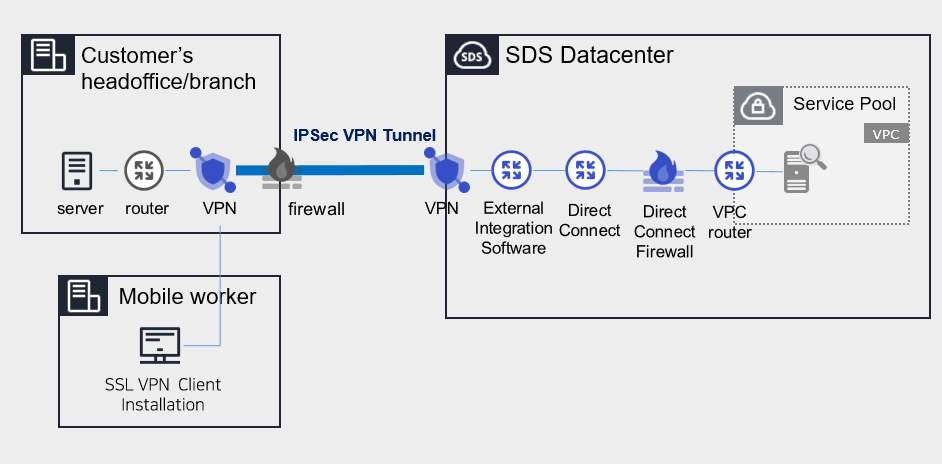
Provided features
We provide the following features.
- IPSec VPN Provision
- Providing IPSec VPN with a nationally certified cryptographic module
- Virtual Private Gateway Creation
- Create a Virtual Private Gateway to connect the cloud internal network with the customer’s network.
- Select traffic bandwidth for bidirectional communication based on network scale
- Create VPN Tunnel
- Ensuring service continuity in the event of a failure by configuring redundant IPsec VPN Gateways.
Component
Secured VPN(Virtual Private Network) provides services composed of Center VPN managed by SDS and Branch VPN installed within the customer’s premises.
Constraints
- The center VPN equipment is a shared device used by many customers, and it cannot be used if its address range overlaps with VPC ranges used by other customers or ranges currently used in Samsung Cloud Platform. Customers who need to use the Secured VPN service should check the available ranges in advance.
- Samsung Cloud Platform usage range: 172.16.0.0/12, 192.168.240.0/20
- Example: Customer A has applied for and is using the 10.0.0.1/24 range; when Customer B newly applies for a Secured VPN, the 10.0.0.1/24 range cannot be used. Verify the available ranges in advance and configure the VPC range accordingly.
Reference
- To verify the available band, contact Console > Support Center > Contact or email mssp.scp@samsung.com.
- After confirming the available address range, SDS performs NAT on the rented branch VPN to change the IP. However, if the branch VPN equipment was purchased directly by the customer, the NAT configuration is handled by the customer.
- The MSP adds the NATed IP to the VPC routing rules in the Samsung Cloud Platform Console.
- Check for cases where the branch VPN and Samsung Cloud Platform IP ranges overlap. If the destination IP range is included in the source IP range, the router will send traffic internally instead of outward, making communication impossible.
- Branch VPN is offered as a rental of SECUI equipment, and a separate fee applies for the equipment lease. If the client already uses VPN equipment, it is necessary to confirm whether non‑SECUI vendor devices are compatible with the center VPN equipment (SECUI).
- For compatibility testing matters other than SECUI equipment, please contact Console > Support Center > Contact Us or via mssp.scp@samsung.com.
Provision status by region
Secured VPN is available in the following environments.
| Region | General (Enter) | Public |
|---|---|---|
| Korea West (kr-west1) | Provided | Not provided |
| Korea East (kr-east1) | Not provided | Not provided |
| South Korea South 1 (kr-south1) | Not provided | Provided |
| South Korea South 2 (kr-south2) | Not provided | Provided |
| South Korea South 3 (kr-south3) | Not provided | Provided |
Table. Secured VPN regional availability status
Preceding Service
This is a list of services that must be pre‑configured before creating a Secured VPN service. Refer to the guides provided for each service for details and prepare them in advance.
- When creating a Direct Connect, create a connection to the target VPC and a DCon-VPN connection.
| Service Category | Service | Detailed description |
|---|---|---|
| Networking | Direct Connect | A service that securely and quickly connects the customer’s network with the Samsung Cloud Platform |
Table. Secured VPN preliminary service
- To use the Secured VPN service, configuration work is required for communication between the customer’s on-premise Office and the customer’s VPC within the Samsung Cloud Platform. Please follow the process below to request an uplink line, including external integration software and VPN configuration, and opening the Direct Connect firewall.
- Application path : Console > Support Center > Service Request
- Service : Networking > Direct Connect
- Task Category : Uplink line request
Reference
Direct Connect creation and Uplink line request must be completed to use the Secured VPN service.