The page has been translated by Gen AI.
Overview
Service Overview
Secured VPN (Virtual Private Network) is a service that securely connects external customer networks and the Samsung Cloud Platform network through an encrypted virtual private network. Authenticated customer networks can securely access the Samsung Cloud Platform at any time via a secure channel.
Features
- Rapid Service Provision: To ensure a secure VPN communication link between the customer’s network and the Samsung Cloud Platform, a dedicated VPN device must be deployed, and during deployment, we provide installation support services by security specialists.
- Secure Access: Provides a virtual network tunnel equipped with certified authentication devices and nationally certified encryption modules that have been verified for performance and stability, allowing customers to safely connect from their external network to the internal network built on the Samsung Cloud Platform.
- Convenient operating environment: Providing network configuration and VPN operation services optimized for the customer’s environment by security experts, we provide an operating environment that enables easier use of VPN services.
Configuration diagram
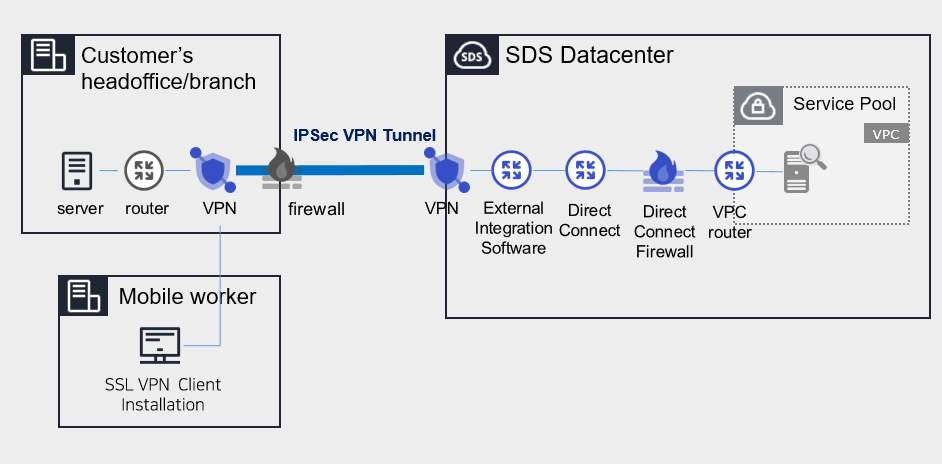
Provided Features
We provide the following features.
- IPSec VPN provision
- IPSec VPN provided with nationally validated cryptographic module
- Virtual Private Gateway creation
- to connect the internal cloud network with the customer’s network, create Virtual Private Gateway
- Select traffic bandwidth for bidirectional communication considering network scale
- VPN Tunnel Creation
- IPsec VPN Gateway Redundant configuration ensures service continuity in case of failure
Components
Secured VPN(Virtual Private Network) is composed of a center VPN managed by SDS and a branch VPN installed within the customer’s internal network, providing services.
Constraints
- The center VPN equipment is a shared device used by many customers, and it cannot be used if it overlaps with VPC ranges used by other client companies or ranges currently used in Samsung Cloud Platform. Customers who need to use the Secured VPN service, please check the available range in advance.
- Samsung Cloud Platform usage range: 172.16.0.0/12, 192.168.240.0/20
- Example: Customer A has applied for and is using the 10.0.0.1/24 range, and when Customer B newly applies for Secured VPN, the 10.0.0.1/24 range cannot be used. Need to check available ranges in advance and configure VPC range accordingly.
Reference
- To check the available band, go to Console > Support Center > Contact or inquire via mssp.scp@samsung.com.
- After checking the available range, SDS changes the IP by processing NAT on the branch VPN (rental). However, if the branch VPN equipment was purchased directly by the customer, the NAT setting is performed by the customer.
- MSP adds the NATed IP to the VPC routing rule in the Samsung Cloud Platform Console.
- Check if the branch VPN and Samsung Cloud Platform IP ranges overlap. If the destination IP range is included in the source IP range, the router will send traffic internally instead of externally, making communication impossible.
- The branch VPN is provided as a rental of SECUI equipment, and a separate cost is incurred when renting the equipment. If the client has VPN equipment in use, it is necessary to verify whether non-SECUI vendor equipment is compatible with the center VPN equipment (SECUI).
- For matters related to compatibility testing other than SECUI equipment, Console > Support Center > Contact Us or contact via mssp.scp@samsung.com.
Provision status by region
Secured VPN is available in the following environment.
| Region | General (Enter) | Public |
|---|---|---|
| Korea West (kr-west1) | Provided | Not provided |
| Korea East (kr-east1) | Not provided | Not provided |
| Korea South1(kr-south1) | Not provided | Provided |
| South Korea 2 (kr-south2) | Not provided | Provided |
| South Korea 3 (kr-south3) | Not provided | Provided |
Table. Secured VPN Provision status by region
Preceding Service
Before creating the Secured VPN service, this is a list of services that must be pre-configured. For details, refer to the guide provided for each service and prepare in advance.
- When creating Direct Connect, create a connection to the target VPC and DCon-VPN.
| Service Category | Service | Detailed Description |
|---|---|---|
| Networking | Direct Connect | A service that safely and quickly connects the customer’s network with Samsung Cloud Platform |
Table. Secured VPN Preliminary Service
- Secured VPN service usage requires configuration work for communication between the customer’s Office (On-premise) and the customer’s VPC within Samsung Cloud Platform. Please follow the process below, including external integration software and VPN settings, Direct Connect firewall opening, etc., to apply for an Uplink line.
- Application path : Console > Support Center > Service request
- Service : Networking > Direct Connect
- Work classification : Uplink line request
Note
Direct Connect creation and Uplink line application must be completed to use Secured VPN service.