The page has been translated by Gen AI.
Secured VPN Build Process Guide
To launch the Secured VPN service, you need to install a branch VPN in the client’s network and then perform an integration check. However, if you have a VPN that you operate directly, the integration check is not required. Refer to the process below to apply for the Secured VPN service.
Caution
Be sure to check the restrictions when using the Secured VPN service.
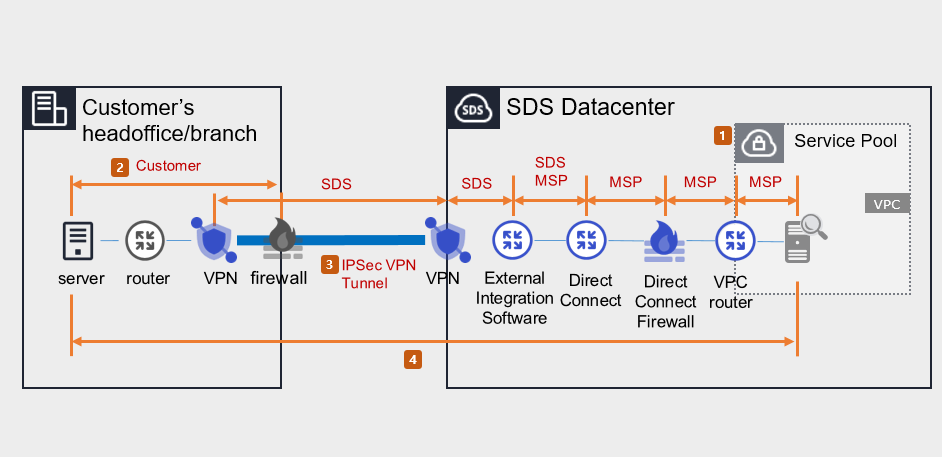
Samsung Cloud Platform Console task (perform MSP)
- Apply for Direct Connect.
- Create a VPC and DCon-VPN connection for the connection target.
- Apply for Uplink line.
- Purpose of request: Configuration work to enable communication between the customer’s Office(On-premise) and the customer’s VPC within the Samsung Cloud Platform.
- Select the application path: Console > Support Center > Service Request.
- Service: Networking > Direct Connect
- Task Category: Uplink line request
- For the construction lead time and Uplink line work schedule, please inquire via Console > Support Center > Contact.
- Set up routing for Firewall, Security Group, Direct Connect, etc.
Routing and firewall configuration (client performed)
- Configure routing between the client’s Office internal network and the branch VPN, and set up the client’s firewall.
- Prior consultation is required for routing and firewall configuration. (SDS → MSP → customer)
- Configure the Samsung Cloud Platform segment and the client Office segment for bidirectional communication.
Installation of client VPN equipment and tunnel activation (MSP/SDS performed)
When installing the customer’s VPM equipment, you can either rent equipment from SDS or use your own equipment. Check the process that applies to your situation.
Case 1) When using the branch VPN device as a SECUI rental device provided by SDS
- Check the specifications, quantity, schedule, and installation location of the leased VPN equipment. (MSP→SDS)
- Please request the preparation of a pre‑installation environment survey for VPN. (SDS → MSP)
- Visit the client site and install the SECUI rental VPN equipment. (SDS)
- Open a tunnel between the branch VPN and the center VPN. (SDS)
Case 2) When using the branch VPN device as the customer’s own equipment
- Check the branch VPN equipment specifications and schedule. (MSP→SDS)
- Request equipment compatibility and IPSec VPN license/equipment setup. (SDS → client/MSP)
- Establish a tunnel between the branch VPN ↔ center VPN. (Customer/SDS)
Reference
- If the client requests a VPN installation work plan, contact via Console > Support Center > Contact or mssp.scp@samsung.com.
- Proceed with the work in compliance with the National Intelligence Service VPN installation guide and security review standards.
End-to-End test (perform MSP/SDS)
- Verify and share the test schedule after installing the branch VPN equipment (or configuring existing equipment). (SDS → MSP)
- Verify communication between the branch VPN device and the VPC (bidirectional).
Caution
Uplink line not requested, customer routing and firewall configuration errors, etc., can cause the End-to-End test to fail.