The page has been translated by Gen AI.
Secured VPN Construction Process Guide
To initiate the Secured VPN service, it is necessary to proceed with the installation of the branch VPN in the customer’s band and then perform the connection inspection work. However, if you have a directly operated VPN, you do not need to perform the connection inspection work. Please refer to the process below to apply for the Secured VPN service.
Caution
When using the Secured VPN service, please check the restrictions.
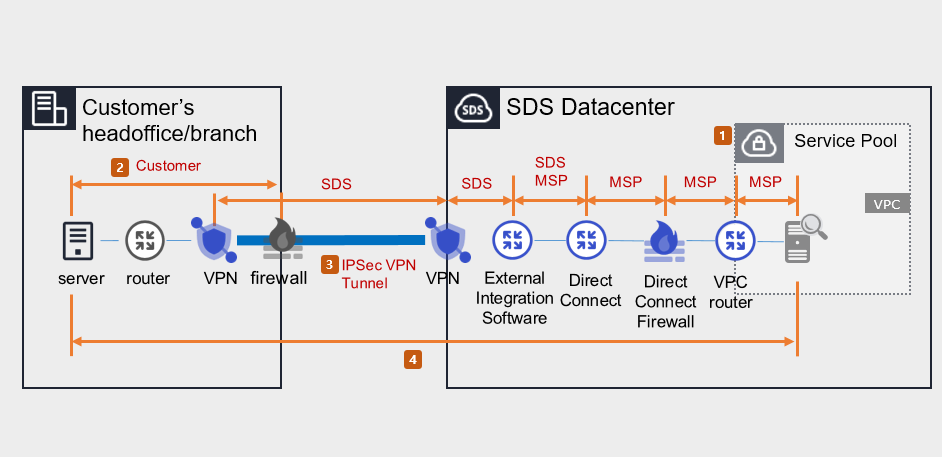
1. Samsung Cloud Platform Console work (MSP performance)
- Apply for Direct Connect.
- Create a connection target VPC and DCon-VPN connection.
- Apply for Uplink line.
- Application purpose: This is a setup work for communication between the customer’s Office (On-premise) and the customer VPC within the Samsung Cloud Platform.
- Application path: Console > Support Center > Service Request should be selected.
- Service: Networking > Direct Connect
- Work classification: Uplink line application
- Please inquire about the construction period and Uplink line work schedule through Console > Support Center > Contact Us.
- Set up routing, such as Firewall, Security Group, Direct Connect, etc.
2. Routing and Firewall Settings (Customer Implementation)
- Set up routing between the customer’s Office internal subnet and branch VPN, and configure the customer’s firewall. Prior consultation is required for routing and firewall settings. (SDS → MSP → Customer Company)
- Set up the Samsung Cloud Platform bandwidth and the customer’s Office bandwidth to allow for two-way communication.
3. Installation of customer’s VPN equipment and tunnel opening (MSP/SDS performance)
When installing VPM equipment for customer companies, you can use SDS equipment for rent or use your own equipment. Please check the process suitable for the situation.
Case 1) Using the branch VPN equipment as SECUI leased equipment provided by SDS
- Check the specifications, quantity, schedule, and installation location of the leased VPN equipment.(MSP→SDS)
- Request to create a pre-installation environment survey for VPN installation.(SDS → MSP)
- Visit the customer’s site and install SECUI leased VPN equipment.(SDS)
- Open a tunnel between the branch VPN and the center VPN.(SDS)
Case 2) When using the branch VPN equipment as the customer’s own equipment
- Check the specifications and schedule of the branch VPN equipment.(MSP→SDS)
- Request equipment compatibility, IPSec VPN license/equipment settings. (SDS → Customer/MSP)
- Open a tunnel between the branch VPN and the center VPN.(Customer/SDS)
Reference
- In case the customer requests a VPN installation work plan, please inquire through Console > Support Center > Contact Us or mssp.scp@samsung.com.
- Please proceed with the work in compliance with the National Intelligence Service VPN installation guide and security review standards.
4. End-to-End test (MSP/SDS execution)
- Check and share the test schedule after installing the branch VPN equipment (or setting up existing equipment) and share it. (SDS → MSP)
- Check the communication between the branch VPN device and VPC (both directions).
Caution
The End-to-End test may fail due to reasons such as not applying for an uplink line, customer routing and firewall setting errors, etc.