This is the multi-page printable view of this section. Click here to print.
Secured Firewall
- 1: Overview
- 2: How-to guides
- 3: Release Note
1 - Overview
Service Overview
Secured Firewall is a next-generation firewall service for cloud network security provided by Samsung Cloud Platform. It manages network access to servers based on IP address/port policies, and supports detailed analysis in the event of a security incident.
Special Features
- Diverse Network Environment Protection: Supports setting robust network security policies to safely protect cloud assets. Detects and blocks based on IP, protocol/port-based ACL policies, providing a secure network communication environment.
- Easy and simple network management: You can easily establish firewall policies, and conveniently create and manage applied rules such as source/destination IP, protocol/port, inbound/outbound, etc.
- Security expert-based firewall policy implementation: We support establishing firewall policies optimized for customers’ systems migrating to the cloud. We provide a service where we receive firewall policy requests from customers to more easily apply security policies in the cloud environment, and security professionals reflect the policies.
- Security Authentication Product-Based Service: You can use firewall services that meet various networks and requirements for internet connectivity and ensure an optimized security environment. This safely protects the internal network from unauthorized access.
Diagram
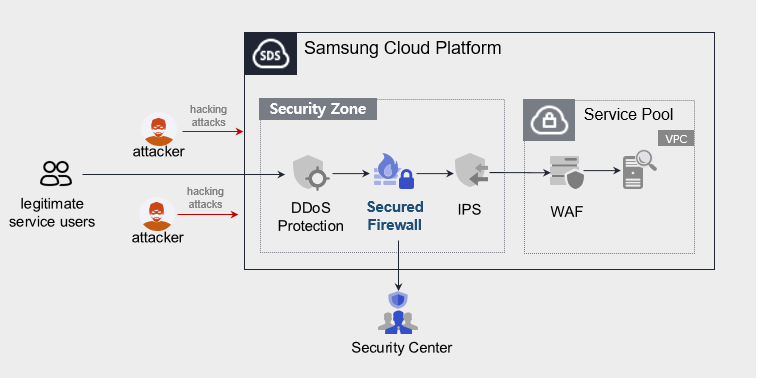
Provided Features
We provide the following features.
- Cloud Optimized Firewall
- Apply domain policy considering cloud environment
- Apply firewall rules and logging
- Monitoring Information Provision
- Monthly report provision
Components
- Secured Firewall provides services based on public IP configured within the VPC.
- We provide services targeting servers that can be accessed via the Internet, and when a user requests a service, we provide it based on the server (Virtual Server) specifications listed in the service application form.
Constraints
- Firewall policy applications cannot be applied for in the Samsung Cloud Platform Console.
- We will send the application form to the email you registered when applying for the service. Please refer to the form to proceed with the firewall application.
- Access control management of the system built inside the Pool (Security Group, etc. firewall policy management) must be performed by the customer directly.
Provision status by region
Secured Firewall is available in the environment below.
| Region | General (Enter) | Public |
|---|---|---|
| Korea West (kr-west1) | Provided | Not provided |
| Korea East (kr-east1) | Not provided | Not provided |
| Korea South 1 (kr-south1) | Not provided | Provided |
| South Korea South2(kr-south2) | Not provided | Provided |
| South Korea South3(kr-south3) | Not provided | Provided |
Preliminary Service
- This is a list of services that must be pre-configured before creating the Secured Firewall service. For details, refer to the guide provided for each service and prepare in advance.
- When creating a VPC’s Internet Gateway, you must select SIGW (Secure Internet Gateway) in the type to be able to use Secured Firewall.
- When creating a VPC’s Internet Gateway, if you select Internet Gateway in the ‘Category’, you cannot use the Secured Firewall service.
- If you change to Secure Internet Gateway, you need to change the public IP you are using.
| Service Category | Service | Detailed Description |
|---|---|---|
| Networking | VPC | Service that protects web applications from web vulnerabilities and attacks |
2 - How-to guides
The user can apply for the service by entering the required information for using the Secured Firewall service through the Samsung Cloud Platform Console.
Secured Firewall Create
You can apply for and use the Secured Firewall service on the Samsung Cloud Platform Console.
Secured Firewall If you want to request service creation, follow the steps below.
All Services > Security > Secured Firewall Click the menu. Navigate to the Service Home page of Secured Firewall.
Click the Secured Firewall Service Request button on the Service Home page. Navigate to the Support Center > Service Request List > Service Request page.
Service Request page, enter or select the relevant information in the required input fields.
- In the work category, select Secured Firewall creation.
Input Item Detailed Description Title Enter the title of the service request content - Example: Secured Firewall service creation request
Region Select the location of Samsung Cloud Platform - Automatically filled with the region corresponding to the Account
Service Select the service category and service. Secured Firewall service request button is pressed, it is entered automatically - Service Category: Security
- Service: Secured Firewall
Task Category Select the type you want to request - Create Secured Firewall: select when requesting a new service
Content Guidance on creating and applying customer basic information - Content to write: End customer/MSP information
Attachment Upload the completed Secured Firewall service application (required) and any additional files you wish to share - Each attached file must be within 5MB, and up to 5 files can be attached
- Only doc, docx, xls, xlsx, ppt, ppts, hwp, txt, pdf, jpg, jpeg, png, gif, tif files can be attached
Table. Secured Firewall service creation request items
- In the work category, select Secured Firewall creation.
After checking the application process and reference information, click the Form Download > Service Request Form Download button to download the Secured Firewall Service Application Form.
Secured Firewall service application form please fill out.
- Refer to the item descriptions in the Application Information and Control Information tabs, and fill out the required items.
Category Details Application Information Fill in required items such as application type, usage period, basic information - Application Type: Select Application
- Usage Period: Desired start date, contract status, expected usage period input
- Basic Information: Account name, Project name, recipient information input
Monitoring Information Write required items such as protected target IP, exception handling IP, etc. (need to specify purpose per IP) - Write application classification per IP
- New: select when applying for a new service
- Public customers do not need to fill out
Table. Secured Firewall Service Creation Application Form Main Contents
- Refer to the item descriptions in the Application Information and Control Information tabs, and fill out the required items.
Attach the completed application form in the attachment area.
On the service request page, click the Request button.
- When the application is completed, check the applied content on the Support Center > Service Request List page.
After the monitoring officer verifies the submitted service request, the process for using the service proceeds.
Secured Firewall service will be launched.
Secured Firewall Cancel
Secured Firewall To request service termination, follow the steps below.
- All Services > Management > Support Center Click the menu. Support Center > Service Home Go to the page.
- Support Center Service Home on the page, click the Service Request button. Navigate to the Service Request List page.
- Service Request List page, click the Service Request button. It navigates to the Service Request page.
- Service Request page, enter or select the relevant information in the required input fields.
- In the work category, select Secured Firewall termination.
Input Item Detailed Description Title Enter the title of the service request content - Example: Secured Firewall service termination request
Region Select the location of Samsung Cloud Platform - Automatically filled with the region corresponding to the Account
Service Select service category and service - Service Category: Security
- Service: Secured Firewall
Task Category Select the type you want to request - Secured Firewall termination: select if you are terminating the service
Content Guidance on creating and applying customer basic information - Content: End customer/MSP information
Attachment Upload the completed Secured Firewall service application (required) and any additional files you wish to share - Each attached file must be within 5 MB, and up to 5 files can be attached
- Only doc, docx, xls, xlsx, ppt, ppts, hwp, txt, pdf, jpg, jpeg, png, gif, tif files can be attached
Table. Table. Secured Firewall service termination request items
- In the work category, select Secured Firewall termination.
- Application Process and Reference Information after checking, click the Form Download > Service Request Form Download button to download the Secured Firewall Service Application Form.
- Secured Firewall Service Application Form please fill out.
- Refer to the item descriptions in the Application Information and Control Information tabs, and fill out the required items.
Category Detailed Content Application Information Fill in required items such as application type, usage period, basic information, etc. - Application type: Select termination
- Usage period: Enter desired termination date
- Basic information: Account name, Project name, Recipient information
Control information When the entire service is terminated, no input is required Table. Secured Firewall Service Termination Application Form Key Contents
- Refer to the item descriptions in the Application Information and Control Information tabs, and fill out the required items.
- Attach the completed application form in the attachment area.
- On the service request page, click the Request button.
- When the application is completed, check the submitted details on the Support Center > Service Request list page.
- After the monitoring staff verifies the submitted service request, the termination process is completed once the monitored IP is deleted.
- Service termination takes 3 business days, including the cancellation request date.