This is the multi-page printable view of this section. Click here to print.
Secrets Manager
- 1: Overview
- 2: How-to guides
- 3: Release Note
1 - Overview
Service Overview
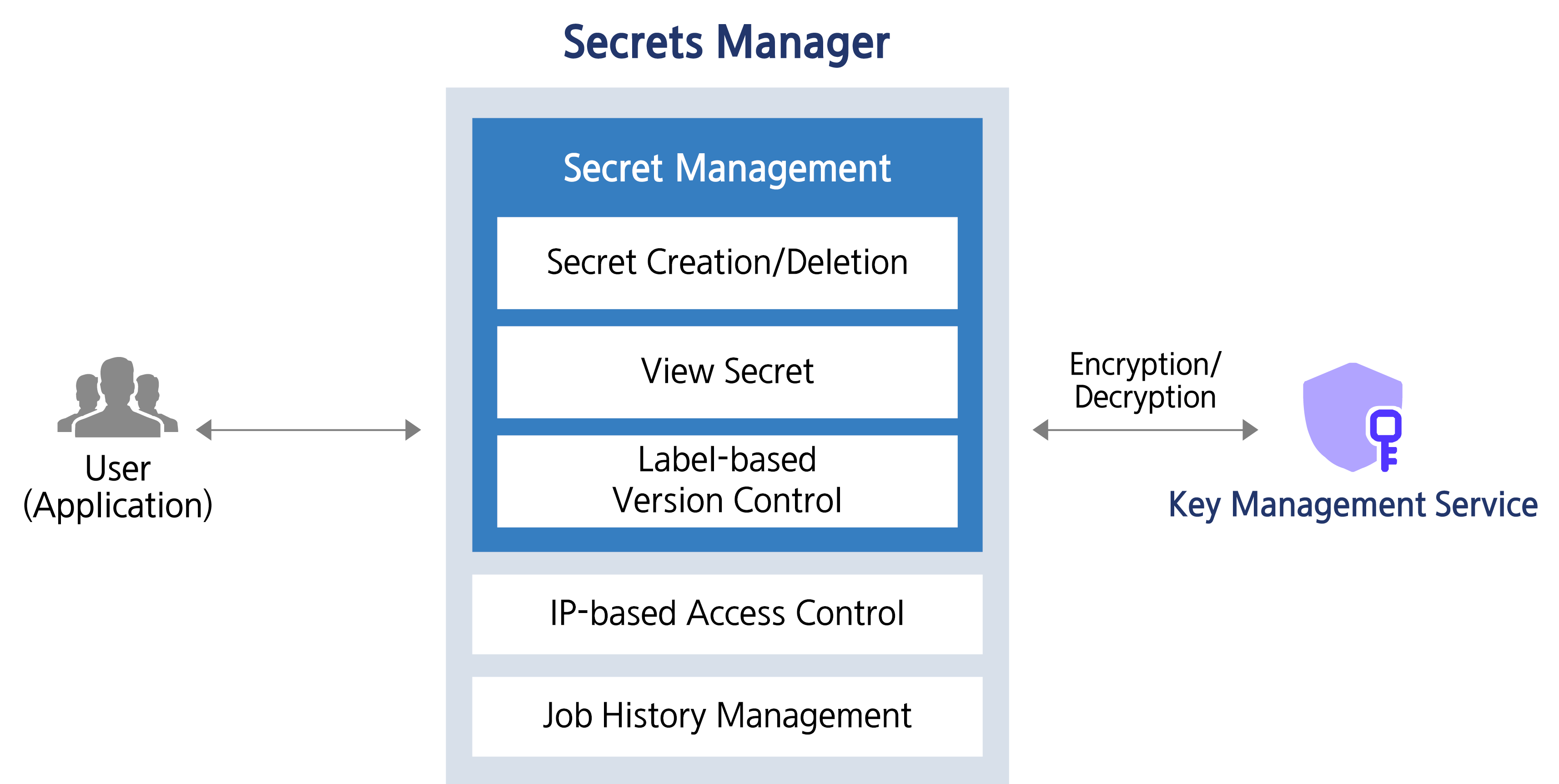
Secrets Manager is a service that encrypts customers’ sensitive information as Secrets (secure information) and stores and manages it safely. It removes hardcoding of important information in application source code, and allows you to call and retrieve Secrets stored safely in a Key-Value format. Secrets are encrypted with user-managed keys in conjunction with Key Management Service and stored securely.
Service Architecture Diagram
Provided Features
Secrets Manager provides the following features.
- Secret creation/deletion: Secrets Manager can create/delete and manage Secrets. Users store security (sensitive) information in Key/Value form in the created Secret.
- Secret lookup: You can view the Secret value based on custom policies and permissions.
- Label-based version control: You can set a label on the version, which is a snapshot of unique data generated each time a Secret is modified, allowing you to manage Secrets more efficiently.
Components
Secret
It stores the logical unit for sensitive (important) information by encrypting security information values in Key/Value form with a KMS key.
- Secret is an object created through the creation of a Secrets Manager product service in the Samsung Cloud Platform Console.
Version
It is a snapshot of unique data that is newly created each time a Secret is modified (the unit that stores the actual value of the Secret).
Label
It is a name tag or label attached to a specific version of a Secret (a pointer for referencing a specific version).
Constraints
Secrets Manager service constraints are as follows. Before use, be sure to check the constraints below and reflect them in your service usage plan.
- Secrets Manager is a regional service, and the created Secret can only be used within that region.
- As of December 2025, Secrets Manager provides only public endpoints via Open API. In the future, we plan to provide private endpoints that can be connected based on Samsung Cloud Platform resources.
| Item | Detailed Description | Quota |
|---|---|---|
| Secret Value Size | Size of encrypted Secret value | 65,536 |
| Secrets | Number of Secrets per region in an Account | 500,000 |
| Attached Labels for Secret | Number of Labels attached to all versions of Secret | 20 |
| Versions per Secret | Number of Secret versions | 100 |
Pre-service
Secrets Manager has no prerequisite service.
2 - How-to guides
The user can enter the required information for the Secrets Manager service through the Samsung Cloud Platform Console, select detailed options, and create the service.
Secrets Manager Create
You can create and use Secrets Manager from the Samsung Cloud Platform Console.
To create a Secrets Manager, follow the steps below.
Click the All Services > Security > Secrets Manager menu. Go to the Service Home page of Secrets Manager.
Click the Secrets Manager Create button on the Service Home page. You will be taken to the Secrets Manager Create page.
Secrets Manager creation 페이지에서 서비스 생성에 필요한 정보들을 입력하고 추가 정보를 입력하세요.
- Enter service information area, input or select the required information.CategoryRequired
Detailed description Secret name Required Enter Secret name Type Required Select the type you want to manage encrypted with Secret from the list Key/Value input Required Enter a pair of Secret information’s Key/Value - + Click to add up to 10
- X Click to delete the entry
Encryption Key Required Select the KMS key to use when encrypting the Secret from the list - Choose a key created in the KMS service from the list. Or click +Create New to create a KMS key
- Only KMS keys for encryption/decryption can be selected. The selectable encryption/decryption KMS key types are encryption/decryption (AES-256), encryption/decryption and signing/verification (RSA-2048), encryption/decryption (ARIA) – three types
- When entering Key/Value, input must be within 64 KB; registration is not allowed if the size exceeds this limit
- For detailed information on creating a KMS key, refer to Create KMS Key
Allowed Access IP Required Enter allowed access IP - After entering the IP address, click the Add button to register up to 10
- Click the Delete All button to remove all IP entries from the list
- You can register the 0.0.0.0/24 - 0.0.0.0/32 range, but it may be vulnerable to security
Description Option Enter additional information for Secret Table. Secrets Manager service information input items - Additional Information Input area, enter or select the required information.
Category RequiredDetailed description Tag Select Add Tag - Up to 50 can be added per resource
- After clicking the Add Tag button, enter or select Key, Value values
Table. Secrets Manager Additional Information Input Items
- Enter service information area, input or select the required information.
Summary Check the detailed information and estimated billing amount generated in the panel, and click the Complete button.
- When creation is complete, check the created resource on the Secrets Manager List page.
Secrets Manager View Detailed Information
Secrets Manager can view and edit the full list of resources and detailed information. Secrets Manager Details page consists of Detail Information, Version, Tag, Operation History tabs.
To view the detailed information of Secrets Manager, follow these steps.
- All Services > Security > Secrets Manager 메뉴를 클릭하세요. Secrets Manager의 Service Home 페이지로 이동합니다.
- Click the Secrets Manager menu on the Service Home page. Navigate to the Secrets Manager List page.
- Click the resource to view detailed information on the Secrets Manager List page. You will be taken to the Secrets Manager Details page.
- Secrets Manager Details At the top of the page, status information and descriptions of additional features are displayed.
Category Detailed description Status Displays the status of Secrets Manager - Active: Available/Active
- To be Terminated: Scheduled for deletion
Service termination Button to cancel the service Table. Secrets Manager status information and additional features
- Secrets Manager Details At the top of the page, status information and descriptions of additional features are displayed.
Detailed Information
On the Secrets Manager List page, you can view the detailed information of the selected resource and, if necessary, edit the information.
Category | Detailed description |
|---|---|
| Service | Service Name |
| Resource Type | Resource Type |
| SRN | Unique resource ID in Samsung Cloud Platform |
| Resource Name | Resource Name |
| Resource ID | Unique resource ID in the service |
| Creator | User who created the service |
| Creation Date/Time | Service Creation Date/Time |
| Editor | User who modified the service |
| Modification Date/Time | Service Modification Date/Time |
| Secret | Name of the generated Secret |
| Secret value | Entered Secret value
|
| Type | Type of the generated Secret |
| Recent search timestamp | Recent search timestamp of the generated Secret |
| Encryption Key | Display the KMS key name selected by the user
|
| Allowed Access IP (CIDR) | Display registered access control IP information
|
| Description | Display additional description for Secret
|
Version
On the Secrets Manager List page, you can use labels to track the version of a selected secret.
Refer to the definition of each item when checking the version information of Secret Manager.
- Secret: Logical unit that stores sensitive (important) information
- Version: A snapshot of unique data generated each time the Secret is modified (the unit that stores the actual value of the Secret)
- Label: name tag or tag attached to a specific version of a Secret (a pointer to reference a specific version)
| Category | Detailed description |
|---|---|
| Version ID | Displays the ID of the current version, previous version, and the version with a custom label (Custom Label) set
|
| Label | Secret version display
|
| Last Access Time | Secret’s Recent Access Time |
| Creation Time | Secret’s creation time |
The constraints when using the Secret version are as follows.
- Up to 100 versions can be stored per Secret. If the number of versions exceeds 100, regardless of whether a custom label is set, the oldest versions will be deleted.
- For important versions with custom labels, create a new Secret before the version is deleted due to quota exceedance, and configure the running application to reference the new Secret.
Tag
Secrets Manager List page allows you to view the tag information of the selected resource, and you can add, modify, or delete it.
| Category | Detailed description |
|---|---|
| Tag List | Tag List
|
Work History
You can view the operation history of the selected resource on the Secrets Manager list page.
| Category | Detailed description |
|---|---|
| Work Details | Work Execution Content |
| Work Date/Time | Task Execution Date/Time |
| Resource Type | Resource Type |
| Resource Name | Resource Name |
| Work Result | Task Execution Result (Success/Failure) |
| Operator Information | Information of the user who performed the work |
Secrets Manager Cancel
You can cancel the unused Secrets Manager.
To cancel Secrets Manager, follow the steps below.
- All Services > Security > Secrets Manager 메뉴를 클릭하세요. Secrets Manager의 Service Home 페이지로 이동합니다.
- Click the Secrets Manager menu on the Service Home page. Go to the Secrets Manager List page.
- Click the resource to view detailed information on the Secrets Manager list page. It navigates to the Secrets Manager details page.
- Click the Cancel Service button on the Secrets Manager Details page. You will be taken to the Cancel Service popup.
- Service termination in the popup window, enter the cancellation waiting period and click the Confirm button.
- The termination waiting period can be entered within the range of 7 - 30 days.
- After termination is complete, check on the Secrets Manager List page whether the resource has been terminated.
3 - Release Note
Secrets Manager
- We have launched a service that encrypts customers’ sensitive information in the form of Secret (secure information) and safely stores and manages it.
- You can remove hardcoding of security information in the application source code and call the securely stored Secret to retrieve it.