Service Overview
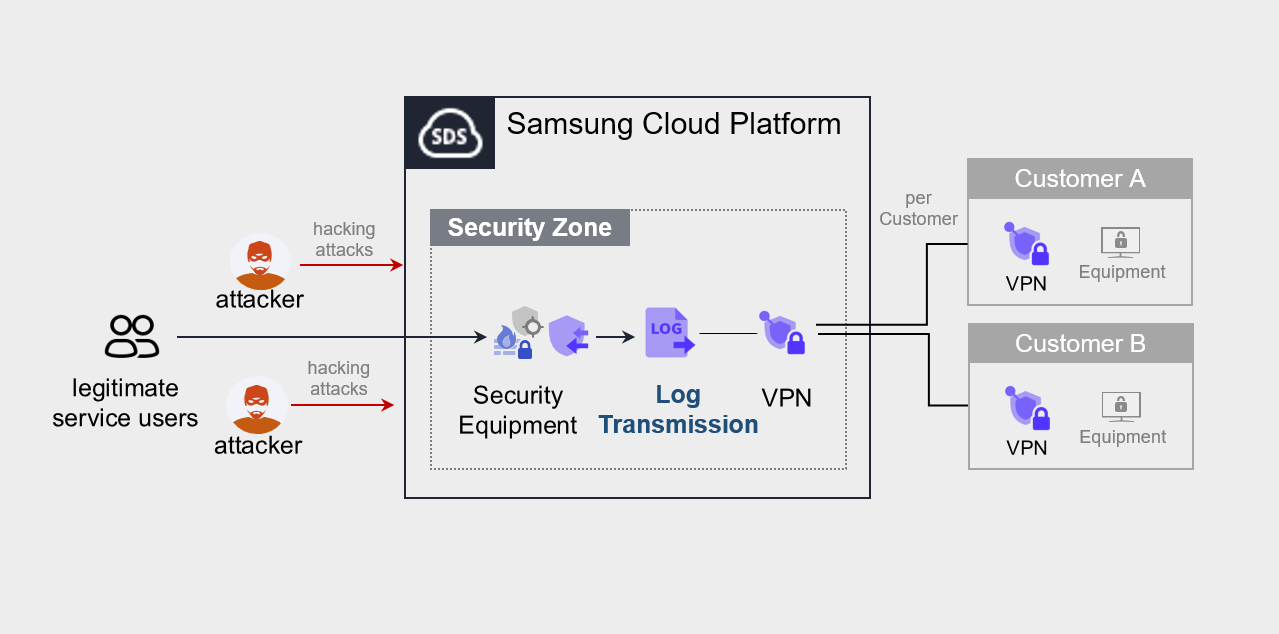
Log Transmission is a service that collects and stores logs in real time from firewalls, IPS, and DDoS security devices, and transmits them to the areas required by the customer. It provides a foundation for performing security monitoring in the user domain using those logs.
Features
- Security Event Log Collection/Transmission: Collect and store logs in real time from security devices, and transmit security events.
- Safe log storage/transfer: Log data can be stored securely, and backup and recovery are possible when needed. Collected logs are safely kept in a redundant storage, and data is transmitted using VPN services, etc. Sending securely.
Configuration diagram
Provided features
We provide the following features.
- Integration of various security log sources
- Real-time log collection from various log sources such as firewalls, IPS, and DDoS security devices.
- Log Filtering and Processing
- Filter out unnecessary logs or extract only the logs requested by the customer.
Component
Log Transmission sends service log sources from the Samsung Cloud Platform to the equipment or system desired by the customer.
- The service runs by connecting via VPN to the customer’s office (server room) where the device that receives the log source is located.
Constraints
To use Log Transmission, please check the following items in advance.
- We collect and transmit logs for Security products offered by the Samsung Cloud Platform.
- To send logs, you must be connected via VPN to the device that receives the logs.
Provision status by region
Log Transmission is available in the environments below.
| Region | Provision status |
|---|---|
| Korea West (kr-west1) | Not provided |
| Korea East (kr-east1) | Not provided |
| South Korea South 1 (kr-south1) | Provided |
| South Korea South 2 (kr-south2) | Provided |
| South Korea South 3 (kr-south3) | Provided |
Table. Log Transmission regional availability status
Preceding Service
This is a list of services that must be pre-configured before creating the Log Transmission service. Refer to the guide provided for each service to prepare in advance.
| Service Category | Service | Detailed description |
|---|---|---|
| Networking | Direct Connect | A service that securely and quickly connects the customer’s network to the Samsung Cloud Platform |
Table. Secured VPN preliminary service
- When running Log Transmission, you must select the service to which logs will be sent. Once the log transmission service target is determined, a VPN connection is required for secure log transmission.
- To use the Log Transmission service, configuration work is required for communication between the customer’s Office (on‑premise) and the customer’s VPC within the Samsung Cloud Platform. Please follow the process below to request an uplink line, including external integration software and VPN settings, Direct Connect firewall opening, etc.
- Create a Direct Connect service.
- Create a connection between the customer’s VPC and DCon-VPN.
- Apply for an uplink line for communication between the customer’s on‑premise environment and the VPC.
- Application path: Support Center > Service Request List > Service Request
- Select service: Networking > Direct Connect
- Task Category: Uplink line request
- Configure routing for the VPN path.
- Set up the required routing information such as Firewall, Security Group, Direct Connect, etc.
Reference
Direct Connect creation and Uplink line request must be completed to use the Log Transmission service.