This is the multi-page printable view of this section. Click here to print.
Log Transmission
- 1: Overview
- 2: How-to guides
- 3: Release Note
1 - Overview
Service Overview
Log Transmission collects and stores logs in real time from firewalls, IPS, DDoS security devices, and transmits them to the area needed by the customer as a service. It provides a foundation for performing security monitoring of the user area using those logs.
Features
- Security event log collection/transmission: Collect/store logs from security devices in real time and transmit security events.
- Secure Log Storage/Transmission: Log data can be stored securely, and backup and recovery are possible when needed. Collected logs are safely stored in a redundant storage, and data is utilized using VPN services, etc. Sending safely.
Diagram
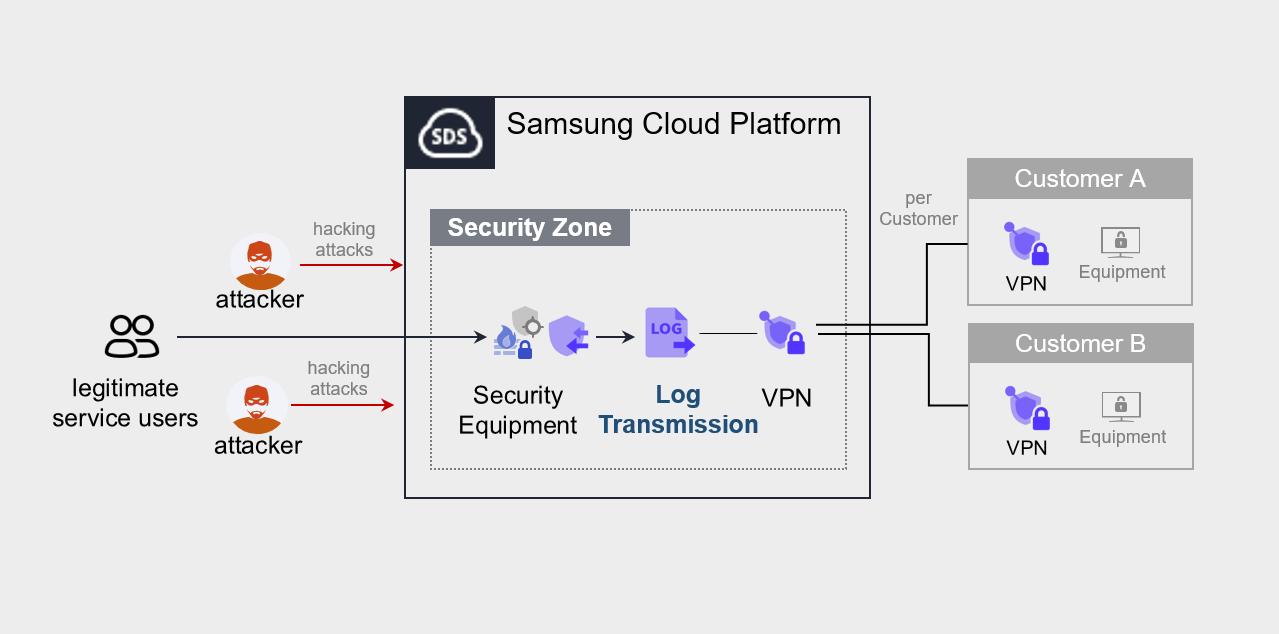
Provided Features
We provide the following features.
- Various security log source integration
- Real-time log collection from various log sources such as firewalls, IPS, DDoS security devices, etc.
- Log filtering and processing
- Filter out unnecessary logs or extract only the logs requested by the customer
Components
Log Transmission sends service log sources from Samsung Cloud Platform to the equipment or system desired by the customer.
- The service runs by connecting via VPN to the customer’s office (server room) where the device that receives the log source is located.
Constraints
To use Log Transmission, please check the following items in advance.
- Collect and send logs targeting Security products provided by Samsung Cloud Platform.
- To send logs, you must be connected via VPN to the device that will receive the logs.
Region-wise Provision Status
Log Transmission is available in the environment below.
| Region | Availability |
|---|---|
| Korea West (kr-west1) | Provided |
| Korea East (kr-east1) | Not provided |
| South Korea South1(kr-south1) | Not provided |
| South Korea South2(kr-south2) | Not provided |
| South Korea 3 (kr-south3) | Not provided |
Preliminary Service
This is a list of services that must be pre-configured before creating the Log Transmission service. For details, refer to the guide provided for each service and prepare in advance.
| Service Category | Service | Detailed Description |
|---|---|---|
| Networking | Direct Connect | A service that safely and quickly connects the customer’s network with Samsung Cloud Platform. |
| Security | DDoS Protection | Large-scale network traffic attack detection and response service |
| Security | IPS | A service that detects and responds to intrusions on websites and application servers in real time. |
| Security | Secured Firewall | Next-generation firewall service that meets high security requirement levels |
- Log Transmission when executed, you must select the service to which logs should be sent. When the log transmission service target is determined, a VPN connection is required for secure log transmission.
- Log Transmission service usage requires configuration work for communication between the client company’s Office (On-premise) and the client VPC within Samsung Cloud Platform. Please follow the process below, such as external integration software and VPN settings, Direct Connect firewall opening, to apply for an uplink line.
- Direct Connect Create the service.
- Create a connection between the client company’s VPC and DCon-VPN.
- Apply for an uplink line for communication between the client company’s on-premise and VPC.
- Application path: Support Center > Service Request List > Service Request
- Select Service: Networking > Direct Connect
- Task type: Uplink line request
- Proceed with the routing configuration of the VPN path.
- Firewall, Security Group, Direct Connect etc. configure the necessary routing information.
2 - How-to guides
The user can create the service by entering the required information for using the Log Transmission service through the Samsung Cloud Platform Console.
Log Transmission Create
You can apply for and use the Log Transmission service from the Samsung Cloud Platform Console.
To request the creation of the Log Transmission service, follow the steps below.
All Services > Security > Log Transmission Click the menu. Navigate to Log Transmission’s Service Home page.
Click the Log Transmission Service Request button on the Service Home page. Navigate to the Support Center > Service Request List > Service Request page.
Service Request page, enter or select the relevant information in the required input fields.
- In the work classification, select Create Log Transmission.
Input Item Detailed Description Title Enter the title of the service request content - Example: Log Transmission Service Creation Request
Region Select the location of Samsung Cloud Platform - Automatically filled with the region corresponding to the Account
Service Select the service category and service. Log Transmission service request button is pressed, it is entered automatically - Service Category: Security
- Service: Log Transmission
Task Classification Select the type you want to request - Create Log Transmission: select when requesting a new service
Content Guidance on creating and applying basic customer information - Content to write: End customer/MSP information
Attachment Upload the completed Log Transmission service application form (required) and any additional files you wish to share - Each attached file must be within 5MB, and up to 5 files can be attached
- Only doc, docx, xls, xlsx, ppt, ppts, hwp, txt, pdf, jpg, jpeg, png, gif, tif files can be attached
Table. Log Transmission Service Creation Request Items
- In the work classification, select Create Log Transmission.
After checking the application process and reference information, click the Form Download > Service Request Form Download button to download the Log Transmission Service Application Form.
Log Transmission service application form please fill out.
- Refer to the item descriptions in the Application Information and Control Information tabs, and fill out the required items.
Category Detailed Content Application Information Write required items such as application type, usage period, recipient information, etc. - Application type: select application
- Usage period: enter desired start date
- Basic information: enter Account name, Project name, recipient information
Monitoring Information Write required items such as log transmission target, client company usage IP (range), etc. - Write all items except special cases
Table. Main contents of Log Transmission service creation application form
- Refer to the item descriptions in the Application Information and Control Information tabs, and fill out the required items.
Attach the completed application form in the attachment area.
On the service request page, click the Request button.
- When the application is completed, check the applied content on the Support Center > Service Request List page.
After the monitoring officer verifies the submitted service request, the process for using the service proceeds.
Log Transmission service will be launched.
Log Transmission Check detailed information
Log Transmission service proceeds with procedures after applying through SR. Unlike other services, Log Transmission detailed information cannot be viewed in the Console.
- To view detailed information, click the Support Center > Inquiry List page’s Inquiry button. On the Inquiry page, you can write and submit your questions.
Log Transmission Cancel
To request cancellation of the Log Transmission service, follow the steps below.
- All Services > Management > Support Center Click the menu. Support Center > Service Home Navigate to the page.
- Support Center Service Home on the page, click the Service Request button. Navigate to the Service Request List page.
- Service Request List page, click the Service Request button. Service Request page will be opened.
- Service Request on the page, enter or select the relevant information in the required input fields.
- In the work classification, select Log Transmission cancellation.
Input Item Detailed Description Title Enter the title of the service request content - Example: Log Transmission Service Termination Request
Region Select the location of Samsung Cloud Platform - Automatically filled with the region corresponding to the Account
Service Select service category and service - Service Category: Security
- Service: Log Transmission
Task Classification Select the type you want to request - Log Transmission termination: select if you are terminating the service
Content Guidance on creating and applying basic customer information - Content to write: End customer/MSP information
Attachment Upload the completed Log Transmission service application form (required) and any additional files you wish to share - Each attached file can be up to 5 MB, with a maximum of 5 files
- Only doc, docx, xls, xlsx, ppt, ppts, hwp, txt, pdf, jpg, jpeg, png, gif, tif files can be attached
Table. Table. Log Transmission Service Termination Request Items
- In the work classification, select Log Transmission cancellation.
- After checking the Application Process and Reference Information, click the Form Download > Service Request Form Download button to download the Log Transmission Service Application Form.
- Log Transmission service application form please fill out.
- Refer to the item descriptions in the Application Information and Control Information tabs, and fill out the required items.
Category Details Application Information Fill in required items such as application type, usage period, recipient information, etc. - Application Type: Select Application
- Usage Period: Enter desired service termination date
- Basic Information: Enter Account name, Project name, recipient information
- Usage amount does not need to be filled
Control Information Write required items such as log transmission target, client company usage IP (range) etc. - Write all items except special cases
Table. Log Transmission Service Termination Application Form Main Contents
- Refer to the item descriptions in the Application Information and Control Information tabs, and fill out the required items.
- Attach the completed application form in the attachment area.
- On the service request page, click the Request button.
- When the application is completed, check the submitted details on the Support Center > Service Request list page.
- After the monitoring officer confirms the submitted service request, if the log transmission target and the customer’s used IP (range) are deleted, the termination process is completed.
- Service termination takes 2-3 business days, including the cancellation request date.