This is the multi-page printable view of this section. Click here to print.
Key Management Service
1 - Overview
Service Overview
Key Management Service(KMS) is a service that easily creates encryption keys and securely stores/manages them to safely protect an application’s critical data. Users encrypt and decrypt data using an encryption key, which is securely managed through a centrally controlled hierarchical encryption key system.
Provided features
Key Management Service provides the following features.
- Key Management: KMS can create/delete and manage customer-managed keys. * The user directly creates a data key that encrypts data using the master key generated by KMS.
- Key Permission Management: You can control and manage usage permissions for master keys based on custom policy.
- Key Lifecycle Management: Through key rotation, you can generate new encrypted data for the master key without creating a new key, and the key rotation interval can be set according to customer policy. * Through lifecycle management, encryption keys that are no longer used are deactivated or deleted, safely protecting data from cryptographic threats.
- Platform-managed key: When another product within the Samsung Cloud Platform encrypts using a KMS key, the CSP (Cloud Service Provider) generates a platform-managed key and performs encryption, so the user does not need to create a key directly in KMS.
Components
master key
Master key is used to generate data keys for encrypting data, and depending on the purpose, can generate symmetric key (encryption/decryption (AES), generation/verification (HMAC)) and asymmetric key (encryption/decryption and signing/verification (RSA), signing/verification (ECDSA)). By properly managing the master key to encrypt data keys, you can protect frequently used data keys during operation.
- The master key is a key generated through the creation of a KMS product service in the Samsung Cloud Platform Console.
Data key
The data key is used to encrypt the actual data and is generated for each target service that performs encryption. Through this, even if a single data key is leaked, it does not affect services encrypted with other data keys.
HSM (hardware security module)
Stores the root key of the KMS system domain. The master key is generated using the root key stored in an HSM (Hardware Security Module) that complies with the FIPS 140-2 Lv3 standard, and is securely distributed and stored in the KMS for protection.
Constraints
The Key Management Service of Samsung Cloud Platform limits the number of key creation and rotation as follows.
| Item | Detailed description | Quota |
|---|---|---|
| KMS Key | Number of KMS Keys created per region | 10000 |
| KMS Validation Password Key | Number of public authentication algorithm keys that can be generated per account | 100 |
When rotating a customer-managed key, the key’s version is changed internally. By using a newly generated version key, you can decrypt information encrypted with the previous version’s key to maintain compatibility.
- Versions changed by key rotation are compatible up to version 100, regardless of the encryption algorithm.
- KMS keys created as a regional service can be used only within that region.
- The restrictions on the public authentication algorithm key apply only to the KR SOUTH region.
Preceding service
Key Management Service has no prerequisite services.
2 - How-to guides
Users can create the service by entering the required information for the Key Management Service through the Samsung Cloud Platform Console and selecting detailed options.
Key Management Service provides the following two key services.
- Customer-managed key: To securely protect important application data, users can generate and manage encryption keys themselves.
- Platform-managed key: Since CSP(Cloud Service Provider) creates and manages it directly, users cannot change or delete the key’s properties.
Create a customer-managed key
You can create and use a customer-managed key in the Samsung Cloud Platform Console.
To create a customer-managed key, follow these steps.
All Services > Security > Key Management ServiceClick the menu. 1. Go to the Service Home page of Key Management Service.
On the Service Home page, click the Create Customer Managed Key button. 2. Go to the Customer Managed Key Creation page.
On the Customer Managed Key Creation page, enter the information required to create the service and provide additional details.
- Enter or select the required information in the Service Information Input area.Categoryrequired status
Detailed description Key name Required Enter key name Public authentication algorithm Selection Use When selected, you can generate encryption keys that comply with public encryption standards - The public authentication algorithm option is available only in the KR SOUTH region
- The public authentication algorithm provides the ARIA algorithm, which has passed security verification through Korea’s cryptographic module validation program
Purpose Required Select the key purpose and encryption method - If you do not select the use of public authentication algorithms, choose among encryption/decryption (AES-256), encryption/decryption and signing/verification (RSA-2048), signing/verification (ECDSA), and generation/verification (HMAC)
Auto rotation Selection Select whether to enable automatic key rotation - If Use is selected, the internal algorithm of the generated key is converted to a different value and applied at each configured rotation interval
- The rotation interval can be set to a value between 1 and 730 days. If the rotation interval is not specified, it defaults to 90 days
Public access control Required Enter the IP range to allow access - After entering the IP range to use, click the Add button
- You must enter at least one, and up to a maximum of 10 can be entered
- /24 - /32 ranges can be used, but may be vulnerable to security risks
- Click Delete All in the IP list to remove all registered entries
Private access control Selection Select the resource to allow access - Use select, then click the Add button to select the resource to use
- Click Delete in the resource list to remove the registered item
- If private access control is not set, you cannot access any private resources
Explanation Selection Enter additional information for the key Table. Customer Managed Key Service Information Input Items - In the Additional Information Input area, enter or select the required information.
Category required statusDetailed description tag Selection Add Tag - Up to 50 per resource can be added
- Add Tag After clicking the Add Tag button, enter or select Key, Value values
Table. Customer-managed key additional information input fields
- Enter or select the required information in the Service Information Input area.
Summary Check the detailed information and estimated charges generated in the panel, and click the Create button.
- Once creation is complete, check the created resource on the Customer Managed Key List page.
Check detailed information of customer-managed key
You can view and edit the full resource list and detailed information of customer-managed keys. Customer Managed Key Details page consists of Details, Tags, Activity Log tabs.
If the status of the customer-managed key service is Creating, the service is being created, so you cannot navigate to the detail page.
- If it remains in the Creating state after a certain amount of time, delete the key and recreate it.
To view detailed information about the Key Management Service, follow these steps.
- Click the All Services > Security > Key Management Service menu. 1. Go to the Service Home page of Key Management Service.
- On the Service Home page, click the Customer Managed Key menu. 2. Navigate to the Customer Managed Key List page.
- On the Customer Managed Key List page, click the resource to view its details. 3. Go to the Customer Managed Key Details page.
- Customer Managed Key Details The top of the page displays status information and descriptions of additional features.
Category Detailed description status Displays the status of a customer-managed key - Active: available/activated
- Stop: stopped/disabled
- To be terminated: scheduled for deletion
- Creating: creating/creation error (immediate retry possible)
Key rotation Button to manually rotate the generated key Key Deactivation Button to deactivate the generated key Service cancellation Button to terminate the service - When the status is To be terminated, display the Cancel termination button
Table. Customer-managed key status information and additional features
- Customer Managed Key Details The top of the page displays status information and descriptions of additional features.
Detailed Information
Customer Managed Key List page allows you to view detailed information of the selected resource and edit the information if necessary.
Category | Detailed description |
|---|---|
| service | Service Name |
| Resource Type | Resource Type |
| SRN | Unique resource ID in Samsung Cloud Platform |
| Resource Name | Resource Name |
| Resource ID | 서비스에서의 고유 자원 ID |
| 생성자 | 서비스를 생성한 사용자 |
| 생성 일시 | 서비스를 생성한 일시 |
| 키명 | 생성된 키의 이름 |
| 공공 인증 알고리즘 | 공공 인증 알고리즘 사용 여부 |
| 용도 | 암/복호화 및 서명/검증 같은 키의 용도 및 암호화 방식 |
| 현재 버전 | 생성된 키의 현재 버전
|
| 자동 회전 | 키의 자동 회전 사용 여부
|
| 다음 회전일 | 회전 주기에 따른 키의 다음 회전일 표시
|
| 회전 주기 | 자동 회전 사용 시 회전 주기 기간 |
| URL | 퍼블릭/프라이빗 접속 URL 주소
|
| 퍼블릭 접근 제어 | 퍼블릭 접근 허용 IP 주소
|
| 프라이빗 접근 제어 | 프라이빗 접근 허용 리소스
|
| 설명 | 키에 대한 추가 설명 표시
|
Tag
On the Customer Managed Key List page, you can view the tag information of the selected resource and add, modify, or delete it.
| 구분 | 상세 설명 |
|---|---|
| 태그 목록 | 태그 목록
|
Job History
On the Customer Managed Key List page, you can view the operation history of the selected resource.
| 구분 | 상세 설명 |
|---|---|
| 작업 내역 | 작업 수행 내용
|
| 작업 일시 | 작업 수행 일시 |
| 자원 유형 | 자원 유형 |
| 자원명 | 자원 이름 |
| 작업 결과 | 작업 수행 결과(성공/실패) |
| 작업자 정보 | 작업을 수행한 사용자 정보 |
Managing Customer-Managed Keys
You can create a new version of a registered key or change its usage status.
Configure customer-managed key rotation
Key rotation is a feature that transforms the internal algorithm of a generated key into a different value.
- When rotating the key, only the master key value changes, and the ciphertext and plaintext values of previously generated data keys remain unchanged.
- Even if key rotation is performed, the master key retains the previous version’s data, so decryption using the master key is unaffected, and the value of the data key in use also remains unchanged.
- However, when wrapping with a changed master key (decrypting and then re‑encrypting), calling the rewrapData API will trigger the key rotation function.
- When rotating a customer-managed key, the key’s version is changed internally. * By using a newly generated version key, you can decrypt data encrypted with the previous version’s key, preserving compatibility.
- Versions changed by key rotation are compatible up to the 100th version, regardless of the encryption algorithm.
To create a new version of a customer-managed key (key rotation), follow these steps.
- Click the All Services > Security > Key Management Service menu. 1. Go to the Service Home page of Key Management Service.
- On the Service Home page, click the Customer Managed Key menu. 2. Navigate to the Customer Managed Key List page.
- On the Customer Managed Key List page, click the resource to view detailed information. 3. Navigate to the Customer Managed Key Details page.
- On the Customer Managed Key Details page, click the Key Rotation button. 4. Key Rotation Navigate to the notification window.
- In the Key rotation notification dialog, click the Confirm button.
Configure Customer-Managed Key Activation
You can configure the usage of the selected key.
To set the activation/deactivation status of a customer-managed key you created, follow these steps.
- Click the All Services > Security > Key Management Service menu. 1. Go to the Service Home page of Key Management Service.
- On the Service Home page, click the Customer Managed Key menu. 2. Navigate to the Customer Managed Key List page.
- On the Customer Managed Key List page, click the resource to view its details. 3. Navigate to the Customer Managed Key Details page.
- On the Customer Managed Key Details page, click the Enable/Disable Key button. 4. Key activation/Key deactivation Navigate to the notification dialog.
- In the Key activation/key deactivation notification dialog, click the OK button.
Encryption case using Key Management Service keys
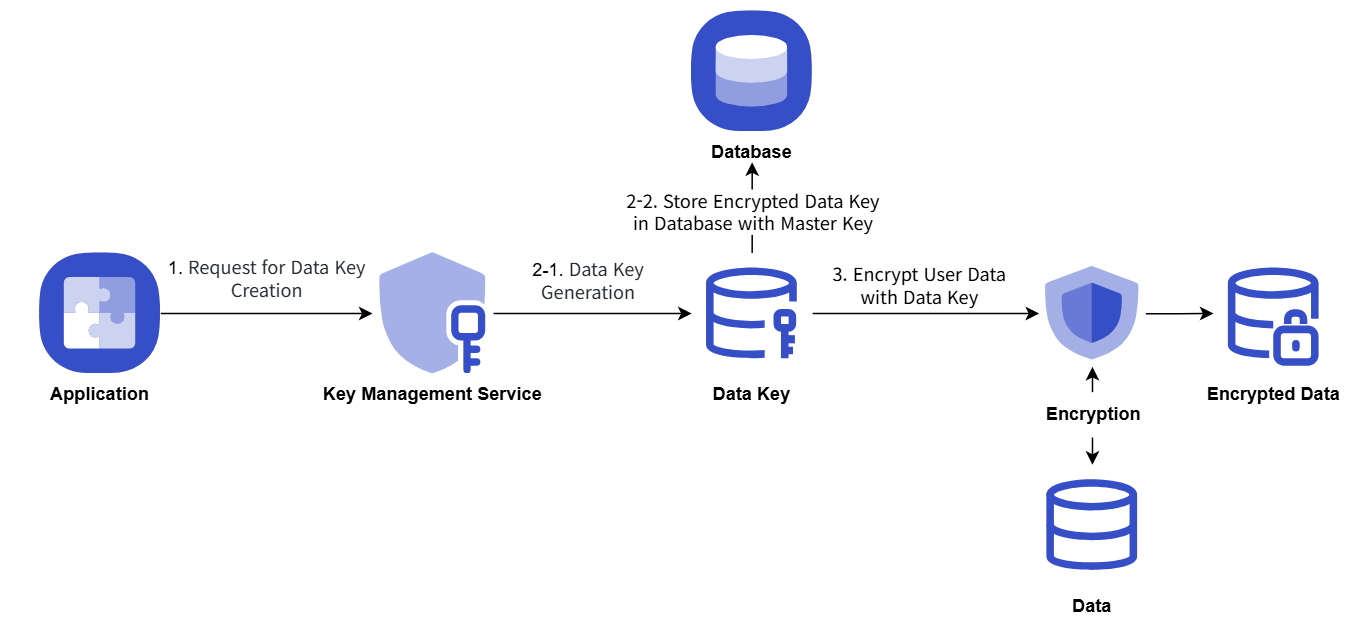
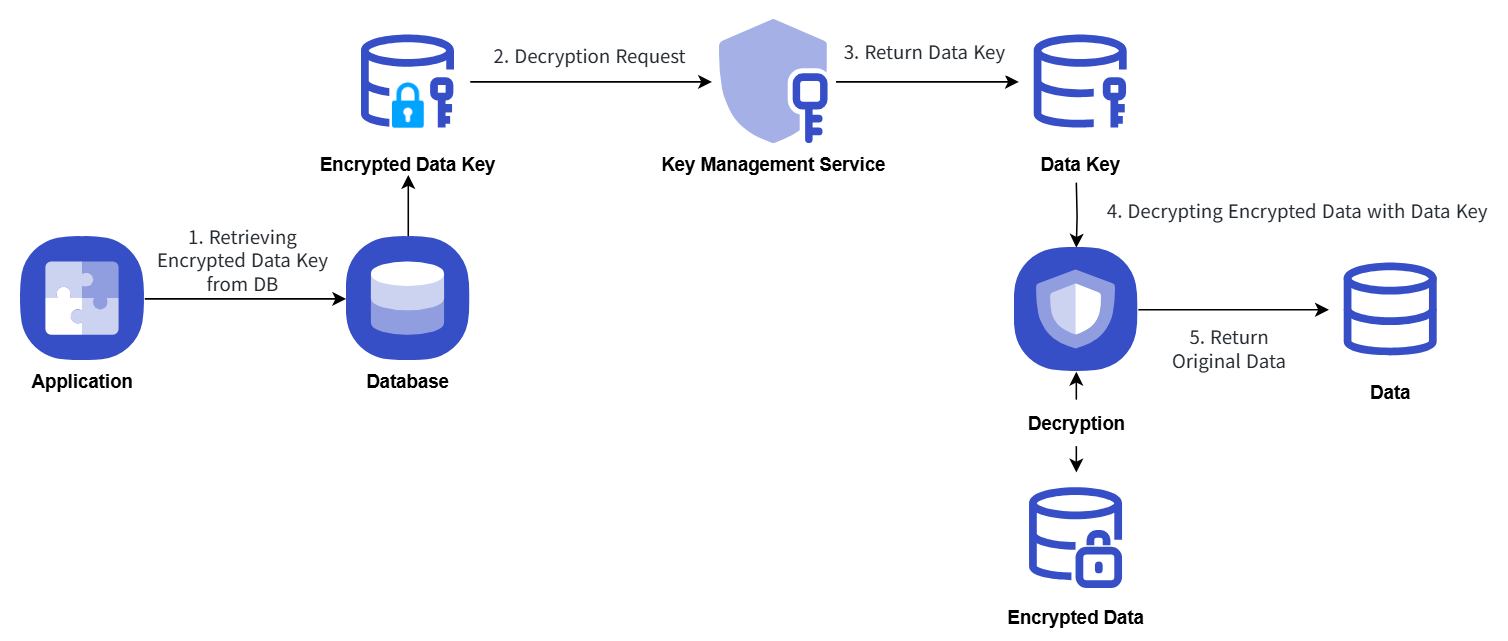
An example procedure for encrypting and storing a user application’s critical data by obtaining a data key from KMS is as follows.
- When the application starts, it obtains a data key using the KMS master key information, and then uses the plaintext data key on the client side to perform secure data encryption and store it.
- The data key is stored in the database in an encrypted form using the master key.
- When performing secure data decryption, the data key stored in the database is retrieved and a decryption request is made using the KMS master key information.
The encryption/decryption process using the Key Management Service key is explained with the following diagram.
Encryption
Decryption
Terminate Customer Managed Key
You can revoke customer-managed keys that are not in use.
To cancel a customer-managed key, follow these steps.
- Click the All Services > Security > Key Management Service menu. 1. Go to the Service Home page of Key Management Service.
- On the Service Home page, click the Customer Managed Key menu. 2. Go to the Customer Managed Key List page.
- On the Customer Managed Key List page, click the resource to view its details. 3. Go to the Customer Managed Key Details page.
- On the Customer Managed Key Details page, click the Terminate Service button. 4. Navigate to the Service Cancellation alert window.
- Service cancellation alert dialog, select Immediate cancellation / Scheduled cancellation and verify the contents, then click the Confirm button.
- When termination is complete, check on the Customer Managed Key List page whether the resource has been terminated.
- When the key deletion is complete, a notification is sent to both the user who created the key and the user who deleted it.
- Even if you click the Service Termination button in the More Options menu at the far right of the generated customer-managed key list, you can terminate the selected key.
- To undo the cancellation of a reserved service, click the Cancel Cancellation button on the customer-managed key list page or the detail page.
- Cancel Service Termination in the popup window, if you click Confirm, the selected key will not be deleted and will be restored in a disabled state.
- To reuse the key, click the Customer Managed Key Details page’s Activate Key button.
2.1 - Encryption Example Using Key Management Service Keys
Encryption example using Key Management Service keys
This is a Java code example for implementing envelope encryption and data signing/verification using a key generated in KMS.
Envelope encryption
It presents an envelope encryption scenario, and you can review the Java, Go, and Python example code and their output generated according to the scenario.
Scenario
- To encrypt password information using the envelope encryption method, a Data Key is issued.
- Encrypt the password using the issued Data Key information.
- Encrypt the password and encrypted Data Key information using envelope encryption and store them in a JSON file.
Java example code
This is a Java example code written according to the provided scenario.
// URI
static String KMS_API_BASE_URI = {{ OpenAPI 가이드의 URL 참조 }};
// END POINT
static String KMS_API_DECRYPT = "/v1/kms/openapi/decrypt/%s";
static String KMS_API_CREATE_DATAKEY = "/v1/kms/openapi/datakey/%s";
// KEY ID
static String KEY_ID = {{마스터 키 ID}};

createEnvelop() {
    // 새로운 데이터 키 생성을 요청
    String encryptedDataKey = getDataKey();
    // 암호화를 할 데이터
    String example_json_data = "{\"PASSWORD\":\"SECRET_CREDENTIAL\"}";
    // 암호화된 데이터 봉투(Envelop encryption)
    String envelope = encryptData(example_json_data, encryptedDataKey);
    // 이 예제 코드에서는 암호화된 데이터 봉투를 파일로 저장
    File envelopeFile = new File("envelope.json");
}

getDataKey() {
    String endPoint = String.format(KMS_API_CREATE_DATAKEY, KEY_ID);
    String url = KMS_API_BASE_URI + endPoint;
    JSONObject data = new JSONObject();
    data.put("key_type", "plaintext");
    JSONObject respJsonObject = callApi(endPoint, data.toJSONString());
    return respJsonObject.get("ciphertext").toString();
}

encryptData() {
    Map<String, String> envelope = new HashMap<>();
    // 데이터 키 복호화
    String dataKey = decryptDataKey(encryptedDataKey);
    // Cipher Class 사용 (사용자가 기 사용 중인 암호화 알고리즘 사용 가능)
    SecretKey secretKey = new SecretKeySpec(decodeBase64(dataKey), "{사용자 선택 알고리즘}");
    Cipher cipher = Cipher.getInstance("{사용자 선택 알고리즘}");
    cipher.init(Cipher.ENCRYPT_MODE, secretKey);
    byte[] iv = cipher.getParameters().getParameterSpec(IvParameterSpec.class).getIV();
    byte[] cipherText = cipher.doFinal(obj.toString().getBytes());

    envelope.put("encryptedKey", encryptedDataKey);
    envelope.put("cipherText", encodeBase64(cipherText));
    envelope.put("iv", encodeBase64(iv));

    return JSONValue.toJSONString(envelope);
}

decryptDataKey() {
    String endPoint = String.format(KMS_API_DECRYPT, KEY_ID);
    JSONObject data = new JSONObject();
    data.put("cipherText", sealedKey);
    JSONObject respJsonObject = callApi(endPoint, data.toJSONString());
    String plaintext = (respJsonObject.get("plaintext")).toString();
    return plaintext;
}
Go example code
This is a Go example code written based on the provided scenario.
// URI
const KMS_API_BASE_URI = {{ OpenAPI 가이드의 URL 참조 }}

// END POINT
const KMS_API_DECRYPT = "/v1/kms/openapi/decrypt/%s"
const KMS_API_CREATE_DATAKEY = "/v1/kms/openapi/datakey/%s"

// KEY ID
const KEY_ID = {{마스터 키 ID}}

createEnvelop() {
        // 새로운 데이터 키 생성을 요청
        encryptedDataKey := getDataKey()
        // 암호화를 할 데이터
        example_json_data := "{\"PASSWORD\":\"SECRET_CREDENTIAL\"}"
        // 암호화된 데이터 봉투(Envelop encryption)
        envelope := encryptData(example_json_data, encryptedDataKey)
        // 이 예제 코드에서는 암호화된 데이터 봉투를 파일로 저장
        file, _ := os.Create("envelope.json")
        defer file.Close()
        file.WriteString(envelope)
}

getDataKey() {
        endPoint := fmt.Sprintf(KMS_API_CREATE_DATAKEY, KEY_ID)
        data := map[string]interface{}{
            "key_type": "plaintext",
        }
        jsonData, _ := json.Marshal(data)
        respJsonObject := callApi(endPoint, jsonData)
        info := &KMSDatakeyInfo{}
        json.Unmarshal([]byte(respJsonObject), info)

        return info.DataKey
}

encryptData() {
        envelope := make(map[string]string)
        // 데이터 키 복호화
        dataKey := decryptDataKey(encryptedDataKey)
        secretKey, _ := base64.StdEncoding.DecodeString(dataKey)

        // Cipher Class 사용
        block, _ := {사용자 선택 알고리즘}.NewCipher(secretKey)
        cipherText := make([]byte, {사용자 선택 알고리즘}.BlockSize+len(example_json_data))
        iv := cipherText[:{사용자 선택 알고리즘}.BlockSize]
        if _, err := io.ReadFull(rand.Reader, iv); err != nil {
               panic(err)
        }

        mode := cipher.NewCFBEncrypter(block, iv)
        mode.XORKeyStream(cipherText[{사용자 선택 알고리즘}.BlockSize:], []byte(example_json_data))

        envelope["encryptedKey"] = encryptedDataKey
        envelope["cipherText"] = base64.StdEncoding.EncodeToString(cipherText)
        envelope["iv"] = base64.StdEncoding.EncodeToString(iv)

        jsonString, _ := json.Marshal(envelope)

        return string(jsonString)
}

decryptDataKey() {
        endPoint := fmt.Sprintf(KMS_API_DECRYPT, KEY_ID)
        data := map[string]interface{}{
               "cipherText": sealedKey,
        }
        jsonData, _ := json.Marshal(data)
        respJsonObject := callApi(endPoint, jsonData)
        info := &KMSDecryptInfo{}
        json.Unmarshal([]byte(respJsonObject), info)

        return info.DecryptedData

}
Python example code
This is a Python example code written according to the presented scenario.
# URI
KMS_API_BASE_URI = {{ OpenAPI 가이드의 URL 참조 }}

# END POINT
KMS_API_DECRYPT = "/v1/kms/openapi/decrypt/"
KMS_API_CREATE_DATAKEY = "/v1/kms/openapi/datakey/"

# KEY ID
KEY_ID = {{마스터 키 ID}}

create_envelop()
    # 새로운 데이터 키 생성을 요청
    encrypted_data_key = get_dataKey()

    # 암호화를 할 데이터
    example_json_data = {"PASSWORDTEST":"SECRET_CREDENTIALTEST"}
    json_data_str = json.dumps(example_json_data)

    # 암호화된 데이터 봉투(Envelop encryption)
    envelope = encrypt_data(json_data_str,encrypted_data_key)

    # 이 예제 코드에서는 암호화된 데이터 봉투를 파일로 저장
    with open("envelope.json", "w") as file:
        file.write(envelope)


get_dataKey()
    end_point = f"{KMS_API_CREATE_DATAKEY}{KEY_ID}"
    data = {
        "key_type": "plaintext"
    }
    response_object = call_api(end_point, data)

    data_key = response_object.get("ciphertext", "")

    return data_key


encrypt_data()
    envelope = {}
    # 데이터 키 복호화
    dataKey = decrypt_data_key(encrypted_data_key)
    decoded_data_key = base64.b64decode(dataKey)

    # Cipher Class 사용
    iv = get_random_bytes(16)
    cipher = {사용자 선택 알고리즘}.new(decoded_data_key, {사용자 선택 알고리즘}.MODE_CBC, iv)
    data_to_encrypt = obj
    data_bytes = data_to_encrypt.encode()
    padded_data = pad(data_bytes, {사용자 선택 알고리즘}.block_size)
    cipher_text = cipher.encrypt(padded_data).hex()

    envelope["encryptedKey"] = encrypted_data_key
    envelope["cipherText"] = cipher_text
    envelope["iv"] = base64.b64encode(iv).decode()

    return json.dumps(envelope)

decrypt_data_key()
    end_point = f"{KMS_API_DECRYPT}{KEY_ID}"
    data = {}
    data["cipherText"] = sealed_key
    resp_json_object = call_api(end_point,data)
    plaintext = resp_json_object.get("decryptedData")
    return plaintext
Example code result
Displays the result of the example code.
  {
        "cipherText":"d3S81rzaGAl8U12LlKSlRbDekPlGuibTntXX962KCjBIKuXdPOG8N8vk3Jet8lyG",
        "iv":"0kP7QKZ6BUeQPlThk4tySA==",
        "encryptedKey":"vault:v1:KJjjLtGHTbaV5N8LWC5O9eMDCaJVeff5SM\/MAYseugjiqiXFVgdXaKXg6kym0NmjHkO\/wLPsa+YK0aVk"
    }
Use envelope encryption
You can present an envelope encryption usage scenario and view the Java, Go, and Python example code and results written according to the scenario.
Scenario
- Decrypt the Data Key of the encrypted envelope file.
- Decrypt the encrypted data of the envelope file using the decrypted Data Key.
Java example code
This is a Java example code written according to the provided scenario.
// URI
static String KMS_API_BASE_URI = {{ OpenAPI 가이드의 URL 참조 }};
// END POINT
static String KMS_API_DECRYPT = "/v1/kms/openapi/decrypt/%s";
// KEY ID
static String KEY_ID = {{마스터 키 ID}};;


getData() {
    // 암호화된 데이터 봉투(Envelop encryption)
    String envelope = new String(Files.readAllBytes(Paths.get("envelope.json")));
    JSONParser parser = new JSONParser();
    JSONObject envelopeJson = (JSONObject) parser.parse(envelope);
    String encryptedDataKey = envelopeJson.get("encryptedKey").toString();
    String cipherText = envelopeJson.get("cipherText").toString();
    String iv = envelopeJson.get("iv").toString();

    return decryptData(cipherText, encryptedDataKey, iv);
}

decryptData() {
    String dataKey = decryptDataKey(encryptedDataKey);
    IvParameterSpec ivParameterSpec = new IvParameterSpec(decodeBase64(iv));
    SecretKey secretKey = new SecretKeySpec(decodeBase64(dataKey), "{사용자 선택 알고리즘}");
    Cipher cipher = Cipher.getInstance("{사용자 선택 알고리즘}");
    cipher.init(Cipher.DECRYPT_MODE, secretKey, ivParameterSpec);
    byte[] plaintext = cipher.doFinal(decodeBase64(cipherText));

    return new String(plaintext);
}

decryptDataKey() {
    String endPoint = String.format(KMS_API_DECRYPT, KEY_ID);
    JSONObject data = new JSONObject();
    data.put("cipherText", sealedKey);
    JSONObject respJsonObject = callApi(endPoint, data.toJSONString());
    String plaintext = (respJsonObject.get("plaintext")).toString();
    return plaintext;
}
Go example code
This is a Go example code written according to the presented scenario.
// URI
const KMS_API_BASE_URI = {{ OpenAPI 가이드의 URL 참조 }}

// END POINT
const KMS_API_DECRYPT = "/v1/kms/openapi/decrypt/%s"

// KEY ID
const KEY_ID = {{마스터 키 ID}}

getData() {
    // 암호화된 데이터 봉투(Envelop encryption) 불러오기
    jsonData, _ := os.ReadFile("envelope.json")
    var envelope map[string]interface{}
    if err := json.Unmarshal(jsonData, &envelope); err != nil {
           fmt.Println("JSON 파싱 오류:", err)
           os.Exit(1)
    }
    encryptedDataKey := envelope["encryptedKey"].(string)
    cipherText := envelope["cipherText"].(string)
    iv := envelope["iv"].(string)

    return decryptData(cipherText, encryptedDataKey, iv)
}

decryptData() {
    dataKey := decryptDataKey(encryptedDataKey)
    ciphertext, _ := base64.StdEncoding.DecodeString(cipherText)
    dataKeyBytes, _ := base64.StdEncoding.DecodeString(dataKey)
    decodedData := ciphertext[{사용자 선택 알고리즘}.BlockSize:]
    ivparam := ciphertext[{사용자 선택 알고리즘}.BlockSize]
    block, _ := {사용자 선택 알고리즘}.NewCipher(dataKeyBytes)

    mode := cipher.NewCFBDecrypter(block, ivparam)
    mode.XORKeyStream(decodedData, decodedData)
    decryptedData := string(decodedData)

    return decryptedData
}

decryptDataKey() {
    endPoint := fmt.Sprintf(KMS_API_DECRYPT, KEY_ID)
    data := map[string]interface{}{
           "cipherText": sealedKey,
    }
    jsonData, _ := json.Marshal(data)
    respJsonObject := callApi(endPoint, jsonData)
    info := &KMSDecryptInfo{}
    json.Unmarshal([]byte(respJsonObject), info)

    return info.DecryptedData
}
Python example code
This is a Python example code written according to the presented scenario.
# URI
KMS_API_BASE_URI = {{ OpenAPI 가이드의 URL 참조 }}

# END POINT
KMS_API_DECRYPT = "/v1/kms/openapi/decrypt/"

# KEY ID
KEY_ID = {{마스터 키 ID}}

get_data()
    # 암호화된 데이터 봉투(Envelop encryption) 열기
    with open("envelope.json", "r") as file:
        envelope = file.read()
    envelope_json = json.loads(envelope)
    encrypted_data_key = envelope_json["encryptedKey"]
    cipher_text = envelope_json["cipherText"]
    iv = envelope_json["iv"]
    return decrypt_data(cipher_text, encrypted_data_key, iv)

decrypt_data()
    data_key = decrypt_data_key(encrypted_data_key)
    iv_bytes = base64.b64decode(iv)
    decoded_data_key = base64.b64decode(data_key)
    cipher_txt = bytes.fromhex(cipher_text)

    cipher = {사용자 선택 알고리즘}.new(decoded_data_key, {사용자 선택 알고리즘}.MODE_CBC, iv_bytes)
    plain_text_bytes = unpad(cipher.decrypt(cipher_txt), {사용자 선택 알고리즘}.block_size)
    plain_text = plain_text_bytes.decode('utf-8')
    return plain_text

decrypt_data_key()
    end_point = f"{KMS_API_DECRYPT}{KEY_ID}"
    data = {}
    data["cipherText"] = sealed_key
    resp_json_object = call_api(end_point,data)
    plaintext = resp_json_object.get("decryptedData")
    return plaintext
Example code result
Displays the result of the example code.
{"PASSWORD":"SECRET_CREDENTIAL"}
Use data signature
It provides a data signing usage scenario to guarantee data integrity, and you can review the Java, Go, and Python example code and their results as written according to the scenario.
Scenario
- Call the OpenAPI to sign the data.
- The signed data is enveloped and saved as a JSON file.
Java example code
This is a Java example code written according to the provided scenario.
// URI
static String KMS_API_BASE_URI = {{ OpenAPI 가이드의 URL 참조 }};

// END POINT
static String KMS_API_SIGN = "/v1/kms/openapi/sign/%s";

// KEY ID
static String KEY_ID = {{마스터 키 ID}};

signEnvelop() {
    // 서명 데이터 봉투(Envelop encryption)
    String envelope = sign();
    // 이 예제 코드에서는 서명 데이터 봉투를 파일로 저장
    File envelopeFile = new File("signEnvelope.json");
    OutputStream os = new BufferedOutputStream(new FileOutputStream(envelopeFile));

    try {
        os.write(envelope.getBytes());
    } finally {
        os.close();
    }
}

sign() {
    Map<String, String> envelope = new HashMap<>();

    String example_credential = "SCP KMS Sign Test!!!";
    String endPoint = String.format(KMS_API_SIGN, KEY_ID);
    JSONObject data = new JSONObject();
    data.put("input", encodeToBase64(example_credential));

    JSONObject respJsonObject = callApi(endPoint, data.toJSONString());

    envelope.put("signature", respJsonObject.get("signature").toString());
    if(respJsonObject.get("batch_results") != null) {

        envelope.put("batch_results", respJsonObject.get("batch_results").toString());
    }

    return JSONValue.toJSONString(envelope);
}
Go example code
This is a Go example code written according to the presented scenario.
// URI
const KMS_API_BASE_URI = {{ OpenAPI 가이드의 URL 참조 }}

// END POINT
const KMS_API_SIGN = "/v1/kms/openapi/sign/%s"

// KEY ID
const KEY_ID = {{마스터 키 ID}}

signEnvelop() {
    // 서명 데이터 봉투(Envelop encryption)
    envelope := sign()
    // 이 예제 코드에서는 서명 데이터 봉투를 파일로 저장
    file, _ := os.Create("signEnvelope.json")
    defer file.Close()
    file.WriteString(envelope)
}

sign() {
    envelope := make(map[string]string)
    example_credential := "SCP KMS Sign Test!!!"
    endPoint := fmt.Sprintf(KMS_API_SIGN, KEY_ID)
    data := map[string]interface{}{
        "input": base64.StdEncoding.EncodeToString([]byte(example_credential)),
    }
    jsonData, _ := json.Marshal(data)
    respJsonObject := callApi(endPoint, jsonData)
    info := &KMSSignInfo{}
    json.Unmarshal([]byte(respJsonObject), info)

    envelope["signature"] = info.Signature

    jsonString, _ := json.Marshal(envelope)

    return string(jsonString)
}
Python example code
This is a Python example code written according to the presented scenario.
# URI
KMS_API_BASE_URI = {{ OpenAPI 가이드의 URL 참조 }}

# END POINT
KMS_API_SIGN = "/v1/kms/openapi/sign/"

# KEY ID
KEY_ID = {{마스터 키 ID}}

sign_envelop()
    # 서명 데이터 봉투(Envelop encryption)
    envelope = sign()

    # 이 예제 코드에서는 서명 데이터 봉투를 파일로 저장
    with open("signEnvelope.json", "w") as file:
        file.write(envelope)


sign()
    envelope = {}

    example_credential = "SCP KMS Sign Test!!!"
    end_point = f"{KMS_API_SIGN}{KEY_ID}"
    credential_bytes = example_credential.encode('utf-8')

    data = {
        "input": base64.b64encode(credential_bytes).decode('utf-8')
    }

    resp_json_object = call_api(end_point,data)

    envelope["signature"] = resp_json_object.get("signature")

    return json.dumps(envelope)
Example code result
Displays the result of the example code.
  {
    "signature":"vault:v1:qHGf4ALkTao1Yy\/lpSbLQ2l8YVpsHWBP6ic3Ux1BKSodQQxnEIrjPyUwXXQ1NZfGSVxdeVe5Y6kb0nUPNADQpzkOh9\/e8T\/QCOs9==",
    "projectId":"PROJECT-qWrHRJX5sZnTkopcr9N1dk"
}
Use data validation
It presents a verification usage scenario for validating data integrity, and you can view the Java, Go, and Python example code and their results written according to the scenario.
Scenario
- Retrieves the signature value of the signed envelope file.
- Validates the signed data and outputs the result.
Java example code
This is a Java example code written according to the provided scenario.
// URI
static String KMS_API_BASE_URI = {{ OpenAPI 가이드의 URL 참조 }};

// END POINT
static String KMS_API_VERIFY = "/v1/kms/openapi/verify/%s";

// KEY ID
static String KEY_ID = {{마스터 키 ID}};

getSign() {
    // 서명 데이터 봉투(Envelop encryption)
    String envelope = new String(Files.readAllBytes(Paths.get("signEnvelope.json")));
    JSONParser parser = new JSONParser();
    JSONObject envelopeJson = (JSONObject) parser.parse(envelope);
    String signature = envelopeJson.get("signature").toString();

    return verify(signature);
}

verify() {
    String endPoint = String.format(KMS_API_VERIFY, KEY_ID);
    JSONObject data = new JSONObject();
    data.put("input", "U0NQIEtNUyBTaWduIFRlc3QhISE=");
    data.put("signature", signature);
    JSONObject respJsonObject = callApi(endPoint, data.toJSONString());
    String valid = (respJsonObject.get("valid")).toString();
    return valid;
}
Go example code
This is a Go example code written according to the presented scenario.
// URI
const KMS_API_BASE_URI = {{ OpenAPI 가이드의 URL 참조 }}

// END POINT
const KMS_API_VERIFY = "/v1/kms/openapi/verify/%s"

// KEY ID
const KEY_ID = {{마스터 키 ID}}

getSign() {
    // 서명 데이터 봉투(Envelop encryption) 불러오기
    jsonData, _ := os.ReadFile("signEnvelope.json")
    var envelope map[string]interface{}
    if err := json.Unmarshal(jsonData, &envelope); err != nil {
           fmt.Println("JSON 파싱 오류:", err)
           os.Exit(1)
    }
    signature := envelope["signature"].(string)

    return verify(signature)
}

verify() {
    endPoint := fmt.Sprintf(KMS_API_VERIFY, KEY_ID)
    data := map[string]interface{}{
           "input":          "U0NQIEtNUyBTaWduIFRlc3QhISE=",
           "signature":      signature,
    }
    jsonData, _ := json.Marshal(data)
    respJsonObject := callApi(endPoint, jsonData)
    info := &KMSVerifyInfo{}
    json.Unmarshal([]byte(respJsonObject), info)

    return info.Valid
}
Python example code
This is a Python example code written according to the presented scenario.
# URI
KMS_API_BASE_URI = {{ OpenAPI 가이드의 URL 참조 }}

# END POINT
KMS_API_VERIFY = "/v1/kms/openapi/verify/"

# KEY ID
KEY_ID = {{마스터 키 ID}}

get_sign()
    # 서명 데이터 봉투(Envelop encryption) 열기
    with open("signEnvelope.json", "r") as file:
        envelope = file.read()
    envelope_json = json.loads(envelope)
    signature = envelope_json["signature"]

    return verify(signature)


verify()
    end_point = f"{KMS_API_VERIFY}{KEY_ID}"

    data = {
        "input": "U0NQIEtNUyBTaWduIFRlc3QhISE=",
        "signature": signature
    }

    resp_json_object = call_api(end_point,data)
    valid = resp_json_object.get("valid")

    return valid
Example code result
Displays the result of the example code.
  {
    "valid": true
}
2.2 - Platform-managed Key
Users can view detailed information about the platform-managed key automatically generated for service provisioning on the Samsung Cloud Platform.
- Platform-managed keys are created and managed directly by the CSP (Cloud Service Provider), so users cannot modify or delete key attributes.
- When another product within Samsung Cloud Platform uses a KMS key for encryption, the CSP generates a platform-managed key itself and performs the encryption, even if the user does not create a key directly in KMS.
Check detailed information of platform-managed key
You can view the full resource list and detailed information of platform-managed keys. The Platform Managed Key Details page consists of Details, Operation History tabs.
To view detailed information about the Key Management Service, follow these steps.
- Click the All Services > Security > Key Management Service menu. You will be taken to the Service Home page of Key Management Service.
- On the Service Home page, click the Platform Managed Key menu. You will be taken to the Platform Managed Key List page.
- On the Platform Managed Key List page, click the resource to view detailed information. You will be taken to the Platform Managed Key Details page.
- Platform Managed Key Details page displays status information and descriptions of additional features at the top.
Category Detailed description status Display the status of the platform-managed key - Active: Available/Active
Table. Platform Managed Key Status Information
- Platform Managed Key Details page displays status information and descriptions of additional features at the top.
Detailed Information
On the Platform Managed Key List page, you can view detailed information of the selected resource.
Category | Detailed description |
|---|---|
| Service | Service name |
| Resource Type | Resource Type |
| SRN | Unique resource ID in Samsung Cloud Platform |
| Resource name | Resource Name |
| Resource ID | Unique resource ID in the service |
| Creation date and time | Service creation timestamp |
| key name | Name of the generated key |
| Explanation | Show additional description for the key
|
Job History
You can view the operation history of the selected resource on the Platform Managed Key List page.
| Category | Detailed description |
|---|---|
| Work log | Task execution details
|
| Operation date and time | Task execution date and time |
| Resource Type | Resource Type |
| Resource name | Resource Name |
| Result | Task execution result (success/failure) |
| Operator Information | User information for the performed operation |
3 - API Reference
4 - CLI Reference
5 - Release Note
Key Management Service
- Provides an endpoint that allows API calls for encryption and decryption from internal and external resources of the Samsung Cloud Platform.
- You can select the resources for API calls and configure access control settings.
- In addition to the ‘customer-managed key’ created directly by the user, a ‘platform-managed key’ service generated and managed by the CSP (Cloud Service Provider) is also provided.
- When another product within the Samsung Cloud Platform encrypts using a KMS key, it can encrypt with a platform-managed key generated directly by the CSP without the user having to create a key in KMS.
- We enhanced traceability by segmenting operation logs for API calls—such as encryption and decryption—into individual API units and logging them.
- When an encryption key is deleted, notifications are provided not only to the user who deleted the key but also to the key creator, and the notification additionally includes the region name where the encryption key resides.
- Additionally provides the generation/verification (HMAC) encryption method used for creating and verifying hash-based message authentication codes.
- We have launched an encryption key management service (Key Management Service) to securely protect critical data of customer applications.
- Encryption keys can be generated, provided, and managed for various purposes (encryption/decryption, signing/verification).