This is the multi-page printable view of this section. Click here to print.
Key Management Service
1 - Overview
Service Overview
Key Management Service(KMS) is a service that creates and safely stores/manages encryption keys in a convenient way to securely protect important data of applications. The user uses the encryption key to encrypt/decrypt data, and the encryption key is managed stably with a hierarchically encrypted centralized encryption key method.
Provided Function
Key Management Service provides the following functions.
- Key Management: KMS can create/delete and manage keys. Users can create data keys for encrypting data using the master key created through KMS.
- Key Authority Management: You can control and manage access rights to the master key based on a user-defined policy.
- Key Life Cycle Management: through key rotation, it is possible to generate new encryption data for the corresponding master key without having to create a new key, and the key rotation cycle can be set according to customer policy. Key life cycle management safely protects data from cryptographic threats by deactivating or deleting encryption keys that are no longer in use.
Components
Master Key
The master key is used to generate a data key used for encrypting data, and depending on the purpose, it can generate symmetric keys (encryption/decryption (AES), generation/verification (HMAC)) and asymmetric keys (encryption/decryption and signing/verification (RSA), signing/verification (ECDSA)) respectively. With proper master key management, data keys can be encrypted to protect frequently used data keys during operation.
- The master key is a key created through the creation of KMS product services in the Samsung Cloud Platform Console.
Data Key
The data key is used to encrypt actual data, and is created for each target service that performs encryption, thereby ensuring that even if one data key is leaked, it will not affect services encrypted with other data keys.
HSM (Hardware Security Module)
The root key of the KMS system area is stored, the master key is created through the root key stored in the HSM (Hardware Security Module) that complies with the FIPS 140-2 Lv3 standard, and it is safely distributed and protected in the KMS.
Limitations
Samsung Cloud Platform’s Key Management Service limits the number of Key creations as follows.
| Item | Detailed Description | Allocation Amount |
|---|---|---|
| KMS Key | Number of KMS Keys created per region | 10000 |
| KMS Validation Password Key | Number of public authentication algorithm keys that can be created per account | 100 |
- KMS keys created by region services can only be used within the region.
- The constraints of the public certification algorithm Key only apply to the SCP Sovereign.
Preceding service
Key Management Service has no preceding service.
2 - How-to guides
The user can enter the essential information of the Key Management Service service and create the service by selecting detailed options through the Samsung Cloud Platform Console.
Key Management Service creation
You can create and use the Key Management Service on the Samsung Cloud Platform Console.
To create a Key Management Service, follow the following procedure.
- All services > Security > Key Management Service menu is clicked. It moves to the Service Home page of Key Management Service.
- Service Home page, click the Key Management Service creation button. It moves to the Key Management Service creation page.
- Key Management Service creation page, enter the information required for service creation and add additional information.
- Service Information Input area, please enter or select the required information.ClassificationMandatory
Detailed Description Key Name Required Enter Key Name Public Certification Algorithm Option Select whether to use the public certification algorithm - The public certification algorithm option is only available in SCP Sovereign
- The public certification algorithm provides the Aria algorithm that has completed security verification by the National Intelligence Service
Purpose Required Select the purpose and encryption method of the key Automatic Rotation Option Select whether to use automatic rotation of the key - Use is selected, the internal algorithm of the generated key is converted to a different value and applied for each set rotation cycle
Auto Rotation > Rotation Period Required Enter the rotation period of the key - The rotation period can enter a value between 1~730 days. If the rotation period is not entered, it is automatically set to 90 days
Description Options Enter additional information for the key Table. Key Management Service service information input items - Additional Information Input area, please enter or select the required information.
Classification MandatoryDetailed Description Tag Selection Add Tag - Up to 50 can be added per resource
- Click the Add Tag button and enter or select Key, Value
Table. Key Management Service Additional Information Input Items
- Summary panel, review the detailed information generated and the estimated billing amount, and click the Complete button.
- Once creation is complete, check the created resource on the Key Management Service list page.
Key Management Service detailed information check
Key Management Service can check and modify the entire resource list and detailed information. The Key Management Service details page consists of details, tags, and operation history tabs.
Key Management Service detailed information to confirm, please follow the next procedure.
- All services > Security > Key Management Service menu is clicked. It moves to the Service Home page of Key Management Service.
- Service Home page, click the Key Management Service menu. It moves to the Key Management Service list page.
- Key Management Service list page, click the resource to check the detailed information. It moves to the Key Management Service details page.
- Key Management Service details page top displays the status information and additional features description.
Classification Detailed Description Status Indicates the status of Key Management Service - Active: Available/Activated
- Stop: Stopped/Deactivated
- To be Terminated: Scheduled for Deletion
- Creating: Being Created/Creation Error (Only immediate deletion is possible for retrying creation)
Key Rotation A button that can manually rotate the generated key Key Deactivation a button that can deactivate the generated key Service Cancellation Button to cancel the service Table. Key Management Service Status Information and Additional Features
Detailed Information
Key Management Service list page where you can check the detailed information of the selected resource and modify the information if necessary.
Classification | Detailed Description |
|---|---|
| Service | Service Name |
| Resource Type | Resource Type |
| SRN | Unique resource ID in Samsung Cloud Platform |
| Resource Name | Resource Title |
| Resource ID | Unique resource ID in the service |
| Creator | The user who created the service |
| Creation Time | The time when the service was created |
| Key Name | Name of the generated key |
| Public Certification Algorithm | Cryptographic algorithm verified through the Korea Cryptographic Module Validation Program
|
| Purpose | Purpose of the key such as encryption/decryption and signing/verification and encryption method |
| Automatic Rotation | Whether to use automatic rotation of the key |
| Rotation Period | Set the rotation period when using auto-rotation |
| Next rotation date | Display of the next rotation date of the key according to the rotation cycle
|
| usage count | the number of times the key is used to call the encryption/decryption function |
| Description | Display additional description for the key |
Tag
Key Management Service list page where you can check the tag information of the selected resource, and add, change or delete it.
| Classification | Detailed Description |
|---|---|
| Tag List | Tag list
|
Work History
Key Management Service list page where you can check the operation history of the selected resource.
| Classification | Detailed Description |
|---|---|
| Work History | Work Performance Contents
|
| Work Time | Work Performance Time |
| Resource Type | Resource Type |
| Resource Name | Resource Title |
| Task Result | Task Execution Result(Success/Failure) |
| Worker Information | Information of the user who performed the task |
Key Management Service management
You can create a new version of the registered key or change its usage status.
KMS Key Rotation Settings
Key rotation is a function that converts the internal algorithm of the generated key into another value.
- When rotating the key, only the master key value is changed, and the ciphertext and plaintext values of the data key created previously are not changed.
- Even if the key rotation is performed, the master key has the previous version of the data, so there is no effect on the decryption performed through the master key, and the value of the data key being used is also not changed.
- However, if you wrap (decrypt and re-encrypt) with a changed master key, calling the rewrapData API will execute the key rotation function.
To create a new version of the created Key Management Service (key rotation), follow these steps.
- All services > Security > Key Management Service menu is clicked. It moves to the Service Home page of Key Management Service.
- Service Home page, click the Key Management Service menu. It moves to the Key Management Service list page.
- Key Management Service list page, click on the resource to check the detailed information. It moves to the Key Management Service details page.
- Key Management Service details page, click the key rotation button. It moves to the key rotation popup window.
- Key Rotation popup window, check the message and click the Confirm button.
KMS Key Activation Settings
You can set whether to use the selected key.
To set whether to enable or disable the created Key Management Service, follow the next procedure.
- All services > Security > Key Management Service menu is clicked. It moves to the Service Home page of Key Management Service.
- Service Home page, click the Key Management Service menu. It moves to the Key Management Service list page.
- Key Management Service list page, click on the resource to check the detailed information. It moves to the Key Management Service details page.
- Key Management Service details page, click the key activation/key deactivation button. Move to the key activation/key deactivation popup window.
- Key Activation/Key Deactivation popup window, check the message and click the Confirm button.
Key Management Service utilizing keys for encryption cases
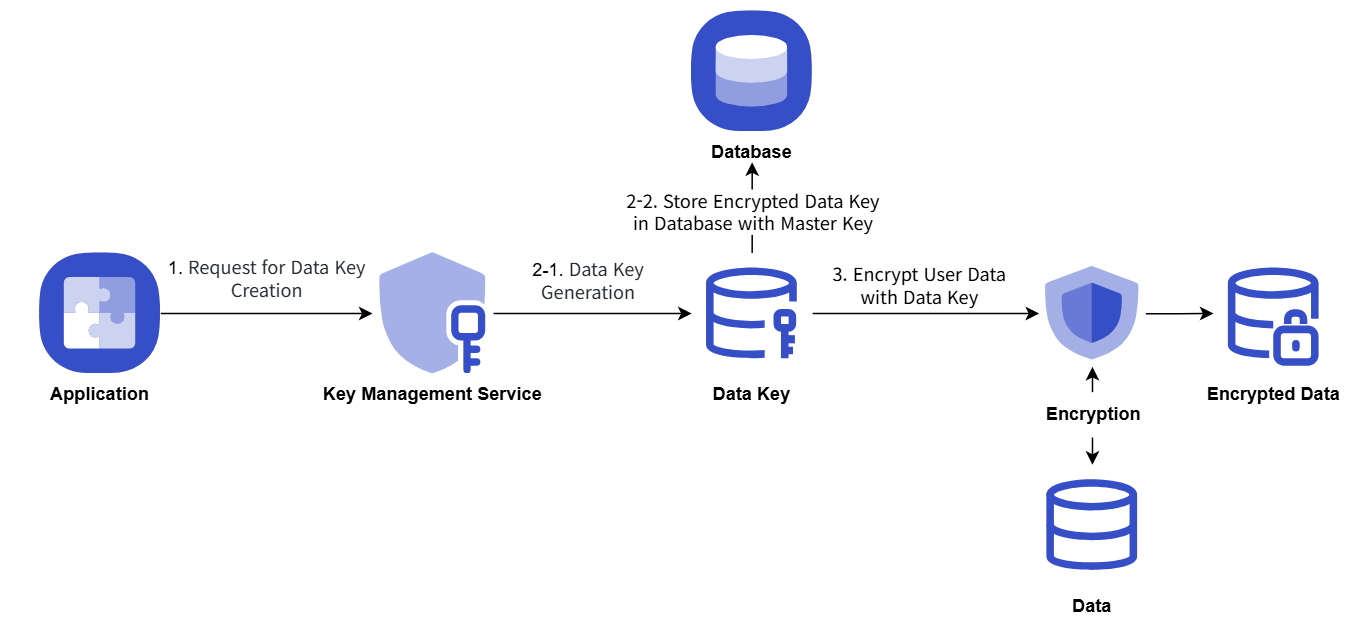
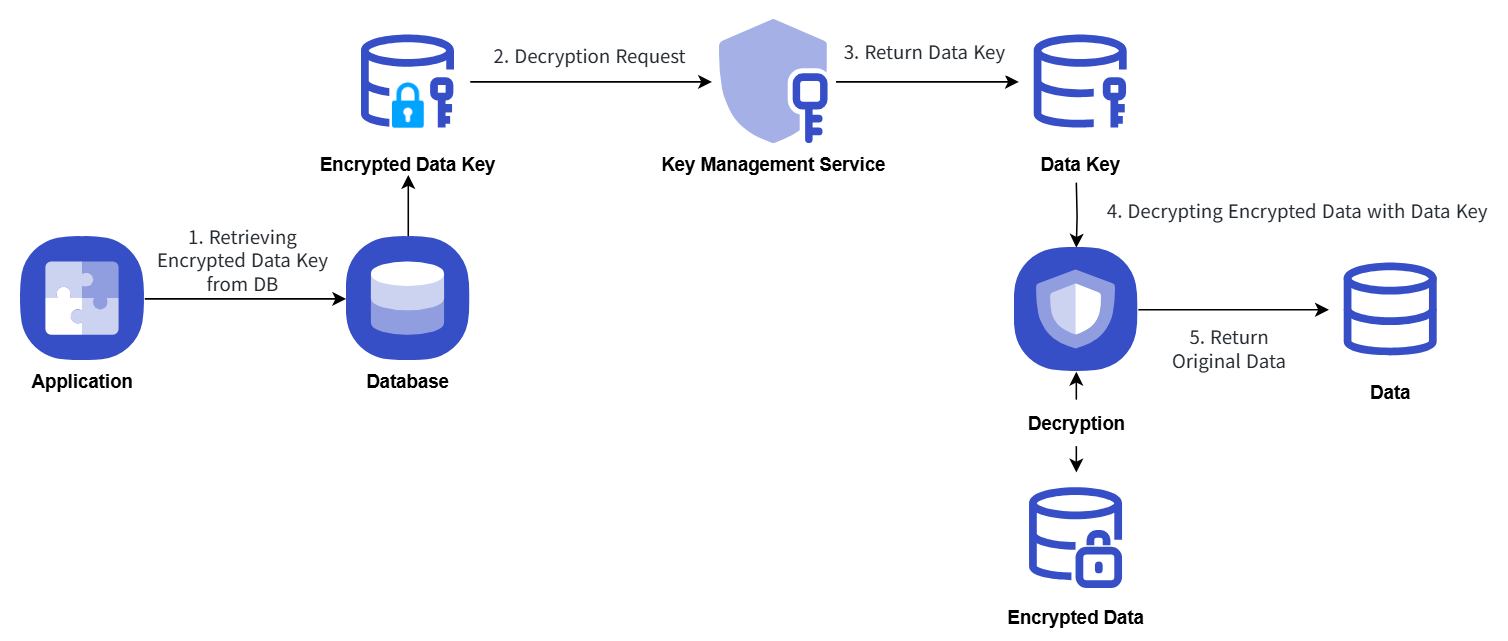
The procedure example for storing important data of the user Application by issuing a data key from KMS and encrypting it is as follows.
- Application startup, when KMS master key information is used to issue a data key, and then the data key in plain text form is used on the client-side to perform secure data encryption and storage.
- The data key is stored in the database in the form encrypted with the master key.
- When performing security data decryption, it requests decryption with KMS master key information by querying the data key stored in the database.
Key Management Service uses the key for encryption/decryption procedures, which are explained in the following concept diagram.
Encryption
Decryption
Key Management Service Cancellation
You can cancel the Key Management Service that is not being used.
To cancel the Key Management Service, follow the following procedure.
- All services > Security > Key Management Service menu, click. It moves to the Service Home page of Key Management Service.
- Service Home page, click the Key Management Service menu. It moves to the Key Management Service list page.
- Key Management Service list page, click the resource to check the detailed information. It moves to the Key Management Service details page.
- Key Management Service details page, click the service cancellation button. It moves to the service cancellation pop-up window.
- Service Cancellation popup window, select Immediate Cancellation/Reserved Cancellation and confirm the contents, then click the Confirm button.
- Once the cancellation is complete, check if the resource has been cancelled on the Key Management Service list page.
- Key deletion notification will be sent to both the user who created the key and the user who deleted it when the key deletion is completed.
- You can also deactivate the selected key by clicking the Cancel Service button in the More Menu button at the far right of the generated KMS list.
- To cancel the cancellation of a reserved service, click the Cancel Cancellation button on the KMS list page or detail page.
- Service Cancellation Cancellation In the popup window, if you click Confirm, the selected key will be restored to an inactive state without being deleted.
- To reuse the key, click the Key Activation button on the Key Management Service details page.
2.1 - Key Management Service Encryption example using keys
Key Management Service Encryption Example Using Keys
This is a Java code example for implementing envelope encryption (Envelope Encryption) and data signing/verification using a key generated by KMS.
Envelope Encryption
It presents an envelope encryption scenario, and you can view the Java, Go, and Python example code and results written according to the scenario.
Scenario
- Obtain a Data Key to encrypt password information using envelope encryption.
- Use the issued Data Key information to encrypt the password.
- Encrypt the password and encrypted Data Key information using envelope encryption and save it as a JSON file.
Java Example Code
This is a Java example code written according to the presented scenario.
// URI
static String KMS_API_BASE_URI = {{ Reference the OpenAPI guide URL }};
// END POINT
static String KMS_API_DECRYPT = "/v1/kms/openapi/decrypt/%s";
static String KMS_API_CREATE_DATAKEY = "/v1/kms/openapi/datakey/%s";
// KEY ID
static String KEY_ID = {{Master Key ID}};

createEnvelop() {
    // Request creation of a new data key
    String encryptedDataKey = getDataKey();
    // Data to be encrypted
    String example_json_data = "{\"PASSWORD\":\"SECRET_CREDENTIAL\"}";
    // Encrypted data envelope(Envelop encryption)
    String envelope = encryptData(example_json_data, encryptedDataKey);
    // In this example code, the encrypted data envelope is saved to a file
    File envelopeFile = new File("envelope.json");
}

getDataKey() {
    String endPoint = String.format(KMS_API_CREATE_DATAKEY, KEY_ID);
    String url = KMS_API_BASE_URI + endPoint;
    JSONObject data = new JSONObject();
    data.put("key_type", "plaintext");
    JSONObject respJsonObject = callApi(endPoint, data.toJSONString());
    return respJsonObject.get("ciphertext").toString();
}

encryptData() {
    Map<String, String> envelope = new HashMap<>();
    // Data key decryption
    String dataKey = decryptDataKey(encryptedDataKey);
    // Encrypt the generated data key using AES-CBC method
    // Cipher Class usage (User can use the encryption algorithm they are already using)
    SecretKey secretKey = new SecretKeySpec(decodeBase64(dataKey), "AES");
    Cipher cipher = Cipher.getInstance("AES/CBC/PKCS5Padding");
    cipher.init(Cipher.ENCRYPT_MODE, secretKey);
    byte[] iv = cipher.getParameters().getParameterSpec(IvParameterSpec.class).getIV();
    byte[] cipherText = cipher.doFinal(obj.toString().getBytes());

    envelope.put("encryptedKey", encryptedDataKey);
    envelope.put("cipherText", encodeBase64(cipherText));
    envelope.put("iv", encodeBase64(iv));

    return JSONValue.toJSONString(envelope);
}

decryptDataKey() {
    String endPoint = String.format(KMS_API_DECRYPT, KEY_ID);
    JSONObject data = new JSONObject();
    data.put("cipherText", sealedKey);
    JSONObject respJsonObject = callApi(endPoint, data.toJSONString());
    String plaintext = (respJsonObject.get("plaintext")).toString();
    return plaintext;
}
Go example code
This is a Go example code written according to the presented scenario.
// URI
const KMS_API_BASE_URI = {{ Reference the OpenAPI guide URL }}

// END POINT
const KMS_API_DECRYPT = "/v1/kms/openapi/decrypt/%s"
const KMS_API_CREATE_DATAKEY = "/v1/kms/openapi/datakey/%s"

// KEY ID
const KEY_ID = {{Master Key ID}}

createEnvelop() {
        // Request new data key creation
        encryptedDataKey := getDataKey()

        // data to be encrypted
        example_json_data := "{\"PASSWORD\":\"SECRET_CREDENTIAL\"}"
        // encrypted data envelope(Envelop encryption)
        envelope := encryptData(example_json_data, encryptedDataKey)
        // In this example code, the encrypted data envelope is saved to a file
        file, _ := os.Create("envelope.json")
        defer file.Close()

        file.WriteString(envelope)
"}

getDataKey() {
        endPoint := fmt.Sprintf(KMS_API_CREATE_DATAKEY, KEY_ID)
        data := map[string]interface{}{
            "key_type": "plaintext",
        }
        jsonData, _ := json.Marshal(data)
        respJsonObject := callApi(endPoint, jsonData)
        info := &KMSDatakeyInfo{}
        json.Unmarshal([]byte(respJsonObject), info)

        return info.DataKey
"}

encryptData() {
        envelope := make(map[string]string)
        // Data key decryption
        dataKey := decryptDataKey(encryptedDataKey)
        secretKey, _ := base64.StdEncoding.DecodeString(dataKey)
        // Encrypt the generated data key using AES-CBC method
        // Cipher Class use
        block, _ := aes.NewCipher(secretKey)
        cipherText := make([]byte, aes.BlockSize+len(example_json_data))
        iv := cipherText[:aes.BlockSize]
        if _, err := io.ReadFull(rand.Reader, iv); err != nil {
               panic(err)
        }

        mode := cipher.NewCFBEncrypter(block, iv)
        mode.XORKeyStream(cipherText[aes.BlockSize:], []byte(example_json_data))


        envelope["encryptedKey"] = encryptedDataKey
        envelope["cipherText"] = base64.StdEncoding.EncodeToString(cipherText)
        envelope["iv"] = base64.StdEncoding.EncodeToString(iv)

        jsonString, _ := json.Marshal(envelope)

        return string(jsonString)
}


decryptDataKey() {
        endPoint := fmt.Sprintf(KMS_API_DECRYPT, KEY_ID)
        data := map[string]interface{}{
               "cipherText": sealedKey,
        }
        jsonData, _ := json.Marshal(data)
        respJsonObject := callApi(endPoint, jsonData)
        info := &KMSDecryptInfo{}
        json.Unmarshal([]byte(respJsonObject), info)

        return info.DecryptedData

}
Python example code
This is a Python example code written according to the presented scenario.
# URI
KMS_API_BASE_URI = {{ Refer to the URL of the OpenAPI guide }}

# END POINT
KMS_API_DECRYPT = "/v1/kms/openapi/decrypt/"
KMS_API_CREATE_DATAKEY = "/v1/kms/openapi/datakey/"


# KEY ID
KEY_ID = {{Master Key ID}}

create_envelop()
    # Request new data key creation
    encrypted_data_key = get_dataKey()


    # Data to be encrypted
    example_json_data = {"PASSWORDTEST":"SECRET_CREDENTIALTEST"}
    json_data_str = json.dumps(example_json_data)

    # Encrypted Data Envelope(Envelop encryption)
    envelope = encrypt_data(json_data_str,encrypted_data_key)

    # In this example code, the encrypted data envelope is saved to a file
    with open("envelope.json", "w") as file:
        file.write(envelope)


get_dataKey()
    end_point = f"{KMS_API_CREATE_DATAKEY}{KEY_ID}"
    data = {
        "key_type": "plaintext"
    }
    response_object = call_api(end_point, data)

    data_key = response_object.get("ciphertext", "")

    return data_key


encrypt_data()
    envelope = {}
    # Data key decryption
    dataKey = decrypt_data_key(encrypted_data_key)
    decoded_data_key = base64.b64decode(dataKey)

    # Encrypt the generated data key using AES-CBC
    # Cipher Class use
    iv = get_random_bytes(16)
    cipher = AES.new(decoded_data_key, AES.MODE_CBC, iv)
    data_to_encrypt = obj
    data_bytes = data_to_encrypt.encode()

    padded_data = pad(data_bytes, AES.block_size)
    cipher_text = cipher.encrypt(padded_data).hex()


    envelope["encryptedKey"] = encrypted_data_key
    envelope["cipherText"] = cipher_text
    envelope["iv"] = base64.b64encode(iv).decode()

    return json.dumps(envelope)

decrypt_data_key()
    end_point = f"{KMS_API_DECRYPT}{KEY_ID}"
    data = {}
    data["cipherText"] = sealed_key
    resp_json_object = call_api(end_point,data)
    plaintext = resp_json_object.get("decryptedData")
    return plaintext
Example code output
Displays the result value of the example code.
  {
        "cipherText":"d3S81rzaGAl8U12LlKSlRbDekPlGuibTntXX962KCjBIKuXdPOG8N8vk3Jet8lyG",
        "iv":"0kP7QKZ6BUeQPlThk4tySA==",
        "encryptedKey":"vault:v1:KJjjLtGHTbaV5N8LWC5O9eMDCaJVeff5SM\/MAYseugjiqiXFVgdXaKXg6kym0NmjHkO\/wLPsa+YK0aVk"
    }
## Use envelope encryption

Present a use case for envelope encryption and you can check the example code in Java, Go, Python written according to the scenario and the resulting values.

### Scenario

1. Decrypt the Data Key of the encrypted envelope file.
2. Decrypt the encrypted data of the envelope file using the decrypted Data Key.

### Java Example Code
This is a Java example code written according to the presented scenario.
// URI static String KMS_API_BASE_URI = {{ Refer to the OpenAPI guide URL }}; // END POINT static String KMS_API_DECRYPT = “/v1/kms/openapi/decrypt/%s”; // KEY ID static String KEY_ID = {{Master Key ID}};;
getData() { // Encrypted data envelope(Envelop encryption) String envelope = new String(Files.readAllBytes(Paths.get(“envelope.json”))); JSONParser parser = new JSONParser(); JSONObject envelopeJson = (JSONObject) parser.parse(envelope); String encryptedDataKey = envelopeJson.get(“encryptedKey”).toString(); String cipherText = envelopeJson.get(“cipherText”).toString(); String iv = envelopeJson.get(“iv”).toString();
return decryptData(cipherText, encryptedDataKey, iv);
}
decryptData() { String dataKey = decryptDataKey(encryptedDataKey); IvParameterSpec ivParameterSpec = new IvParameterSpec(decodeBase64(iv)); SecretKey secretKey = new SecretKeySpec(decodeBase64(dataKey), “AES”); Cipher cipher = Cipher.getInstance(“AES/CBC/PKCS5Padding”); cipher.init(Cipher.DECRYPT_MODE, secretKey, ivParameterSpec); byte[] plaintext = cipher.doFinal(decodeBase64(cipherText));
return new String(plaintext);
}
decryptDataKey() { String endPoint = String.format(KMS_API_DECRYPT, KEY_ID); JSONObject data = new JSONObject(); data.put(“cipherText”, sealedKey); JSONObject respJsonObject = callApi(endPoint, data.toJSONString()); String plaintext = (respJsonObject.get(“plaintext”)).toString(); return plaintext; }
### Go example code
This is a Go example code written according to the presented scenario.
// URI
const KMS_API_BASE_URI = {{ Reference the OpenAPI guide URL }}

// END POINT
const KMS_API_DECRYPT = "/v1/kms/openapi/decrypt/%s"

// KEY ID
const KEY_ID = {{Master Key ID}}

getData() {
    // Load encrypted data envelope(Envelop encryption)
    jsonData, _ := os.ReadFile("envelope.json")
    var envelope map[string]interface{}
    if err := json.Unmarshal(jsonData, &envelope); err != nil {
           fmt.Println("JSON parsing error:", err)
           os.Exit(1)
    }
    encryptedDataKey := envelope["encryptedKey"].(string)
    cipherText := envelope["cipherText"].(string)
    iv := envelope["iv"].(string)

    return decryptData(cipherText, encryptedDataKey, iv)
}

decryptData() {
    dataKey := decryptDataKey(encryptedDataKey)
    ciphertext, _ := base64.StdEncoding.DecodeString(cipherText)
    dataKeyBytes, _ := base64.StdEncoding.DecodeString(dataKey)
    decodedData := ciphertext[aes.BlockSize:]
    ivparam := ciphertext[:aes.BlockSize]
    block, _ := aes.NewCipher(dataKeyBytes)

    mode := cipher.NewCFBDecrypter(block, ivparam)
    mode.XORKeyStream(decodedData, decodedData)
    decryptedData := string(decodedData)

    return decryptedData
"}

decryptDataKey() {
    endPoint := fmt.Sprintf(KMS_API_DECRYPT, KEY_ID)
    data := map[string]interface{}{
           "cipherText": sealedKey,
    }
    jsonData, _ := json.Marshal(data)
    respJsonObject := callApi(endPoint, jsonData)
    info := &KMSDecryptInfo{}
    json.Unmarshal([]byte(respJsonObject), info)

    return info.DecryptedData
}
Python example code
This is a Python example code written according to the presented scenario.
# URI
KMS_API_BASE_URI = {{ Refer to the OpenAPI guide URL }}


# END POINT
KMS_API_DECRYPT = "/v1/kms/openapi/decrypt/"

# KEY ID
KEY_ID = {{Master Key ID}}

get_data()
    # Open Encrypted Data Envelope(Envelop encryption)
    with open("envelope.json", "r") as file:
        envelope = file.read()

    envelope_json = json.loads(envelope)
    encrypted_data_key = envelope_json["encryptedKey"]
    cipher_text = envelope_json["cipherText"]
    iv = envelope_json["iv"]
    return decrypt_data(cipher_text, encrypted_data_key, iv)

decrypt_data()
    data_key = decrypt_data_key(encrypted_data_key)
    iv_bytes = base64.b64decode(iv)
    decoded_data_key = base64.b64decode(data_key)
    cipher_txt = bytes.fromhex(cipher_text)

    cipher = AES.new(decoded_data_key, AES.MODE_CBC, iv_bytes)
    plain_text_bytes = unpad(cipher.decrypt(cipher_txt), AES.block_size)
    plain_text = plain_text_bytes.decode('utf-8')
    return plain_text

decrypt_data_key()
    end_point = f"{KMS_API_DECRYPT}{KEY_ID}"
    data = {}
    data["cipherText"] = sealed_key
    resp_json_object = call_api(end_point,data)
    plaintext = resp_json_object.get("decryptedData")
    return plaintext
Example code output
Displays the result value of the example code.
{"PASSWORD":"SECRET_CREDENTIAL"}
Use Data Signature
It presents a data signature usage scenario to ensure data integrity, and you can check the Java, Go, Python example code and results written according to the scenario.
Scenario
- Call OpenAPI with the data to be signed and sign it.
- The signed data is enveloped and saved as a json file.
Java Example Code
This is a Java example code written according to the presented scenario.
// URI
static String KMS_API_BASE_URI = {{ Refer to the OpenAPI guide URL }};

// END POINT
static String KMS_API_SIGN = "/v1/kms/openapi/sign/%s";

// KEY ID
static String KEY_ID = {{master key ID}};

signEnvelop() {
    // signature data envelope(Envelop encryption)
    String envelope = sign();
    // In this example code, the signature data envelope is saved to a file
    File envelopeFile = new File("signEnvelope.json");
    OutputStream os = new BufferedOutputStream(new FileOutputStream(envelopeFile));

    try {
        os.write(envelope.getBytes());
    } finally {
        os.close();
    }
}

sign() {
    Map<String, String> envelope = new HashMap<>();

    String example_credential = "SCP KMS Sign Test!!!";
    String endPoint = String.format(KMS_API_SIGN, KEY_ID);
    JSONObject data = new JSONObject();
    data.put("input", encodeToBase64(example_credential));

    JSONObject respJsonObject = callApi(endPoint, data.toJSONString());

    envelope.put("signature", respJsonObject.get("signature").toString());
    if(respJsonObject.get("batch_results") != null) {

        envelope.put("batch_results", respJsonObject.get("batch_results").toString());
    }

    return JSONValue.toJSONString(envelope);
"}
Go example code
This is a Go example code written according to the given scenario.
// URI
const KMS_API_BASE_URI = {{ Reference the OpenAPI guide URL }}


// END POINT
const KMS_API_SIGN = "/v1/kms/openapi/sign/%s"

// KEY ID
const KEY_ID = {{Master Key ID}}


signEnvelop() {
    // signature data envelope(Envelop encryption)
    envelope := sign()
    // In this example code, the signature data envelope is saved to a file
    file, _ := os.Create("signEnvelope.json")
    defer file.Close()
    file.WriteString(envelope)
"}

sign() {
    envelope := make(map[string]string)
    example_credential := "SCP KMS Sign Test!!!"
    endPoint := fmt.Sprintf(KMS_API_SIGN, KEY_ID)
    data := map[string]interface{}{
        "input": base64.StdEncoding.EncodeToString([]byte(example_credential)),
    }
    jsonData, _ := json.Marshal(data)
    respJsonObject := callApi(endPoint, jsonData)
    info := &KMSSignInfo{}
    json.Unmarshal([]byte(respJsonObject), info)

    envelope["signature"] = info.Signature

    jsonString, _ := json.Marshal(envelope)

    return string(jsonString)
}
Python Example Code
This is a Python example code written according to the given scenario.
# URI
KMS_API_BASE_URI = {{ Refer to the URL of the OpenAPI guide }}

# END POINT
KMS_API_SIGN = "/v1/kms/openapi/sign/"


# KEY ID
KEY_ID = {{Master Key ID}}

sign_envelop()
    # Signature Data Envelope(Envelop encryption)
    envelope = sign()

    # This example code saves the signature data envelope to a file
    with open("signEnvelope.json", "w") as file:
        file.write(envelope)


sign()
    envelope = {}

    example_credential = "SCP KMS Sign Test!!!"
    end_point = f"{KMS_API_SIGN}{KEY_ID}"
    credential_bytes = example_credential.encode('utf-8')


    data = {
        "input": base64.b64encode(credential_bytes).decode('utf-8')
    }

    resp_json_object = call_api(end_point,data)

    envelope["signature"] = resp_json_object.get("signature")

    return json.dumps(envelope)
Example code output
Displays the result value of the example code.
  {
    "signature":"vault:v1:qHGf4ALkTao1Yy\/lpSbLQ2l8YVpsHWBP6ic3Ux1BKSodQQxnEIrjPyUwXXQ1NZfGSVxdeVe5Y6kb0nUPNADQpzkOh9\/e8T\/QCOs9==",
    "projectId":"PROJECT-qWrHRJX5sZnTkopcr9N1dk"
}
Data Validation Use
It presents a verification usage scenario for validating data integrity, and you can view the Java, Go, and Python example code and results written according to the scenario.
Scenario
- Retrieve the signature value of the signed envelope file.
- Verify the signed data and output the result.
Java example code
This is a Java example code written according to the presented scenario.
// URI
static String KMS_API_BASE_URI = {{ Reference the OpenAPI guide URL }};

// END POINT
static String KMS_API_VERIFY = "/v1/kms/openapi/verify/%s";

// KEY ID
static String KEY_ID = {{Master Key ID}};

getSign() {
    // signature data envelope(Envelop encryption)
    String envelope = new String(Files.readAllBytes(Paths.get("signEnvelope.json")));
    JSONParser parser = new JSONParser();
    JSONObject envelopeJson = (JSONObject) parser.parse(envelope);
    String signature = envelopeJson.get("signature").toString();

    return verify(signature);
}

verify() {
    String endPoint = String.format(KMS_API_VERIFY, KEY_ID);
    JSONObject data = new JSONObject();
    data.put("input", "U0NQIEtNUyBTaWduIFRlc3QhISE=");
    data.put("signature", signature);
    JSONObject respJsonObject = callApi(endPoint, data.toJSONString());
    String valid = (respJsonObject.get("valid")).toString();
    return valid;
}
Go example code
This is a Go example code written according to the presented scenario.
// URI const KMS_API_BASE_URI = {{ Reference the OpenAPI guide URL }}
// END POINT const KMS_API_VERIFY = “/v1/kms/openapi/verify/%s”
// KEY ID const KEY_ID = {{Master Key ID}}
getSign() { // Load signature data envelope (Envelop encryption) jsonData, _ := os.ReadFile(“signEnvelope.json”) var envelope map[string]interface{} if err := json.Unmarshal(jsonData, &envelope); err != nil { fmt.Println(“JSON parsing error:”, err) os.Exit(1) } signature := envelope[“signature”].(string)
return verify(signature)
}
verify() { endPoint := fmt.Sprintf(KMS_API_VERIFY, KEY_ID) data := map[string]interface{}{ “input”: “U0NQIEtNUyBTaWduIFRlc3QhISE=”, “signature”: signature, } jsonData, _ := json.Marshal(data) respJsonObject := callApi(endPoint, jsonData) info := &KMSVerifyInfo{} json.Unmarshal([]byte(respJsonObject), info)
return info.Valid
}
### Python example code
This is a Python example code written according to the presented scenario.
URI
KMS_API_BASE_URI = {{ Refer to the URL of the OpenAPI guide }}
END POINT
KMS_API_VERIFY = “/v1/kms/openapi/verify/”
KEY ID
KEY_ID = {{Master Key ID}}
get_sign() # Signature data envelope(Envelop encryption) Open with open(“signEnvelope.json”, “r”) as file: envelope = file.read()
envelope_json = json.loads(envelope)
signature = envelope_json["signature"]

return verify(signature)
verify() end_point = f"{KMS_API_VERIFY}{KEY_ID}"
data = {
    "input": "U0NQIEtNUyBTaWduIFRlc3QhISE=",
    "signature": signature
}

resp_json_object = call_api(end_point,data)
valid = resp_json_object.get("valid")

return valid
### Example code output
Displays the result value of the example code.
{ “valid”: true “}
3 - API Reference
4 - CLI Reference
5 - Release Note
Key Management Service
- Encryption, decryption, etc., improved to facilitate tracking management by logging work records for API calls in detail by individual API units.
- When the encryption key is deleted, it provides notification not only to the user who deleted the key, but also to the key creator, and also provides the name of the region where the encryption key is located in the notification.
- It also provides a hash-based message authentication code creation and verification (HMAC) encryption method.
- The customer application’s important data is safely protected by launching a key management service (Key Management Service) for encryption key management.
- You can create, provide, and manage encryption keys for various purposes (encryption/decryption, signing/verification).