The page has been translated by Gen AI.
Google Cloud Platform
This explains how to configure the firewall appliance and FPMS when the firewall is Google Cloud Platform.
Configuring firewall device
This describes how to configure firewall devices or verify information for integrating FPMS with a firewall. Access the firewall and configure or verify the following.
Create user credentials
Generate authentication credentials for VPC firewall access.
- OAuth 2.0 Client ID creation: Access https://console.cloud.google.com/apis/credentials and create an ‘OAuth 2.0 Client ID’.
- Add an approved redirect URI: When creating an ‘OAuth 2.0 client ID’, add
http://localhost:8088/oauth2callbackto the ‘Approved redirect URI’.
Refresh token issuance
Obtain an OAuth 2.0 refresh token using the token issuance app.
- Token issuance app: oauth2token.zip
- App Usage Guide: OAuth 2.0 Refresh Token Issuance
Setting up FPMS
This explains the additional settings required when registering a firewall in FPMS. Access the FPMS and configure the following.
Firewall API Integration Settings
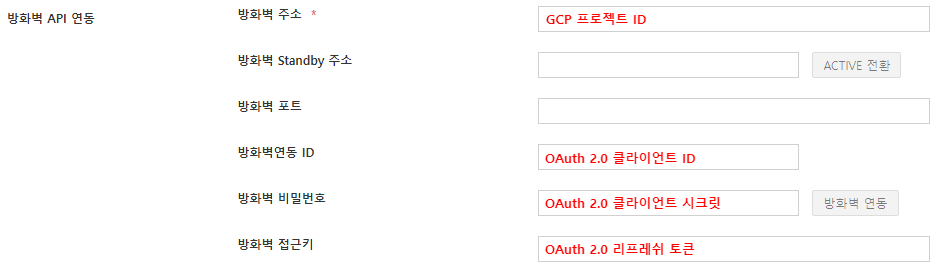
- Firewall address: Enter the GCP project ID. * (e.g., fpms-dev-268204)
- Firewall integration ID: Enter the OAuth 2.0 client ID. * (e.g., 1014408751598-vhl2beerlo618s63kcvpcq47lq2ba86n.apps.googleusercontent.com) (Refer to the creation of user credentials above)
- Firewall password: Please enter the OAuth 2.0 client secret. * (e.g.: DsG0-CW6gS9wBWiwDQvIMQRi)
- Firewall access key: The input field is enabled when a vendor is selected; please enter the OAuth 2.0 refresh token. * (see above refresh token issuance)