Example of Zone Management Usage
Define the firewall policy details and creation method based on Zone information. The following is an example of Zone management usage commonly employed by firewall administrators.
| Utilizing Zone Management | Case |
|---|---|
| ZONE address configuration | A Zone address must be configured before creating rule sets and policies. |
| Zone interface configuration | Specify the Zone type for specific vendors whose Zone type is set to any (Palo Alto, Juniper, Cisco, etc.) |
| Zone direction setting | Limit the origin/destination to a specific departure address / Limit the origin or destination to a Zone address / Both origin and destination correspond to Zone addresses |
| Specific band filtering settings | Filtering configuration for a specific address (range) within a Zone address (range) |
| Setting to exclude rule set creation in the same management domain | Both the origin and destination zones correspond to a specific zone / The origin and destination zones are identical / The origin and destination are in the same range |
| Set policy location criteria | Specify the rule’s location when the origin/destination falls within a specific zone. |
| Unmanaged zone range configuration | Specify the Zone name when the origin/destination is not assigned to a Zone address |
| Zone Alias configuration | Generate a rule set even when the range is broader than the Zone address. |
ZONE address configuration
Case: The rule set and policy are generated only when the Zone address is configured.
📹 Video guide: How to set ZONE address
When there is no Zone address configuration
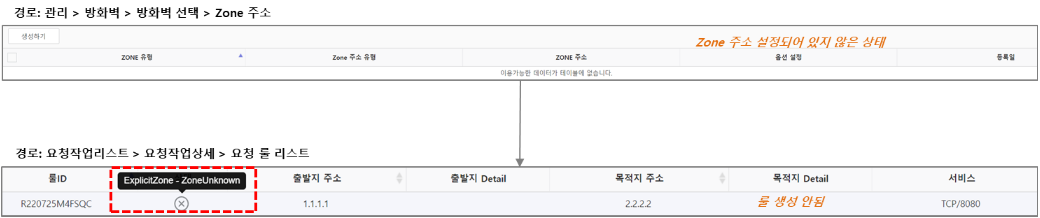
Figure. When Zone address is not set When the zone address is set
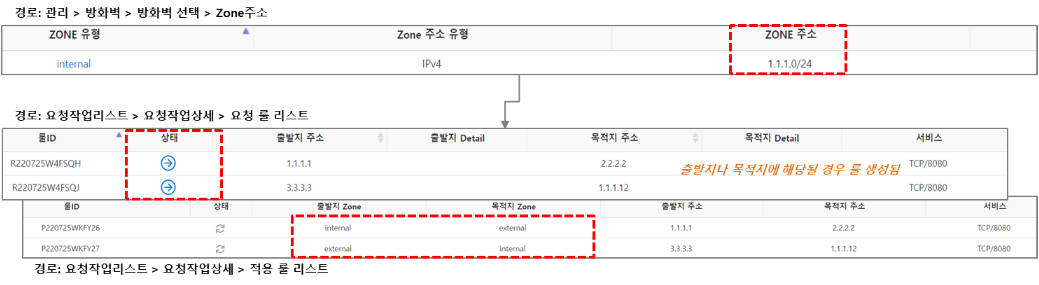
Figure. When the Zone address is configured
Zone interface configuration
Case: Specify the Zone type for specific vendors (Palo Alto, Juniper, Cisco, etc.) where the Zone type is set to any.
📹 Video guide: Zone Interface Setup Guide
If an interface is not configured on a Palo Alto firewall, the source/destination Zone is set to any, and the ‘Firewall Detailed Function’ will not be applied correctly when used.
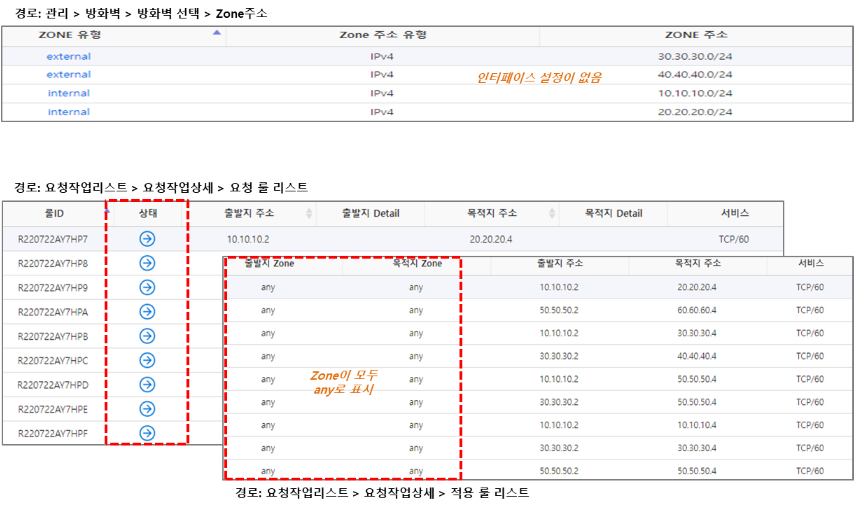
Figure. No interface configuration If you configure an interface on a Palo Alto firewall, the “Firewall Detailed Function” is applied correctly.
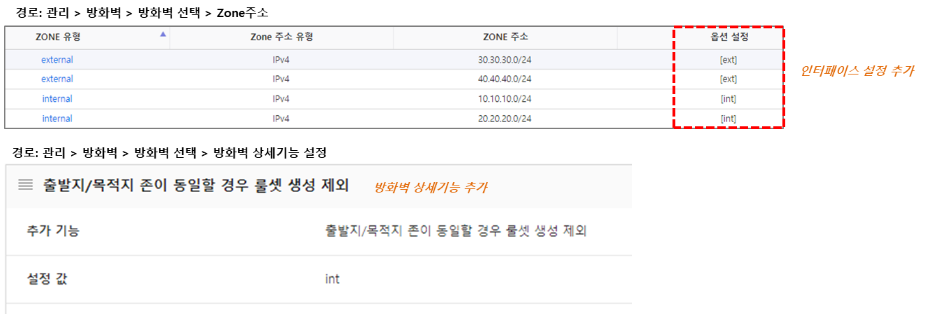
Figure. When the interface is configured 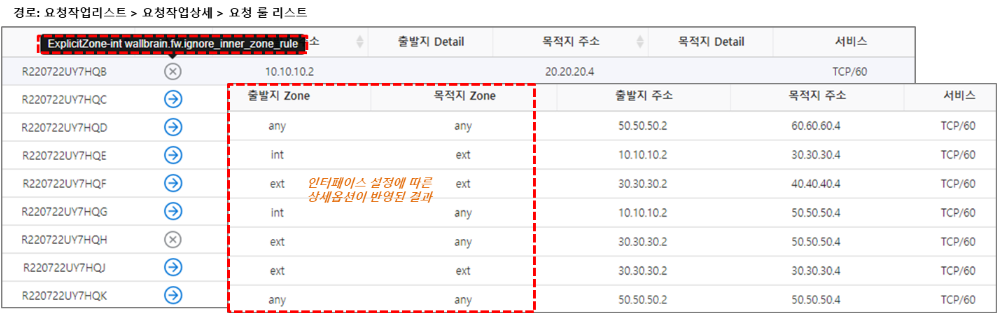
Figure. Interface configuration result
Zone direction setting
Case 1: Limit the origin/destination to a specific departure address
📹 Video guide: Zone Direction Setting - Case 1
Set a specific source address for the Zone address
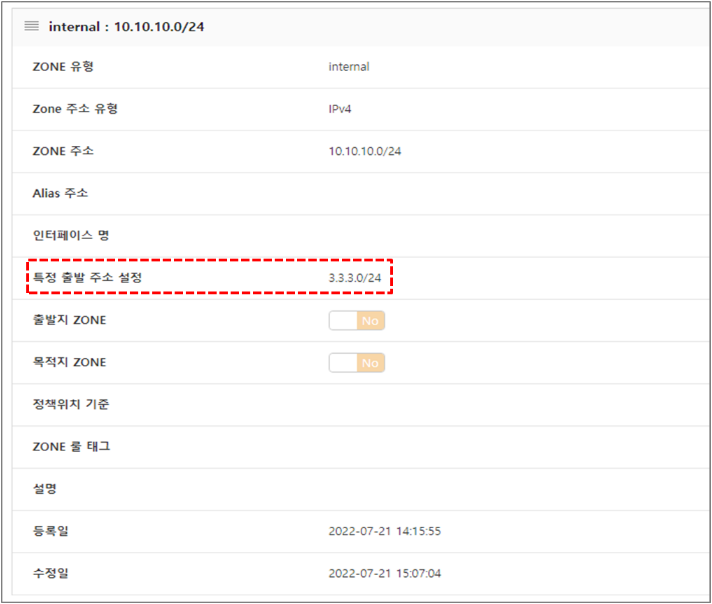
Figure. Set specific start address If you set a specific source address (3.3.3.0/24) for the Zone address (10.10.10.0/24), a rule is generated when it serves as either the source or the destination.
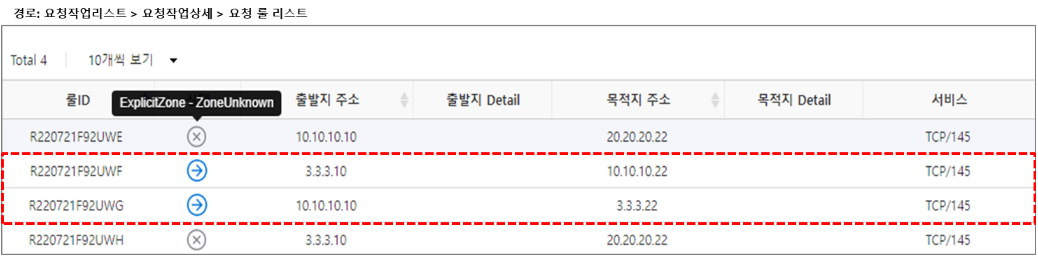
Figure. Specific departure address setting result
Case 2: Limit to Zone addresses among origin/destination
📹 Video guide: Zone Direction Setting - Case 2
Enable the source or destination Zone at the Zone address
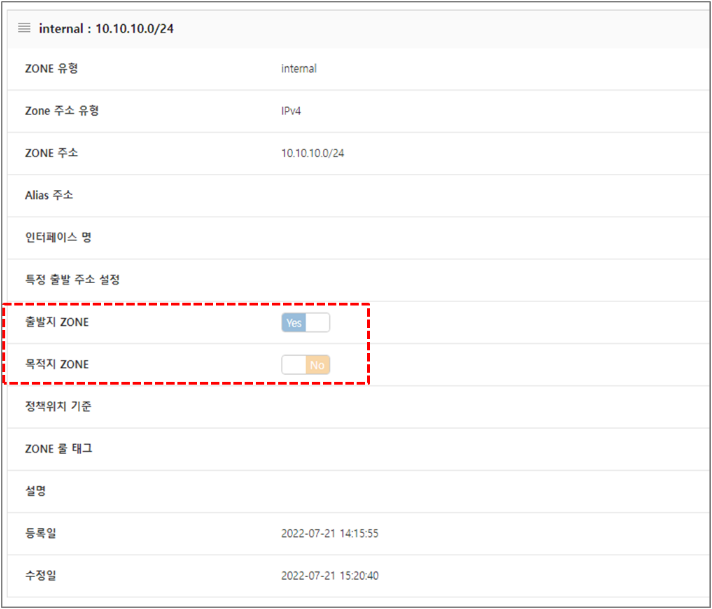
Figure. Origin/Destination Zone enable setting When setting the Zone address (10.10.10.0), a rule is created according to the option setting (source or destination ZONE enable). * According to the option settings, the Zone address 10.10.10.0/24 must be the source, so a rule is created for 10.10.10.10(source) → 20.20.20.22, and rule creation is excluded for 3.3.3.10 → 10.10.10.22(destination).

Figure. Zone Directionality Case 2 Result
Case 3: Both the origin and destination correspond to Zone addresses
📹 Video guide: Zone Direction Setting - Case 3
In the firewall details, set ‘Manage both source/destination zones’
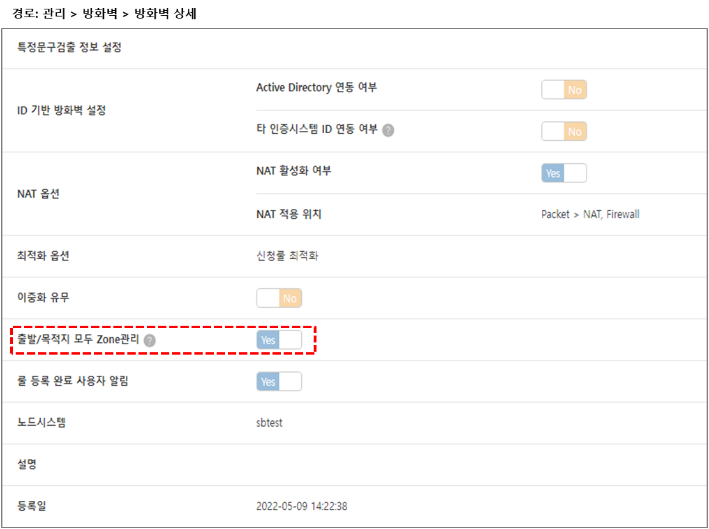
Figure. Departure/Destination Both Zone Management Settings Zone address setting

Figure. Zone address configuration A rule is created when the registered ZONE address is included in both the source and destination. * (In the case of 1.1.1.2 → 10.10.10.4, the source is not a Zone address, so rule creation is excluded)

Figure. Zone Directionality Case 3 Result
Specific band filtering configuration
Case: Set filtering for a specific address (range) within a Zone address (range).
📹 Video guide: How to set specific band filtering
ZONE address configuration
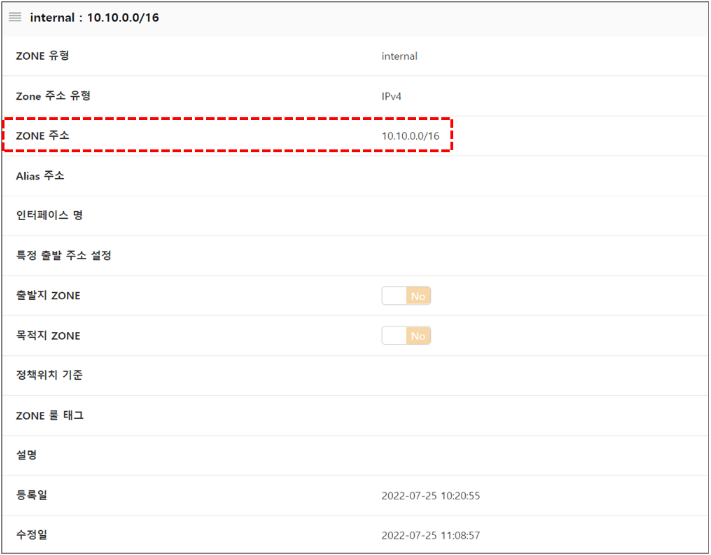
Figure. ZONE address setting Rule setting: If the source address is within 10.10.252.0/24, change the rule’s state to INVALID
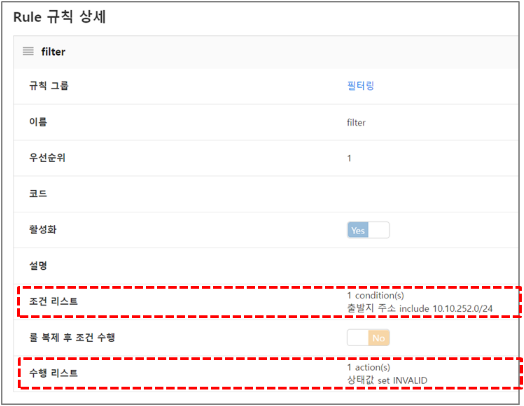
Figure. Rule Settings If the source is within a specific range (10.10.252.0), the rule set is not created.
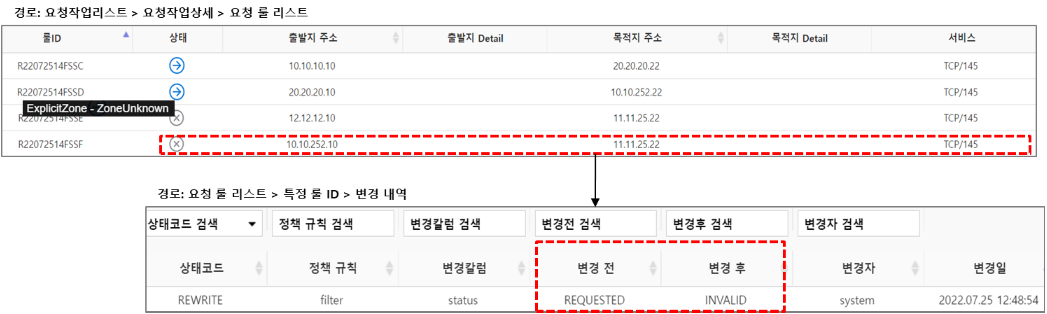
Figure. Specific band filtering result
Exclude rule set creation in the same management band
ZONE address

Figure. ZONE address
Case 1: Exclude when both the origin and destination zones belong to a specific zone
📹 Video guide: Exclude Rule Set Creation - Case 1
Firewall detailed feature setting: setting value = internal
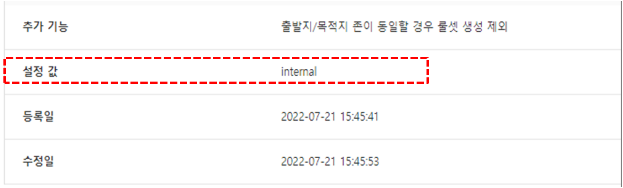
Figure. Firewall detailed function setting (internal) When the firewall’s detailed features are applied and both the source and destination zones correspond to the configured value internal, rule creation is not possible.

Figure. Rule set creation excluded Case 1 result
Case 2: Exclude when the departure and destination zones are the same
📹 Video guide: Exclude Rule Set Creation - Case 2
Firewall detailed feature settings: Setting value = (none)
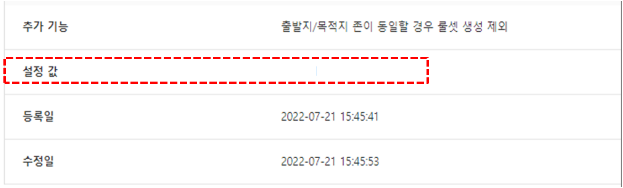
Figure. Firewall detailed function setting (blank) When the firewall’s detailed features are applied and the source and destination zones are identical, rule creation is not possible.
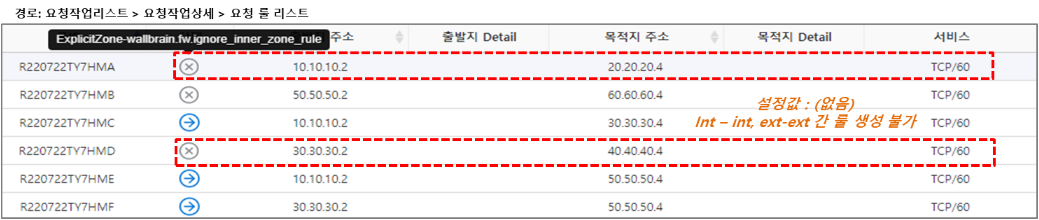
Figure. Rule set creation excluded Case 2 result
Case 3: Exclude when the departure and destination are in the same segment
📹 Video guide: Rule set creation exclusion - Case 3
Firewall detailed feature configuration: setting value = subnet
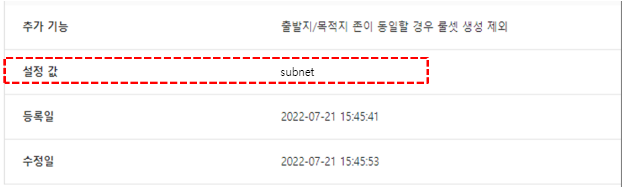
Figure. Firewall detailed feature setting (subnet) When the firewall’s detailed features are applied and the source and destination are in the same subnet, rule creation is not possible.
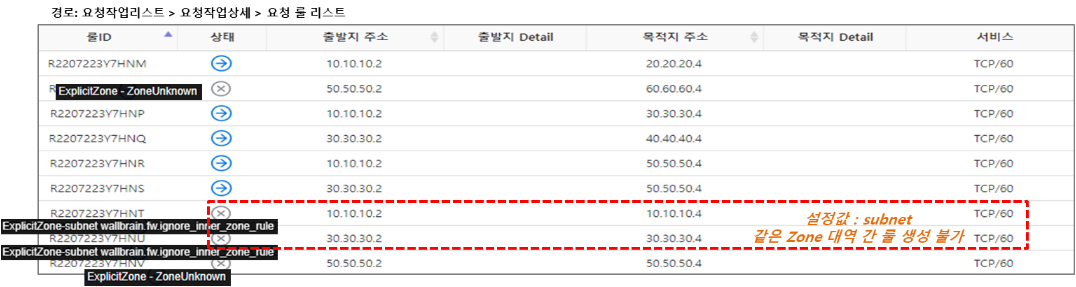
Figure. Rule set creation excluded Case 3 result
Policy order setting
Case: When the source/destination corresponds to a specific Zone, specify the rule’s location. (Create below the specified location)
📹 Video guide: How to set policy location criteria
Set the policy location basis for the Zone address
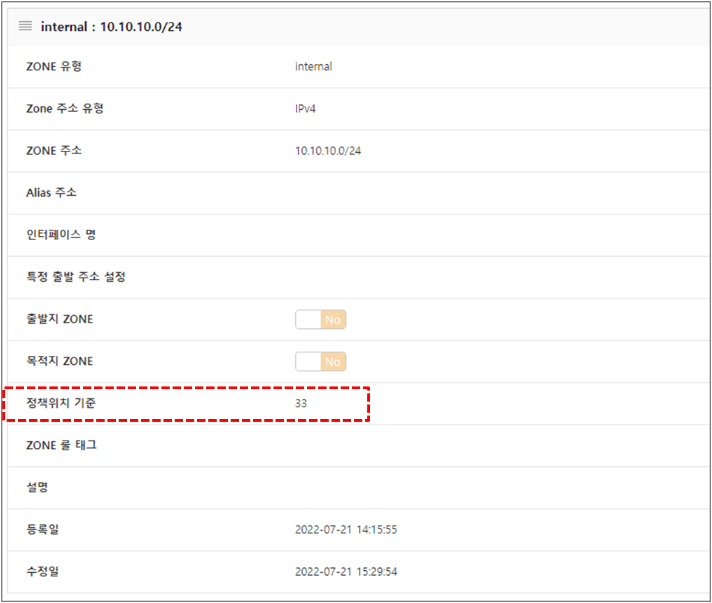
Figure. Policy location criteria setting The order value of the rule for the Zone address (10.10.10.0/24) is set based on the policy position (33).

Figure. Policy location based result
Unmanaged zone configuration
Case: If the origin/destination is not assigned to a Zone address, specify the Zone name.
📹 Video guide: How to configure substitution for unmanaged zones
Firewall detailed feature configuration: setting value = zone name
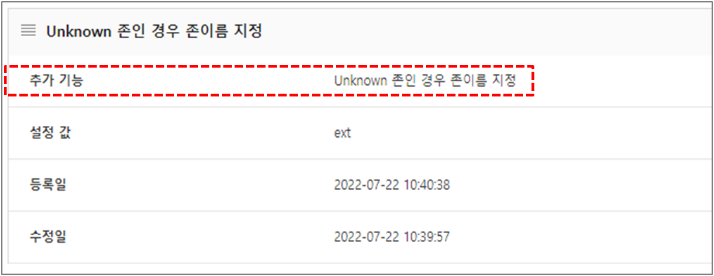
Figure. Firewall Detailed Feature Settings (Zone Name) Zone address

Figure. Zone address When a rule is requested for a Zone range not assigned to a Zone address, it is designated with the Zone name ’ext’.
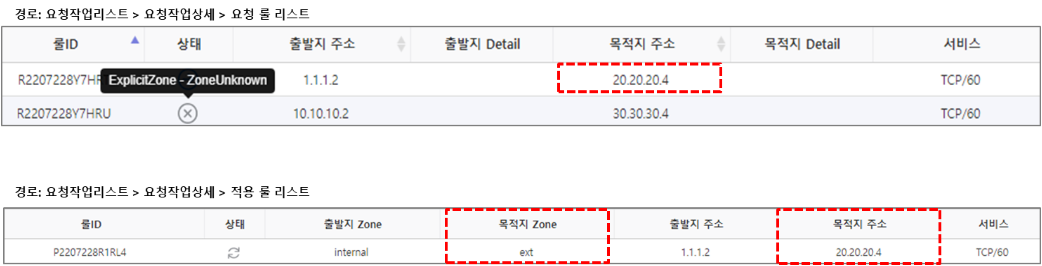
Figure. Unmanaged Zone Result
Zone Alias configuration
Case: Even if the range is broader than the Zone address, a rule set is generated.
📹 Video guide: Zone Alias setup guide
If there is no Alias address set for the Zone address, the rule will not be created as ZoneUnknown.
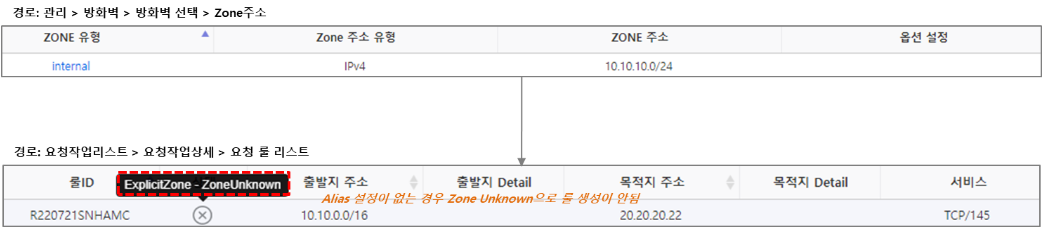
Figure. When Alias address is not set If an Alias address is set for a Zone address, it will be changed to the Zone address with the Alias address set.
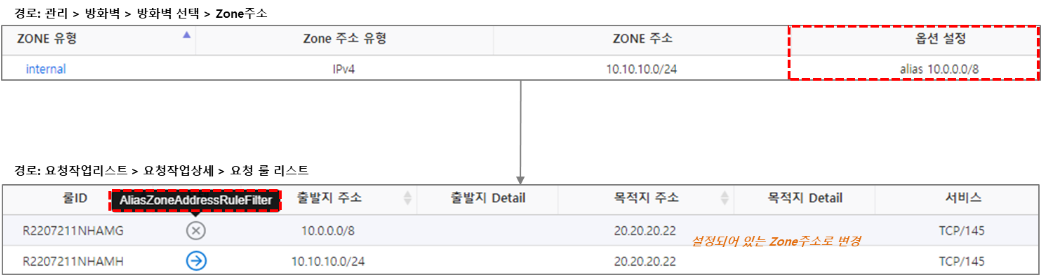
Figure. When the Alias address is set