FPMS Introduction
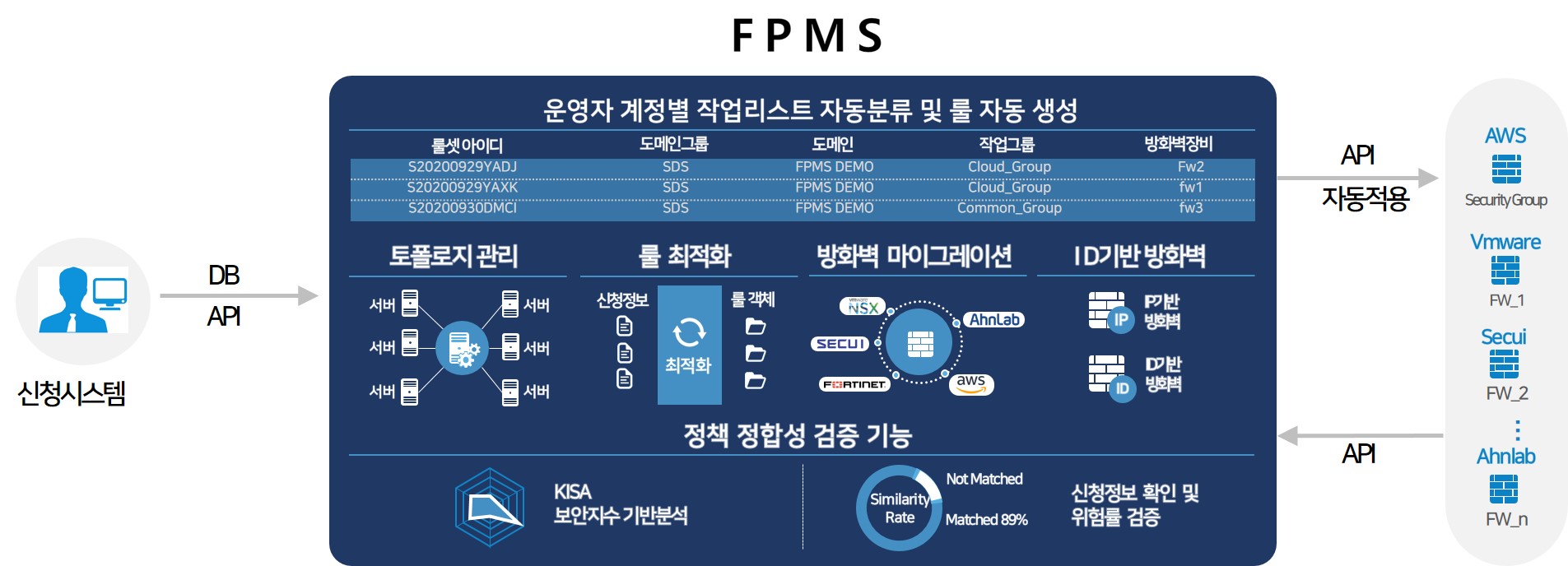
FPMS(Firewall Policy Management System) is an automated firewall operation solution that eliminates human errors and failures by automating all processes that operators manually perform during firewall operation, thereby reducing users’ service lead time.
FPMS architecture diagram
FPMS Key Features
The main features of FPMS are as follows.
| Main features | Explanation |
|---|
| multi-vendor | - Automatically creates and applies firewall rules that match the characteristics of the firewall vendor.
- Supports SECUI(MF2, Bluemax), Fortinet, Palo Alto, VMware NSX, Cisco ASA, AxGate, Juniper SRX, Check Point, and Security Groups of public clouds (AWS, Azure, GCP).
|
| Policy Optimization | - Provides multiple functions to ensure that application information can be registered to the firewall without errors.
- Application information validation and automatic conversion: Checks whether IP, Port, etc., are entered according to syntax and structure, and converts incorrect or variably formatted values into correct data. Supports IP and Port allowed ranges, automatic conversion of ICMP application ports, range applications, multiple item applications, etc.
- Operational information validation and automatic conversion: Checks compliance with network operation and security standards to determine allowance. For example, if ANY is not permitted, it is automatically blocked and the corresponding Zone is verified.
- Automatic classification of application information: Finds and classifies the firewall where the application information should be registered.
|
| Automatic policy application | - Provides a function to transform application information through policy rule settings.
- Provides a function to determine the application location according to firewall policy order rules.
- Provides expiration functionality for firewalls that do not support expiration.
- Provides a function to schedule firewall policy Push times for application.
- Provides a function to automatically create required objects or reuse existing objects based on the application details when applying policies.
- Provides a function to replicate policies applied to one firewall to another firewall for DR and backup firewalls, etc.
- Provides a function to automatically delete disabled (Disable) policies.
|
| Policy Management | - Provides the ability to manage policy change history and view change details.
- Provides the ability to search policies in real time and query them with multiple conditions.
- Provides authentication firewall policy management and automatic registration.
- Provides authentication functionality as a substitute for firewalls that do not support it. To use authentication, the entire network must support the authentication feature.
- Provides the ability to compare firewall policies by selecting two dates.
|
| Object Management | - Provides a function to manage individual address and address group objects used in firewall policies.
- Provides a function to manage individual service and service group objects used in firewall policies.
|
| Policy Security Analysis | - We derive security index results for each firewall policy based on period management, policy utilization, policy scope adequacy, service safety, and compliance with security standards.
- We analyze the similarity between application information and policies to report risk status.
- We analyze duplicate, unused, expired, shadow, and overly open policies.
- Based on logs, we analyze unused objects and policy flow.
|
| Firewall Management | - Supports firewall configuration for complex networks.
- Allows you to view relationships between multiple firewalls.
- Easily manage multiple firewalls.
- Features can be restricted based on administrator privileges.
|
| Other management | - Reports the request information application status per firewall.
- Reports the overall policy status and daily application status per firewall.
- Reports the overall object status and daily application status per firewall.
- Provides a function to view the change history in FPMS.
- Provides a function to notify firewall administrators of daily applied or failed rule set information.
- Provides a function to send the change history from FPMS to Syslog.
|
Table. FPMS Main Features
FPMS Expected Benefits
FPMS automates firewall operation tasks, supporting efficient and stable operation. By using FPMS, you can achieve the following expected benefits.
Failure Prevention
- Prevents human errors caused by manual registration.
- Management based on each administrator’s work capability can be performed according to system operation standards.
- The verification feature enables you to proactively identify and prevent potential failure factors.
Operation Support
- Even if the operational security level increases, the workload does not increase. * Changing the policy registration criteria from blacklist to whitelist can significantly increase the workload.
- It lowers the entry barrier for firewall rule registration tasks, making them easy to use.
- Full automation without the need for an operator is possible depending on the options.
- You can operate multiple firewall vendors and use it regardless of the number of firewalls.
Security
- You can prevent direct access to the firewall device and grant only the necessary permissions.
- You can proactively prevent policies that violate security standards.