This is the multi-page printable view of this section. Click here to print.
FPMS
- 1: Overview
- 2: How-to guides
- 3: Release Note
1 - Overview
Service Overview
FPMS (Firewall Policy Management System) is an automated firewall operation service designed to efficiently and securely manage firewalls across various cloud environments. It automates all processes that operators currently perform manually, eliminating human errors and failures, and reducing users’ service lead time.
Features
- Failure Prevention: Prevent human errors that can occur when manually registering firewall policies, and verify that the IP and Port information in the request conforms to proper syntax and structure, converting it to correct data to proactively prevent failures.
- Operational Convenience Improvement: It automates the application of firewall policies and provides a function that replicates a requested policy to another firewall for redundancy. By leveraging the firewall policy expiration feature offered by FPMS, policies can be limited to a specific period, and features such as automatic deletion of disabled policies help reduce the workload of operational personnel.
- Firewall Policy Optimization: Use an optimization algorithm for the requested firewall policy to optimize the firewall policy. Also, by checking for duplicate or permanent policies, you can prevent the application of unnecessary rules.
- Continuous Security Enhancement: Analyze excessive open policies and expired or unmanaged policies, quantify diagnostic scores by category, and easily identify vulnerability status. Additionally, you can continuously strengthen security through the vulnerability remediation guide.
Service Architecture Diagram
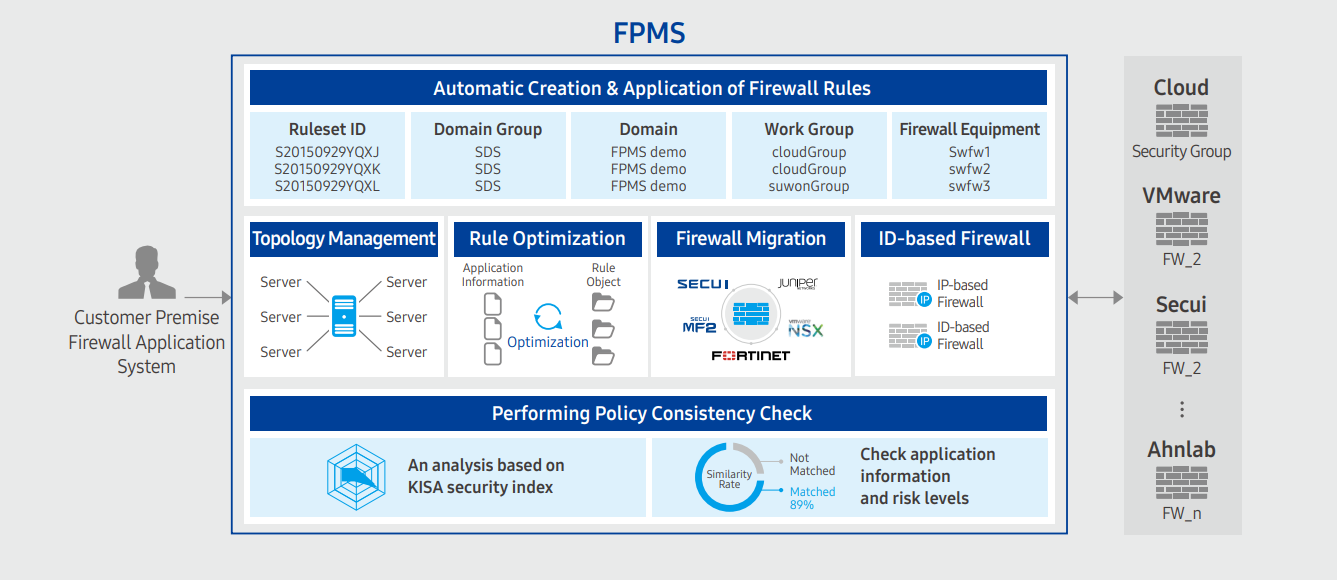
Provided features
FPMS provides the following features.
- Policy Management
- Policy change history management and real-time monitoring
- Policy search and policy expiration management
- Automatic Policy Registration
- Application data consistency check and automatic conversion
- Network operation/security standard inspection and conversion
- Automatic rule creation and application based on firewall vendor characteristics
- Policy Optimization
- Remove duplicate policy address/port/protocol
- Policy pattern analysis optimization
- Unused/Expired/Duplicate Policy Analysis
- Policy Security Analysis
- Provide security index results for each firewall policy
- Report risk status after similarity analysis of application information and policy
Component
Firewall
FPMS can register and manage firewalls that are currently in operation.
- Before registering a firewall, you need to confirm that it is compatible (check manufacturer, model name, OS version).
- FPMS uses the API to connect to firewall devices to insert policies or retrieve information. To do this, firewall operators must create an integration account on the firewall device and configure the API or verify information so that access is possible.
Firewall Application System
To retrieve firewall application data, FPMS must be integrated with the application system.
Constraints
The constraints of the FPMS service are as follows. Please be sure to review the constraints below before use and incorporate them into your service usage plan.
- Separate infrastructure must be prepared for the installation and service provision of FPMS.
- A VM for web/app services and a DBMS configuration for data storage are required.
Provision status by region
FPMS is available in the following environments.
| Region | Provision status |
|---|---|
| Korea West (kr-west1) | Provided |
| Korea East (kr-east1) | Provided |
| South Korea South 1 (kr-south1) | Not provided |
| South Korea South 2 (kr-south2) | Not provided |
| South Korea South 3 (kr-south3) | Not provided |
Prior Service
FPMS has no prior service.
2 - How-to guides
Users can create the service by entering the required information to receive the FPMS service through the Samsung Cloud Platform Console.
Create FPMS
You can create and use the FPMS service from the Samsung Cloud Platform Console.
To request the creation of an FPMS service, follow the steps below.
- Click the All Services > Security > FPMS menu. Navigate to the FPMS Service Home page.
- On the Service Home page, click the FPMS Service Request button. You will be taken to the Support Center > Service Request List > Service Request page.
- Service Request page: enter or select the required information in the mandatory input fields.
- In the task type, select FPMS Service Creation.
Input field Detailed description Title Enter the title of the service request - Example: FPMS Service Creation Request
Region Select the location of Samsung Cloud Platform Service Select the service group and service. If you click the FPMS service request button, it is entered automatically - Service Group: Security
- Service: FPMS
Task classification Select the task you want to request - Create FPMS Service: Select if you are requesting a new service
content Check the service application process and reference information, then enter the detailed application details. Attachment If you have additional files you want to share for the service application, proceed with the upload - You can attach up to 5 files, each no larger than 5 MB
- Only doc, docx, xls, xlsx, ppt, ppts, hwp, txt, pdf, jpg, jpeg, png, gif, tif files can be attached
Table. FPMS Service Creation Request Items
- In the task type, select FPMS Service Creation.
- Check the required information entered on the Service Request page and click the Request button.
- After completing the FPMS service application, a dedicated FPMS technical support representative will contact you by email to set up the installation and usage of FMPS.
- After confirming the details with the dedicated FPMS technical support representative, the FPMS installation and related system integration work will proceed.
Check FPMS Application Details
After applying for the FPMS service, you can view the detailed information and processing steps.
To check the FPMS service application details, follow the steps below.
- Click the All Services > Support Center menu. Go to the Service Home page of Support Center.
- On the Service Home page, click the Service Request menu. You will be taken to the Service Request List page.
- On the Service Request List page, select the request item. You will be taken to the Service Request Details page.
- Check the detailed information and processing steps on the Service Request Details page.
Detailed FPMS information can be viewed in a separate FPMS management portal.
- The management portal address will be sent separately by the person in charge via email after the FPMS installation is complete.
Terminate FPMS
To request cancellation of the FPMS service, follow the steps below.
Click the All Services > Security > FPMS menu. Navigate to the Service Home page of FPMS.
On the Service Home page, click the FPMS Service Request button. Navigate to the Support Center > Service Request List > Service Request page.
Service Request page, enter or select the required information in the mandatory input fields.
- Select FPMS Service Termination in the task type.
Input field Detailed description Title Enter the title of the service request - Example: FPMS Service Termination Request
Region Select the location of Samsung Cloud Platform Service Select the service group and service. If you click the FPMS service request button, it is entered automatically - Service Group: Security
- Service: FPMS
Task classification Select the operation you want to request - FPMS Service Termination: Select if you want to terminate the service
content Review the service termination process and reference information, then enter the detailed application details. Attachment If you have any additional files you want to share for service termination, proceed with the upload - Attachments can be up to 5 MB each, with a maximum of 5 files
- Only doc, docx, xls, xlsx, ppt, ppts, hwp, txt, pdf, jpg, jpeg, png, gif, tif files are allowed
Table. Table. FPMS Service Termination Request Items
- Select FPMS Service Termination in the task type.
Verify the required information entered on the Service Request page, and click the Request button.
- After you complete the FPMS service termination request, the dedicated FPMS technical support staff will verify it and proceed with the FPMS service termination and deletion.
3 - Release Note
FPMS
- A feature has been added to FPMS that allows registering and managing firewalls and Security Groups of the Samsung Cloud Platform Console.
- The SecuAI firewall v3.7 support (anyzone) feature has been improved.
- We have launched the FPMS (Firewall Policy Management System) service, which automates firewall operation tasks to efficiently and securely manage firewalls across diverse cloud environments.