This is the multi-page printable view of this section. Click here to print.
FPMS
- 1: Overview
- 2: How-to guides
- 3: Release Note
1 - Overview
Service Overview
FPMS(Firewall Policy Management System) is a firewall operation automation service for efficient and safe operation of firewalls in various cloud environments. It automates all processes that operators are currently performing manually, eliminating human errors and failures, and reducing the user’s service lead time.
Features
- Failure Prevention: Prevent human errors that may occur when manually registering firewall policies, and check if the IP, Port information, etc. of the application information is a value that conforms to grammar and structure, thereby converting it to the correct data to prevent failures in advance.
- Improved Operational Convenience: It provides features such as automating firewall policy application and replicating the applied policy to another firewall for duplication configuration. It can be used to enable policies to be used only for a certain period of time using the firewall policy expiration feature provided by FPMS, and provides features such as automatic deletion of inactive policies, which can reduce the operational burden of personnel.
- Firewall Policy Optimization: Optimizes the firewall policy being applied by utilizing optimization algorithms, and also checks for duplicate or permanent policies to prevent unnecessary rule applications.
- Continuous Security Enhancement: Analyze and diagnose excessive open policies, expired or unmanaged policies, and quantify the scores by department to easily grasp the vulnerability status. Additionally, the vulnerability handling guide enables continuous security enhancement.
Service Composition Diagram
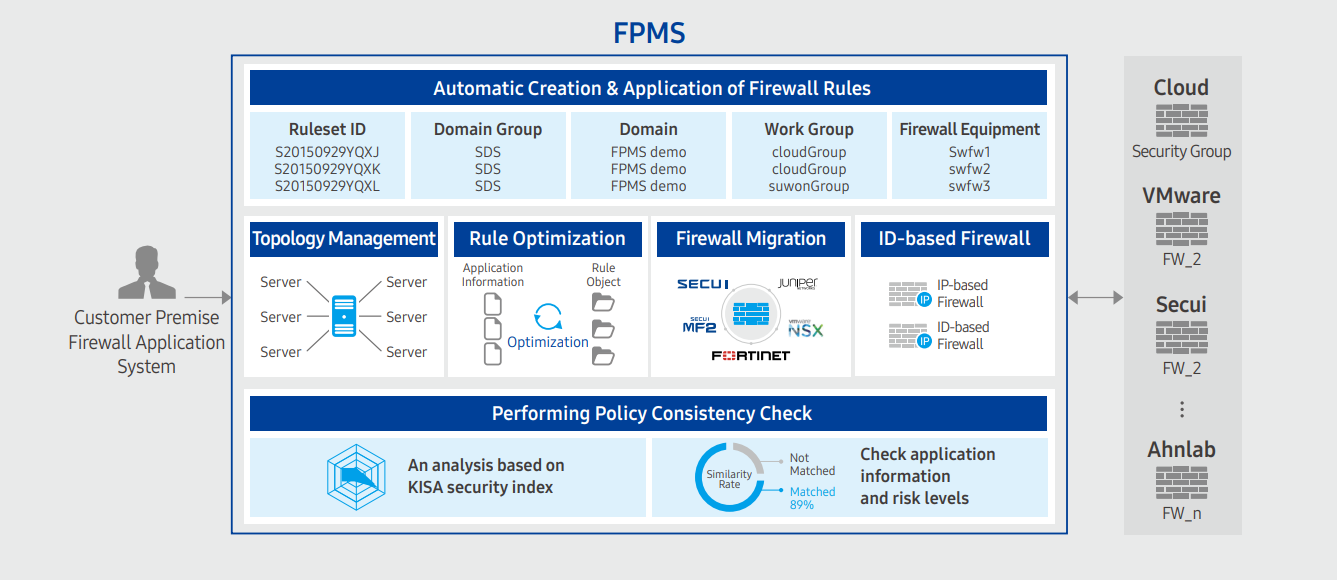
Provided Features
FPMS provides the following functions.
- Policy Management
- Policy change history management and real-time monitoring
- Policy search and policy expiration management
- Policy Auto Registration
- Check application information consistency and automatic conversion
- Network operation/security standard inspection and conversion
- Automatic creation/application of rules based on firewall vendor characteristics
- Policy Optimization
- Remove duplicates of policy address/port/protocol
- Policy pattern analysis optimization
- Analysis of unused/expired/duplicate policies
- Policy Security Analysis
- Provides security index results by firewall policy
- Analyze the similarity between application information and policy, and report risks after analysis
Component
Firewall
FPMS can register and manage firewalls in operation.
- It is necessary to check if the firewall is connectable before registration. (Check manufacturer, model name, OS version)
- FPMS uses API to access firewall devices and put in policies or retrieve information. To do this, the firewall operator must create a linked account on the firewall device and set up API settings or check information to enable access.
Firewall Application System
To retrieve the firewall application data, FPMS and the application system must be linked.
Constraints
The limitations of the FPMS service are as follows. Please confirm the limitations below before use and reflect them in your service usage plan.
- A separate infrastructure must be prepared for the installation and provision of FPMS services.
- VM and DBMS configuration for Web/App services and data storage are required.
Regional Provision Status
FPMS can be provided in the following environment.
| Region | Availability |
|---|---|
| Western Korea(kr-west1) | Provided |
| Korea East(kr-east1) | Provided |
| South Korea 1(kr-south1) | Not provided |
| South Korea, southern region 2(kr-south2) | Not provided |
| South Korea southern region 3(kr-south3) | Not provided |
Preceding service
FPMS has no preceding service.
2 - How-to guides
The user can create the service by entering the necessary information to receive the FPMS service through the Samsung Cloud Platform Console.
Create FPMS
You can create and use the FPMS service in the Samsung Cloud Platform Console.
To request the creation of an FPMS service, follow the following procedure.
- Click all services > Security > FPMS menu. It moves to the Service Home page of FPMS.
- Service Home page, click the FPMS Service Request button. It moves to the Support Center > Service Request List > Service Request page.
- Service Request page, enter or select the corresponding information in the required input field.
- Select FPMS Service Creation in the work division.
| Input Item | Detailed Description |
|---|---|
| Title | Enter the title of the service request content
|
| Region | Select the location of Samsung Cloud Platform |
| Service | Select service group and service. If the FPMS service request button is pressed, it is automatically entered
|
| Work Division | Select the work you want to request
|
| Content | Check the service application process and notes, and enter the detailed application content |
| Attachments | If you have additional files you want to share for service application, you can upload them
|
- Check the required information entered on the Service Request page and click the Request button. Once the FPMS service application is completed, the FPMS dedicated technical support manager will contact you by email for FMPS installation and usage settings. After checking the details with the FPMS dedicated technical support person in charge, FPMS installation and related system linkage work will be proceeded.
FPMS Application History Check
After applying for the FPMS service, you can check the detailed history and processing process.
To check the FPMS service application history, follow the following procedure.
- Click all services > Support Center menu. It moves to the Service Home page of Support Center.
- On the Service Home page, click the Service Request menu. It moves to the Service Request List page.
- On the Service Request List page, select the application item. It moves to the Service Request Details page.
- Service Request Details page to check the details and processing procedure.
FPMS detailed information can be found in a separate FPMS management portal.
- The management portal address will be sent separately by email after the FPMS installation is completed by the person in charge.
Cancel FPMS
To request the cancellation of FPMS service, please follow the following procedure.
- Click All Services > Security > FPMS menu. It moves to the Service Home page of FPMS.
- On the Service Home page, click the FPMS Service Request button. It moves to the Support Center > Service Request List > Service Request page.
- Service Request page, enter or select the corresponding information in the required input area.
- Select FPMS Service Cancellation in the work classification.
| Input Item | Detailed Description |
|---|---|
| Title | Enter the title of the service request content
|
| Region | Select the location of Samsung Cloud Platform |
| Service | Select service group and service. If the FPMS service request button is pressed, it is automatically entered
|
| Work Classification | Select the work you want to request
|
| Content | Check the service cancellation process and notes, and enter the detailed application content |
| Attachments | If you have any additional files you would like to share for service cancellation, please upload them
|
- On the Service Request page, check the required information entered and click the Request button.
- Once the FPMS service cancellation application is completed, the FPMS dedicated technical support person in charge will confirm and proceed with the FPMS service cancellation and deletion work.
3 - Release Note
FPMS
- A feature has been added that allows registering the firewall and Security Group of the Samsung Cloud Platform Console to FPMS for management.
- SecuEye firewall v3.7 support (anyzone) feature has been improved.
- We have launched the Firewall Policy Management System (FPMS) service for automating firewall operation tasks to efficiently and safely operate firewalls in various cloud environments.