This is the multi-page printable view of this section. Click here to print.
DDoS Protection
- 1: Overview
- 2: How-to guides
- 3: Release Note
1 - Overview
Service Overview
DDoS Protection is a service that detects and defends against DDoS (Distributed Denial of Service) attacks, which generate large volumes of traffic to cause service disruptions. Continuous monitoring detects and blocks external traffic attacks, protecting the servers within the Samsung Cloud Platform. When a DDoS attack occurs, blocking the attack traffic minimizes the traffic load entering the internal servers of the Samsung Cloud Platform, ensuring the continuity of web services.
Features
- Rapid Attack Detection: When a large volume of traffic arrives, it detects DDoS attacks in real time. Continuously updating DDoS defense items enables effective response to the latest attack techniques.
- Effective Attack Defense: When a DDoS attack occurs, we detect it in real time and block malicious traffic to ensure service availability, supporting regular users to access the website normally.
- Stable web service operation: Provide 24/7 security monitoring services, and based on extensive network operation experience, effectively respond to external security threats, delivering alerts with attack information when incidents occur. Additionally, monthly reports are provided to review event details.
Configuration diagram
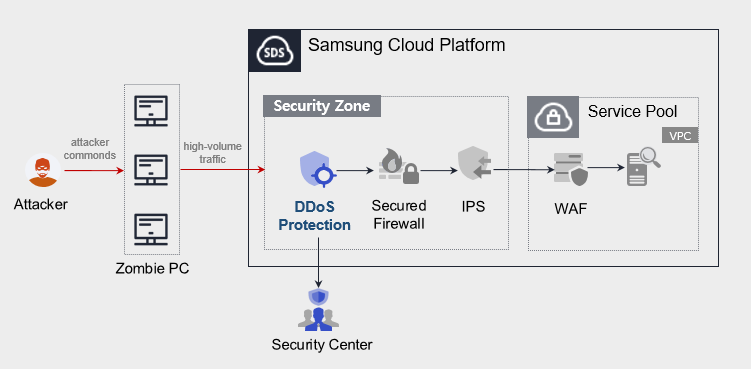
Provided features
We provide the following features.
- Intrusion Detection and Analysis
- 24x365 event monitoring
- Automatic detection of DDoS attacks
- Intrusion Response
- Provides learning-based detection and blocking for various DDoS attacks at the L3/L4 level.
- Monitoring Information Provision
- Alert on event detection
- Provide monthly report (alert list and details)
Component
- DDoS Protection provides services based on public IPs configured within the VPC.
- We provide services for servers that can be accessed over the Internet, and blocking can be performed based on attacker IP addresses.
Constraints
When providing DDoS Protection service, a minimum one‑month learning period is required to set the protection threshold, and we analyze the learned thresholds to provide optimal policy settings.
Provision status by region
DDoS Protection is available in the following environments.
| Region | Provision status |
|---|---|
| Korea West (kr-west1) | Not provided |
| Korea East (kr-east1) | Not provided |
| South Korea South 1 (kr-south1) | Provided |
| South Korea South 2 (kr-south2) | Provided |
| South Korea 3 (kr-south3) | Provided |
Preceding Service
- This is a list of services that must be pre-configured before creating a DDoS Protection service. For details, refer to the guides provided for each service and prepare in advance.
- When creating a VPC Internet Gateway, you must select SIGW (Secure Internet Gateway) in Category to be able to use DDoS Protection.
- When creating an Internet Gateway for a VPC, selecting Internet Gateway in ‘Category’ prevents the use of the DDoS Protection service.
- If you switch to Secure Internet Gateway, you need to change the public IP you are using.
| Service Category | Service | Detailed description |
|---|---|---|
| Networking | VPC | A service that provides an isolated virtual network in a cloud environment |
2 - How-to guides
Users can apply for the service by entering the required information for using the DDoS Protection service through the Samsung Cloud Platform Console.
Create DDoS Protection
You can apply for and use the DDoS Protection service from the Samsung Cloud Platform Console.
To request the creation of a DDoS Protection service, follow these steps.
- Click the All Services > Security > DDoS Protection menu. Navigate to the Service Home page of DDoS Protection.
- On the Service Home page, click the DDoS Protection Service Request button. You will be taken to the Support Center > Service Request List > Service Request page.
- Service Request page, enter or select the required information in the mandatory input fields.
- Select Create DDoS Protection in the task category.
Input field Detailed description Title Enter the title of the service request - Example: DDoS Protection Service Creation Request
Region Select the location of the Samsung Cloud Platform - Automatically filled with the region corresponding to the Account
Service Select the service category and service. If you click the DDoS Protection service request button, it is entered automatically - Service Category: Security
- Service: DDoS Protection
Task classification Select the type you want to request - Create DDoS Protection: select when requesting a new service
content Guide to the service application process and reference information Attachment Upload the completed DDoS Protection service application (required) and any additional files you wish to share - You can attach up to 5 files, each no larger than 5 MB
- Only doc, docx, xls, xlsx, ppt, ppts, hwp, txt, pdf, jpg, jpeg, png, gif, tif files are allowed
Table. DDoS Protection Service Creation Request Items
- Select Create DDoS Protection in the task category.
- After reviewing the application process and reference information, click the Form Download > Service Request Form Download button to download the DDoS Protection Service Application Form.
- Please fill out the DDoS Protection Service Application Form.
- Refer to the item descriptions in the Application Information and Monitoring Information tabs and complete the required fields.
Category Detailed description Application Information Fill out required items such as application type, usage period, and basic information - Application type: select application
- Usage period: enter desired start date, contract status, and estimated usage period
- Basic information: enter Account name, Project name, and recipient information
Monitoring information Enter required fields such as protected IPs and exception handling IPs (purpose per IP must be specified) - Specify application classification per IP
- New: select when applying for a new service
Table. Main contents of the DDoS Protection service creation request form
- Refer to the item descriptions in the Application Information and Monitoring Information tabs and complete the required fields.
- Attach the completed application form in the attachment area.
- Click the Request button on the service request page.
- After the request is completed, check the submitted details on the Support Center > Service Request List page.
- After the monitoring personnel review the submitted service request, they proceed with the process to use the service.
- The DDoS Protection service is now available.
Cancel DDoS Protection
To request cancellation of the DDoS Protection service, follow the steps below.
- Click the All Services > Management > Support Center menu. You will be taken to the Support Center > Service Home page.
- On the Support Center Service Home page, click the Service Request button. You will be taken to the Service Request List page.
- On the Service Request List page, click the Service Request button. You will be taken to the Service Request page.
- Service Request page, enter or select the required information in the mandatory input fields.
- Select DDoS Protection termination in the operation type.
Input field Detailed description Title Enter the title of the service request - Example: DDoS Protection Service Cancellation Request
Region Select the location of the Samsung Cloud Platform - Automatically filled with the region corresponding to the Account
Service Select service category and service - Service Category: Security
- Service: DDoS Protection
Task classification Select the type of request you want to make - Cancel DDoS Protection: select if you are terminating the service
content Guide to the service application process and reference information Attachment If you have a completed DDoS Protection service application (required) and any additional files you wish to share, proceed with the upload - You can attach up to 5 files, each no larger than 5 MB
- Only doc, docx, xls, xlsx, ppt, ppts, hwp, txt, pdf, jpg, jpeg, png, gif, and tif files are allowed
Table. Table. DDoS Protection service termination request items
- Select DDoS Protection termination in the operation type.
- After reviewing the Application Process and Reference Information, click the Form Download > Service Request Form Download button to download the DDoS Protection Service Application Form.
- Please complete the DDoS Protection Service Application Form.
- Refer to the item descriptions in the Application Information and Monitoring Information tabs and complete the required fields.
Category Detailed description Application Information Fill out required fields such as application type, usage period, and basic information - Application type: select termination
- Usage period: enter desired termination date
- Basic information: Account name, Project name, recipient information
Monitoring information When terminating the entire service, no input is required. Table. Main contents of DDoS Protection service termination request form
- Refer to the item descriptions in the Application Information and Monitoring Information tabs and complete the required fields.
- Attach the completed application form to the attachment area.
- On the service request page, click the Request button.
- When the request is completed, check the submitted details on the Support Center > Service Request list page.
- After the monitoring staff verifies the submitted service request, the termination process is completed when the monitored IP/policy is deleted.
- Service termination requires three business days, including the cancellation request date.