This is the multi-page printable view of this section. Click here to print.

Return to the regular view of this page.

Overview

Service Overview

Config Inspection is a service that diagnoses the security level of Console settings for each service of the Samsung Cloud Platform. Provides a security checklist organized by areas such as IAM, Networking, Database, and Logging, and checks the current status via API calls to verify whether the recommended security settings for each diagnostic item are applied.

Users can create a diagnostic target by creating a service, then request a diagnosis, and view the diagnostic request results through a Report. The report provides the diagnostic request history and item-specific diagnostic results, and for diagnostic items that require the user’s final confirmation or action, detailed results—including the associated resource information and remediation guide—can be viewed.
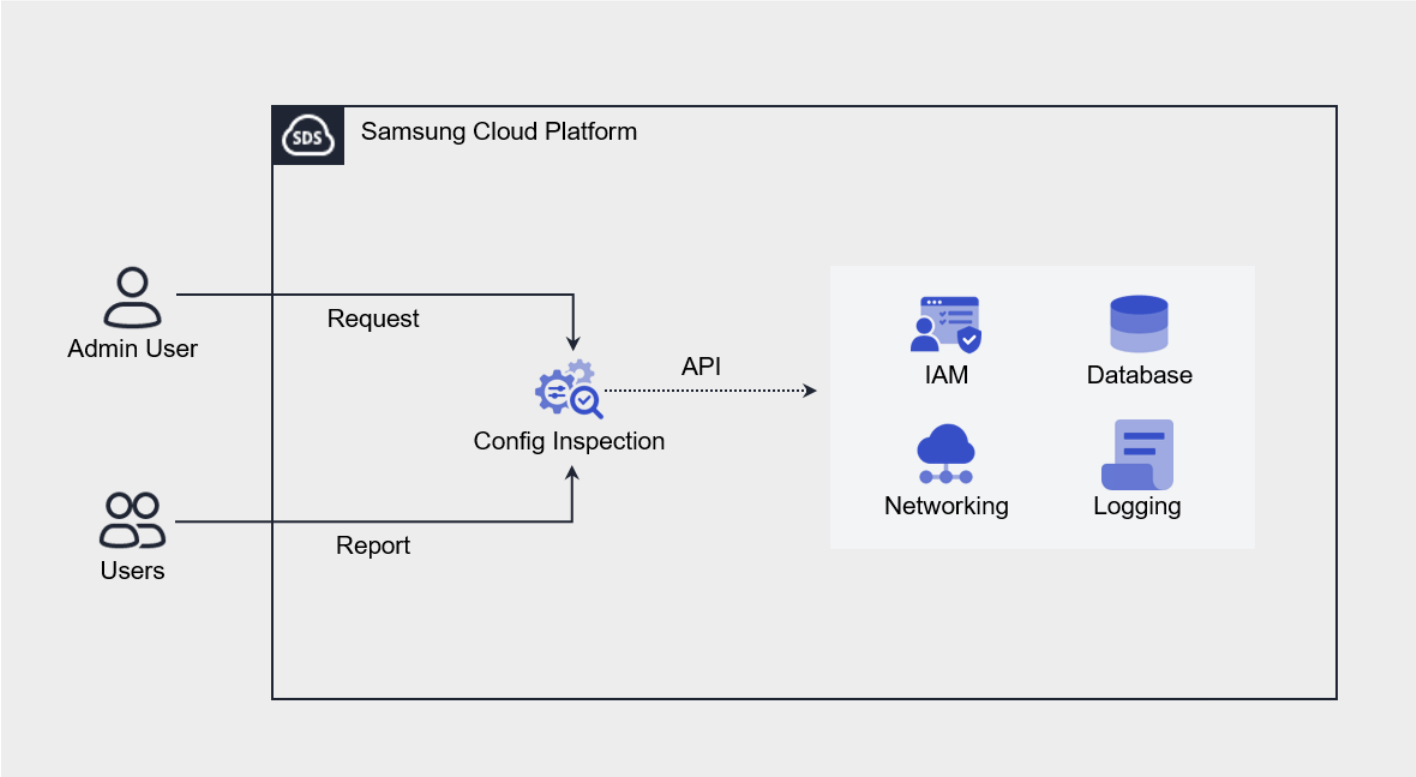
Diagram
Figure. Config Inspection diagram

Provided Features

Config Inspection provides the following features.

  • Console Diagnostics: You can call the Console API using an authentication key method to assess the security level.
  • Diagnostic Target Management: You can create and manage a user’s Samsung Cloud Platform account as a diagnostic target through service creation.
  • Diagnostic Request: On the resource detail screen, you can request a diagnosis by clicking the Diagnostic Request button.
  • Diagnostic Result Management: In Report, you can view the list of diagnostic requests and detailed diagnostic results, and download them as an Excel file.

Component

Checklist

A checklist is a collection of diagnostic items that serve as the basis for diagnostic results, and the checklist currently provided by Config Inspection is as follows.

  • Refer to the Checklist for detailed diagnostic items of the checklist provided by Samsung Cloud Platform.
CloudChecklist nameNumber of items
Samsung Cloud PlatformBest Practice27
Table. Config Inspection checklist types

Report

In the Config Inspection Report, you can view diagnostic results in the order of result list, result details, and item details.

CategoryDetailed description
Diagnostic Results ListAll diagnostic request history in the Account
  • Completed: The diagnostic request has been successfully completed
    • Click the instance to view detailed diagnostic results
  • Error: The diagnostic request was not completed successfully
    • If the diagnostic result is an error, detailed diagnostic results are not provided.
    • The cause of the error can be found in the Config Inspection details
Detailed Diagnosis ResultsResult of a successfully completed diagnostic request (list of diagnostic items)
  • PASS: No vulnerable resources exist in the diagnostic item.
  • FAIL: Vulnerable resources exist in the diagnostic item.
  • CHECK: User’s final confirmation is required regarding the vulnerability status.
  • ERROR: There is an error with user/authentication key permissions or the API call.
  • N/A: No resources correspond to the diagnostic item.
Diagnostic Item DetailsDetailed results by diagnostic item
Table. Config Inspection Report Diagnostic Configuration

Preceding Service

Config Inspection has no prerequisite service.

1 - Checklist

You can view the types of checklists provided by Config Inspection and the detailed diagnostic items for each checklist.

Checklist

A checklist is a collection of diagnostic items that serve as the basis for diagnostic results, and the types of checklists currently provided by Config Inspection are as follows.

CloudChecklist nameNumber of items
Samsung Cloud PlatformBest Practice27
Table. Config Inspection checklist types

Best Practice

The detailed diagnostic items of the Best Practice checklist provided by Samsung Cloud Platform are as follows.

areaDiagnostic Items
IAM
  • The authority to manage Account users should be granted only to users who need to manage IAM Users, in accordance with the principle of least privilege.
  • There must be no long‑term inactive users.
  • A policy that allows access only from authorized IPs for all users must be applied.
  • Permissions must be granted according to the principle of least privilege, considering job duties and usage purpose.
Networking
  • A NAT Gateway must not be created in a Private Subnet that does not require Internet access.
  • Network integration products must use a firewall.
  • No unnecessary local subnets should exist, and only the Virtual Server (VM) or Bare Metal Server (BM) required for operation may be connected within the created local subnet.
  • Remote access ports for each protocol must have Internet access blocked, and connections should be allowed only for specified IPs that require access.
  • Security Groups should register only the necessary rules on an IP/Port basis.
  • The firewall of network integration products should register only the necessary rules on an IP/Port basis.
Compute
  • When using Cloud Functions function URLs, you must apply access control.
Container
  • The control plane of the Kubernetes cluster must not use public endpoints.
  • Only authorized resources should be allowed to access the private endpoints of the Kubernetes cluster.
  • Restrict access to the Container Registry to authorized IP resources only.
  • Enable vulnerability scanning for Container Registry images and remediate any discovered vulnerabilities.
  • Restrict the use of vulnerable images in the Container Registry.
Database
  • The DB must be deployed in a private subnet and have internet access blocked.
  • KMS keys should grant the minimum necessary permissions only to entities that require access.
  • KMS keys must be rotated periodically (within 90 days) using the automatic rotation feature.
Logging
  • Enable the Trail service of Logging&Audit and set the scope to all regions/resource types/users.
  • Set the log file verification of Logging&Audit Trail to enabled.
  • The Trail logs of Logging&Audit must be retained for at least one year.
  • Security Groups must have logging enabled.
  • Enable NAT logging for the Internet Gateway.
  • Enable control plane logging for Kubernetes Engine clusters.
  • Network integration products must enable Firewall logging.
  • DB audit logs must be stored.
Table. Samsung Cloud Platform Best Practice checklist items