Overview
Service Overview
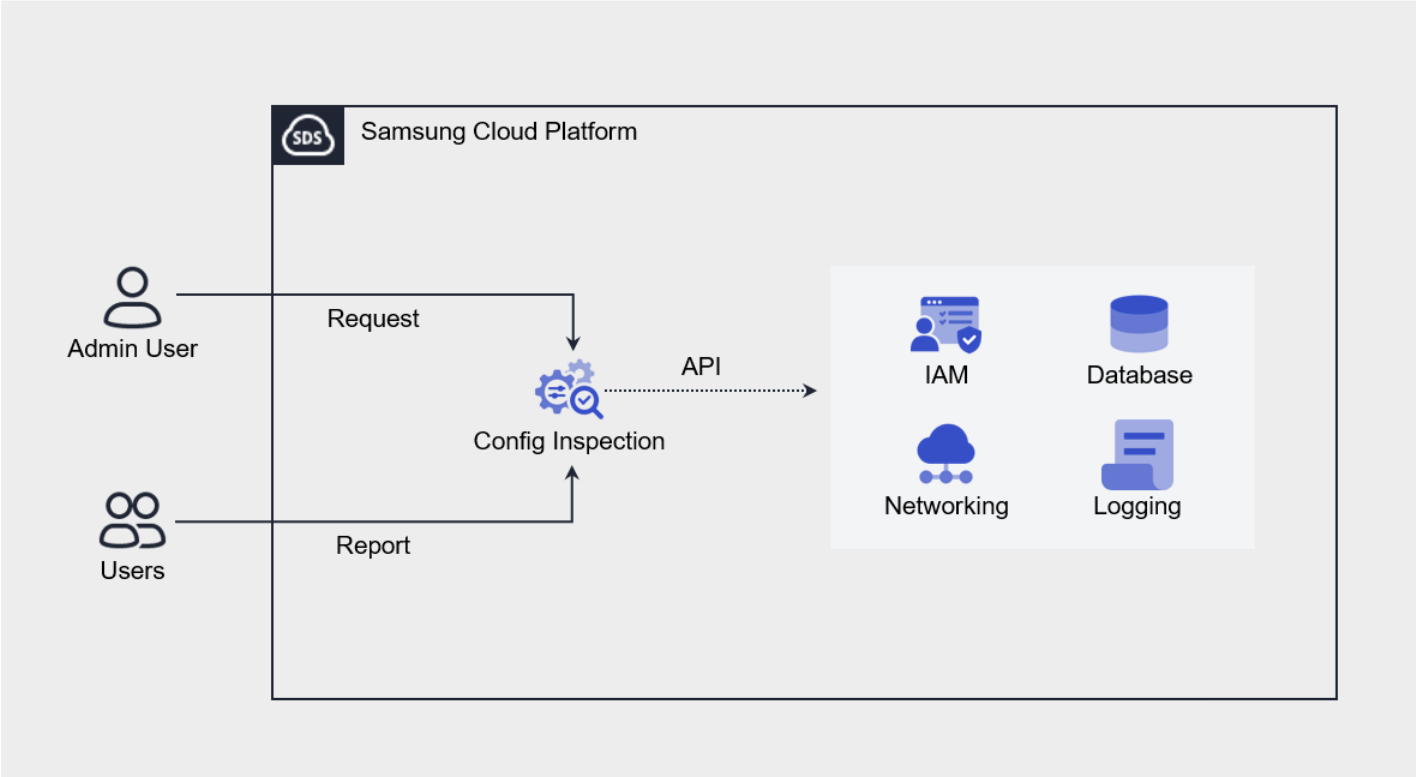
Config Inspection is a service that diagnoses the security level of Console settings for each service of the Samsung Cloud Platform. Provides a security checklist organized by areas such as IAM, Networking, Database, and Logging, and checks the current status via API calls to verify whether the recommended security settings for each diagnostic item are applied.
Users can create a diagnostic target by creating a service, then request a diagnosis, and view the diagnosis request results through a Report. The report provides the diagnostic request history and per-item diagnostic results, and for diagnostic items that require the user’s final confirmation or action, detailed results—including the resource information and action guide corresponding to each item—can be viewed.
Provided Features
Config Inspection provides the following features.
- Console Diagnostics: You can call the Console API using an authentication key method to assess the security level.
- Diagnostic Target Management: Through service creation, you can create and manage a user’s Samsung Cloud Platform account as a diagnostic target.
- Diagnostic Request: On the resource detail screen, you can request a diagnosis by clicking the Diagnostic Request button.
- Diagnostic Result Management: In Report, you can view the list of diagnostic requests and detailed diagnostic results, and download them as an Excel file.
Components
Checklist
The checklist is a collection of diagnostic items that serve as the basis for diagnostic results, and the checklist currently provided by Config Inspection is as follows.
- Refer to the 체크 리스트 for the detailed diagnostic items of the checklist provided by Samsung Cloud Platform.
| Cloud | Checklist name | Number of items |
|---|---|---|
| Samsung Cloud Platform | Best Practice | 27 |
| Samsung Security Index (SSI) | 24 |
Report
In the Config Inspection Report, you can view the diagnostic results in the order of result list, result details, and item details.
| Category | Detailed description |
|---|---|
| Diagnostic Result List | All diagnostic request history in the Account
|
| Detailed Diagnosis Results | Result of a successfully completed diagnostic request (diagnostic item list)
|
| Diagnostic Item Details | Detailed results by diagnostic item |
Preliminary Service
Config Inspection has no preceding service.