Overview
Service Overview
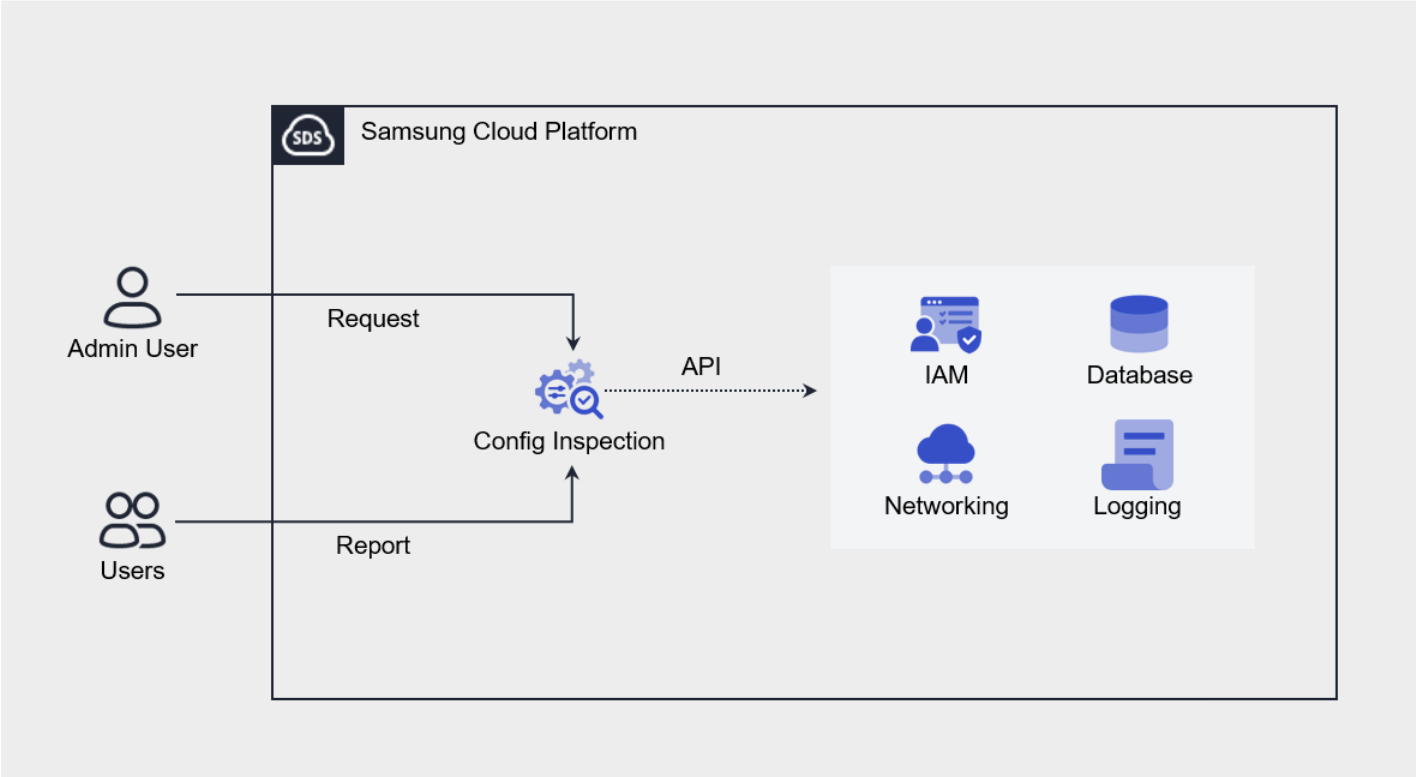
Config Inspection is a service that diagnoses the security level of console settings for each service of Samsung Cloud Platform. It provides a security checklist organized by areas such as IAM, Networking, Database, Logging, and checks the current status via API calls to see whether the recommended security settings for each diagnostic item are applied.
Users can create a diagnostic target through service creation and then request a diagnosis, and the diagnosis request results can be checked via the Report. The Report provides the diagnosis request history and item-specific diagnosis results, and for diagnostic items that require the user’s final confirmation or action, detailed results including the resource information corresponding to each item and a remedial guide can be viewed.
Provided Features
Config Inspection provides the following features.
- Console Diagnosis: You can diagnose the security level by calling the Console API using the authentication key method.
- Diagnosis Target Management: Through service creation, you can create and manage the user’s Samsung Cloud Platform account as a diagnosis target.
- Diagnosis Request: In the resource detail screen, you can request a diagnosis by clicking the Diagnosis Request button.
- Diagnostic Result Management: In Report, you can view the list of diagnosis requests and detailed diagnosis results, and download them as an Excel file.
Components
Checklist
The checklist is a collection of diagnostic items that serve as the basis for diagnostic results, and the checklist currently provided by Config Inspection is as follows.
| Cloud | Checklist Name | Number of Items |
|---|---|---|
| Samsung Cloud Platform | Best Practice | 18 |
The detailed diagnostic items of the Best Practice checklist provided by Samsung Cloud Platform are as follows.
| Area | Diagnostic Item |
|---|---|
| Networking |
|
| Container |
|
| Database |
|
| Logging |
|
Report
In the Config Inspection Report, you can view the diagnostic results in the order of result list, result details, and item details.
| Category | Detailed description |
|---|---|
| Diagnosis Result List | All diagnosis request history within Account
|
| Diagnosis Result Details | Result of a successfully completed diagnosis request (diagnosis item list)
|
| Diagnostic Item Details | Detailed Results per Diagnostic Item |
Preliminary Service
Config Inspection has no preceding service.