Service Overview
Certificate Manager is a service that supports certificate deployment and integrated management, allowing users to create and use SSL/TLS certificates issued by a Certificate Authority (CA) and self-signed certificates for development or testing purposes in Samsung Cloud Platform resources. It also enables management of the certificate lifecycle by checking expiring certificates through expiration notification emails.
Features
- Easy creation: You can create a certificate with a simple task on the Samsung Cloud Platform Console. User certificates issued from outside undergo validity verification and only deployable certificates are distributed.
- Service Integration: Connects certificates registered in Certificate Manager to Load Balancer to encrypt network connections and protect services.
- Certificate Expiration Alert: Until 1 day before the expiration date, periodic notifications allow you to check and replace certificates that are about to expire.
Service Composition Diagram
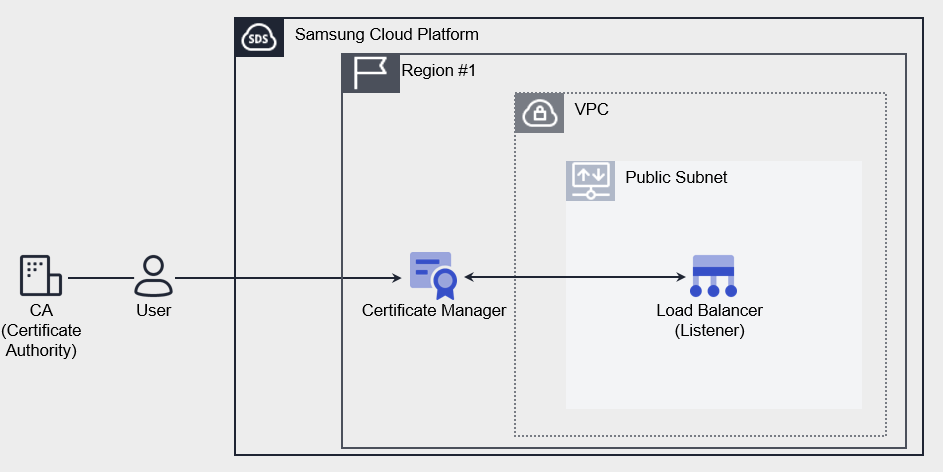
Provided Features
Certificate Manager provides the following functions.
- Certificate Creation: You can create a user certificate issued by a certificate authority or a self-signed certificate suitable for development/testing purposes.
- Connected Resource Inquiry: You can inquire about Samsung Cloud Platform resources that are using certificates. Currently, it provides a list of Load Balancer’s Listener(HTTPS).
- Expiration Notice: You can set the recipient of the expiration notice for each certificate. The notification recipient will receive an email from 45 days before expiration. (Sent 45/30/15/7/1 day before expiration)
Components
The Certificate Manager’s user certificate consists of Private Key, Certificate Body, and Certificate Chain. Enter the certificate information, including the entire contents, including the BEGIN and END lines.
Private Key
Enter the private key in PEM format. The private key supports RSA and the decrypted value must be entered.
-----BEGIN RSA PRIVATE KEY-----
Private Key
-----END RSA PRIVATE KEY-----
Certificate Body
Server(Leaf) inputs the certificate in PEM format. Only one certificate can be entered in the Certificate Body.
-----BEGIN CERTIFICATE-----
Server Certificate
-----END CERTIFICATE-----
Certificate Chain
Enter the upper certificate in PEM format. Enter in the order of Sub(Intermediate) CA → Root CA, and it can be omitted only when it is a self-signed/issued certificate.
-----BEGIN CERTIFICATE-----
Intermediate Certificate
-----END CERTIFICATE-----
-----BEGIN CERTIFICATE-----
Root Certificate
-----END CERTIFICATE-----
Constraints
Certificate Manager provides a service by Region unit. Please create and use the service in the required Region. The quota per Region is as follows.
| Classification | Basic Quantity | Description |
|---|---|---|
| CERTIFICATE_MANAGER.USER_CERT_DEFAULT.COUNT | 100 | Number of user certificates per region |
| CERTIFICATE_MANAGER.SELFSIGNED_CERT_DEFAULT.COUNT | 100 | Number of self-issued certificates per Region |
Preceding Service
Certificate Manager has no preceding services.