Overview
Service Overview
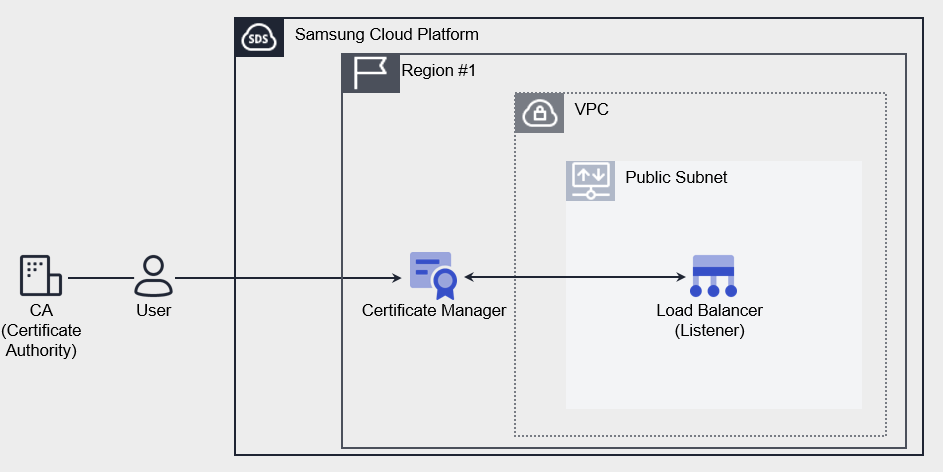
Certificate Manager is a service that supports certificate distribution and integrated management, enabling users to generate SSL/TLS certificates issued by a Certificate Authority (CA) and self‑signed certificates for development or testing purposes, and use them on Samsung Cloud Platform resources. By receiving pre‑expiration notification emails, users can identify certificates that are about to expire and manage the certificate lifecycle.
Features
- Simple Creation: You can generate certificates with simple steps in the Samsung Cloud Platform Console. User certificates issued externally are validated, and only certificates that pass verification are distributed.
- Service Integration: Connect the certificates registered in Certificate Manager to the Load Balancer to encrypt network connections and protect the service.
- Certificate Expiration Alert: You can identify and replace certificates that are about to expire with periodic notifications up to 1 day before the expiration date.
Service Architecture Diagram
Provided features
Certificate Manager provides the following features.
- Certificate Creation: You can generate a user certificate issued by a certification authority or a self-signed certificate suitable for development/testing (Self-signed).
- Connected Resource Lookup: You can view Samsung Cloud Platform resources that are using the certificate. Currently, it provides a list of Load Balancer listeners (HTTPS).
- Expiration Alert: You can set expiration alert recipients for each certificate. Emails are sent to the recipients starting 45 days before expiration. (Sent 45/30/15/7/1 days before expiration)
Component
User certificates in Certificate Manager consist of a Private Key, Certificate Body, and Certificate Chain. Enter the entire certificate information, including the BEGIN and END lines.
Private Key
Enter the private key in PEM format. Private Key supports RSA and must be entered as a decrypted value.
-----BEGIN RSA PRIVATE KEY-----
(개인키)
-----END RSA PRIVATE KEY-----
Certificate Body
Enter the Server (Leaf) certificate in PEM format. Only one certificate can be entered in the Certificate Body.
-----BEGIN CERTIFICATE-----
(서버 인증서)
-----END CERTIFICATE-----
Certificate Chain
Enter the upper-level certificate in PEM format. Input them in the order Sub (Intermediate) CA → Root CA, and you may omit this only for self‑signed or self‑issued certificates.
-----BEGIN CERTIFICATE-----
(중간 인증서)
-----END CERTIFICATE-----
-----BEGIN CERTIFICATE-----
(루트 인증서)
-----END CERTIFICATE-----
Constraints
Certificate Manager provides services on a per‑Region basis. Create the service in the required Region and use it. The quota per Region is as follows.
| Category | Default quantity | Explanation |
|---|---|---|
| CERTIFICATE_MANAGER.USER_CERT_DEFAULT.COUNT | 100 | Number of user certificates per Region |
| CERTIFICATE_MANAGER.SELFSIGNED_CERT_DEFAULT.COUNT | 100 | Number of self-issued certificates per Region |
Prior Service
Certificate Manager has no prerequisite services.