Service Overview
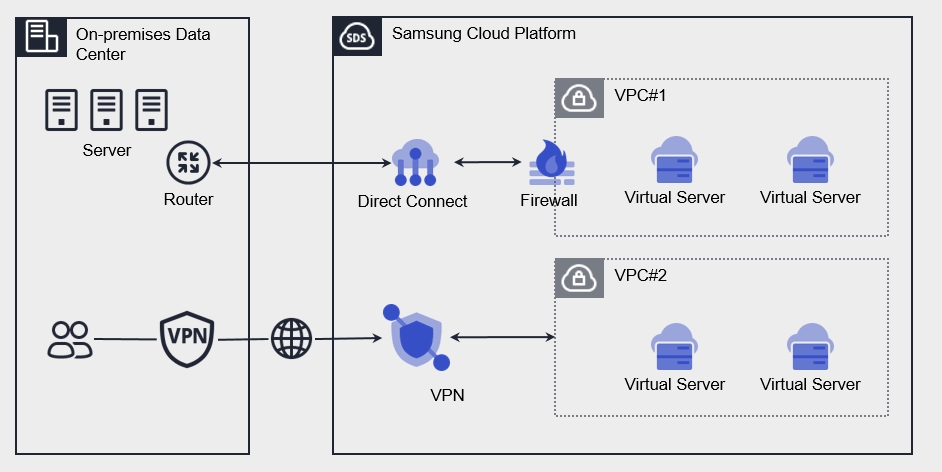
VPN(Virtual Private Network) is a service that connects the customer’s network to the Samsung Cloud Platform through an encrypted virtual private network.
Features
Rapid Service Delivery You can configure automated services through a web-based console, and after creating a service, you can use the VPN service immediately without any waiting time.
Thorough secure connection You can securely connect from a customer’s external network to the customer’s internal network built on the Samsung Cloud Platform via encrypted virtual tunneling using a performance‑ and reliability‑validated IPsec VPN.
Simple operating environment You can easily and quickly manage web-based deployment, capacity provisioning, and service updates without the need for a complex network environment setup.
Efficient Service Use You can bear costs only for the amount you use the service without any separate installation fees, enabling efficient cost management.
Provided features
VPN provides the following features.
- Provide virtual tunneling encrypted with IPsec
- Compatible VPN: Secui – Bluemax (TG360),Paloalto,Axgate,Cisco-router/ASA/Meraki, Checkpoint,AWS,Azure,Vmware NSX-T
- Virtual Private Gateway creation
- Create a Gateway to connect the customer’s network to a private network that cannot be accessed externally.
- VPN Tunnel Creation
- Select IPsec VPN Gateway (up to 5 VPN tunnels per VPN Gateway)
- In an IPsec VPN Gateway redundancy configuration, the standby device automatically operates when a failure occurs on the active device.
The system stays in a waiting state until the remote peer initiates a connection, and when the peer sends a connection request, it receives it from the waiting state and automatically establishes a tunnel. * Remote Peer VPN must be operated in Active mode.
Constraints
| Category | Default quota | Detailed description |
|---|---|---|
| VPN Gateway | 3 | Up to 3 can be created per account |
| VPN Tunnel | 5 | Up to 5 can be created per VPN Gateway |
Provision status by region
VPN is available in the following environments.
| Region | Provision status |
|---|---|
| Korea West (kr-west1) | Provide |
| Korea East (kr-east1) | Provide |
| South Korea 1 (kr-south1) | Not provided |
| South Korea 2 (kr-south2) | Not provided |
| South Korea South 3 (kr-south3) | Provide |
Preceding Service
| Service Category | service | Detailed description |
|---|---|---|
| Networking | VPC | A service that provides an isolated virtual network in a cloud environment |