Overview
Service Overview
Samsung Cloud Platform provides VPC services to support the use of logically isolated, customer‑dedicated private network spaces in a cloud environment.
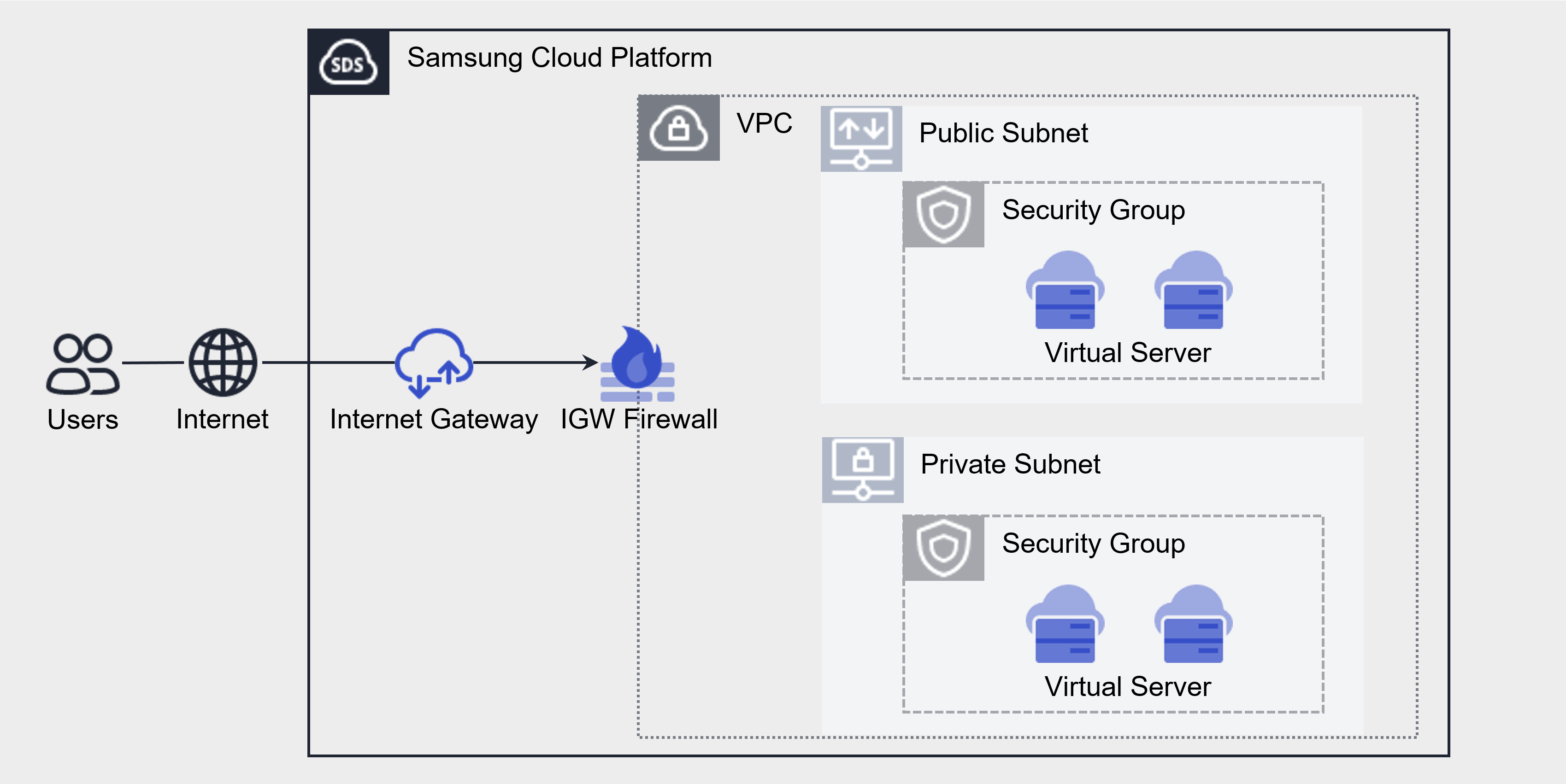
VPC(Virtual Private Cloud) is a service that provides a logically isolated, customer‑dedicated private network space in a cloud environment. Depending on the intended use, you can create a General Subnet or a Local Subnet for inter‑server communication, and freely select NAT Gateway and Internet Gateway to configure various networks. You can create multiple VPCs and operate them independently. VPC Peering allows configuration of connections between VPCs.
Service configuration diagram
Component
Subnet
Subnet refers to the IP address range of a VPC. Create subnets for public or private use by utilizing the General Subnet according to the purpose. It is a service that lets users segment the network within a VPC according to their purpose and scale. Subnet provides a regular Subnet and a Local Subnet for communication between servers.
General Subnet Creation/Retrieval/Deletion: When a VPC is created, the default Subnet that is generated is utilized according to its purpose. * For example, you can separate and use a Public Subnet that can access the internet and a Private Subnet that cannot.
VPC Endpoint Subnet Creation/Query/Deletion: You can access the Samsung Cloud Platform via a private connection from an external network connected to the VPC, enabling entry into the VPC.
Local Subnet Create/Read/Delete: It does not allow connections to other subnets or external access, and only permits direct connections between Virtual Server-Virtual Server or Bare Metal Server-Bare Metal Server, so it can be configured only for Virtual Server-Virtual Server within the VPC.
Subnet types
A network zone that logically partitions the VPC IP range, segmenting traffic and security through routing and public/private separation. The provided Subnet types are as follows.
| type | Detailed description |
|---|---|
| Public Subnet | Subnet that can communicate with the Internet inbound/outbound through Public IP NAT and NAT Gateway |
| Private Subnet | Subnet that can perform outbound Internet communication through a NAT Gateway |
| VPC Endpoint Subnet | Subnet for VPC Endpoint creation |
| Local Subnet | A subnet that does not permit external communication, intended solely for inter‑server communication. |
Internet Gateway
You can create an Internet Gateway, connect it to a VPC, view its details, or delete an Internet Gateway that is not in use. You can connect VPC resources to the Internet using an Internet Gateway.
You can assign a Public IP to instances and load balancers that are internet‑connected, enabling access from outside.
NAT Gateway
You can create a NAT Gateway, connect it to a subnet, view its details, or delete an unused NAT Gateway.
To create a NAT Gateway for a subnet, you must first create an Internet Gateway and attach it to the VPC. When you create a NAT Gateway, internet access is allowed for all resources belonging to the subnet. Apply firewall rules to restrict internet access.
A NAT Gateway can be created when it is of the General type, and it is a service that maps a Virtual Server without a public IP NAT to a single representative public IP for outbound internet usage.
Public IP
If you want to use the same IP address each time you stop and start an instance, reserve a Public IP and use it.
It is a service that creates a desired public IP within the available Public IP pool of Samsung Cloud Platform and assigns it to compute resources for use.
Compute resources assigned with the designated public IP retain the IP even after a reboot.
Port
Provides a connection point for connecting a single device, such as a server’s NIC, to the network. This enables adding beyond the default provided NIC.
VPC Endpoint
Provides an entry point for the VPC that enables access to the Samsung Cloud Platform via a private connection from an external network connected to the VPC.
VPC Peering
You can communicate via IP through a 1:1 private route between VPCs. By default, it provides peering between VPCs in the same account, and only one connection is allowed between different accounts.
Private NAT
You can use Direct Connect in compute resources within the VPC to map the customer’s IP and establish a connection.
Transit Gateway
Transit Gateway is a gateway service that easily connects the customer’s network with the Samsung Cloud Platform network and serves as a connection hub for multiple VPCs within the cloud environment.
Through the Transit Gateway, you can configure various network topologies that customers desire. Additionally, it provides independent firewall configuration and routing functions for each connected network segment, enabling thorough security management.
PrivateLink
It is a service that connects internal Samsung Cloud Platform data to a private path between the VPC and the SCP service without exposing it to the Internet.
- PrivateLink Service is for service providers, and PrivateLink Endpoint is for service users.
Constraints
The VPC of Samsung Cloud Platform limits the number of VPCs and Subnets that can be created as follows.
| Category | Default quota | Detailed description |
|---|---|---|
| VPC | 5 | Default VPC creation limit per account |
| VPC IP range | 6 | Number of IP range creation limits per VPC (default 1 + additional 5) |
| VPC Peering | 5 | VPC Peering creation limit per account |
| Primary Subnet | 3 | Maximum number of default Primary Subnets that can be created per VPC |
| Secondary Subnet | 4 | The default limit on the number of Secondary Subnets that can be created per Primary Subnet
|
| Private NAT | 3 | Number of default Private NATs that can be created per VPC |
| Transit Gateway | 3 | Maximum number of Transit Gateways that can be created per account |
| Transit Gateway connection from VPC | 5 | Number of VPC connections per Transit Gateway (only the same account can be connected) |
Preliminary Service
VPC has no prerequisite services.