This is the multi-page printable view of this section. Click here to print.
Private 5G Cloud
- 1: Overview
- 2: How-to guides
- 3: Release Note
1 - Overview
Service Overview
Private 5G Cloud is a service based on the Samsung Cloud Platform that provides Private 5G Core and Edge solutions to enterprise customers. By leveraging the cloud, it minimizes the deployment of physical 5G network equipment, enabling the construction of a flexible and scalable network environment optimized for the customer’s private environment, and allowing easy connection of multiple geographically distributed locations.
Provides a dedicated enterprise 5G Core in a cloud environment, ensures service availability through stable operation, and enables real-time processing of large internal data and secure protection of critical data via Edge solutions.
Features
- Stable Operation: Private 5G Cloud combines a 5G Core that has been validated for quality and reliability with cloud security policies. It also provides 24‑hour monitoring services by specialized 5G operations personnel. This enables regular system diagnostics and rapid response in case of failures, allowing the service to be operated stably. Efficient Cost Management: By deploying a Private 5G network on the Samsung Cloud Platform, you can reduce initial investment costs for building a 5G system and minimize operational expenses. It enables a fast and secure cloud‑based Private 5G network, as well as flexible operation and capacity scaling.
- Private Edge Solution Offering: We provide application management and Edge Computing services based on Kubernetes that apply the 3GPP MEC standard. By configuring an Edge Computing service environment within the client’s premises, ultra‑low‑latency data transmission is possible, and because all data and services reside within the client’s premises, the company’s valuable information can be securely protected.. Various Integration Features: You can access a variety of solutions and software validated in the Private 5G Open Lab through the marketplace. Customers can leverage the pre-configured development environment and related ecosystem to adopt emerging technologies such as AI, machine learning, and big data, and can use customized solutions.
Service Architecture Diagram
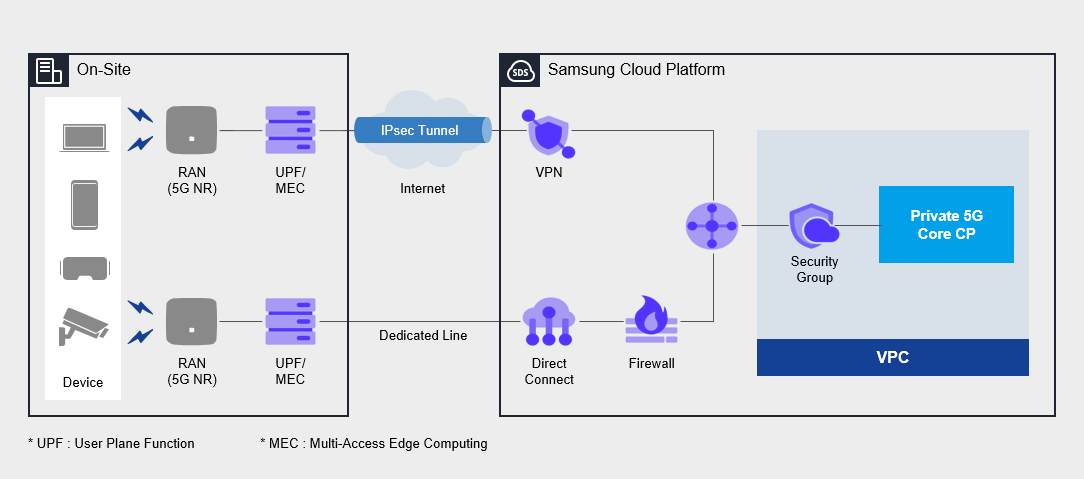
Provided features
Private 5G Cloud provides the following features. Private 5G Cloud Core: Provision of cloud-based 5G wireless network and authentication services Private 5G Core CP: Processing customer-specific 5G signal control in the cloud domain UPF: Data processing of each customer’s unique service in the customer’s site area 5G network: handling dedicated network services (VPN/dedicated line) between the cloud and the customer’s premises
Component
Private 5G Cloud provides services across the entire 5G network within the customer’s site, and its components are as follows.
5G Core network
- User authentication, session management, data processing
- Customer device registration/deletion/modification/management
Service Portal
- Provision of a 5G integrated service portal
- User portal: Create/modify/manage user policies
- Admin Portal: Authentication Policy Management and Monitoring
Network Solution
Configure cloud network solutions such as VPN and dedicated lines
Provision status by region
Private 5G Cloud can be provided in the environments below.
| Region | Provision status |
|---|---|
| Korea West 1 (kr-west1) | Provided |
| Korea East 1 (kr-east1) | Provide |
| South Korea South 1 (kr-south1) | Provide |
| South Korea South 2 (kr-south2) | Provided |
| South Korea 3 (kr-south3) | Provided |
Prior Service
This is a list of services that must be pre‑configured before creating the service. Please refer to the guide provided for each service for details and prepare in advance.
| Service Category | service | Detailed description |
|---|---|---|
| Compute | Virtual Server | Virtual server optimized for cloud computing |
| Networking | VPC | A service that provides an isolated virtual network in a cloud environment |
| Networking | Security Group | Virtual firewall that controls server traffic |
| Networking | Direct Connect | A service that securely and quickly connects the customer’s network with the Samsung Cloud Platform |
| Networking | Firewall | A service that provides a firewall for traffic between the VPC, the Internet, and the customer’s network. |
| Networking | VPN | A service that connects the customer’s network and Samsung Cloud Platform via an encrypted virtual private network
|
2 - How-to guides
Users can enter the required information for the Private 5G Cloud service, select detailed options, and create the service through the Samsung Cloud Platform Console.
Create Private 5G Cloud
You can create and use a Private 5G Cloud service from the Samsung Cloud Platform Console.
To create a Private 5G Cloud, follow these steps.
- Click the All Services > Networking > Private 5G Cloud menu. You will be taken to the Private 5G Cloud Service Home page.
- On the Service Home page, click the Private 5G Cloud Service Request button. You will be taken to the Service Request page.
- On the Service Request page, select or enter the required information for Private 5G Cloud.informationIn the task category, select Private 5G Cloud Service Creation and create it.
| Input field | Detailed description |
|---|---|
| Title | Title of the service you want to request |
| Region | Select location of Samsung Cloud Platform
|
| service | Select the service group and service for the given service
|
| Task classification | Select the task to perform
|
| content | Enter detailed information required to create a Private 5G Cloud [Basic Information]
[Application Information]
|
| Attachment | Proceed with upload only if there are additional files you want to share
|
- Review the entered generation information and click the Request button.
- Once creation is complete, check the Service Request List page to see if the resource was created.
- This provisioning process involves steps such as purchasing physical servers, delivery, configuration, and site setup, and requires a minimum of eight weeks of business days.
Check Private 5G Cloud application details
You can view the application and cancellation history of the Private 5G Cloud service in the Samsung Cloud Platform Console.
To view the service application and termination request history of Private 5G Cloud, follow the steps below.
To check your Private 5G Cloud service application details, follow the steps below.
- Click the All Services > Management > Support Center menu. Navigate to the Support Center > Service Home page.
- On the Support Center Service Home page, click the Service Request menu. You will be taken to the Service Request List page.
- On the Service Request List page, click the Title of the service request you submitted. You will be taken to the Service Request Details page.
- Service Request Details page, check the request status and information.
Terminate Private 5G Cloud
You can reduce operating costs by terminating the Private 5G Cloud service whose contract period has expired.
- If you terminate the service, the running service may be stopped immediately, so you should proceed with the termination only after fully considering the impact of the service interruption.
- To request service termination before the contract period expires, you must first complete the termination of the Private 5G Cloud contract through prior consultation between the user’s contract manager and Samsung SDS contract manager, and then proceed with termination according to the steps below.
To cancel Private 5G Cloud, follow the steps below.
- Click the All Services > Networking > Private 5G Cloud menu. You will be taken to the Private 5G Cloud Service Home page.
- On the Service Home page, click the Private 5G Cloud Service Request button. You will be taken to the Service Request page.
- On the Service Request page, select or enter the required information for Private 5G Cloud.InformationIn the task category, select Private 5G Cloud Service Termination and cancel it.
| Input field | Detailed description |
|---|---|
| Title | Title of the service you want to request |
| Region | Select location of Samsung Cloud Platform
|
| service | Select the service group and service for this service
|
| Task classification | Select the task you want to perform
|
| Content | Private 5G Cloud Enter detailed information required for termination [Basic Information]
|
| Attachment | Only proceed with upload if there are additional files you want to share
|
- Review the entered generation information and click the Request button.
- After the termination is complete, check on the Service Request List page whether the resource has been terminated.
- The termination process is completed after the physical server is returned, and it takes at least 3–4 weeks of business days.