This is the multi-page printable view of this section. Click here to print.
Private 5G Cloud
- 1: Overview
- 2: How-to guides
- 3: Release Note
1 - Overview
Service Overview
Private 5G Cloud is a service based on the Samsung Cloud Platform that provides Private 5G Core, Edge solutions for enterprise customers. By utilizing the cloud, it minimizes the construction of physical 5G network equipment, allowing for the creation of a flexible and expandable network environment optimized for the customer’s private environment, and easily connecting multiple geographically dispersed locations.
It provides an enterprise-dedicated 5G Core in a cloud environment, guarantees service availability with stable operation, and enables real-time processing of large amounts of data within the enterprise and secure protection of important data through Edge solutions.
Features
- Stable Operation: Private 5G Cloud provides a combination of verified 5G Core quality and stability, and cloud security policies. Additionally, it offers 24-hour monitoring services by 5G professional operation personnel. This enables regular system diagnostics and prompt action in case of failures, allowing for stable service operation.
- Efficient cost management: By configuring a Private 5G network on the Samsung Cloud Platform, you can reduce the initial investment cost for building a 5G system and minimize operating costs. Fast and secure cloud-based Private 5G network configuration is possible, as well as flexible operation and capacity expansion.
- Private Edge solution provision: Provides application management and Edge Computing services based on Kubernetes applying 3GPP MEC standards. It configures the Edge Computing service environment within the customer’s company, enabling ultra-low latency data transmission, and since all data and services are located within the customer’s company, it can safely protect the company’s valuable information.
- Various linkage functions: Various solutions and software verified in Private 5G Open Lab can be used in the marketplace. Customers can introduce new technologies such as AI, machine learning, and big data by utilizing already configured development environments and related ecosystems, and customized solution use is possible.
Service Composition Diagram
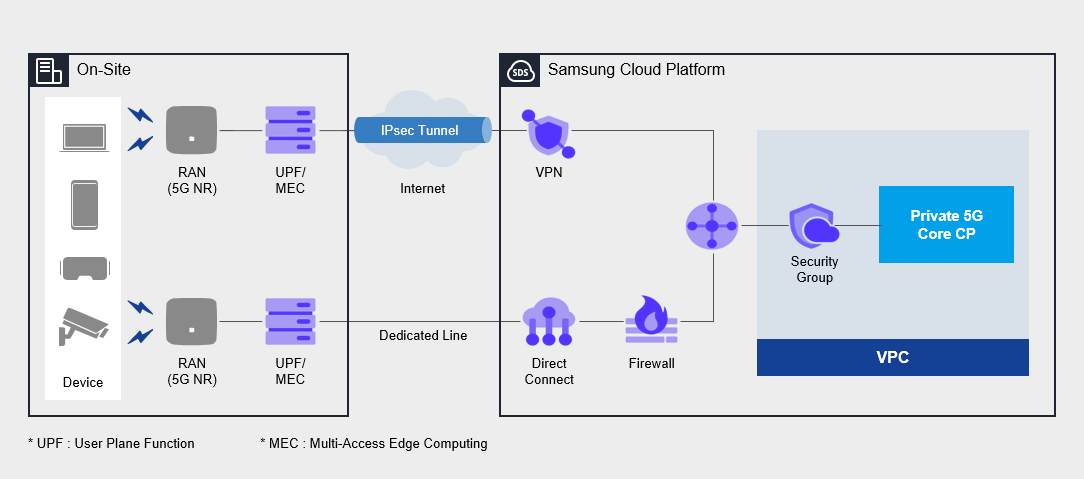
Provided Function
Private 5G Cloud provides the following functions.
- Private 5G Cloud Core: cloud-based 5G wireless network and authentication service provision
- Private 5G Core CP: cloud area where customer-specific 5G signal control processing
- UPF: handling data of unique services for each customer in the customer’s business area
- 5G Network: Cloud and customer premises dedicated network service processing between customers (VPN/Dedicated Line)
Components
Private 5G Cloud provides services across the entire 5G network within the customer’s business site, and the components are as follows.
5G Core network
- User authentication, session management, data processing
- Customer terminal registration/deletion/modification/management
Service Portal
- 5G integrated service portal provision
- User Portal: User Policy Creation/Change/Management
- Administrator Portal: Authentication Policy Management and Monitoring
Network Solution
VPN, dedicated lines, etc. cloud network solution configuration
Regional Provision Status
Private 5G Cloud can be provided in the following environments.
| Region | Availability |
|---|---|
| Korea West 1(kr-west1) | Provided |
| Korean East 1 (kr-east1) | provided |
| South Korea 1(kr-south1) | Provided |
| South Korea 2(kr-south2) | Provided |
| South Korea South 3 | provided |
Preceding service
This is a list of services that must be pre-configured before creating the service. Please refer to the guide provided for each service and prepare in advance for more detailed information.
| Service Category | Service | Detailed Description |
|---|---|---|
| Compute | Virtual Server | virtual server optimized for cloud computing |
| Networking | VPC | a service that provides an independent virtual network in a cloud environment |
| Networking | Security Group | a virtual firewall that controls the server’s traffic |
| Networking | Direct Connect | A service that securely and quickly connects the customer network and Samsung Cloud Platform |
| Networking | Firewall | A service that provides a firewall for traffic connecting VPC and the internet, customer network |
| Networking | VPN | A service that connects the customer network and Samsung Cloud Platform through an encrypted virtual private network
|
2 - How-to guides
The user can enter the essential information of the Private 5G Cloud service and select detailed options to create the service through the Samsung Cloud Platform Console.
Private 5G Cloud creation
You can create and use the Private 5G Cloud service on the Samsung Cloud Platform Console.
To create a Private 5G Cloud, follow the next procedure.
- All services > Networking > Private 5G Cloud menu is clicked. It moves to the Service Home page of Private 5G Cloud.
- Service Home page, click the Private 5G Cloud service request button. It moves to the service request page.
- Service Request 페이지에서 Private 5G Cloud에 대한 필수 정보를 선택하거나 입력하세요. -> 3. Service Request page, select or enter the essential information for Private 5G Cloud.NoticeIn the job classification, select and create Private 5G Cloud service creation.
| Input Item | Detailed Description |
|---|---|
| Title | Title of the service you want to request |
| Region | Location selection of Samsung Cloud Platform
|
| Service | Select the service group and service of the corresponding service
|
| Task classification | Select the task you want to perform
|
| Content | Private 5G Cloud creation requires detailed information input [Basic Information]
[Application Information]
|
| Attachment | Only upload when you have additional files to share
|
- Check the entered creation information, and click the request button.
- Once creation is complete, check the Service Request List page to see if the resource has been created.
- This creation work proceeds with procedures such as purchasing physical servers, delivery, configuration work, and site construction, and takes at least 8 weeks or more based on business days.
Private 5G Cloud application history check
You can check the application and cancellation details of the Private 5G Cloud service on the Samsung Cloud Platform Console.
Private 5G Cloud’s service application and cancellation request details can be checked through the following procedure.
To check the application history of Private 5G Cloud service, follow the next procedure.
- All services > Management > Support Center menu, click. Support Center > Service Home page will be moved.
- Support Center Service Home page, click the Service Request menu. It moves to the Service Request List page.
- Service Request List page, click the title of the service request you applied for. It moves to the Service Request Details page.
- Service Request Details page where you can check the application status and information.
Private 5G Cloud Cancellation
You can cancel the Private 5G Cloud service whose contract period has expired to reduce operating costs.
- If the service is canceled, the service in operation may be stopped immediately, so the cancellation work must be proceeded after fully considering the impact that occurs when the service is stopped.
- To apply for service cancellation before the contract period expires, the user’s contract manager and SamsungSDS contract manager must complete the cancellation of the corresponding Private 5G Cloud contract through prior consultation before cancellation, and then proceed with the cancellation according to the following procedure.
To cancel Private 5G Cloud, follow the following procedure.
- All services > Networking > Private 5G Cloud menu is clicked. It moves to the Service Home page of Private 5G Cloud.
- Service Home page, click the Private 5G Cloud service request button. It moves to the service request page.
- Service Request 페이지에서 Private 5G Cloud에 대한 필수 정보를 선택하거나 입력하세요. -> 3. Service Request page, select or enter the required information for Private 5G Cloud.Notice작업 구분에서 Private 5G Cloud 서비스 해지를 선택해 해지하세요. -> In the job classification, select Private 5G Cloud service cancellation to cancel.
| Input Item | Detailed Description |
|---|---|
| title | title of the service you want to request |
| Region | Location selection of Samsung Cloud Platform
|
| Service | Select the service group and service for the corresponding service
|
| Task Classification | Select the task you want to perform
|
| Content | Private 5G Cloud cancellation requires detailed information input [Basic Information]
|
| Attachment file | Only upload when you have a file you want to share additionally
|
- Check the entered creation information, and click the request button.
- When the cancellation is complete, Service Request List page should be checked to see if the resource has been cancelled.
- The cancellation process is completed after returning the physical server, so it takes at least 3-4 weeks based on business days.