This is the multi-page printable view of this section. Click here to print.

Return to the regular view of this page.

Overview

Service Overview

The Load Balancer (LB) service of Samsung Cloud Platform automatically distributes traffic to available servers when there is an unpredictable traffic surge or server failure, ensuring the stability and continuity of customer services.

A Load Balancer serves as the service endpoint provided to clients, is deployed in a VPC subnet according to the service type (L4 / L7), and you can configure multiple services by adding listeners to the created Load Balancer.

The Listener receives client requests through the service port and processes traffic according to routing rules. L4 supports TCP / UDP / TLS protocols, and L7 supports HTTP / HTTPS protocols; in L7, you can specify an LB server group for each routing condition or set a redirect response for the request URL.

The LB server group forwards requests received by the Listener to specific servers based on load balancing and health checks. The servers receive client requests from the Load Balancer’s Source NAT IP through the ports configured for the members, and the server status is periodically monitored by the Load Balancer’s health check IP.

LB health check defines the member health check method registered in the LB server group. You can select a default LB health check resource provided for the LB server group, or create a new one to configure monitoring suitable for the application.

Features

  • Various load balancing methods: Round Robin, Least Connection, IP Hash, etc., are provided.
  • SSL Authentication Encryption and Offloading: Supports SSL offloading and allows selection of encryption level.
  • Enhanced Security: Use a firewall to manage Load Balancer communication and view connection logs by storing logs.

Service Architecture Diagram
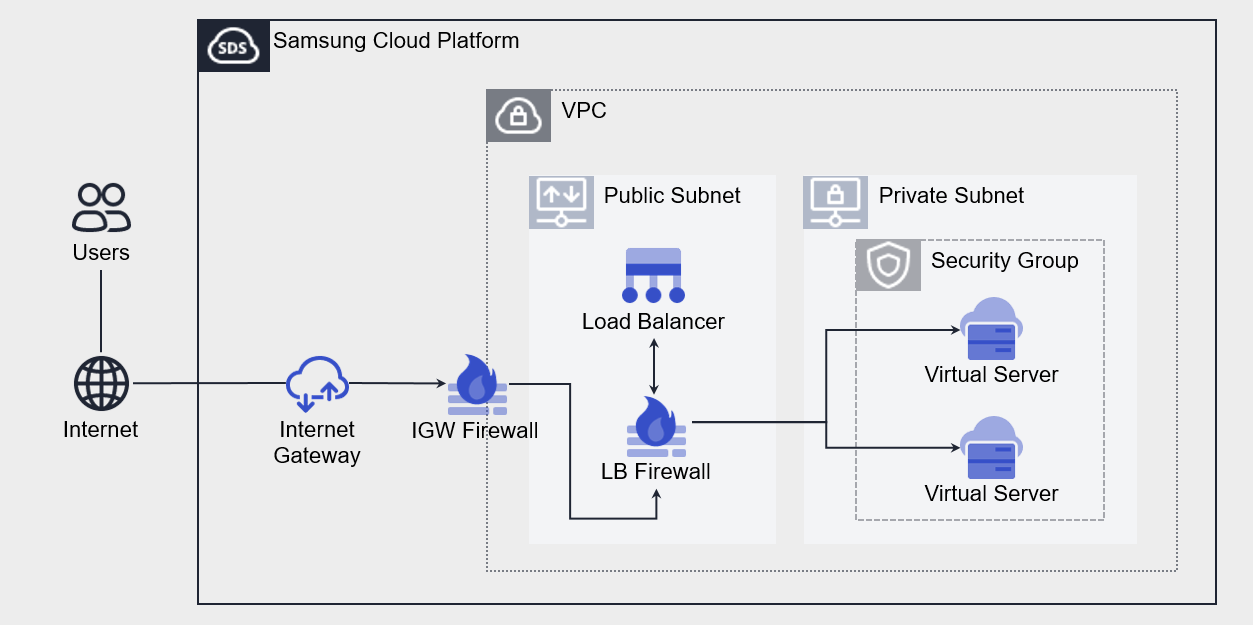
Diagram
Figure. Load Balancer diagram

Provided features

  • Load Balancer: Select the service type and configure the IP to be used by the Load Balancer.
  • Listener: Set the protocol, port, and routing rules. You can add multiple Listeners to a single Load Balancer.
  • LB server group: Sets the load balancing method. LB server group can be attached to a single Load Balancer.
  • Member: Select the server to add to the LB server group. You can choose Virtual Server or Bare Metal Server resources created in the same VPC as the Load Balancer, or enter an IP address directly.
  • LB health check: Sets the member health check method. LB health checks can be registered and used across multiple LB server groups.

Component

A Load Balancer consists of a Load Balancer (Listener), LB server group (member), and LB health check.

Load Balancer

The components that make up a Load Balancer are as follows. By configuring each component, you can set up load balancing suitable for the customer’s workload.

ComponentDetailed description
Service CategoryLoad Balancer service type
  • Classification of Listener protocols that can be created according to L4 / L7
Service SunbetAssign the Service IP, Source NAT IP, and Health Check IP required for the Load Balancer in the Subnet range of the VPC Subnet
  • Subnet
Service IPService IP that the client accesses
Source NAT IPIP used to forward server traffic in the Load Balancer
Health check IPIP used for health checks in the Load Balancer
ListenerResources connected to the Load Balancer
  • protocol, port, LB server group settings
Table. Load Balancer components

LB server group

The elements that make up an LB server group are as follows. Traffic is delivered to members of the LB server group according to the settings of each component.

ComponentDetailed description
ProtocolLB server group forwarding protocol
Load balancingTraffic distribution method
  • Deliver traffic to a specific member according to the load balancing method
LB health checkMember health check method
  • LB Select from the list of resources created by the health check
MemberServer that processes client requests
  • Set weights or modify activation status based on load balancing
Table. LB server group components

LB health check

The elements that make up the LB health check are as follows. Member health checks are performed according to the settings of each component.

ComponentDetailed description
ProtocolHealth check protocol
Health check portPort used for health check
PeriodHealth check execution interval
Waiting timeServer response latency for health check
Detection countCriteria for determining member health check status (Healthy / Unhealthy)
Table. LB health check components

Constraints

The Load Balancer of Samsung Cloud Platform has a default quota, which limits the number of Load Balancers, Listeners, LB server groups, and members that can be created. You can manage current usage through the Console and request additional quota for items that can be expanded.

ItemDefault quotaDetailed description
LOAD_BALANCER.SERVICE_SUBNET.DEFAULT.COUNT3Number of Service Subnets per VPC that can create a Load Balancer
LOAD_BALANCER.DEFAULT.COUNT50Number of Load Balancers created per Region
LOAD_BALANCER.LISTENER.DEFAULT.COUNT1000Number of Listeners created per Region
LOAD_BALANCER.SERVER_GROUP.DEFAULT.COUNT1000Number of LB server groups created per region
LOAD_BALANCER.MEMBER.DEFAULT.COUNT1000Number of members that can be registered to the entire LB server group per region
LOAD_BALANCER.HEALTH_CHECK.DEFAULT.COUNT500Number of LB health checks created per region
Table. Load Balancer Constraints

Preliminary Service

This is a list of services that must be pre-configured before creating a Load Balancer service. Please refer to the guide provided for each service and prepare in advance.

Service CategoryServiceDetailed description
NetworkingVPCA service that provides an isolated virtual network in a cloud environment
Table. Load Balancer prerequisite service

1 - ServiceWatch metric

The Load Balancer sends metrics to ServiceWatch. The metrics provided by basic monitoring are data collected at 5‑minute intervals.

Reference
Refer to the ServiceWatch guide for how to view metrics in ServiceWatch.

Basic Metrics

The following are the default metrics for the Load Balancer namespace.

The indicators whose names are displayed in bold text below are the key metrics selected from the basic metrics provided by Load Balancer. Key metrics are used to build the service dashboards that are automatically created for each service in ServiceWatch.

Each metric provides guidance in the user guide on which statistical values are meaningful when querying that metric, and among the meaningful statistics, the values shown in bold are the primary statistics. In the service dashboard, you can view key metrics using primary statistical values.

Performance itemsDetailed descriptionunitmeaningful statistics
LB StatusLoad Balancer status--
LB Total ConnectionsLB cumulative connection countCount
  • total
LB Total L4 ConnectionsCumulative L4 connection countCount
  • total
LB Total L7 ConnectionsCumulative L7 connection countCount
  • Total
LB Total SSL ConnectionsCumulative SSL connection countCount
  • Total
LB Total TCP ConnectionsCumulative TCP connection countCount
  • Total
LB Current ConnectionsCurrent number of active connectionsCount
  • Total
LB Current SSL ConnectionsCurrent SSL connection countCount
  • Total
LB Peak ConnectionsLB maximum connectionsCount
  • Total
LB Total RequestsLB cumulative request countCount
  • Total
LB Current RequestsLB current request countCount
  • Total
LB Connection Rate (CPS)Number of new inbound connectionsCount
  • Total
LB Forward BytesCumulative bytes transferred from the LB to the serverBytes
  • total
LB Forward Bytes (Delta)Cumulative bytes (Delta) delivered from LB to serverBytes
  • Total
LB Forward PacketsCumulative packets delivered from the LB to the serverCount
  • Total
LB Forward Packets (Delta)Cumulative packets (Delta) delivered from the LB to the serverCount
  • Total
LB Reverse BytesCumulative packets delivered from LB to the serverBytes
  • Total
LB Reverse Bytes (Delta)Cumulative bytes (Delta) received from the serverBytes
  • Total
LB Reverse PacketsCumulative packets received from the serverCount
  • Total
LB Reverse Packets (Delta)Cumulative packets (Delta) received from the serverCount
  • Total
LB Current ResponsesLB current response countCount
  • total
LB Total Success ResponsesCumulative successful response countCount
  • Total
LB Last Response TimeLB last response timeMilliseconds
  • Total
LB Fastest Response TimeLB shortest response timeMilliseconds
  • Total
LB Slowest Response TimeLB maximum response timeMilliseconds
  • Total
LB Total Failure ActionsNumber of failures handled in LBCount
  • Total
Listener StatusListener statusCount
  • total
Listener Total ConnectionsListener cumulative connection countCount
  • Total
Listener Total L4 ConnectionsCumulative L4 connection countCount
  • Total
Listener Total L7 ConnectionsCumulative L7 connection countCount
  • Total
Listener Total SSL ConnectionsCumulative SSL connection countCount
  • total
Listener Total TCP ConnectionsCumulative TCP connection countCount
  • Total
Listener Current ConnectionsCurrent number of active connectionsCount
  • Total
Listener Current SSL ConnectionsCurrent SSL connection countCount
  • Total
Listener Peak ConnectionsMaximum number of connections for the listenerCount
  • Total
Listener Current RequestsListener current request countCount
  • Total
Listener Total RequestsListener cumulative request countCount
  • Total
Listener Connection Rate (CPS)Number of new inbound connectionsCount
  • Total
Listener Forward BytesCumulative bytes transferred from the Listener to the serverBytes
  • Total
Listener Forward Bytes (Delta)Cumulative bytes (Delta) transmitted from the Listener to the serverBytes
  • Total
Listener Forward PacketsCumulative packets transmitted from the Listener to the serverCount
  • Total
Listener Forward Packets (Delta)Cumulative packets (Delta) transmitted from the Listener to the serverCount
  • Total
Listener Reverse BytesCumulative bytes received from the serverBytes
  • Total
Listener Reverse Bytes (Delta)Cumulative bytes (Delta) received from the serverBytes
  • Total
Listener Reverse PacketsCumulative packets received from the serverCount
  • Total
Listener Reverse Packets (Delta)Cumulative packets (Delta) received from the serverCount
  • Total
Listener Current ResponsesListener current response countCount
  • total
Listener Total Success ResponsesCumulative successful response countCount
  • Total
Listener Last Response TimeListener last response timeMilliseconds
  • Total
Listener Fastest Response TimeListener minimum response timeMilliseconds
  • Total
Listener Slowest Response TimeListener maximum response timeMilliseconds
  • Total
Listener Total Failure ActionsNumber of failures processed in the ListenerCount
  • total
ServerGroup StatusLB server group statusCount
  • Total
ServerGroup Request CountCumulative request count for LB server groupCount
  • Total
ServerGroup Response CountLB server group cumulative response countCount
  • Total
ServerGroup 2xx Response CountNumber of HTTP 2xx responsesCount
  • Total
ServerGroup 3xx Response CountNumber of HTTP 3xx responsesCount
  • Total
ServerGroup 4xx Response CountNumber of HTTP 4xx responsesCount
  • Total
ServerGroup 5xx Response CountNumber of HTTP 5xx responsesCount
  • Total
ServerGroup Healthy Member CountNumber of healthy membersCount
  • Total
ServerGroup Unhealthy Member CountHealth check abnormal member countCount
  • Total
ServerGroup Peak ConnectionsMaximum connections for LB server groupCount
  • Total
Table. Load Balancer basic metrics