Overview
Service Overview
The Load Balancer (LB) service of Samsung Cloud Platform automatically distributes traffic to available servers when there is an unpredictable traffic surge or server failure, ensuring the stability and continuity of customer services.
A Load Balancer serves as the service endpoint provided to clients, is deployed in a VPC subnet according to the service type (L4 / L7), and you can configure multiple services by adding listeners to the created Load Balancer.
The Listener receives client requests through the service port and processes traffic according to routing rules. L4 supports TCP / UDP / TLS protocols, and L7 supports HTTP / HTTPS protocols; in L7, you can specify an LB server group for each routing condition or set a redirect response for the request URL.
The LB server group forwards requests received by the Listener to specific servers based on load balancing and health checks. The servers receive client requests from the Load Balancer’s Source NAT IP through the ports configured for the members, and the server status is periodically monitored by the Load Balancer’s health check IP.
LB health check defines the member health check method registered in the LB server group. You can select a default LB health check resource provided for the LB server group, or create a new one to configure monitoring suitable for the application.
Features
- Various load balancing methods: Round Robin, Least Connection, IP Hash, etc., are provided.
- SSL Authentication Encryption and Offloading: Supports SSL offloading and allows selection of encryption level.
- Enhanced Security: Use a firewall to manage Load Balancer communication and view connection logs by storing logs.
Service Architecture Diagram
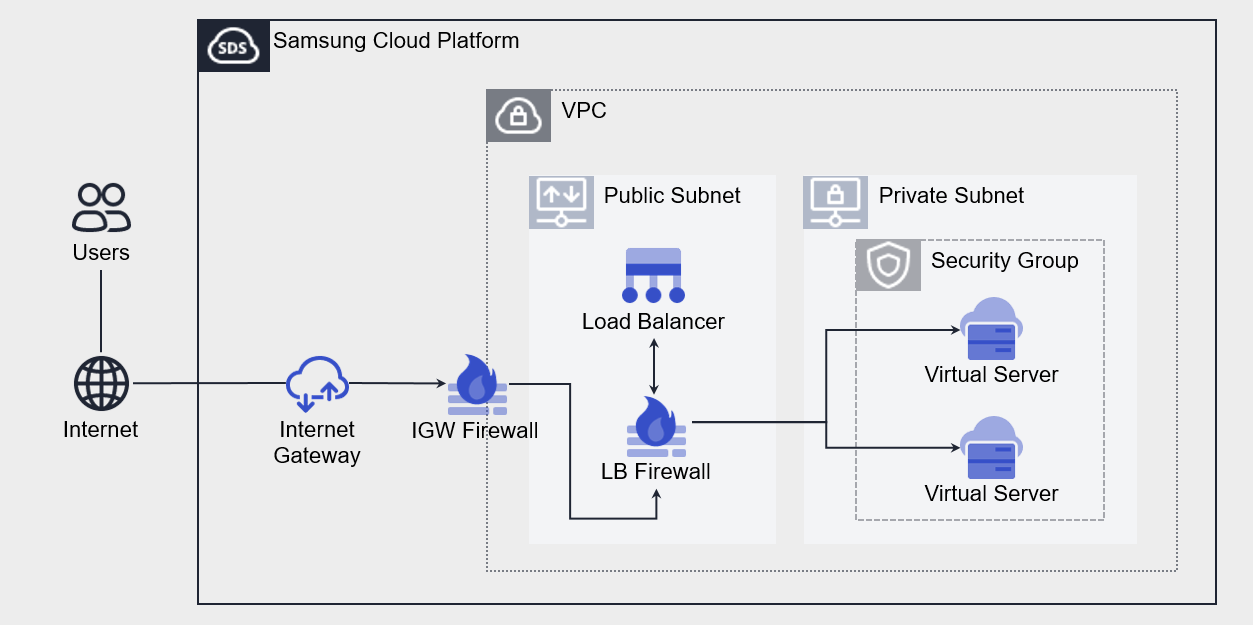
Provided features
- Load Balancer: Select the service type and configure the IP to be used by the Load Balancer.
- Listener: Set the protocol, port, and routing rules. You can add multiple Listeners to a single Load Balancer.
- LB server group: Sets the load balancing method. LB server group can be attached to a single Load Balancer.
- Member: Select the server to add to the LB server group. You can choose Virtual Server or Bare Metal Server resources created in the same VPC as the Load Balancer, or enter an IP address directly.
- LB health check: Sets the member health check method. LB health checks can be registered and used across multiple LB server groups.
Component
A Load Balancer consists of a Load Balancer (Listener), LB server group (member), and LB health check.
Load Balancer
The components that make up a Load Balancer are as follows. By configuring each component, you can set up load balancing suitable for the customer’s workload.
| Component | Detailed description |
|---|---|
| Service Category | Load Balancer service type
|
| Service Sunbet | Assign the Service IP, Source NAT IP, and Health Check IP required for the Load Balancer in the Subnet range of the VPC Subnet
|
| Service IP | Service IP that the client accesses |
| Source NAT IP | IP used to forward server traffic in the Load Balancer |
| Health check IP | IP used for health checks in the Load Balancer |
| Listener | Resources connected to the Load Balancer
|
LB server group
The elements that make up an LB server group are as follows. Traffic is delivered to members of the LB server group according to the settings of each component.
| Component | Detailed description |
|---|---|
| Protocol | LB server group forwarding protocol |
| Load balancing | Traffic distribution method
|
| LB health check | Member health check method
|
| Member | Server that processes client requests
|
LB health check
The elements that make up the LB health check are as follows. Member health checks are performed according to the settings of each component.
| Component | Detailed description |
|---|---|
| Protocol | Health check protocol |
| Health check port | Port used for health check |
| Period | Health check execution interval |
| Waiting time | Server response latency for health check |
| Detection count | Criteria for determining member health check status (Healthy / Unhealthy) |
Constraints
The Load Balancer of Samsung Cloud Platform has a default quota, which limits the number of Load Balancers, Listeners, LB server groups, and members that can be created. You can manage current usage through the Console and request additional quota for items that can be expanded.
| Item | Default quota | Detailed description |
|---|---|---|
| LOAD_BALANCER.SERVICE_SUBNET.DEFAULT.COUNT | 3 | Number of Service Subnets per VPC that can create a Load Balancer |
| LOAD_BALANCER.DEFAULT.COUNT | 50 | Number of Load Balancers created per Region |
| LOAD_BALANCER.LISTENER.DEFAULT.COUNT | 1000 | Number of Listeners created per Region |
| LOAD_BALANCER.SERVER_GROUP.DEFAULT.COUNT | 1000 | Number of LB server groups created per region |
| LOAD_BALANCER.MEMBER.DEFAULT.COUNT | 1000 | Number of members that can be registered to the entire LB server group per region |
| LOAD_BALANCER.HEALTH_CHECK.DEFAULT.COUNT | 500 | Number of LB health checks created per region |
Preliminary Service
This is a list of services that must be pre-configured before creating a Load Balancer service. Please refer to the guide provided for each service and prepare in advance.
| Service Category | Service | Detailed description |
|---|---|---|
| Networking | VPC | A service that provides an isolated virtual network in a cloud environment |