This is the multi-page printable view of this section. Click here to print.
Cloud LAN-Campus
- 1: Overview
- 2: How-to guides
- 3: Release Note
1 - Overview
Service Overview
Cloud LAN-Campus is a service that provides a user authentication‑based integrated wired and wireless network environment within the customer’s premises. It offers a versatile integrated network access environment, based on SDN (Software Defined Network), that can be freely used regardless of location within the site through simple user/device authentication. By minimizing physical network equipment and leveraging the cloud, multiple geographically distributed locations can be easily connected. This allows enterprises to reduce the complexity of infrastructure deployment and operation, and to build a flexible, scalable network environment. Additionally, with network design/configuration optimized for the customer’s environment, professional operational systems, and enhanced security management, the site network can be operated more reliably and efficiently.
Provided features
Cloud LAN-Campus provides the following features.
- Campus Network: Providing wired and wireless network usage environment and integrated authentication services for the site
- NW Access: Infrastructure (AP, NW Switch, etc.) and SDN system services for site network usage
- NW Authentication: User/device authentication-based network segmentation, integrated management of authentication/security policies across multiple sites, support for various authentication methods (AD, certificates, etc.) and policy operation/management through the service portal (user/administrator)
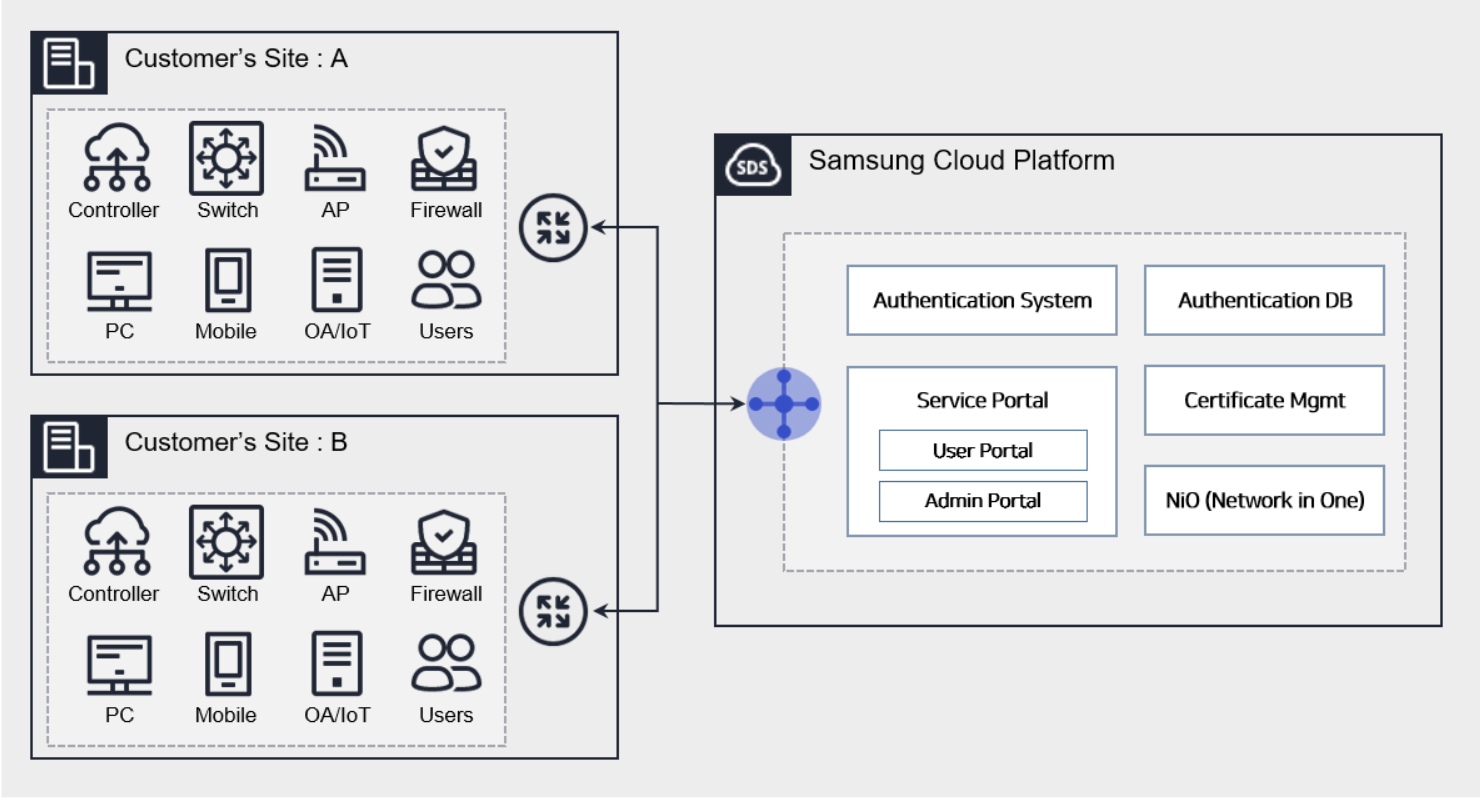
Features
- Rapid Business Site Network Work Environment: Provides a unified wired/wireless network usage environment through a user-authentication-based SDN (Software Defined Network) solution. IP Mobility and device-purpose-based separated networks are applied instantly, and users can easily perform network topology changes via the service portal.
- Network Security Enhancement: By applying logical network segmentation and an authentication-based unified wired/wireless security management system, consistent security policies can be enforced for users and devices. Even when users access the headquarters and multiple sites, the same network access environment and security policies can be applied, and authentication information is securely managed under the Samsung Cloud Platform security framework.
- Multi-Vendor Acceptance and Total Network Service Provision: Performing multi-vendor network integration certification makes the SDN equipment configuration at each site flexible. Additionally, by providing an integrated service framework instead of customers designing/building/operating/managing the network infrastructure themselves, operational and management efficiency improves. We deliver fast and reliable network services with site-optimized network designs and dedicated teams.
- Service-based Integrated Billing System: The billing system can reduce initial investment costs, and when needed, network infrastructure can be expanded and capacity increased. It provides usage-based authentication services, and no separate operational staff or maintenance contracts are required.
- Various authentication methods and scalability: We provide the optimal authentication solution for customers using various authentication methods. Additionally, we enable functional expansion through integration with client systems (groupware, security systems, etc.) and allow differentiated policy management based on security levels per site.
Component
Cloud LAN-Campus provides services across the entire network within the site. The components are as follows, and related services can be created.
| Category | Detailed description |
|---|---|
| Network authentication |
|
| Service portal | Provision of unified wired/wireless authentication service portal
|
| wired/wireless network | Design and integrated configuration, operation, and management of SDN-based wired and wireless networks |
| WIPS | Wireless Intrusion Prevention System Configuration/Operation/Management |
| Network solution | Configuration/operation/management of network solutions such as DHCP, NMS |
Constraints
When using the Cloud LAN-Campus service, there are the following limitations.
- Network communication/connection between the customer’s site and the Samsung Cloud Platform region is required to use CLAN authentication.
- Use Cloud Last Mile, dedicated lines, VPN, etc.
- If you need to use network equipment from a specific vendor, prior consultation is required.
- After creating the service to configure equipment within the site, the start and end times of the service are finalized after consultation with the responsible AM.
- When using AD integration for authentication, the authentication-related policy rules must be properly deployed to the user’s PC in advance.
- Issues with AD functionality require management by the client’s AD administrator.
- The network segmentation certificate method is supported for the designated OS type (currently limited to Windows), and additional costs apply beyond the certification fee.
Provision status by region
Cloud LAN-Campus can be provided in the environments below.
| Region | Provision status |
|---|---|
| Korea West (kr-west1) | Provided |
| South Korea South 1 (kr-south1) | Not provided |
| South Korea South 2 (kr-south2) | Not provided |
| South Korea 3 (kr-south3) | Not provided |
Preceding Service
Cloud LAN-Campus has no prerequisite services.
2 - How-to guides
Users can create the service by entering the required information for the Cloud LAN-Campus service and selecting detailed options through the Samsung Cloud Platform Console.
Campus Network Service Creation Request
You can create and use the Campus Network service in the Samsung Cloud Platform Console.
To request the creation of a Campus Network service, follow these steps.
- Click the All Services > Networking > Cloud LAN-Campus menu. You will be taken to the Service Home page.
- On the Service Home page, click the Cloud LAN-Campus Service Request button. You will be taken to the Support Center > Service Request page.
- On the Service Request page, enter or select the required information in the mandatory input fields.
- In the task type, select Campus Network Service Request.
Input field Detailed description Title Title of the service you want to request Region Select location of Samsung Cloud Platform - Automatically filled with the account’s region
Service Select the service category and service for the given service (auto-select) - Service Category: Networking
- Service: Cloud LAN-Campus
Task classification Select the type you want to perform - Campus Network service request: select if you are requesting a new service
content Enter detailed information required to create a Campus Network service - SCP account name: Enter the account name of Samsung Cloud Platform
- SCP project name: Enter the project name of Samsung Cloud Platform
- Company/Corporation name: Enter the company/corporation name
- Customer information (Name/E-mail/Phone number): Enter user information
- Desired service start date: Enter the service start date
- Network segmentation: Yes / No
- Wired network usage: Yes / No
- Wireless network usage: Yes / No
- Wireless WIPS usage: Yes / No
- Network solution usage (NMS, WAN accelerator, DHCP, etc.): Yes / No
- Estimated contract period: Enter 4 years, 5 years, or 6 years
- Operational service: Yes / No
Attachment If you have additional files you want to share, proceed with the upload - You can attach up to 5 files, each no larger than 5 MB
- Only doc, docx, xls, xlsx, ppt, ppts, hwp, txt, pdf, jpg, jpeg, png, gif, and tif files can be attached
Table. Detailed description of Campus Network service request items
- In the task type, select Campus Network Service Request.
- Verify the required information entered on the Service Request page, then click the Request button.
- After the request is completed, check the submitted details on the Support Center > Service Request List page.
- The requested work takes approximately 5 to 7 business days.
- Once the service request is completed, a customer representative will contact you separately for site consulting and architecture optimization design.
- Ask the Samsung SDS account manager about the progress and service-related matters.
Campus Network Service Cancellation Request
You can cancel the Campus Network service in the Samsung Cloud Platform Console.
To request termination of the Campus Network service, follow the steps below.
Click the All Services > Networking > Cloud LAN-Campus menu. Navigate to the Service Home page.
On the Service Home page, click the Cloud LAN-Campus Service Request button. You will be taken to the Support Center > Service Request page.
On the Service Request page, enter or select the required information in the mandatory input fields.
- In the task category, select Campus Network Service Termination.
Input field Detailed description Title Title of the service you want to request Region Select location of Samsung Cloud Platform - Automatically filled with the account’s region
service Select the service category and service for the given service (auto-select) - Service Category: Networking
- Service: Cloud LAN-Campus
Task classification Select the type you want to perform - Campus Network service termination: select if you are requesting to terminate the service
content Enter detailed information required for Campus Network service termination - SCP Account Name: Enter the account name of Samsung Cloud Platform
- SCP Project Name: Enter the project name of Samsung Cloud Platform
- Customer Information (Name/Company/Department/E-mail/Phone Number): Enter user information
- Service Termination Request Date: Enter the service termination date
- Details: Enter additional information
Attachment If you have additional files you want to share, proceed with the upload - You can attach up to 5 files, each no larger than 5 MB
- Only doc, docx, xls, xlsx, ppt, ppts, hwp, txt, pdf, jpg, jpeg, png, gif, tif files can be attached
Table. Detailed description of Campus Network service request items
- In the task category, select Campus Network Service Termination.
Check the required information entered on the Service Request page, and click the Request button.
- When the request is completed, check the submitted details on the Support Center > Service Request List page.
- The requested work takes approximately 5 to 7 business days.
- When the service request is completed, a customer representative will contact you separately to cancel the service.
- Contact the Samsung SDS account manager to inquire about the progress and service-related matters.