Service Overview
The DNS service converts domain names, which are convenient for humans to recognize, into numeric IP addresses that the system can identify, allowing access to services.
With the DNS service, users can easily register the desired domain and manage its DNS records themselves.
Features
- Easy Domain Registration: You can register and modify new domains via a web-based console. Without building separate DNS infrastructure or installing DNS solutions, you can easily create and manage domains through the web.
- Support for Various Records: You can configure various resource record types such as A, AAAA, CNAME, TXT, MX, SPF, and it automatically scales to handle large query volumes without user intervention.
- Convenient Hosting Environment Management: You can select and use a Public domain name, which is exposed to the Internet to provide web services, or a Private domain name, which is accessible only to designated internal users without an Internet connection, according to your usage environment and purpose.
Configuration diagram
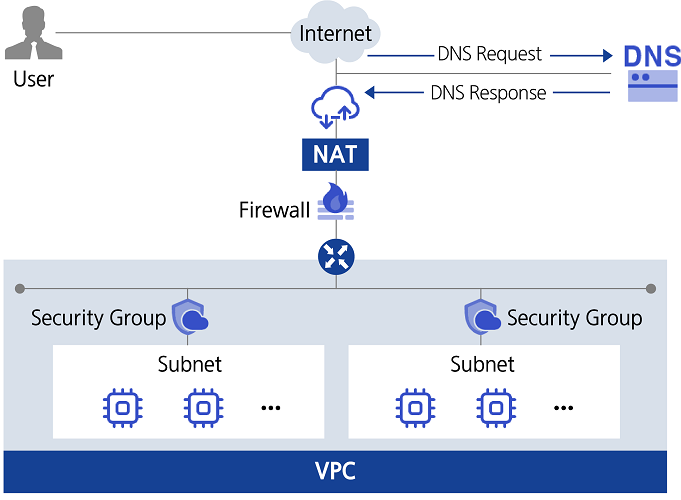
Provided features
The DNS service provides the following functions.
- Hosting Zone Creation/Management: You can create and manage Public Hosted Zones that are accessible from anywhere via the Internet, and Private Hosted Zones that are not exposed to the Internet and are only accessible within a designated network environment.
- Public Domain Name Application: You can apply for a Public Domain Name that can be accessed from anywhere via the Internet.
- Support for various resource records: You can select and use record types that suit your environment and purpose.
| Record type | Detailed description |
|---|---|
| A | Specify the IPv4 address corresponding to the domain name so that the IP address can be resolved from the domain name. |
| AAAA | Specify the IPv6 address corresponding to the domain name so that the IP address can be resolved from the domain name. |
| TXT | Set text information for the domain |
| CNAME | Assign an alias for the domain name |
| MX | Specify the mail server for the user’s domain and subdomains |
| SPF | To prevent spam mail, verify the sending mail server’s IP address or domain name, etc. (Sender Policy Framework) |
| NS | Name server responsible for this domain (auto-generated) |
| SOA | Define the domain’s initial information (the starting point of authority) (auto-generated) |
Component
Private DNS
To manage private domain names for use only within a designated network environment without exposing them to the internet, you must first create a Private DNS. The Private DNS name is used uniformly across all regions within the account. It can be initially created in any region of the account, and later it can be activated in other regions using the same Private DNS name from the Private DNS list. You can select the VPC to connect to Private DNS for each region. By using a common Private DNS name, you can share and manage the Private Hosted Zone information across all regions.
Hosted Zone
Private Hosted Zone allows you to create and manage domain names that can be used only in the network environment designated for VPCs connected to Private DNS. A Public Hosted Zone can manage the public domain name created through the Samsung Cloud Platform. Through a Hosted Zone, you can create and edit records that match your intended use.
Public Domain Name
You can apply for a Public Domain Name in partnership with Whois, the public domain name management provider. Public Domain Name can be purchased in one-year increments, and you can set or change the automatic renewal (in one-year increments) up to 7 days before the expiration date.
Constraints
The constraints of the DNS service are as follows.
| Category | description |
|---|---|
| Number of Private DNS that can be created per account | 1 |
| Number of Hosted Zones that can be created in an Account | 20 |
| Number of records that can be registered per Hosted Zone | 100 |
- Requests to use Public Domain Name and Public Hosted Zone in the Korea South (kr-south) region are restricted.
Preceding Service
The DNS service has no prerequisite services.