Overview
Service Overview
The DNS service is a service that allows access to services by converting human-recognizable domain names into numerical IP addresses that the system can identify, making it convenient for people to access services.
Through the DNS service, users can easily register their desired domain and manage their domain records by themselves.
Features
- Easy Domain Registration: New domain registration and change management are possible in a web-based console. You can easily create and manage domains through the web without building a separate DNS infrastructure or installing a DNS solution.
- Support for various records: A, AAAA, CNAME, TXT, MX, SPF, etc. various resource record types can be set, and it can automatically scale to handle large query volumes without user intervention.
- Convenient hosting environment management: You can choose and use public domain names that are exposed to the internet and provide web services, and private domain names that can only be used by designated internal users without an internet connection, according to the usage environment and purpose.
Composition
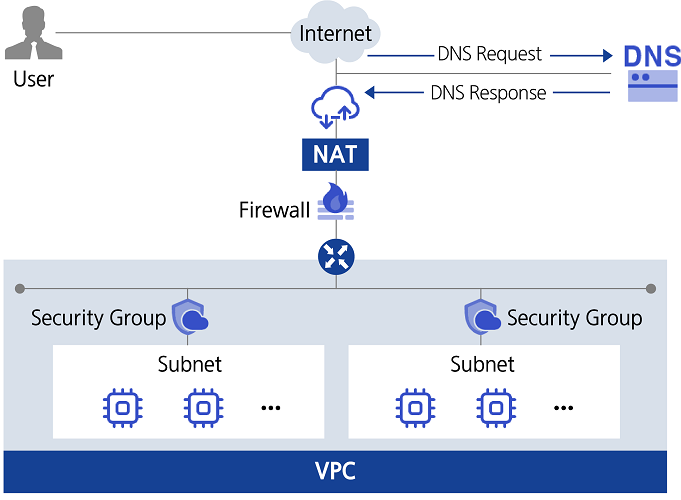
Provided Features
The DNS service provides the following functions.
- 호스팅 영역 생성/관리: You can create and manage Public Hosted Zones that can be accessed from anywhere via the internet and Private Hosted Zones that can only be accessed within a designated network environment without exposing them to the internet.
- Public Domain Name Application: You can apply for a Public Domain Name that allows access from anywhere on the internet.
- Support for various resource records: You can choose and use the record type according to the usage environment and purpose.
| Record Type | Detailed Description |
|---|---|
| A | Specify the IPv4 address corresponding to the domain name so that the IP address can be found with the domain name |
| Specifies the IPv6 address corresponding to the domain name so that the IP address can be found with the domain name as | AAAA |
| Set text information for the domain | |
| CNAME | Specify an alias (Alias) for the domain name |
| MX | Specifies the mail server of the domain and subdomain owned by the user |
| SPF | To prevent spam mail, verify the IP address or domain name of the mail transmission server (Sender Policy Framework) |
| NS | Name server responsible for the domain (automatically generated) |
| SOA | Domain’s starting information (starting point of authority) is defined (automatically generated) |
Component
Private DNS
To manage private domain names for use only in a specified network environment without exposing them to the internet, you must first create a Private DNS. Private DNS names are commonly used in all regions within an Account. It can be created for the first time in any region within the Account, and then activated with the same Private DNS name in other regions from the Private DNS list. You can select the VPC you want to connect to Private DNS by region. By using a common Private DNS name, you can share and manage the information of the Private Hosted Zone across all regions.
Hosted Zone
Private Hosted Zone allows you to create and manage domain names that can only be used in a specified network environment targeting VPCs connected to Private DNS. Public Hosted Zone can manage Public Domain Name created through Samsung Cloud Platform. You can register and modify records suitable for your purpose through the Hosted Zone.
Public Domain Name
You can apply for a Public Domain Name in conjunction with the Whois company, a Public Domain Name management company. The Public Domain Name can be purchased on a yearly basis, and the automatic renewal (on a yearly basis) can be set or changed up to 7 days before the end of the purchase period.
Constraints
The limitations of the DNS service are as follows.
| Classification | Description |
|---|---|
| Number of Private DNS that can be created in Account | 1 |
| Number of Hosted Zones that can be created in Accoutn | 20 |
| Number of records that can be registered per Hosted Zone | 100 |
- The use of Public Domain Name and Public Hosted Zone in the kr-south region of southern Korea is restricted.
Preceding Service
The DNS service has no preceding service.