This is the multi-page printable view of this section. Click here to print.

Return to the regular view of this page.

Overview

Service Overview

Samsung Cloud Platform provides the Direct Connect service to support secure and fast connections between customer networks and the Samsung Cloud Platform environment.

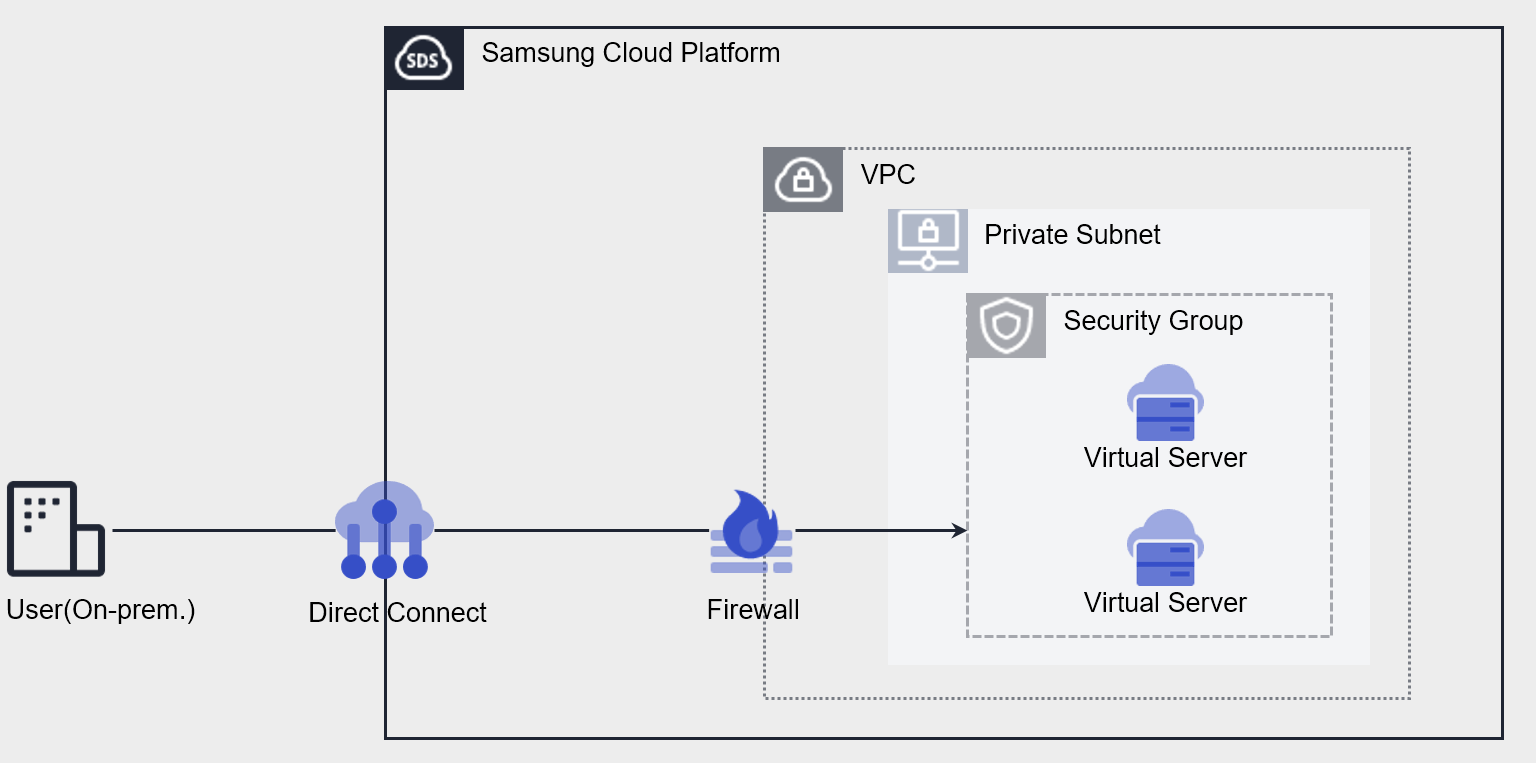
Through Direct Connect, you can allocate and use the internal private network range of existing systems to Samsung Cloud Platform resources. You can place backend systems such as application servers in private network ranges without Internet access, and enhance security by applying Samsung Cloud Platform network services such as Security Groups.

Through Direct Connect, customers’ existing systems can naturally migrate to Samsung Cloud Platform even if they have IP hardcoding on devices or architecture dependencies on IPs.

Configuration Diagram
Figure. Direct Connect Configuration Diagram

Creating a Direct Connect Connection

Supports connection by selecting a single VPC to connect to the customer network.
Provides access blocking through the Direct Connect Firewall, and provides a secure connection path through Route configuration.

Constraints

ItemBasic QuotaDescription
Direct Connect5Can be created per VPC within a service zone (1:1) on an Account basis.
Table. Direct Connect Constraints

Prerequisite Services

This is a list of services that must be pre-configured before creating this service. Please prepare in advance by referring to the guides provided for each service.

Service CategoryServiceDescription
NetworkingVPCService that provides independent virtual networks in the cloud environment
NetworkingSecurity GroupVirtual firewall that controls server traffic
Table. Direct Connect Prerequisite Services

1 - ServiceWatch Metrics

Direct Connect sends metrics to ServiceWatch. The metrics provided as basic monitoring are data collected at 5-minute intervals.

Note
For how to view metrics in ServiceWatch, refer to the ServiceWatch guide.

Basic Metrics

The following are basic metrics for the namespace Direct Connect.

In the table below, metrics displayed in bold are key metrics selected from among the basic metrics provided by Direct Connect. Key metrics are used to configure service dashboards that are automatically built per service in ServiceWatch.

For each metric, the user guide informs which statistical value is meaningful to use when querying that metric, and the statistical value displayed in bold among meaningful statistics is the key statistical value. In the service dashboard, you can query key metrics through key statistical values.

Metric NameDetailed DescriptionUnitMeaningful Statistics
DirectConnect Network In BytesCumulative traffic volume from Direct Connect to VPCBytes
  • Sum
  • Average
  • Maximum
  • Minimum
DirectConnect Network Out BytesCumulative traffic volume from VPC to Direct ConnectBytes
  • Sum
  • Average
  • Maximum
  • Minimum
DirectConnect Network In Bytes_DeltaCumulative traffic volume from Direct Connect to VPC over 5 minutesBytes
  • Sum
  • Average
  • Maximum
  • Minimum
DirectConnect Network Out Bytes_DeltaCumulative traffic volume from VPC to Direct Connect over 5 minutesBytes
  • Sum
  • Average
  • Maximum
  • Minimum
Table. Direct Connect Basic Metrics