A service that provides 1:1 virtual circuits based on the line bandwidth between Global Samsung Cloud Platform regions or customer locations.
This is the multi-page printable view of this section. Click here to print.
Cloud Virtual Circuit
- 1: Overview
- 2: How-to guides
- 3: Release Note
1 - Overview
Service Overview
The Cloud Virtual Circuit service provides a 1:1 virtual circuit based on line bandwidth between global Samsung Cloud Platform regions or customer locations.
Features
Cloud Virtual Circuit offers the following features and benefits.
- Mesh-shaped point-to-point connection: The Samsung Cloud Platform infrastructure is connected across all global regions, allowing point-to-point virtual circuit services to be used anywhere from source to destination.
- No-Contract Short-Term Line Service: Unlike traditional network line services, it offers a no-contract pricing plan, allowing cost-effective use when short-term line service is needed.
- Special Feature Provision: Provides a special function that can split a single virtual circuit into multiple logical circuits for different purposes.
Service Architecture Diagram
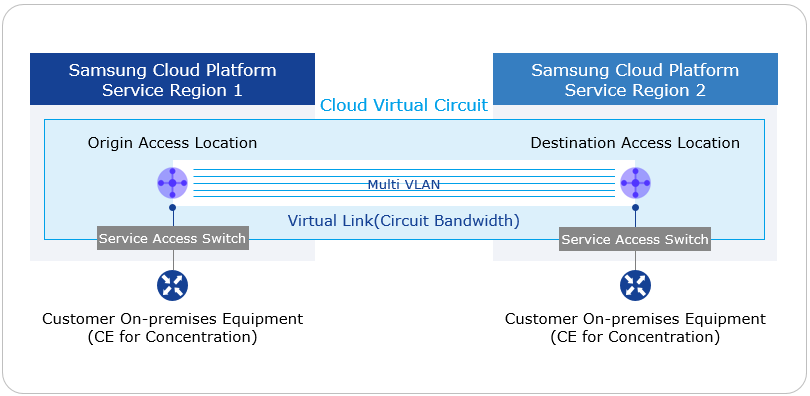
Provided features
The Cloud Virtual Circuit service provides the following features.
- Korean and global service provision
- South Korea: Suwon, Sangam, Chuncheon, Gumi, Nonhyeon
- Global: New Jersey, San Jose, São Paulo, London, Frankfurt, Hong Kong, Singapore, Delhi, Dubai, Tokyo
- Provision of point-to-point virtual circuit service between global regions (L2VPN-based)
- You can select the origin and destination access locations in all service regions.
- A single cloud virtual circuit configures up to two virtual links for redundancy.
- Provided circuit bandwidth:
- 10, 20, 50, 100, 200, 300, 400, 500, 600, 700, 800, 900 Mbps
- 1, 2, 3, 4, 5, 6, 7, 8, 9, 10 Gbps
Reference
The maximum domestic line bandwidth is 10 Gbps, while the maximum bandwidth for Korea‑global and global‑global links is 1 Gbps.
- Provides logical circuit separation (Multi VLAN): Up to five separate VLANs can be used on a single cloud virtual circuit.
Component
Cloud Virtual Circuit provides a 1:1 virtual backbone connection between global locations. The components are as follows, and resources can be created via the related self‑service in the user console.
| Category | content |
|---|---|
| Cloud Virtual Circuit | Virtual resources that accommodate up to two Virtual Links for the same 1:1 endpoint |
| Origin Access Location | 1:1 Virtual circuit’s source Access Location information |
| Destination Access Location | 1:1 virtual circuit destination Access Location information |
| Multi VLAN | A feature that splits a single Virtual Link into multiple logical circuits for provisioning. |
| Virtual Link | Within a Cloud Virtual Circuit, a virtual circuit based on dedicated line bandwidth (line bandwidth, contract term, transmission path level option selection) |
| CE equipment | Network equipment that receives the dedicated line for the customer site (Customer Edge) |
Table. Cloud Virtual Circuit components
Constraints
Cloud Virtual Circuit has the following limitations.
- For each Cloud Virtual Circuit, you can create up to two Virtual Links.
- The Multi VLAN feature can create up to five per Cloud Virtual Circuit.
Provision status by region
The Cloud Virtual Circuit service can be provided in the following environments.
| Region | Provision status |
|---|---|
| Korea West 1 (kr-west1) | Provided |
| Korea East 1 (kr-east1) | Not provided |
| South Korea South 1 (kr-south1) | Not provided |
| South Korea South 2 (kr-south2) | Not provided |
| South Korea South 3 (kr-south3) | Not provided |
Table. Cloud Virtual Circuit regional availability status
Prior Service
There are no services that need to be pre‑configured before creating this service.
2 - How-to guides
Users can apply for the Cloud Virtual Circuit service through Service Request in the Samsung Cloud Platform Console.
Apply for Cloud Virtual Circuit
You can request a Cloud Virtual Circuit through the Support Center of the Samsung Cloud Platform Console.
To apply for a Cloud Virtual Circuit, follow the steps below.
Click the All Services > Networking > Cloud Virtual Circuit menu. Navigate to the Service Home page of Cloud Virtual Circuit.
On the Service Home page, click the Cloud Virtual Circuit Service Request button. You will be taken to the Service Request page in the Support Center.
Select and enter the information required to apply for a Cloud Virtual Circuit.
Category Required statusDetailed description Title Required Enter the title of the service request - using Korean, English, numbers, and special characters (
+=,.@-_) within 64 characters
Region Required Select the region to request the service Service Required Networking service group Cloud Virtual Circuit service selection Task classification Required Cloud Virtual Circuit New Application Select content Required Enter information for Cloud Virtual Circuit application Table. Cloud Virtual Circuit Service Request Items- using Korean, English, numbers, and special characters (
Check the input information and click the Request button.
guide
- After submitting a service request, you cannot modify or delete the content you have entered.
- After submitting a service request, you can view the request details on the Support Center’s Service Request List page. Refer to View Service Request Details.
Cloud Virtual Circuit Terminate
You can request the termination of a Cloud Virtual Circuit from the Support Center in the Samsung Cloud Platform Console.
To apply for a Cloud Virtual Circuit, follow the steps below.
Click the All Services > Management > Support Center menu. You will be taken to the Service Home page.
On the Service Home page, click the Cloud Virtual Circuit Service Request menu. You will be taken to the Service Request page.
Select and enter the information required to cancel the Cloud Virtual Circuit.
Category Required statusDetailed description Title Required Enter a title for the service request - using Korean, English, numbers, and special characters(
+=,.@-_) within 64 characters
Region Required Select the region for which you want to request service termination. Service Required Networking service group Cloud Virtual Circuit service selection Task classification Required Cloud Virtual Circuit Cancellation Request Select content Required Enter information for Cloud Virtual Circuit termination request Table. Cloud Virtual Circuit Service Termination Request Items- using Korean, English, numbers, and special characters(
Check the input information and click the Request button.
guide
- After submitting a service request, you cannot modify or delete the content you entered.
- After submitting a service request, you can view the request details on the Support Center’s Service Request List page. Refer to View Service Request Details.